
Walfront SVP-916
Walfront SVP-916 Adjustable Over and Under Voltage Návod k použití Protector
Model: SVP-916 (40A)
Zavedení
This user manual provides comprehensive instructions for the installation, operation, maintenance, and troubleshooting of the Walfront SVP-916 Adjustable Over and Under Voltage Protector. This device is designed to protect electrical appliances from damage caused by voltage fluktuace, včetně overvoltage a podvoltage conditions. Please read this manual thoroughly before using the product to ensure safe and efficient operation.
Klíčové vlastnosti
- Přepětítage ochrana
- Podpětítage ochrana
- svtagdisplej (objemtage měření)
- Nastavitelný přepětítage ochranná hodnota
- Nastavitelný přepětítage hodnota výtěžnosti
- Nastavitelný přepětítage protection action time
- Nastavitelný podtlaktage ochranná hodnota
- Nastavitelný podtlaktage hodnota výtěžnosti
- Nastavitelný podtlaktage protection action time
- Adjustable delay time for fault recovery
- Adjustable power-on delay on time
- Reset method selection
- Odstraňování problémů
- Obnovit tovární nastavení
Konec produktuview

Obrázek 1: Přední view of the Walfront SVP-916 Adjustable Voltage Protector, showing the digital display and control buttons.

Obrázek 2: Strana view of the Walfront SVP-916, highlighting its compact design and qualification sticker.
Obrázek 3: Detailed dimensions of the Walfront SVP-916, showing measurements in millimeters and inches for installation planning.
Nastavení a instalace
Before installation, ensure the main power supply is turned off to prevent electric shock. This device is designed for DIN rail mounting.
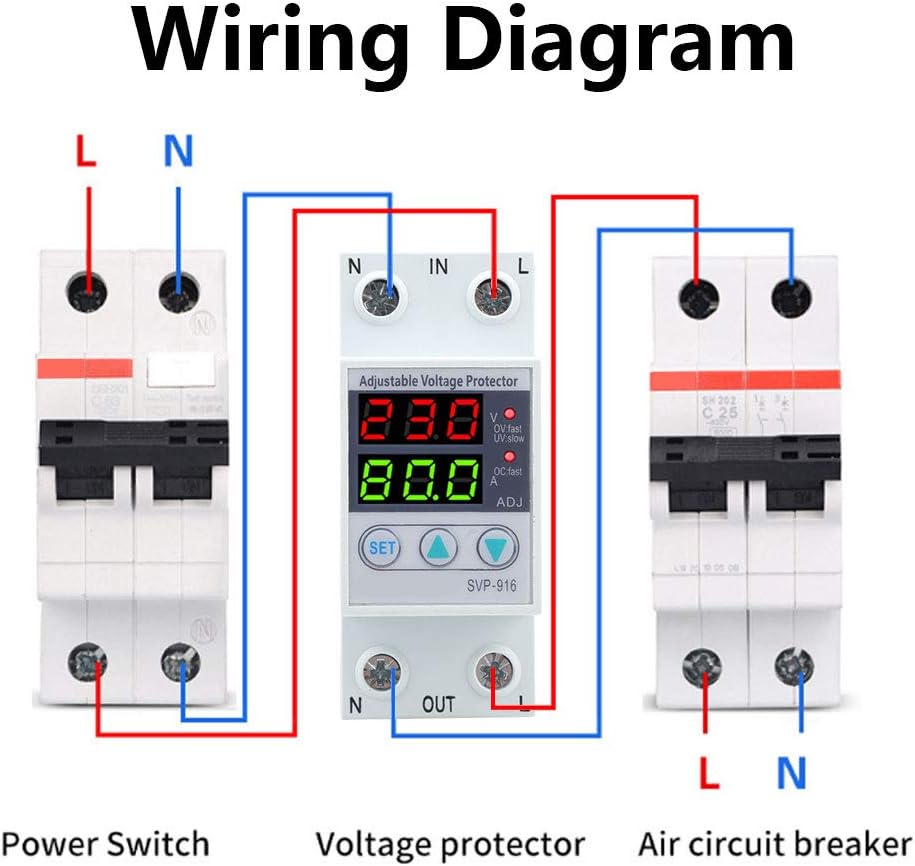
Schéma zapojení

Obrázek 4: Wiring diagram illustrating the connection of the voltage protector between a power switch and an air circuit breaker. Ensure correct L (Live) and N (Neutral) connections for both input and output terminals.
- Mount the SVP-916 protector onto a standard DIN rail in your electrical panel.
- Connect the incoming Live (L) and Neutral (N) wires from your power source to the "IN" terminals of the protector.
- Connect the outgoing Live (L) and Neutral (N) wires from the "OUT" terminals of the protector to your load (e.g., air circuit breaker, appliances).
- Ujistěte se, že všechny spoje jsou bezpečné a řádně izolované.
- Once wiring is complete, restore power to the circuit. The device display will light up.
Návod k obsluze
The SVP-916 features a digital display for real-time voltage and current monitoring, along with buttons for setting protection parameters.
Nastavení parametrů
Pro úpravu objtage and current coefficients, follow these steps:
- Stiskněte tlačítko SOUBOR button 10 times. The display will show "PF1" and a numerical value (default 524). This value represents the voltage coefficient.
- Použijte Up (▲) a Dolů (▼) buttons to adjust this value. For example, to increase the displayed voltage, increase this coefficient.
- Stiskněte tlačítko SOUBOR button again. The display will show "PF2" and a numerical value (default 129). This value represents the current coefficient.
- Použijte Up (▲) a Dolů (▼) buttons to adjust this value if needed.
- Stiskněte tlačítko SOUBOR button twice more to save the settings and return to normal operation.
1 video: Demonstration of adjusting the voltage and current coefficients on the Walfront SVP-916. This video shows how to access the PF1 and PF2 settings and modify their values to calibrate the device's readings.
Nastavení ochrany
The device allows for adjustment of various protection parameters:
- Přepětítage Ochranná hodnota: Adjustable from OFF-80V-100V (Default: 90V).
- PřepětítagHodnota výtěžnosti: Nastavuje voltage at which the device restores power after an overvoltage událost.
- Přepětítage Action Time: Configures the delay before the device trips on overvoltage.
- Podpětítage Ochranná hodnota: Sets the minimum voltage práh.
- PodpětítagHodnota výtěžnosti: Nastavuje voltage at which the device restores power after an undervoltage událost.
- Podpětítage Action Time: Configures the delay before the device trips on undervoltage.
- Fault Recovery Delay Time: Delay before power is restored after any protection trip.
- Power-on Delay Time: Delay before power is supplied to the load upon initial power-up.
Údržba
The Walfront SVP-916 is designed for low maintenance. Regular checks can ensure its longevity and proper function:
- Vizuální kontrola: Pravidelně kontrolujte zařízení, zda nevykazuje známky fyzického poškození, uvolněných spojů nebo změny barvy.
- Čištění: Udržujte zařízení čisté a bez prachu. K čištění používejte suchý, měkký hadřík. Nepoužívejte tekuté čisticí prostředky ani rozpouštědla.
- Kontrola připojení: Ensure all wiring connections remain tight and secure. Loose connections can lead to overheating or intermittent operation.
- Test funkčnosti: If possible, periodically test the protection functions by simulating overvoltage nebo podvoltage conditions (e.g., using a variable power supply) to ensure the device trips as expected.
In case of any malfunction, refer to the troubleshooting section or contact customer support. Do not attempt to open or repair the device yourself, as this may void the warranty and pose a safety risk.
Odstraňování problémů
This section provides solutions to common issues you might encounter with your SVP-916 Voltage Chránič.
| Problém | Možná příčina | Řešení |
|---|---|---|
| Zařízení se nezapne. | No power supply; incorrect wiring; internal fault. | Check main power supply. Verify wiring connections according to the diagram. If problem persists, contact support. |
| Zařízení se často vypíná. | svtage fluctuations; protection settings too sensitive. | Monitor svtage stability. Adjust overvoltage/podvoltage protection values or action times to be less sensitive if appropriate for your application. |
| Nesprávný svtage/current display. | Calibration issue (PF1/PF2 settings). | Refer to "Parameter Adjustment" in Operating Instructions to recalibrate PF1 (voltage) and PF2 (current) values. |
| Device does not reset after trip. | Fault condition still present; manual reset required; internal fault. | Zajistěte zvtage/current has returned to normal range. Check reset method selection. If manual reset is enabled, press the reset button. If problem persists, contact support. |
Obnovení továrního nastavení
To restore the device to its factory default settings, you must manually adjust the PF1 and PF2 values back to their default (PF1: 524, PF2: 129) as described in the "Parameter Adjustment" section. There is no single button for factory reset.
Specifikace
| Parametr | Hodnota |
|---|---|
| Značka | Walfront |
| Model | SVP-916 (40A) |
| Jmenovitý objemtage | 100-130VAC |
| Frekvence | 50/60 Hz |
| Hmotnost položky | 6.5 unce |
| Rozměry produktu | 0.39 x 0.39 x 0.39 inches (approx. 10x10x10 mm) |
| Země původu | Čína |
| Materiál | Plast |
| Způsob instalace | Montáž na lištu DIN |
Informace o záruce
Viz obal produktu nebo pokyny prodejce. website for specific warranty terms and conditions. Typically, Walfront products come with a standard manufacturer's warranty covering defects in materials and workmanship.
Zákaznická podpora
For technical assistance, troubleshooting beyond this manual, or warranty claims, please contact Walfront customer support through their official website or the retailer from whom you purchased the product. Have your product model (SVP-916) and purchase details ready when contacting support.
You can visit the Walfront Store for more information: Walfront Official Store
Ask a question about this manual
Ask about setup, troubleshooting, compatibility, parts, safety, or missing instructions. Manuals+ will review the question and use this page’s manual context to help answer it.