
Zavedení
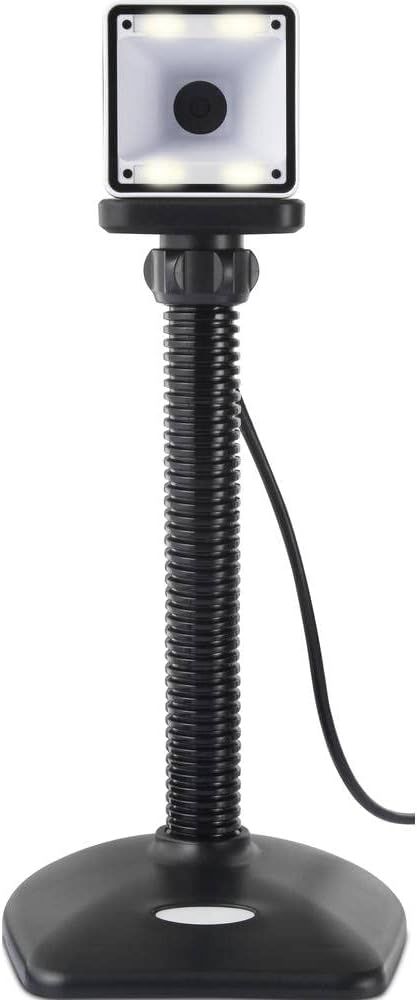
Thank you for choosing the Renkforce RF-SBS-500 2D Wired Barcode Scanner. This device is designed for efficient and reliable scanning of both 1D and 2D barcodes from various surfaces, including paper and smartphone screens. Its omnidirectional scanning capability and hands-free operation make it suitable for a wide range of applications. This manual provides essential information for the proper setup, operation, and maintenance of your scanner.
Bezpečnostní pokyny
- Do not expose the scanner to extreme temperatures, humidity, or direct sunlight.
- Zabraňte pádu skeneru ani jeho vystavování silným nárazům.
- Nepokoušejte se skener rozebírat ani upravovat. Ztratíte tak záruku.
- Keep the scanning window clean to ensure optimal performance. Use a soft, dry cloth.
- Ensure the USB cable is connected securely to prevent accidental disconnection.
Obsah balení
- Renkforce RF-SBS-500 2D Wired Barcode Scanner
- Integrated USB-A Cable
- Uživatelská příručka (tento dokument)
Nastavení
Follow these steps to set up your Renkforce RF-SBS-500 barcode scanner:
- Vybalení skeneru: Opatrně vyjměte skener z obalu.
- Připojení k počítači: Plug the integrated USB-A cable from the scanner into an available USB port on your desktop or laptop computer.
- Instalace ovladače: The scanner is typically plug-and-play. Your operating system (Windows, macOS, Linux) should automatically detect and install the necessary drivers. Wait for the installation to complete.
- Umístění: Place the scanner on a stable, flat surface. The flexible neck allows for adjustment of the scanning head angle for optimal positioning.

Obsluha skeneru
The Renkforce RF-SBS-500 is designed for ease of use with its omnidirectional and hands-free capabilities.
- Zapnutí: Once connected via USB, the scanner will power on automatically. The LED indicators on the scanner head may illuminate briefly.
- Skenování čárového kódu: Position the barcode within the scanning area of the scanner head. The scanner will automatically detect and read the barcode.
- Vizuální a zvuková zpětná vazba: Upon successful scanning, the integrated buzzer will emit a short beep, and the LED display on the scanner will flash or change color, indicating a successful read.
- Všesměrové čtení: The scanner can read barcodes regardless of their orientation, eliminating the need to align the barcode precisely.
- Hands-Free Mode (Presentation Mode): The scanner operates continuously in a presentation mode, allowing you to simply pass items with barcodes in front of the scanning window without pressing any buttons. This saves time and improves workflow efficiency.
- Podporované čárové kódy: The scanner supports both 1D (e.g., EAN, UPC, Code 39) and 2D (e.g., QR Code, Data Matrix, PDF417) barcode types.
Údržba
Správná údržba zajišťuje dlouhou životnost a optimální výkon vašeho skeneru.
- Čištění skenovacího okna: Pravidelně čistěte skenovací okénko měkkým hadříkem, který nepouští vlákna. V případě odolných nečistot lehceampOtřete hadřík vodou nebo jemným, neabrazivním čisticím prostředkem. Nestříkejte čisticí prostředek přímo na skener.
- Generální úklid: Otřete vnější povrch skeneru suchým nebo lehce navlhčeným hadříkem.amp tkanina. Vyhněte se používání agresivních chemikálií nebo abrazivních materiálů.
- Skladování: Pokud skener nepoužíváte, skladujte jej v čistém a suchém prostředí mimo dosah přímého slunečního záření a extrémních teplot.
Odstraňování problémů
Pokud se se skenerem setkáte s problémy, podívejte se na následující běžné problémy a jejich řešení:
| Problém | Možná příčina | Řešení |
|---|---|---|
| Skener se nezapne. | USB cable not connected properly or faulty USB port. | Ensure the USB cable is firmly connected to both the scanner and the computer. Try a different USB port. |
| Skener nečte čárové kódy. | Barcode damaged, scanning window dirty, or incorrect barcode type. | Check the barcode for damage. Clean the scanning window. Ensure the barcode type is supported (1D/2D). Adjust the distance and angle of the barcode to the scanner. |
| No beep or LED feedback after scanning. | Barcode not read successfully. | Refer to the "Scanner does not read barcodes" solution. If the issue persists, contact support. |
| Naskenovaná data se zobrazují nesprávně. | Keyboard layout mismatch or software issue. | Ensure your computer's keyboard layout matches the expected output. Test with a simple text editor. |
If the problem persists after trying these solutions, please contact Renkforce customer support.
Specifikace
| Funkce | Specifikace |
|---|---|
| Číslo modelu | RF-4679568 |
| Schopnost skenování | 1D a 2D čárové kódy |
| Technologie připojení | USB-A (kabelové) |
| Rychlost skenování | 60 obrázků za sekundu |
| Režim skenování | Omnidirectional, Hands-free (Presentation Mode) |
| Zpětná vazba | Integrated Buzzer, LED Display |
| Kompatibilní zařízení | Desktop Computer, Laptop, Smartphone (via appropriate adapter if needed) |
| Rozměry (D x Š x V) | 150 x 5.2 x 5.2 cm |
| Hmotnost položky | 102 gramů |
| Zdroj napájení | USB Powered |
| Země původu | Německo |
Záruka a podpora
Renkforce products are manufactured to high-quality standards and come with a standard warranty. Please refer to your purchase documentation or the Renkforce official webkonkrétní záruční podmínky platné pro váš region naleznete na webových stránkách.
For technical support, troubleshooting assistance, or warranty claims, please contact Renkforce customer service. Contact details can typically be found on the Renkforce webwebu nebo na obalu vašeho produktu.