
Zavedení
This manual provides comprehensive instructions for the assembly, operation, and maintenance of your CaDA Race Car (Dual Control). This product is a detailed replication of a supercar, designed for an engaging building experience and versatile control gameplay.
The model features a low complexity for easy building, consisting of 289 pieces. It supports dual control modes: a 2.4G remote control and APP Bluetooth connectivity, allowing for various functionalities including forward, backward, left, right movement, scratch graphical programming, gyroscope control, and path planning.

Image: The CaDA Race Car (Dual Control) model C51074W, a yellow building block car, displayed alongside its product packaging box. The box highlights the dual control feature and the number of pieces.
Nastavení
Before operating your CaDA Race Car, proper assembly and battery installation are required.
Shromáždění
The product consists of 289 plastic pieces. Follow the included step-by-step building instructions carefully to assemble the race car. Ensure all connections are secure to prevent parts from detaching during operation.
Instalace baterie
The race car requires 2 AAA batteries for operation. These batteries are not included with the product. Locate the battery compartment, typically on the underside or rear of the model, and insert the batteries according to the polarity indicators (+/-).

Obrázek: Dva odlišné views of the fully assembled CaDA Race Car. The top view shows the car from a slightly elevated angle, while the bottom view presents a side profile, demonstrating the completed build.
Návod k obsluze
Your CaDA Race Car offers dual control modes for versatile gameplay.
Dálkové ovládání 2.4G
Power on the remote control and the race car. The devices should automatically pair. Use the joystick and buttons on the remote control to maneuver the car:
- Dopředu Dozadu: Use the main joystick to move the car in straight lines.
- Vlevo/vpravo: Use the secondary controls or joystick movements to steer the car.
APP Ovládání Bluetooth
Download the official CaDA app on your smartphone or tablet. Enable Bluetooth on your device and open the app. Select the CaDA Race Car model to connect. The app provides multiple control interfaces:
- Remote Control Interface: Virtual joysticks and buttons for basic movement.
- Gyroscope Control Interface: Tilt your device to steer the car.
- Path Planning Interface: Draw a path on your screen for the car to follow.
- Scratch Graphical Programming: Utilize the graphical programming feature within the app to create custom movement sequences and actions for the car.
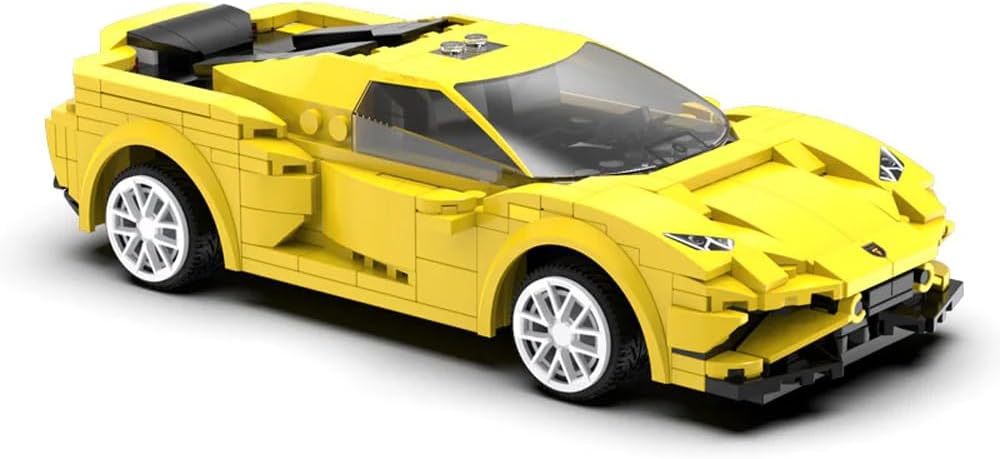
Image: A detailed close-up of the assembled CaDA Race Car, showcasing its sleek yellow body, white wheels, and intricate block construction, ready for operation.
Údržba
To ensure the longevity and optimal performance of your CaDA Race Car, follow these maintenance guidelines:
- Čištění: Use a soft, dry cloth to wipe down the car and remote control. Avoid using water or harsh cleaning agents, as these can damage electronic components and plastic parts.
- Skladování: Store the car and its components in a cool, dry place away from direct sunlight and extreme temperatures.
- Péče o baterie: Remove batteries from the car and remote control if they will not be used for an extended period to prevent leakage.
- Integrita součásti: Periodically check for any loose or damaged parts. Reattach or replace as necessary to maintain structural integrity.
Odstraňování problémů
If you encounter issues with your CaDA Race Car, refer to the following common problems and solutions:
Car Not Responding
- Zkontrolujte baterie: Ensure both the car and remote control have fresh batteries installed correctly with proper polarity.
- Zapnutí: Verify that both the car and remote control are switched ON.
- Párování: If using the remote control, ensure it is properly paired with the car. For APP control, confirm Bluetooth is enabled and the app is connected to the model.
- Vzdálenost: Ensure you are within the effective operating range of the remote control or Bluetooth connection.
Parts Detaching During Play
- Zabezpečená připojení: Re-examine the assembly instructions and ensure all pieces are firmly pressed together. Some connections may require more force during initial assembly.
- Dopad: While the structure is sturdy, repeated collisions can cause parts to loosen. Reattach any detached pieces securely.
Problémy s připojením aplikací
- Bluetooth: Confirm Bluetooth is active on your device.
- Aktualizace aplikace: Ensure the CaDA app is updated to the latest version.
- Restartovat: Try restarting both the car and your smart device.
Specifikace
| Číslo modelu položky | C51074W |
| Rozměry produktu | 9.6 x 20 x 5.5 cm |
| Hmotnost | 620 g |
| Počet kusů | 289 |
| Měřítko | 1:20 |
| Typ materiálu | Plast |
| Maximální rychlost | 3.8 km/h |
| Jsou vyžadovány baterie | 2 baterie AAA (nejsou součástí balení) |
| Montáž Vyžadována | Ano |
| Dálkové ovládání v ceně | No (refers to a separate physical remote, control is via app or optional accessory) |
Záruka a podpora
For warranty information or technical support regarding your CaDA Race Car (Dual Control), please refer to the documentation included with your purchase or visit the official CaDA webwebu. Můžete se také obrátit na prodejce, od kterého jste produkt zakoupili.