
Easytry123 N2QAYB000752
Návod k obsluze náhradního dálkového ovladače Easytry123
Model: N2QAYB000752
For Panasonic Viera LCD HDTV TVs
1. Úvod
This manual provides instructions for the Easytry123 Replacement Remote Control, model N2QAYB000752. This remote is designed to function as a replacement for various Panasonic Viera LCD HDTV models, including TX-L42E5E, TX-L42E5Y, TX-L42EW5, TX-L47E5B, TX-L47E5E, TX-L47E5Y, TX-L47EW5, TX-LR32E5, TX-LR42E5, TX-L42ETW5, TX-L47ET5, and TX-P42UT50. Please note that as a replacement unit, some advanced or specific functions of your original remote may not be fully supported.
For optimal performance, ensure your TV model is listed as compatible. This remote does not require programming and is ready for use once batteries are installed.
2. Nastavení
2.1 Instalace baterie
- Najděte přihrádku na baterie na zadní straně dálkového ovladače.
- Posuňte kryt přihrádky na baterie dolů nebo ve směru šipky, abyste jej otevřeli.
- Insert two (2) AA-size batteries, ensuring the positive (+) and negative (-) terminals align correctly with the markings inside the compartment.
- Nasaďte kryt přihrádky na baterie tak, že jej zasunete zpět na místo, dokud bezpečně nezacvakne.

Figure 1: Back of the remote control with the battery compartment open, illustrating the correct orientation for inserting two AA batteries.

Figure 2: Back of the remote control with the battery compartment securely closed after battery installation.
2.2 První použití
Once batteries are installed, the remote control is ready for immediate use with compatible Panasonic Viera TVs. Point the remote directly at the TV's infrared receiver.
3. Ovládání dálkového ovladače
This section details the primary functions of the buttons on your replacement remote control. Refer to the image below for button layout.
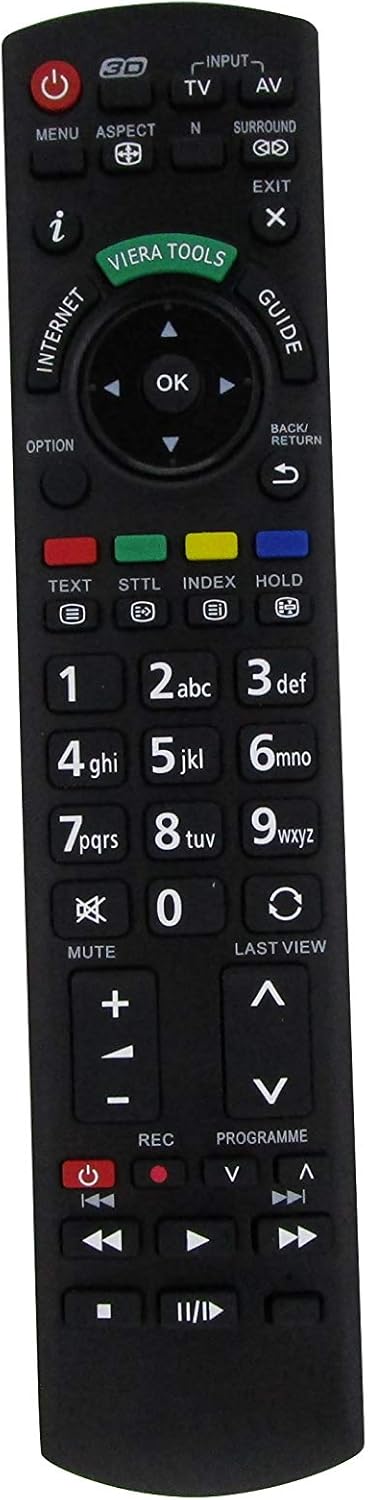
Obrázek 3: Přední strana view of the Easytry123 Replacement Remote Control, highlighting the various function buttons.
3.1 klíčové funkce
- Výkon (●): Zapne nebo vypne televizor.
- Input/AV: Vybere zdroj video vstupu (např. HDMI 1, AV, komponentní).
- TV: Switches to TV broadcast mode.
- Menu: Opens the TV's main menu for settings and adjustments.
- Aspekt: Changes the screen aspect ratio (e.g., 16:9, 4:3).
- N: (Function may vary) Often used for picture modes or specific TV features.
- Surround: Activates or deactivates surround sound modes.
- Výstup: Closes menus or returns to the previous screen.
- i (Info): Displays program information or current status.
- Viera Tools: Accesses Panasonic's Viera Tools menu for smart features.
- Internet: Direct access to internet features (if supported by TV).
- Průvodce: Otevře elektronického programového průvodce (EPG).
- Navigační tlačítko (nahoru, dolů, vlevo, vpravo, OK): Používá se k navigaci v nabídkách a potvrzování výběrů.
- Volba: Accesses context-sensitive options within menus.
- Zpět/Návrat: Returns to the previous menu or channel.
- Text: Activates teletext (if available).
- STTL (Subtitle): Zapíná/vypíná titulky.
- Index: Accesses index pages in teletext or other features.
- Držet: Podrží stránku teletextu.
- Numerická klávesnice (0-9): Enters channel numbers or numerical data.
- Ztlumit: Silences the TV audio.
- Poslední View: Vrátí se k předchozímu viewed channel or input.
- Hlasitost (+/-): Upravuje hlasitost televizoru.
- Channel (▲/▼): Changes TV channels up or down.
- REC (záznam): Initiates recording (if TV supports PVR function).
- Programme (▲/▼): Similar to Channel Up/Down, for program selection.
- Playback Controls (Play, Pause, Stop, Rewind, Fast Forward, Skip): Controls media playback for connected devices or TV's internal media player.
Note: The functionality of certain buttons may depend on your specific Panasonic TV model and its features.
4. Údržba
4.1 Výměna baterie
Replace batteries when the remote's response becomes sluggish or it stops functioning. Always replace both batteries simultaneously with new AA-size batteries. Do not mix old and new batteries, or different types of batteries.
4.2 Čištění
K čištění dálkového ovladače použijte měkký, suchý hadřík. V případě odolných nečistot lehceamphadřík vodou. Nepoužívejte agresivní chemikálie, abrazivní čisticí prostředky ani rozpouštědla, protože by mohly poškodit povrch dálkového ovladače nebo jeho vnitřní součásti.
4.3 Skladování
When storing the remote for extended periods, remove the batteries to prevent leakage, which can cause damage. Store in a cool, dry place away from direct sunlight and extreme temperatures.
5. Řešení problémů
- Dálkové ovládání nereaguje:
- Zkontrolujte, zda jsou baterie vloženy správně se správnou polaritou.
- Vyměňte staré baterie za nové.
- Ujistěte se, že mezi dálkovým ovladačem a infračerveným senzorem televizoru nejsou žádné překážky.
- Ujistěte se, že dálkový ovladač míří přímo na televizor.
- Certain buttons do not work:
- As a replacement remote, some specific functions might not be supported by this unit or your TV model.
- Ensure the TV is in the correct mode (e.g., TV mode for channel buttons, AV mode for playback controls).
- Přerušovaný provoz:
- Slabé baterie mohou způsobovat přerušovaný provoz. Vyměňte je.
- Ujistěte se, že žádné silné zdroje světla (jako je přímé sluneční světlo nebo jasné zářivkové osvětlení) neruší infračervený signál.
6. Specifikace
| Číslo modelu | N2QAYB000752 |
| Značka | Easytry123 |
| Kompatibilita | Panasonic Viera LCD HDTVs (e.g., TX-L42E5E, TX-L47E5B, TX-P42UT50) |
| Zdroj napájení | 2 x AA baterie |
| Konektivita | Infračervený (IR) |
7. Záruka a podpora
For information regarding warranty coverage or technical support, please refer to the purchase documentation or contact the seller, Easytry123, directly. As this is a replacement product, warranty terms may vary from original manufacturer warranties.
For further assistance, please visit the seller's support page or contact their customer service.
Ask a question about this manual
Ask about setup, troubleshooting, compatibility, parts, safety, or missing instructions. Manuals+ will review the question and use this page’s manual context to help answer it.