
Zavedení
Thank you for choosing the Mahli Smart Robotic 3-in-1 Vacuum Cleaner. This manual provides important information on the safe use, operation, and maintenance of your device. Please read it thoroughly before first use and keep it for future reference.

Figure 1: Mahli Smart Robotic 3-in-1 Vacuum Cleaner and Remote Control
This image displays the Mahli Smart Robotic 3-in-1 Vacuum Cleaner in white, accompanied by its remote control. The vacuum cleaner is round with a power button on top, and the remote control is rectangular with navigation and function buttons.
Bezpečnostní pokyny
- Před použitím spotřebiče si přečtěte všechny pokyny.
- Do not operate the vacuum cleaner in wet environments or near water.
- Udržujte vlasy, volné oblečení, prsty a všechny části těla v dostatečné vzdálenosti od otvorů a pohyblivých částí.
- Používejte pouze tak, jak je popsáno v tomto návodu. Používejte pouze příslušenství doporučené výrobcem.
- Nepoužívejte s poškozeným kabelem nebo zástrčkou. Pokud spotřebič nefunguje tak, jak by měl, upadl na zem, byl poškozen, byl ponechán venku nebo spadl do vody, vraťte jej do servisního střediska.
- Netahejte ani nepřenášejte za kabel, nepoužívejte kabel jako rukojeť, nezavírejte na kabel dvířka ani netahejte za kabel kolem ostrých hran nebo rohů. Nepřejíždějte spotřebičem přes kabel. Udržujte kabel mimo dosah horkých povrchů.
- Neodpojujte tahem za kabel. Při odpojování uchopte zástrčku, nikoli kabel.
- Nemanipulujte se zástrčkou nebo spotřebičem mokrýma rukama.
- Do otvorů nevkládejte žádné předměty. Nepoužívejte se zablokovaným otvorem; chraňte před prachem, žmolky, vlasy a vším, co by mohlo omezit proudění vzduchu.
- Před odpojením vypněte všechny ovládací prvky.
- Při čištění na schodech dbejte zvýšené opatrnosti.
- Nepoužívejte k vysávání hořlavých nebo hořlavých kapalin, jako je benzín, ani je nepoužívejte v oblastech, kde se mohou vyskytovat.
- Nesbírejte nic, co hoří nebo kouří, jako jsou cigarety, zápalky nebo horký popel.
- Nepoužívejte bez nasazeného sáčku na prach a/nebo filtrů.
- Zabraňte neúmyslnému spuštění. Před připojením k baterii, zvednutím nebo přenášením spotřebiče se ujistěte, že je vypínač v poloze vypnuto.
- Nabíjejte pouze nabíječkou specifikovanou výrobcem.
- Neupravujte ani se nepokoušejte opravovat zařízení nebo baterii.
Komponenty produktu
The Mahli Smart Robotic 3-in-1 Vacuum Cleaner comes with the following components:
- Main Robotic Vacuum Unit
- Dálkové ovládání
- USB nabíjecí kabel
- Boční kartáče (2x)
- Hadřík na mop (1x)
- Čisticí kartáček (1x)
Obrázek 2: Zahrnuté součásti
This image shows the Mahli Smart Robotic 3-in-1 Vacuum Cleaner along with its accessories: two side brushes, a mop cloth, a USB charging cable, and a small cleaning brush.
Nastavení
1. Nabíjení vysavače
- Connect the USB charging cable to the charging port on the vacuum cleaner.
- Zapojte druhý konec kabelu USB do kompatibilního napájecího adaptéru USB (není součástí balení) nebo do portu USB počítače.
- Rozsvítí se kontrolka nabíjení. Úplné nabití trvá přibližně 3 hodiny.
- Once fully charged, the indicator light may change or turn off. Disconnect the vacuum cleaner from the power source.
2. Připevnění bočních kartáčů
Gently press the side brushes onto the designated posts on the underside of the vacuum cleaner until they click into place.
3. Attaching the Mop Cloth (Optional)
If using the mopping function, attach the mop cloth to the designated area on the bottom of the vacuum cleaner. Ensure it is securely fastened.
Návod k obsluze
1. Zapnutí/vypnutí
- To power on, press the power switch on the side or bottom of the vacuum cleaner. Alternatively, for some models, simply touch the power button on the top surface after ensuring the main power switch is on.
- To power off, press the power switch again or hold the power button on the top surface.
2. Režimy čištění
The vacuum cleaner features intelligent omni-directional and auto-route technology for efficient cleaning.
- Automatické čištění: Once powered on, the vacuum cleaner will automatically begin cleaning, navigating around obstacles and covering the floor area.
- Obsluha dálkového ovládání: Use the provided remote control for manual direction changes or to start/stop cleaning.
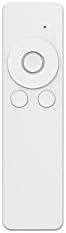
Obrázek 3: Dálkové ovládání
This image shows the white remote control for the Mahli Smart Robotic 3-in-1 Vacuum Cleaner. It features a circular directional pad at the top, with two smaller circular buttons below it.
3. Funkce mopování
If the mop cloth is attached, the vacuum cleaner will perform mopping simultaneously with sweeping and vacuuming. Ensure the mop cloth is clean and slightly damp pro nejlepší výsledky.
Údržba
1. Vyprázdnění popelnice
Regularly empty the dustbin to maintain optimal cleaning performance. Locate the dustbin compartment, open it, and dispose of collected debris. Clean the dustbin with the provided cleaning brush or a soft cloth.
2. Čištění postranních kartáčů
Check the side brushes for tangled hair or debris. Remove any obstructions carefully. If brushes are worn, they may need replacement.
3. Cleaning the Mop Cloth
After each use, remove the mop cloth and wash it thoroughly. Allow it to air dry completely before reattaching.
4. Čištění senzorů
Wipe the anti-fall sensors and other optical sensors on the bottom and front of the vacuum cleaner with a clean, dry cloth to ensure proper navigation.
Odstraňování problémů
| Problém | Možná příčina | Řešení |
|---|---|---|
| Vysavač se nezapne. | Battery is low or depleted. Main power switch is off. | Charge the vacuum cleaner. Ensure the main power switch is in the ON position. |
| Vysavač se neočekávaně zastaví. | Dustbin is full. Obstruction detected. Battery is low. | Empty the dustbin. Remove any obstructions. Recharge the vacuum cleaner. |
| Špatný čisticí výkon. | Dustbin is full. Side brushes are tangled or worn. Sensors are dirty. | Empty the dustbin. Clean or replace side brushes. Clean all sensors. |
| Vacuum cleaner gets stuck frequently. | Too many obstacles in the cleaning area. Sensors are dirty. | Z čištěné oblasti ukliďte nadměrné množství nepořádku. Vyčistěte všechny senzory. |
Specifikace
| Funkce | Detail |
|---|---|
| Model | MBOT3002 |
| Funkce | Sweeping, Vacuuming, Mopping (3-in-1) |
| Kapacita baterie | 2000 XNUMX mAh |
| Doba nabíjení | Přibl. 3 hodin |
| Pracovní doba | Přibl. 2 hodin |
| Jmenovitý objemtage | 3.7V |
| Pracovní hluk | 55 dB |
| Rozměry | Průměr: 12.5 palce, výška: 1.8 palců |
| Suitable Floor Types | Wood, Tile, Linoleum |
| Speciální funkce | Intelligent Omni-Directional, Auto Route Technology, Smart Navigation, 360 Motion, Advanced Sensors, Anti-Fall Sensors |
| Zahrnuté komponenty | Sweeper, 2x Brush, 1x Mop, 1x USB Charging Cable, 1x Cleaning Brush, Remote Control |
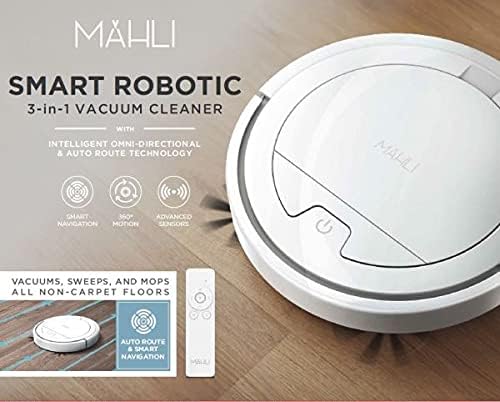
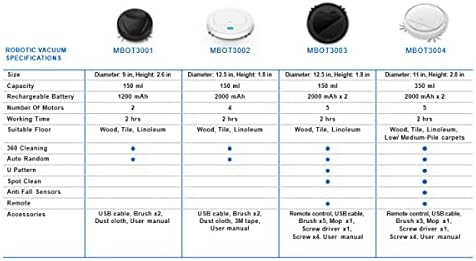
Figure 4: Robotic Vacuum Specifications Overview
This image displays a table comparing specifications for various Mahli robotic vacuum models (MBOT3001, MBOT3002, MBOT3003, MBOT3004). Key specifications include size, capacity, battery, motors, working time, suitable floor, cleaning patterns, sensors, remote, and accessories.
Záruka a podpora
For warranty information and customer support, please refer to the contact details provided on the product packaging or the official Mahli webwebu. Uschovejte si účtenku jako doklad o koupi.
For technical assistance or troubleshooting beyond this manual, please contact Mahli customer service.