
1. Úvod
Thank you for choosing the Hoco W27 Cat Ear Bluetooth Headphones. These headphones combine advanced Bluetooth 5.0 technology with a unique glowing cat ear design, offering a versatile audio experience. They support Bluetooth, TF card, and AUX playback modes, making them compatible with a wide range of mobile phones and tablets. This manual provides detailed instructions for setup, operation, maintenance, and troubleshooting to ensure you get the most out of your device.
2. Konec produktuview
Familiarize yourself with the components of your Hoco W27 headphones.
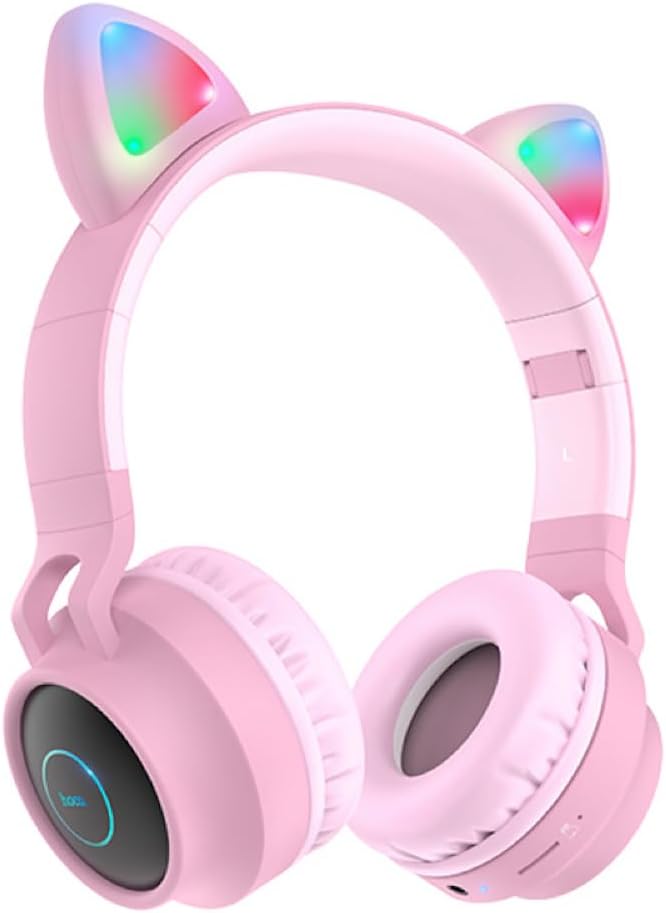
Obrázek 2.1: Přední view of the Hoco W27 Cat Ear Bluetooth Headphones in pink, showcasing the glowing cat ears and over-ear design.

Obrázek 2.2: Strana view of the Hoco W27 headphones, highlighting the control buttons on the left earcup, including volume, track control, and mode switch.

Obrázek 2.3: Shora dolů view of the Hoco W27 headphones, showing the adjustable headband and the placement of the control panel on the earcup.
3. Nastavení
3.1 Nabíjení sluchátek
Before first use, fully charge the headphones. The built-in 300mAh battery requires approximately 2 hours for a full charge.
- Connect the charging cable (usually USB-C or Micro-USB, depending on model) to the charging port on the headphones.
- Druhý konec kabelu připojte k USB zdroji napájení (např. k USB portu počítače, síťovému adaptéru).
- The indicator light will show charging status (e.g., red light while charging, off or blue when fully charged).
3.2 Párování Bluetooth
The Hoco W27 headphones feature Bluetooth 5.0 for stable and efficient wireless connection.
- Ujistěte se, že jsou sluchátka vypnutá.
- Stiskněte a podržte tlačítko napájení, dokud kontrolka nezačne střídavě blikat modře a červeně, což signalizuje režim párování.
- Na svém zařízení (chytrý telefon, tablet, počítač) povolte Bluetooth a vyhledejte dostupná zařízení.
- Select "Hoco W27" or a similar name from the list of found devices.
- Once connected, the indicator light will typically flash blue slowly or turn off, and you will hear a confirmation tone.
3.3 Režim TF karty
The headphones support TF (MicroSD) card playback.
- Insert a TF card with your desired audio filedo slotu pro TF kartu na sluchátkách.
- The headphones should automatically switch to TF card playback mode. If not, press the Mode button to cycle through modes until TF card mode is active.
3.4 Režim AUX
For wired connection, use the AUX mode.
- Connect one end of a 3.5mm audio cable (not always included) to the AUX port on the headphones.
- Druhý konec připojte k audio výstupnímu konektoru vašeho zařízení.
- The headphones will automatically switch to AUX mode. Note that controls on the headphones may be limited in this mode, and playback is controlled by the connected device.
4. Návod k obsluze
4.1 Zapnutí/vypnutí
- Zapnutí: Press and hold the Power button for approximately 3 seconds until the indicator light turns on and you hear a power-on prompt.
- Vypnout: Stiskněte a podržte tlačítko napájení přibližně 3–5 sekund, dokud kontrolka nezhasne a neuslyšíte výzvu k vypnutí.
4.2 Přehrávání hudby
- Přehrát/pozastavit: Stiskněte jednou multifunkční tlačítko (často tlačítko napájení nebo speciální tlačítko Přehrát/Pozastavit).
- Další skladba: Stiskněte a podržte tlačítko pro zvýšení hlasitosti (+) nebo tlačítko pro přehrání další skladby.
- Předchozí skladba: Stiskněte a podržte tlačítko pro snížení hlasitosti (-) nebo příslušné tlačítko pro přehrání předchozí skladby.
- Zvýšit hlasitost: Krátce stiskněte tlačítko pro zvýšení hlasitosti (+).
- Snížit hlasitost: Krátce stiskněte tlačítko pro snížení hlasitosti (-).
The headphones offer up to 5 hours of continuous music playback on a full charge.
4.3 Funkce volání
- Přijmout/ukončit hovor: Během příchozího hovoru stiskněte jednou multifunkční tlačítko.
- Odmítnout hovor: Během příchozího hovoru stiskněte a podržte multifunkční tlačítko přibližně 2 sekundy.
- Znovu vytočit poslední číslo: Dvojitým stisknutím multifunkčního tlačítka neprobíhá hovor.
4.4 Přepínání režimů
Press the 'M' (Mode) button to cycle between Bluetooth, TF Card, and AUX playback modes.
4.5 Cat Ear Lights
The glowing cat ear design adds a unique aesthetic. The lights typically activate automatically when the headphones are powered on. Refer to the product packaging or specific model features for details on controlling the lights, if a dedicated button exists.
4.6 Voice Prompt Switch
To switch the voice prompt language or disable prompts:
- When the headphones are není připojen to a device, double-click the 'M' (Mode) button. You will hear a beep, indicating a change in the voice prompt setting.
5. Údržba
Správná péče zajistí dlouhou životnost vašich sluchátek.
- Čištění: Use a soft, dry, lint-free cloth to clean the surfaces of the headphones. Do not use abrasive cleaners, solvents, or spray directly onto the headphones.
- Skladování: Store the headphones in a cool, dry place away from direct sunlight and extreme temperatures. If storing for an extended period, ensure they are partially charged.
- Péče o baterie: To preserve battery life, avoid fully discharging the headphones frequently. Charge them regularly, even if not in use for a long time.
- Vyhněte se vlhkosti: Nevystavujte sluchátka vodě ani nadměrné vlhkosti.
6. Řešení problémů
If you encounter issues with your Hoco W27 headphones, try the following solutions:
| Problém | Možná příčina | Řešení |
|---|---|---|
| Sluchátka se nezapínají. | Slabá baterie. | Nabíjejte sluchátka alespoň 30 minut. |
| Nelze spárovat přes Bluetooth. | Sluchátka nejsou v režimu párování; Bluetooth zařízení je vypnuté; zařízení je příliš daleko od zařízení. | Ensure headphones are in pairing mode (flashing red/blue). Turn device Bluetooth off and on. Move headphones closer to device. |
| Ze sluchátek není slyšet žádný zvuk. | Volume too low; incorrect mode; loose AUX cable; corrupted TF card files. | Increase volume on headphones and device. Ensure correct mode (Bluetooth, TF, AUX). Re-insert AUX cable. Check TF card files. |
| Špatná kvalita zvuku. | Rušení; slabá baterie; vzdálenost od zařízení. | Move away from sources of interference. Charge headphones. Reduce distance between headphones and device. |
| Cat ear lights not working. | Headphones off; specific light control setting. | Ensure headphones are powered on. Check if there's a dedicated button for lights (refer to product specifics). |
7. Specifikace
Key technical specifications for the Hoco W27 Cat Ear Bluetooth Headphones:
| Funkce | Specifikace |
|---|---|
| Verze Bluetooth | 5.0 (JL AC6925F chip) |
| Kapacita baterie | 300 XNUMX mAh |
| Doba nabíjení | Přibližně 2 hodiny |
| Call / Music Time | Až 5 hodin |
| Pohotovostní doba | Až 200 hodin |
| Průměr reproduktoru | 40 mm |
| Rozměry (D*Š*V) | 203 x 175 x 80 mm (8 x 6.9 x 3.1 palce) |
| Hmotnost | 182 g (6.4 oz) |
| Podporované režimy | Bluetooth, TF karta, AUX |
| Funkce designu | Glowing cat ear shape |
| Umístění uší | Přes ucho |
| Kontrola hluku | Žádný |
8. Bezpečnostní informace
Please read and follow these safety guidelines for safe operation:
- Do not disassemble, repair, or modify the product. This may cause fire, electric shock, or complete damage to the product.
- Keep the headphones away from extreme temperatures, direct sunlight, and high humidity.
- Avoid exposing the headphones to water or other liquids.
- Nepoužívejte sluchátka při nadměrně vysoké hlasitosti po delší dobu, mohlo by dojít k poškození sluchu.
- Uchovávejte mimo dosah dětí.
9. Záruka a podpora
For warranty information and customer support, please refer to the documentation provided with your purchase or contact the retailer where you purchased the Hoco W27 headphones. Keep your proof of purchase for any warranty claims.