
Zavedení
This manual provides detailed instructions for the operation and maintenance of your Casio W736H Series Digital Watch, model W-736H-5AV. Please read this manual thoroughly to ensure proper use and to fully utilize all features of your watch. Keep this manual for future reference.
Konec produktuview
The Casio W736H Series Digital Watch is designed for durability and functionality, featuring a 1/100 second stopwatch, countdown timer, daily alarm with vibration, dual time, and a Super Illuminator LED light. It also boasts 100-meter water resistance and a 10-year battery life.
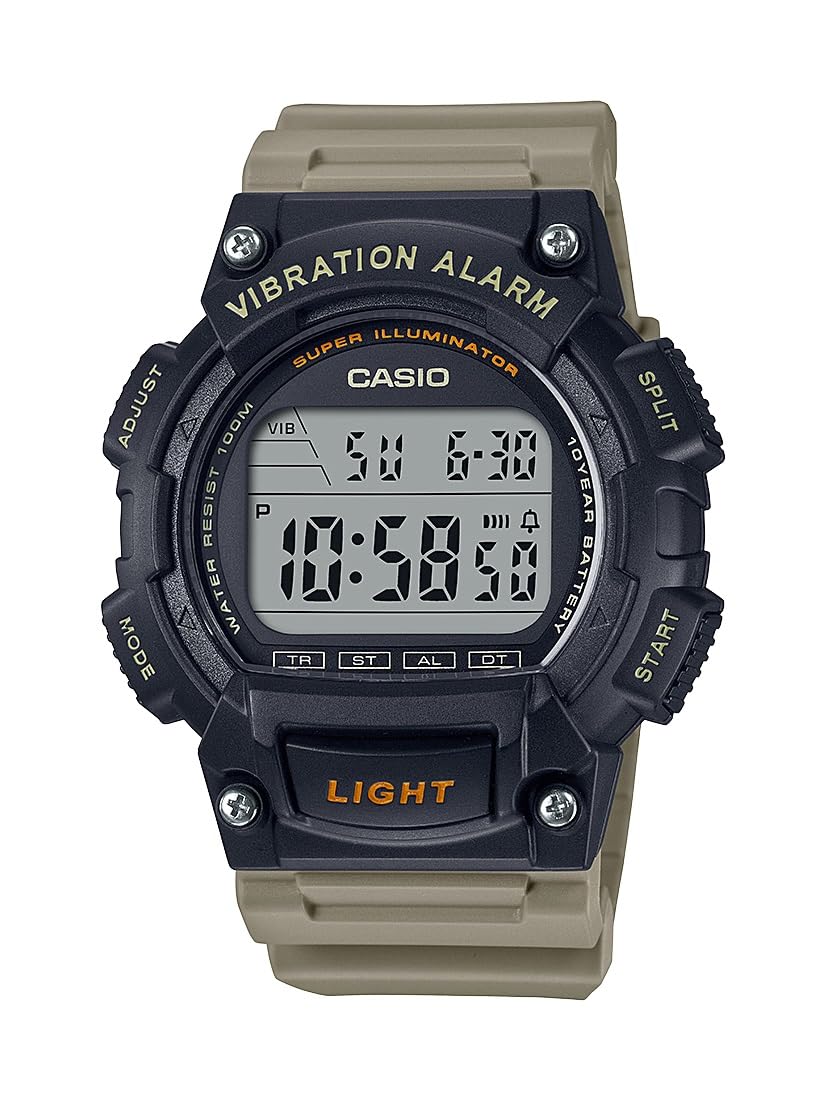
Image: Casio W736H Series Digital Watch, model W-736H-5AV. The watch features a digital display, four side buttons labeled 'ADJUST', 'MODE', 'SPLIT', 'START', and a front button labeled 'LIGHT'.
Funkce tlačítek
- NASTAVENÍ (vlevo nahoře): Používá se pro vstup a výstup z režimů nastavení a pro potvrzení nastavení.
- REŽIM (dole vlevo): Cycles through different watch modes (Timekeeping, Stopwatch, Countdown Timer, Alarm, Dual Time).
- SPLIT / START (Top Right): In Stopwatch mode, used for split/lap timing. In other modes, may function as a start button or for value adjustment.
- START / RESET (Bottom Right): Used to start/stop functions or to reset values. Also used for value adjustment in setting modes.
- LIGHT (Front Bottom): Activates the Super Illuminator LED backlight.
Nastavení
Nastavení času a data
- V režimu měření času stiskněte a podržte tlačítko UPRAVIT tlačítko, dokud nezačnou blikat sekundy, což značí obrazovku nastavení.
- Stiskněte tlačítko MODE button to cycle through the settings in the following order: Seconds → DST (Daylight Saving Time) → Hour → Minute → Year → Month → Day.
- Použijte START / RESET (Bottom Right) and SPLIT / START (Top Right) buttons to adjust the flashing value.
- START / RESET: Zvyšuje hodnotu.
- SPLIT / START: Decreases the value (or cycles through options).
- Jakmile jsou všechna nastavení nakonfigurována, stiskněte tlačítko UPRAVIT button to exit the setting screen and return to Timekeeping Mode.
12/24hodinový formát
V režimu měření času stiskněte tlačítko START / RESET tlačítko pro přepínání mezi 12hodinovým a 24hodinovým formátem času.
Provozní režimy
Stiskněte tlačítko MODE tlačítko pro přepínání mezi různými režimy hodinek:
- Režim měření času
- Režim stopek (ST)
- Countdown Timer Mode (TR)
- Režim budíku (AL)
- Dual Time Mode (DT)
Režim stopek
Stopky měří uplynulý čas, mezičasy a dvě zakončení.
- V režimu měření času stiskněte MODE until 'ST' appears on the display.
- Stiskněte START / RESET (Vpravo dole) pro spuštění stopek.
- Stiskněte START / RESET znovu pro zastavení stopek.
- Chcete-li stopky vynulovat, stiskněte SPLIT / START (Top Right) while it is stopped.
- For split times, press SPLIT / START zatímco stopky běží. Na displeji se zobrazí mezičas. Stiskněte SPLIT / START again to return to elapsed time measurement.
Režim odpočítávání
The countdown timer can be set for a period from 1 minute to 24 hours.
- V režimu měření času stiskněte MODE until 'TR' appears on the display.
- Stiskněte a podržte UPRAVIT until the hour setting flashes.
- Použití START / RESET (Bottom Right) and SPLIT / START (Top Right) to set the desired countdown start time (hours and minutes).
- Stiskněte UPRAVIT pro opuštění obrazovky nastavení.
- Stiskněte START / RESET pro zahájení odpočítávání.
- Stiskněte START / RESET again to pause the countdown. Press it once more to resume.
- To stop and reset the timer, press SPLIT / START while the timer is paused.
- When the countdown reaches zero, the watch will emit a vibration alarm.
Režim alarmu
The watch features a daily alarm with a vibration alert.
- V režimu měření času stiskněte MODE until 'AL' appears on the display.
- Stiskněte a podržte UPRAVIT until the hour setting flashes.
- Použití START / RESET (Bottom Right) and SPLIT / START (Top Right) to set the alarm hour and minute.
- Stiskněte UPRAVIT pro opuštění obrazovky nastavení.
- V režimu alarmu stiskněte START / RESET to toggle the alarm ON/OFF. An alarm indicator will appear when the alarm is active.
- To stop the alarm once it sounds/vibrates, press any button.
Režim duálního času
Tento režim umožňuje sledovat druhé časové pásmo.
- V režimu měření času stiskněte MODE until 'DT' appears on the display.
- Stiskněte a podržte UPRAVIT until the hour setting flashes.
- Použití START / RESET (Bottom Right) and SPLIT / START (Top Right) to set the desired hour and minute for the second time zone.
- Stiskněte UPRAVIT pro opuštění obrazovky nastavení.
Super Illuminator LED Light
The Super Illuminator LED light provides illumination for the display in low-light conditions.
- Stiskněte tlačítko SVĚTLO button (front bottom) to illuminate the display.
- The illumination duration is preset and cannot be adjusted.
Údržba
Informace o baterii

Image: A gold and black emblem indicating '10 Year Battery Life'.
This watch is equipped with a long-life battery, designed to last approximately 10 years under normal use. When the display becomes dim or the light function weakens, it indicates that the battery power is low. Battery replacement should be performed by a qualified watch technician to ensure water resistance is maintained.
Voděodolnost
The watch is rated for 100-meter water resistance. This means it is suitable for swimming, showering, and snorkeling. However, it is not suitable for scuba diving. Do not operate buttons while the watch is wet or submerged in water, as this can compromise the water resistance.
Čištění
Wipe the watch case and band with a soft, dry cloth to remove dirt and moisture. For resin bands, a mild soap solution and water can be used, followed by thorough rinsing and drying. Avoid using harsh chemicals or abrasive cleaners.
Odstraňování problémů
- Displej je prázdný nebo tmavý: The battery may be low. Consider professional battery replacement.
- Čas je nesprávný: Re-adjust the time and date settings as described in the 'Setup' section. Ensure DST (Daylight Saving Time) is correctly set if applicable.
- Alarm nefunguje: Check if the alarm is activated in Alarm Mode. Ensure the volume/vibration setting is enabled.
- Tlačítka nereagují: Ensure the watch is not wet. If the issue persists, a reset may be required (consult a service center), or there might be an internal malfunction.
If problems persist after attempting these solutions, please contact a Casio service center for assistance.
Specifikace
- Číslo modelu: W-736H-5AV
- Moduly: (Not specified in provided data, typically a 4-digit number)
- Voděodolnost: 100 metrů (10 barů)
- Životnost baterie: Approximately 10 years (CR2032 Lithium Metal battery)
- Přesnost: ±30 seconds per month (average)
- Časomíra: Hour, minute, second, p.m., month, date, day
- Kalendářní systém: Plně automatický kalendář (do roku 2099)
- Stopky: 1/100-second; measuring capacity: 23:59'59.99''; measuring modes: elapsed time, split time, 1st-2nd place times
- Odpočítávadlo: Measuring unit: 1 second; countdown range: 24 hours; countdown start time setting range: 1 minute to 24 hours (1-minute increments and 1-hour increments)
- Poplach: Daily alarm with vibration alert
- Dvojí čas: Ano
- Osvětlení: Super Illuminator LED backlight
- Rozměry: 6 x 6 x 4 inches (Product Dimensions as packaged)
- Hmotnost: 3.84 ounces (Product Weight as packaged)
Záruka a podpora
Informace o záruce, servisu nebo další podpoře získáte od oficiálního prodejce Casio. webnebo se obraťte na místního autorizovaného prodejce Casio. Uschovejte si doklad o koupi pro případ reklamace.
Oficiální Casio Webmísto: www.casio.com