
Denon DJ LC6000
Denon DJ LC6000 PRIME USB DJ Sub-Layer Controller Instruction Manual
Model: LC6000
Zavedení
The Denon DJ LC6000 PRIME is a versatile DJ controller designed to expand creative possibilities for both standalone and laptop-based DJ workflows. It provides professional hardware control for the second dual-layer audio output of Engine OS powered DJ Media Players, such as the SC6000 and SC5000 series. Additionally, it functions as a dedicated DJ controller for compatible DJ applications, offering a club-style layout and control.

Image: The Denon DJ LC6000 PRIME controller, showcasing its jog wheel, performance pads, and various controls.

Image: A DJ setup with two Denon DJ media players, demonstrating how the LC6000 PRIME can expand control by managing secondary layers.
Pokyny pro nastavení
Follow these steps to set up your Denon DJ LC6000 PRIME controller:
- Rozbalení: Carefully remove the LC6000 PRIME from its packaging. Ensure all components are present, including the unit itself and any included cables.
- Umístění: Position the LC6000 PRIME on a stable, flat surface. Ensure adequate ventilation around the unit.
- Připojení napájení: The LC6000 PRIME is USB powered. Connect the provided USB cable from the LC6000 PRIME to an available USB port on your computer or a compatible Denon DJ media player (e.g., SC6000, SC5000 series).
- Software Installation (for computer use): If using the LC6000 PRIME with DJ software on a computer (e.g., Serato DJ Pro, Virtual DJ, Algoriddim djay Pro AI), ensure the latest version of your chosen software is installed and updated. Drivers may be automatically installed upon USB connection; refer to your operating system's device manager if issues arise.
- Connecting to Denon DJ Media Players: For sub-layer control with Denon DJ SC series media players, connect the LC6000 PRIME via USB to the media player. This enables physical control over the second audio layer of the media player.

Image: The Denon DJ LC6000 PRIME integrated into a DJ setup with a laptop and mixer, demonstrating its use with DJ software.

Image: Visual representation of the LC6000 PRIME's compatibility with popular DJ software applications.
Návod k obsluze
The LC6000 PRIME offers a comprehensive set of controls for precise DJ performance. Familiarize yourself with the key components:
Jog Wheel and Display

Obrázek: Podrobný view of the LC6000 PRIME's 8.5-inch jog wheel, highlighting its central HD display and tension adjust feature.
- 8.5" Capacitive Touch Jog Wheel: Use this large jog wheel for scratching, nudging, and precise track manipulation.
- Tension Adjust: A dedicated knob allows you to adjust the resistance of the jog wheel to your preference.
- HD Central Display: This color display shows essential information such as track artwork, custom DJ logos, play head position, and other performance data.
Ovládací prvky výkonu

Image: A diagram labeling key performance features of the LC6000 PRIME, including the track search strip, loop controls, navigation, pitch fader, pitch bend buttons, and performance pads.
- Track Search Touch Strip: Quickly navigate through tracks.
- Dedicated Loop Control: Buttons for Auto Loop, Manual Loop In/Out, and Loop On/Off provide precise control over looping sections.
- Dedicated Navigation Control: Use the browse knob and load buttons to navigate your music library and load tracks.
- 100mm Dual-Precision Pitch Fader: Adjust track tempo with high accuracy.
- Pitch Bend Buttons: Temporarily adjust the track's tempo for beatmatching.
- 8 Multi-Function Performance Pads: These robust pads offer various modes for creative performance:
- Hot Cue: Jump to predefined points in your track.
- Smyčka: Trigger saved loops.
- valit: Create momentary loop rolls.
- Kráječ: Chop and re-arrange sections of your track on the fly.
Dual-Layer Control
The LC6000 PRIME is designed to control the second layer of compatible Denon DJ media players (e.g., SC6000, SC5000 series). This allows you to control two tracks from a single media player using the LC6000 PRIME for the second layer, effectively creating a two-deck setup with one media player and one controller.
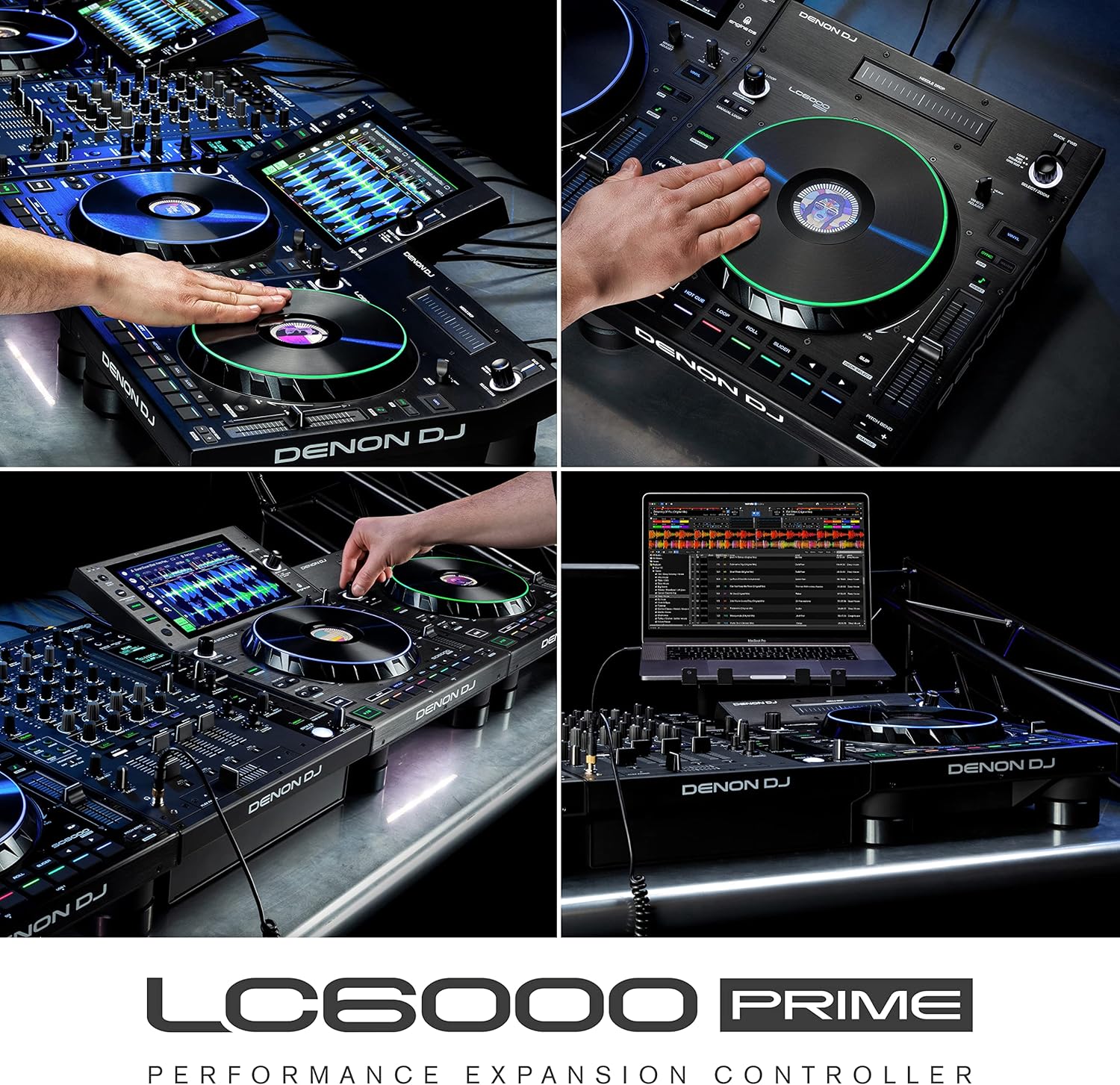
Image: The LC6000 PRIME integrated with a Denon DJ Prime 4, demonstrating its capability to provide dedicated sub-layer control for enhanced performance.

Image: An expanded DJ setup featuring multiple LC6000 PRIME units paired with a 4-channel controller, illustrating advanced control possibilities.
Údržba
Proper maintenance ensures the longevity and optimal performance of your Denon DJ LC6000 PRIME:
- Čištění: K otření jednotky použijte měkký, suchý hadřík. V případě odolné nečistoty použijte lehceamp Lze použít hadřík a poté suchý hadřík. Nepoužívejte abrazivní čisticí prostředky, rozpouštědla ani vosky.
- Ochrana proti prachu: When not in use, cover the unit with a dust cover to prevent dust and debris from accumulating on controls and internal components.
- Skladování: Přístroj skladujte na chladném a suchém místě mimo dosah přímého slunečního záření a extrémních teplot.
- Správa kabelů: Ujistěte se, že všechny kabely jsou úhledně uspořádané a nejsou napjaté, aby nedošlo k poškození konektorů a portů.
Odstraňování problémů
If you encounter issues with your LC6000 PRIME, refer to the following common troubleshooting steps:
- Jednotka se nezapíná:
- Ensure the USB cable is securely connected to both the LC6000 PRIME and a powered USB port on your computer or media player.
- Zkuste jiný port USB nebo kabel.
- If connecting to a computer, ensure the computer is powered on and not in sleep mode.
- Software Not Recognizing LC6000 PRIME:
- Verify that your DJ software is updated to the latest version and supports the LC6000 PRIME.
- Restart your DJ software and/or your computer.
- Check your computer's device manager (Windows) or System Information (macOS) to confirm the LC6000 PRIME is detected.
- Ensure no other applications are interfering with the USB connection.
- Ovládací prvky nereagují:
- Confirm the LC6000 PRIME is properly connected and recognized by your software or media player.
- Check for any firmware updates for the LC6000 PRIME on the Denon DJ webmísto.
- If using with a media player, ensure the correct layer is selected for control.
- Missing Components (e.g., lifters/feet):
- If any essential components, such as rubber feet or lifters, are missing upon unboxing, contact Denon DJ customer support or your retailer immediately for assistance.
For further assistance, refer to the official Denon DJ support resources.
Specifikace
| Funkce | Detail |
|---|---|
| Číslo modelu | LC6000 |
| Hmotnost položky | 11.53 libry (přibližně 5.23 kg) |
| Rozměry produktu (D x Š x V) | 14.16 x 12.6 x 4.44 palců (přibližně 35.97 x 32.00 x 11.28 cm) |
| Jog kolo | 8.5-inch capacitive touch with HD central display |
| Pitch Fader | 100mm dual-precision |
| Výkonové podložky | 8 multi-function (Hot Cue, Loop, Roll, Slicer) |
| Konektivita | USB (Plug & Play, USB Powered) |
| Kompatibilita | Engine OS Media Players (SC6000, SC5000 series), Serato DJ Pro, Virtual DJ, Algoriddim djay Pro AI |
Záruka a podpora
For detailed warranty information, product registration, and technical support, please visit the official Denon DJ website. You can find resources such as FAQs, software downloads, and contact information for customer service.
Oficiální DJ Denon Webmísto: www.denondj.com
Always ensure you are using the latest firmware and software versions for optimal performance and compatibility.
Související dokumenty - LC6000
 |
Denon DJ LC6000 PRIME User Guide Discover the Denon DJ LC6000 PRIME with this comprehensive user guide. Learn about its advanced features, setup, operation, and performance controls for professional DJing, compatible with Virtual DJ and Algoriddim djay. |
 |
Denon DJ PRIME 4+ Samostatný DJ kontroler – Pokročilé funkce a specifikace Prozkoumejte Denon DJ PRIME 4+, nejpokročilejší čtyřsystémový samostatný DJ kontroler na světě. Objevte jeho funkce, včetně streamování hudby přes Wi-Fi, pokročilých efektů, integrovaného ovládání osvětlení a integrace samostatných Stems ovladačů. View technické specifikace a možnosti připojení. |
 |
Denon DJ LC6000 PRIME User Guide: Features, Setup, and Operation Comprehensive user guide for the Denon DJ LC6000 PRIME layer controller, covering features, setup instructions, connection diagrams, and operational details for DJs. Learn about performance controls, syncing, and pad modes. |
 |
Denon DJ MCX8000 Quickstart Guide: Setup and Features Get started with your Denon DJ MCX8000 DJ controller. This quickstart guide covers setup, features, connections, and essential operations for professional DJ performance. |
 |
Denon DJ MC4000 User Guide and Setup Manual Detailed user guide for the Denon DJ MC4000 DJ controller, covering setup, features, connections, technical specifications, and MIDI commands. Includes comprehensive instructions for DJs. |
 |
Denon DJ DS1 Serato DVS Interface User Guide User guide for the Denon DJ DS1 Serato DVS Interface, covering features, setup, and technical specifications. Includes multilingual support information. |
Ask a question about this manual
Ask about setup, troubleshooting, compatibility, parts, safety, or missing instructions. Manuals+ will review the question and use this page’s manual context to help answer it.