
1. Úvod
The Avidsen HomeCam Battery is a 100% wireless outdoor surveillance camera designed for easy installation and robust home protection. Featuring 1080P Full HD resolution, a solar panel for continuous power, night vision, and two-way audio, this camera allows you to monitor your property remotely via a smartphone application without any subscription fees. This manual provides detailed instructions for setting up, operating, and maintaining your camera.
2. Co je v krabici
Please check that all components are present in the package:
- 1 x Avidsen HomeCam Battery IP WiFi Camera
- 1 x Solar Panel (PV module)
- 2 x 18650 baterie
- 1 x Camera Sealing Gasket
- Montážní šrouby a hmoždinky

Image: The Avidsen HomeCam Battery camera and its accompanying solar panel, unmounted, showing the main components included in the box.
3. Průvodce nastavením
3.1. Instalace baterie
- Na fotoaparátu vyhledejte přihrádku na baterie.
- Insert the two 18650 batteries, ensuring correct polarity (+/-).
- Bezpečně uzavřete přihrádku na baterie.
3.2. Montáž kamery a solárního panelu
The camera and solar panel are designed for outdoor use and can be mounted separately or together. Choose a location that provides optimal sunlight exposure for the solar panel and a clear view pro kameru.
- Montáž kamery: The camera features an innovative magnetic mount for precise orientation. Secure the base of the mount to a wall using the provided screws and wall plugs. Attach the camera to the magnetic base and adjust its angle.
- Montáž solárního panelu: Mount the solar panel in a location that receives direct sunlight for several hours a day. Connect the solar panel cable to the camera's charging port.
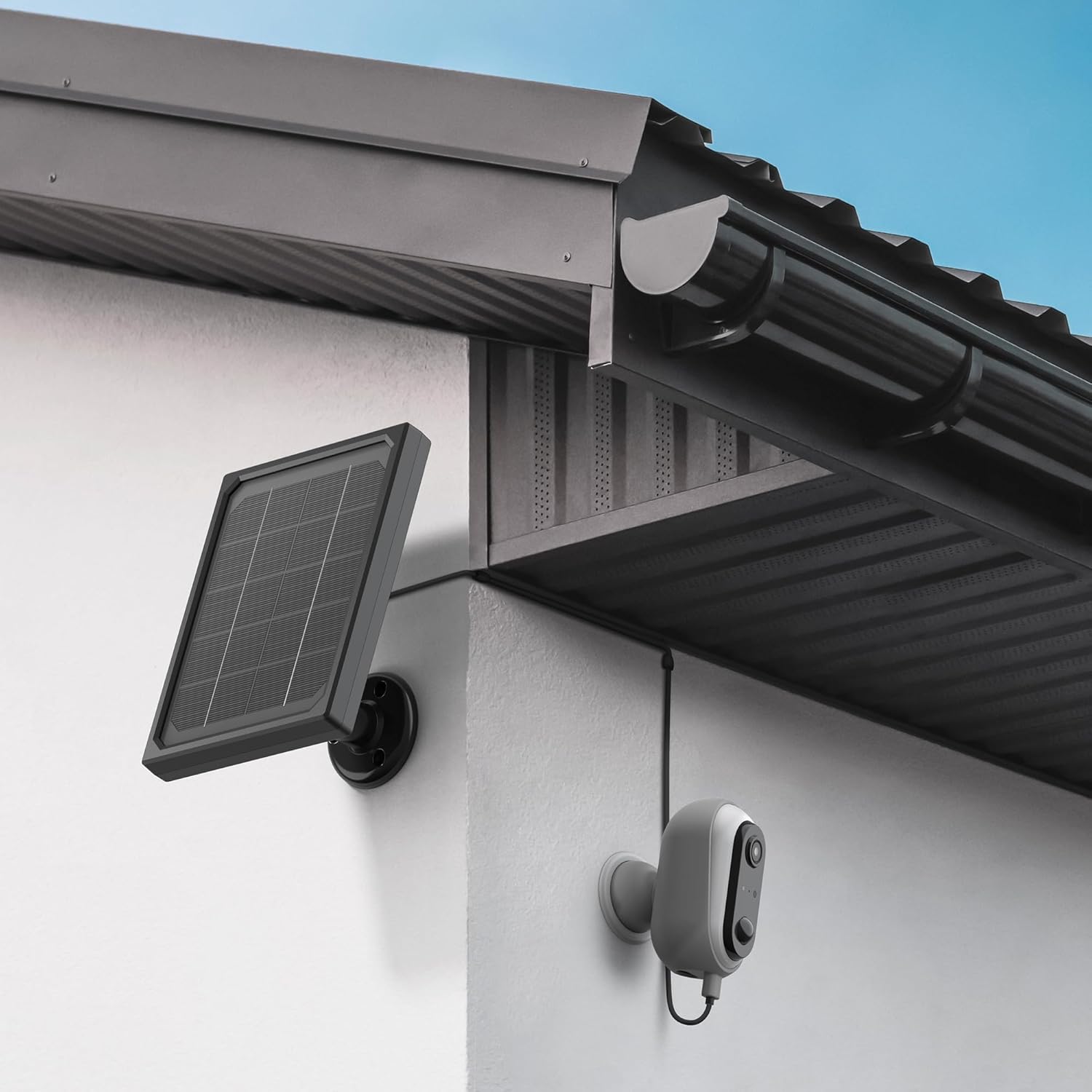
Image: The Avidsen HomeCam Battery camera and its solar panel are shown securely mounted on an exterior wall, positioned to capture sunlight and monitor the area.

Obrázek: Detailní záběr view of the Avidsen HomeCam Battery camera, highlighting its adjustable magnetic mount which allows for flexible positioning and angle adjustments.
3.3. Stažení aplikace a počáteční párování
- Download the "Avidsen Home" application from your smartphone's app store (available on Google Play and Apple App Store).
- Otevřete aplikaci a vytvořte si účet nebo se přihlaste, pokud jej již máte.
- Follow the in-app instructions to add a new device. This typically involves scanning a QR code on the camera or manually selecting the device type.
- Ensure your smartphone is connected to a 2.4GHz Wi-Fi network during the pairing process.
3.4. Připojení Wi-Fi
During the app pairing process, you will be prompted to connect the camera to your home Wi-Fi network.
- Enter your Wi-Fi network name (SSID) and password when requested by the app.
- The camera supports 2.4GHz Wi-Fi networks only. Ensure your router is configured accordingly.
- Po připojení se kontrolka kamery změní a aplikace potvrdí úspěšné spárování.
4. Ovládání fotoaparátu
4.1. Živě View a ovládací prvky
Once connected, open the Avidsen Home app to access the live feed from your camera.
- Živé video: Tap on the camera in the app to view stream videa v reálném čase.
- Obousměrný zvuk: Use the microphone icon in the app to speak through the camera's speaker and the speaker icon to listen to audio from the camera's microphone.
- Záznam: Manually record video or capture screenshots directly from the live view rozhraní.
- Přehrávání: Přístup zaznamenán footage stored on the MicroSD card (not included) via the app's playback feature.

Image: A smartphone screen showing the Avidsen Home app, with options for live view, screenshot, two-way talk, recording, playback, and photo album.
4.2. Detekce pohybu a upozornění
The camera features motion detection to alert you to activity.
- Povolit/zakázat: In the app settings for your camera, you can enable or disable motion detection.
- Citlivost: Upravte citlivost detekce pohybu, abyste minimalizovali falešné poplachy.
- Oznámení: When motion is detected, you will receive a notification on your smartphone.
- Záznam: Motion-triggered events are automatically recorded to the MicroSD card (if installed).
4.3. Noční vidění
The integrated infrared LEDs provide clear visibility up to 8 meters in total darkness.
- Noční vidění se aktivuje automaticky za zhoršených světelných podmínek.
- The camera provides a clear black and white image in night vision mode.
4.4. Local Storage (MicroSD Card)
The camera supports local storage via a MicroSD card (up to 128GB, not included).
- Vložte kartu MicroSD do určeného slotu ve fotoaparátu.
- Ensure the card is formatted correctly (FAT32 recommended).
- All recordings, including motion-triggered events, will be saved to this card.
4.5. Integrace chytré domácnosti
The Avidsen HomeCam Battery is compatible with Amazon Alexa and Google Assistant.
- Link your Avidsen Home account with your Alexa or Google Assistant app.
- Použijte k tomu hlasové příkazy view váš kamerový obraz na kompatibilních chytrých displejích.
5. Údržba
5.1. Čištění
- Regularly clean the camera lens and the surface of the solar panel with a soft, damp hadříkem pro zajištění optimálního výkonu.
- Avoid using harsh chemicals or abrasive materials that could damage the surfaces.
5.2. Péče o baterie
- The solar panel is designed to keep the batteries charged. Ensure the panel is free from obstructions and receives adequate sunlight.
- If the camera's battery level drops significantly, consider repositioning the solar panel or manually charging the batteries if possible (refer to specific battery charging instructions if applicable).
5.3. Connection Check
- Periodically check the physical connection between the solar panel and the camera to ensure it is secure and free from corrosion.
- Verify the camera's Wi-Fi connection status in the Avidsen Home app.
6. Řešení problémů
6.1. No Power / Camera Not Turning On
- Ensure the 18650 batteries are correctly inserted with the right polarity.
- Check if the batteries are charged. If not, ensure the solar panel is connected and receiving sunlight, or try charging the batteries externally if possible.
- Verify the power button (if any) is pressed.
6.2. Nelze se připojit k Wi-Fi
- Confirm your Wi-Fi network is 2.4GHz. The camera does not support 5GHz networks.
- Ujistěte se, že heslo k Wi-Fi zadané v aplikaci je správné.
- Pro zlepšení síly signálu přesuňte kameru blíže k Wi-Fi routeru.
- Restartujte router a kameru.
- If issues persist, try resetting the camera to factory settings (refer to the reset procedure in the app or device manual) and re-pairing.
6.3. Špatná kvalita obrazu
- Očistěte objektiv fotoaparátu, abyste odstranili veškeré nečistoty nebo šmouhy.
- Ujistěte se, že před objektivem nejsou žádné překážky.
- Zkontrolujte sílu signálu Wi-Fi; slabý signál může ovlivnit kvalitu streamovaného videa.
6.4. Detekce pohybu nefunguje nebo je příliš mnoho falešných poplachů
- Verify motion detection is enabled in the Avidsen Home app.
- Adjust the motion detection sensitivity settings in the app. Lower sensitivity for fewer false alarms, higher for more sensitive detection.
- Ujistěte se, že zorné pole kamery view is clear and not obstructed by moving objects like tree branches.
7. Specifikace
| Název modelu | HOME CAM BATTERY (127070) |
| Rezoluce | 1080p Full HD |
| Konektivita | Bezdrátové připojení (Wi-Fi 2.4 GHz) |
| Zdroj napájení | Solar Panel (5V 3W), 2x 18650 Batteries |
| Rozsah nočního vidění | Až 8 metrů |
| Pole View | 130° |
| Hodnocení IP | IP65 (Outdoor use) |
| Skladování | MicroSD karta (až 128 GB, není součástí balení) |
| Speciální funkce | Motion Detection, Two-Way Audio, Smart Home Compatibility (Alexa, Google Assistant) |
| Rozměry | 31.5 x 21 x 8.5 cm |
| Hmotnost | 1100 gramů |
8. Záruka a podpora
8.1. Záruka výrobce
This Avidsen product is covered by a 2letá záruka výrobce od data nákupu. Uschovejte si doklad o koupi pro případ reklamace. Záruka se vztahuje na vady materiálu a zpracování při běžném používání.
8.2. Technická podpora
For technical assistance, troubleshooting, or further inquiries, please visit the official Avidsen website or contact their customer support. You can find contact information and FAQs on their webmísto: