
Zavedení
Děkuji za nákupasing the VoltEdge CX40 Classic Black Controller. This manual provides essential information for setting up, operating, and maintaining your new controller. The VoltEdge CX40 is designed to provide optimal performance and full functionality, featuring built-in dual vibration for an immersive gaming experience and ergonomics tailored for long hours of gaming.
Obsah balení
Ujistěte se prosím, že balení obsahuje všechny položky:
- VoltEdge CX40 Classic Black Controller
- Uživatelská příručka (tento dokument)

Image: The retail packaging box for the VoltEdge CX40 controller, showing the controller and key features like 2m cable, ergonomic design, and dual vibration.
Konec produktuview
The VoltEdge CX40 controller features a classic layout with all standard buttons and analog sticks. It is designed for comfortable use during extended gaming sessions.

Obrázek: Shora dolů view of the VoltEdge CX40 controller, showcasing the D-pad, analog sticks, action buttons (triangle, circle, cross, square), Share, Options, and PS buttons.

Obrázek: Přední strana view of the VoltEdge CX40 controller, highlighting the ergonomic grips and the central PS button.
Vlastnosti ovladače:
- Duální vibrační zpětná vazba
- Funkce Turbo
- 2-meter Cable Length
- Ergonomický design
- Kompatibilní s PS4, PS3 a PC
Nastavení
The VoltEdge CX40 is a wired controller, offering a simple plug-and-play setup.
Connecting to PS4/PS3/PC:
- Locate an available USB port on your PS4, PS3, or PC.
- Insert the USB connector of the VoltEdge CX40 controller into the USB port.
- The system should automatically detect and install the necessary drivers. This may take a few moments.
- Once detected, the controller is ready for use.
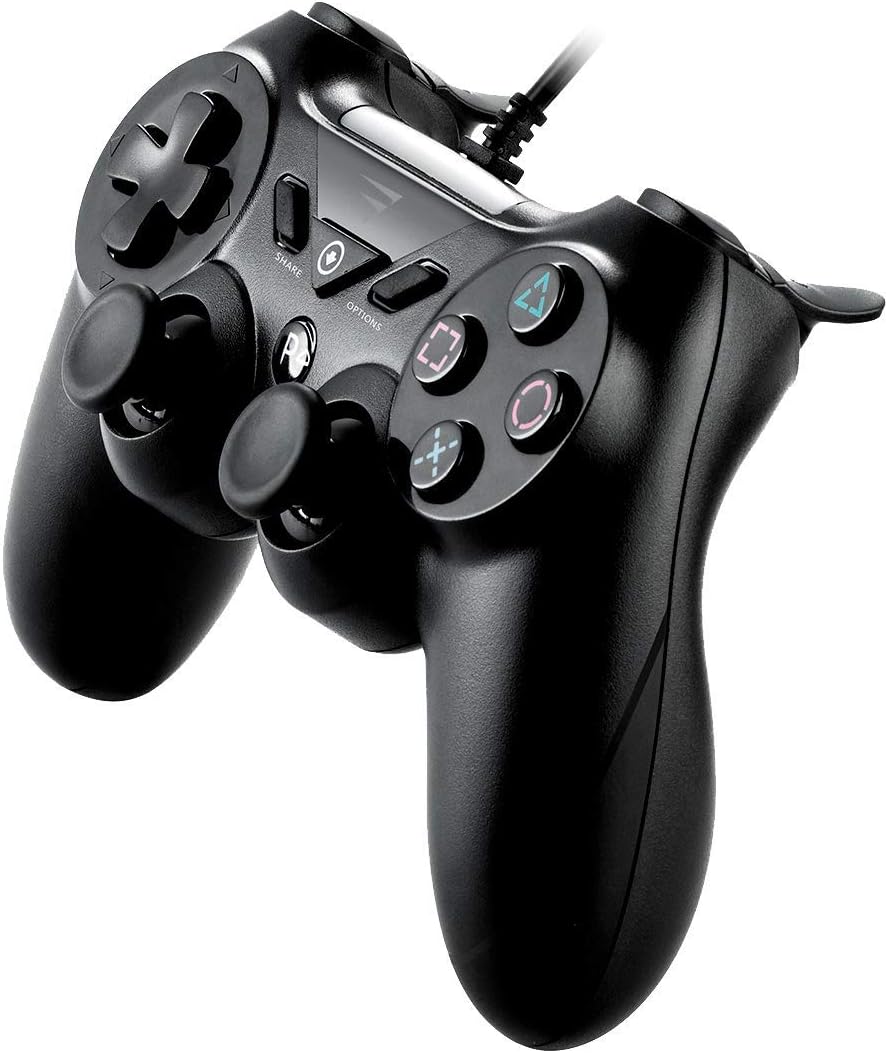
Obrázek: Boční view of the VoltEdge CX40 controller, illustrating the attached USB cable extending from the top of the controller.
Návod k obsluze
The VoltEdge CX40 controller functions similarly to standard game controllers. Familiarize yourself with the button layout for optimal gameplay.
Funkce tlačítek:
| Button/Component | Funkce |
|---|---|
| D-Pad | Directional input for movement or menu navigation. |
| Levé/pravé analogové páčky | Precise directional control, camera movement, or character movement. Press down for L3/R3 functions. |
| Action Buttons (Triangle, Circle, Cross, Square) | Primary in-game actions (e.g., jump, attack, interact). |
| L1/R1 Buttons | Shoulder buttons, often used for secondary actions or weapon switching. |
| Spouštěče L2/R2 | Analog triggers, often used for aiming, shooting, or acceleration/braking. |
| Tlačítko SDÍLET | (PS4) Share gameplay moments, screenshots, or video clips. |
| Tlačítko OPTIONS | (PS4) Access in-game menus, pause, or settings. |
| Tlačítko PS | (PS4/PS3) Access the system menu or turn on/off the console. |

Obrázek: Úhlový view of the VoltEdge CX40 controller, showing the layout of the D-pad, left analog stick, Share, Options, PS buttons, and the right analog stick and action buttons.
Funkce Turbo:
The Turbo function allows a button to be pressed repeatedly as long as it is held down. To activate/deactivate Turbo for a specific button:
- Stiskněte a podržte Turbo button (if present, or a designated combination).
- While holding Turbo, press the desired action button (e.g., Cross, Circle).
- Release both buttons. The Turbo function is now active for that action button.
- Repeat the process to deactivate Turbo for the same button.
Note: Specific Turbo button location or activation method may vary. Refer to the controller's physical markings if a dedicated Turbo button is present.
Údržba
Proper maintenance ensures the longevity and optimal performance of your VoltEdge CX40 controller.
Čištění:
- Disconnect the controller from the console/PC before cleaning.
- K otření povrchu ovladače použijte měkký, suchý hadřík.
- Pro odolnou špínu lehceampOtřete hadřík vodou nebo jemným, neabrazivním čisticím roztokem. Zabraňte nadměrné vlhkosti.
- Do not use harsh chemicals, solvents, or abrasive cleaners, as these can damage the controller's finish.
- Use cotton swabs or compressed air to clean around buttons and analog sticks.
Skladování:
- Regulátor skladujte na chladném a suchém místě mimo dosah přímého slunečního záření a extrémních teplot.
- Avoid placing heavy objects on the controller, which could damage the analog sticks or buttons.
- Keep the cable neatly coiled to prevent tangling or damage.
Odstraňování problémů
If you encounter issues with your VoltEdge CX40 controller, refer to the following common solutions:
| Problém | Možné řešení |
|---|---|
| Konzole/PC nerozpoznává ovladač. |
|
| Tlačítka nebo analogové páčky nereagují. |
|
| Vibrace nefungují. |
|
Specifikace
| Funkce | Detail |
|---|---|
| Název modelu | VoltEdge CX40 Classic Black Controller |
| Číslo modelu | 850021579128 |
| Konektivita | Kabelové USB |
| Délka kabelu | 2 metrů |
| Vibrace | Duální vibrace |
| Kompatibilita | PS4, PS3, PC |
| Rozměry (D x Š x V) | 17 x 6.2 x 14.5 cm |
| Hmotnost | 400 g |
Záruka a podpora
VoltEdge products are designed for durability and performance. For warranty information and technical support, please refer to the official VoltEdge webwebu nebo se přímo obraťte na jejich zákaznický servis.
Uschovejte si doklad o koupi pro případné reklamace.
Pro další pomoc navštivte: www.voltedge.com