
1. Úvod
This manual provides detailed instructions for the safe installation, operation, and maintenance of your Lumi LPA36-463A Full-Motion TV Wall Mount. Please read this manual thoroughly before installation and retain it for future reference. This wall mount is designed to securely hold most LED and LCD televisions ranging from 37 to 70 inches, with a maximum weight capacity of 45 kg (99 lbs).
The full-motion design allows for maximum extension, tilt, and rotation of your television, providing optimal viewing angles from various positions within a room. The mount can extend up to 475 mm from the wall and retract to a slim profile 95 mm.
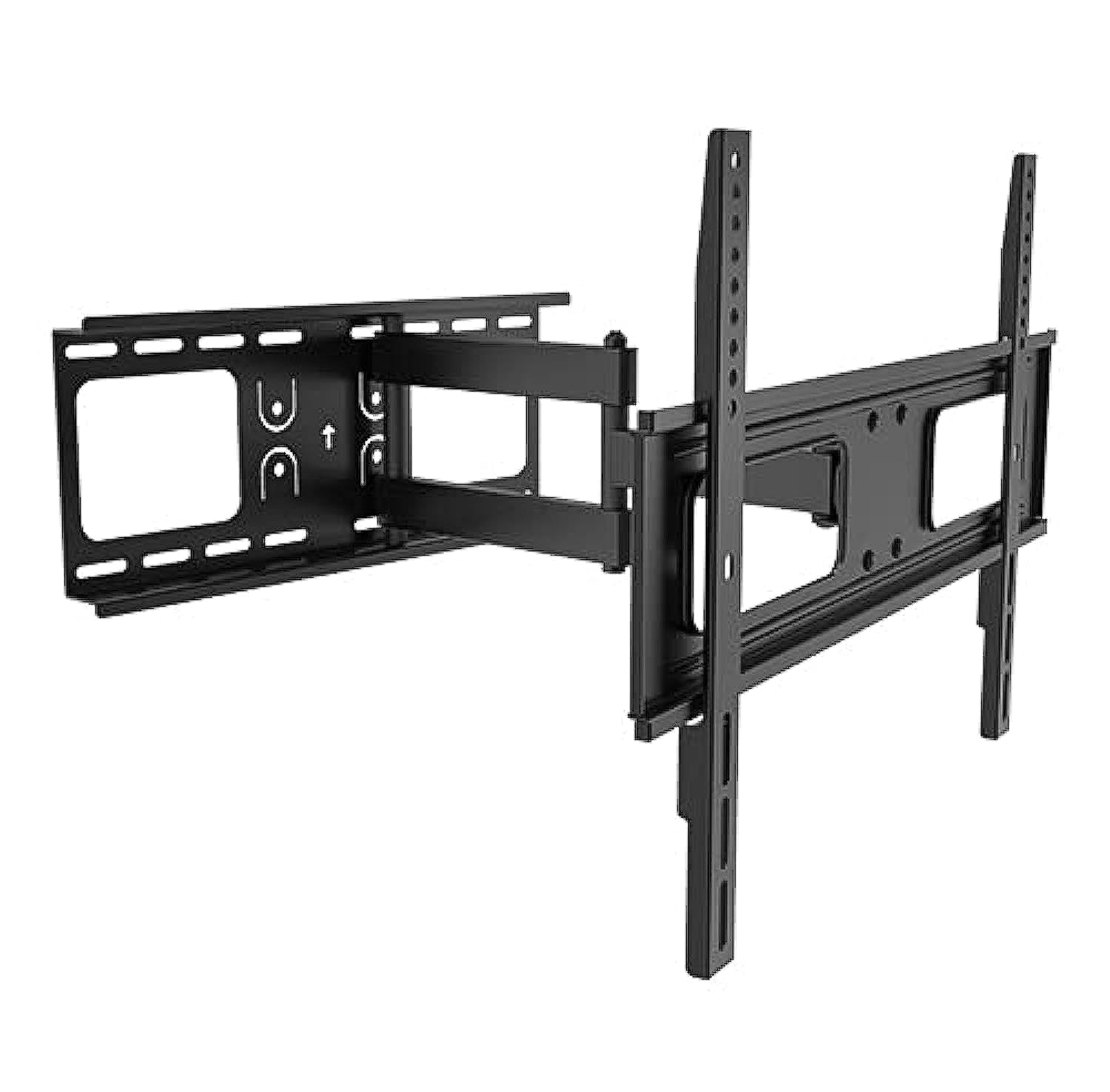
Image 1.1: The Lumi LPA36-463A Full-Motion TV Wall Mount, showing its articulated arm and VESA plate.
2. Bezpečnostní informace
VAROVÁNÍ: Failure to read and follow these instructions may result in serious personal injury, property damage, or voiding of your warranty. If you do not understand these instructions or have doubts about the safety of the installation, please contact a qualified installer.
- Nepřekračujte maximální nosnost 45 kg (99 liber).
- This mount is designed for installation on solid concrete walls, brick walls, or wood stud walls. Do not install on drywall alone.
- Ujistěte se, že konstrukce stěny bezpečně unese celkovou hmotnost držáku a televizoru.
- Use only the mounting hardware provided. Do not use power tools to tighten screws, as this may strip threads.
- Udržujte všechny malé části mimo dosah dětí.
- Instalaci vždy zajistěte alespoň dvěma lidmi, aby nedošlo ke zranění nebo poškození.
- Pravidelně kontrolujte všechna připojení, abyste se ujistili, že jsou bezpečná.
3. Obsah balení
Verify that all components are present and undamaged before beginning installation. If any parts are missing or defective, contact your retailer for assistance.
| Část | Popis | Množství |
|---|---|---|
| Sestava nástěnné desky | Main wall mounting bracket with articulated arm. | 1 |
| TV Bracket (VESA Plate) | Bracket that attaches to the back of the TV. | 1 |
| Sada montážního hardwaru | Includes various screws, washers, and anchors for wall and TV attachment. | 1 sada |
| Úroveň | For ensuring horizontal alignment during installation. | 1 |
| Návod k použití | Tento dokument. | 1 |
4. Nastavení a instalace
Before you begin, ensure you have the necessary tools: pencil, drill, stud finder (for wood studs), measuring tape, and a Phillips head screwdriver. It is highly recommended to have two people for installation.
4.1. Určete místo montáže
- Choose a location on the wall that can support the weight of the TV and mount.
- For wood stud walls, locate the center of the studs using a stud finder.
- For concrete or brick walls, ensure there are no hidden pipes or electrical wires.
- Mark the desired height for the top of your TV.
4.2. Připevněte nástěnnou desku ke zdi
- Position the wall plate assembly against the wall at the desired height. Use the integrated level to ensure it is perfectly horizontal.
- Mark the drill holes through the wall plate onto the wall with a pencil.
- Vyvrtejte vodicí otvory:
- For wood studs: Use a 5.5mm (7/32") drill bit.
- For concrete/brick: Use a 10mm (3/8") masonry drill bit and insert wall anchors.
- Připevněte nástěnnou desku ke zdi pomocí dodaných šroubů s podložkami. Pevně utáhněte, ale nepřetahujte.
4.3. Připevněte držáky televizoru k televizoru
- Opatrně položte televizor displejem dolů na měkký, čistý povrch.
- Identify the VESA mounting holes on the back of your TV. This mount supports VESA patterns up to 400x400 mm.
- Select the appropriate screws (M4, M6, or M8) and washers from the hardware kit that fit your TV's mounting holes.
- Attach the TV brackets to the back of your TV, ensuring they are centered and securely fastened. Do not overtighten.
4.4. Mount TV to Wall Plate
- With assistance, carefully lift the TV and hook the TV brackets onto the wall plate assembly.
- Ujistěte se, že je televizor bezpečně upevněn na nástěnné desce.
- Engage any safety locking mechanisms (if present) to prevent accidental dislodgement.
5. Návod k obsluze
The Lumi LPA36-463A mount offers full-motion capabilities for optimal viewflexibilita.
5.1. Adjusting Extension and Retraction
- Gently pull the TV away from the wall to extend the arm. The mount can extend up to 475 mm.
- Push the TV back towards the wall to retract the arm. The mount can retract to a minimum distance of 95 mm from the wall.
- Always move the TV smoothly and avoid sudden jerks.
5.2. Nastavení náklonu
- The mount allows for vertical tilt adjustment. Loosen the tilt adjustment knobs (if present, refer to diagram in physical manual) on the TV brackets.
- Adjust the TV to the desired upward or downward angle.
- Tighten the tilt adjustment knobs to secure the TV in position.
5.3. Adjusting Swivel (Rotation)
- The articulated arm allows for horizontal swivel of the TV up to 90 degrees left and right.
- Gently push or pull the side of the TV to rotate it to your preferred viewúhel.
- No locking mechanism is typically required for swivel; the friction of the joints holds the position.
6. Údržba
Pravidelná údržba zajistí dlouhou životnost a bezpečný provoz vašeho nástěnného držáku televizoru.
- Čištění: Otřete držák měkkým, suchým hadříkem. Nepoužívejte abrazivní čisticí prostředky ani rozpouštědla.
- Pravidelná prohlídka: Every 3-6 months, check all screws and bolts to ensure they are tight and secure. Retighten if necessary.
- Mazání kloubů: If the arm movement becomes stiff, a small amount of silicone-based lubricant can be applied to the pivot points. Avoid oil-based lubricants.
- Kontrola poškození: Inspect the mount for any signs of damage, wear, or corrosion. If any damage is found, discontinue use and contact customer support.
7. Řešení problémů
If you encounter issues with your Lumi LPA36-463A TV mount, refer to the following common problems and solutions.
| Problém | Možná příčina | Řešení |
|---|---|---|
| Televizor není po instalaci v rovině. | Wall plate not perfectly horizontal. | Carefully loosen wall plate bolts, adjust with a level, and retighten. Some mounts have post-installation leveling adjustments; check your specific model. |
| Držák se zdá být uvolněný nebo kymácející se. | Mounting bolts are not tight enough or incorrect wall anchors were used. | Ensure all wall bolts and TV attachment screws are securely tightened. Verify correct anchors for your wall type. If problem persists, consult a professional. |
| TV cannot tilt or swivel smoothly. | Joints are too tight or require lubrication. | Check if any adjustment knobs are overtightened. Apply a small amount of silicone-based lubricant to the moving joints. |
| Držák na televizi nepasuje. | Nesprávný vzor VESA nebo velikost/hmotnost televizoru. | Verify your TV's VESA pattern and weight against the mount's specifications. This mount supports VESA up to 400x400mm and TVs up to 45kg (99lbs). |
8. Specifikace
| Funkce | Detail |
|---|---|
| Číslo modelu | LPA36-463A |
| Značka | Lumi |
| Typ montáže | Full-Motion Wall Mount |
| Materiál | Kov |
| Kompatibilita velikosti obrazovky | 37" - 70" |
| Hmotnostní kapacita | 45 kg (99 lb) |
| Kompatibilita VESA | Up to 400x400 mm |
| Prodloužení od zdi | 95 mm (zasunutý) až 475 mm (vysunutý) |
| Rozsah náklonu | Adjustable (vertical) |
| Otočný rozsah | Up to 90 degrees left/right |
| Přepravní rozměry | 51.4 x 22.2 x 7 cm; 2.52 kg |
9. Záruka a podpora
Lumi products are manufactured with quality and durability in mind. For specific warranty details, please refer to the warranty card included with your product or visit the official Lumi webwebu. Uschovejte si účtenku jako doklad o koupi.
For technical support, missing parts, or any questions regarding the installation or operation of your Lumi LPA36-463A TV Wall Mount, please contact your local retailer or Lumi customer service.
Kontaktní údaje: (Please refer to your product packaging or Lumi's official webweb s nejaktuálnějšími kontaktními údaji.)