
Zavedení
This instruction manual provides comprehensive guidance for the SOAR NFL True Wireless Earbuds V.4. These earbuds feature Bluetooth 5.0 technology, a built-in microphone, and touch controls, offering 3-4 hours of playtime per charge. The included charging case ensures portability and extended use. Please read this manual thoroughly before using your earbuds to ensure proper operation and longevity.
Co je v krabici
Upon opening your SOAR NFL True Wireless Earbuds V.4 package, you should find the following items:
- One (1) Pair of True Wireless Earbuds
- Jedno (1) nabíjecí pouzdro
- One (1) Micro-USB Charging Cable

The image above displays the SOAR NFL True Wireless Earbuds V.4 in their retail packaging. The package includes the earbuds, the charging case, and a micro-USB charging cable.
Konec produktuview
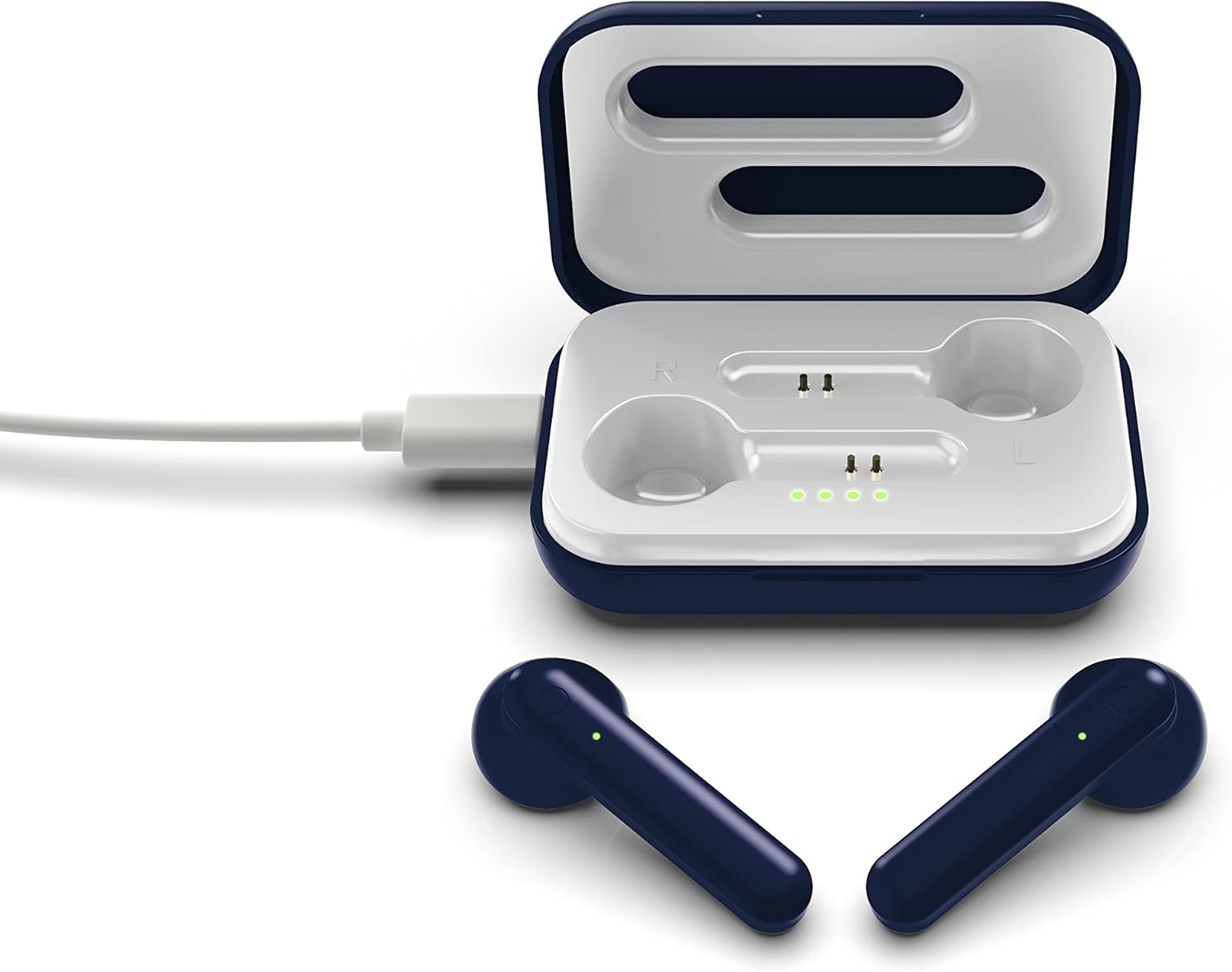
The SOAR NFL True Wireless Earbuds V.4 consist of two individual earbuds and a portable charging case. Each earbud features a touch-sensitive area for controls and an LED indicator. The charging case has a lid, charging ports for the earbuds, and LED indicators to show its battery status.

This image shows the earbuds outside their charging case, which is open and connected to a charging cable. The charging case has designated slots for each earbud (Left and Right) and LED indicators for charging status.
The image above illustrates the earbuds securely placed within their charging case. The illuminated LED lights on the case indicate the charging status of both the case and the earbuds.
Nastavení
1. Nabíjení sluchátek a pouzdra
Před prvním použitím plně nabijte sluchátka i nabíjecí pouzdro.
- Nabíjení pouzdra: Connect the provided Micro-USB cable to the charging port on the case and the other end to a USB power source (e.g., computer, wall adapter). The LED indicators on the case will illuminate to show charging progress.
- Nabíjení sluchátek: Place the earbuds into their respective slots in the charging case. Ensure they are correctly seated. The earbuds will begin charging automatically from the case's internal battery. The LED indicators on the earbuds will show their charging status.
- Plné nabití poskytuje přibližně 3–4 hodiny přehrávání.
2. Párování Bluetooth
Připojení sluchátek k zařízení:
- Ujistěte se, že jsou sluchátka nabitá.
- Open the charging case. The earbuds will automatically power on and enter pairing mode. The LED indicator on one earbud will flash, indicating it is ready to pair.
- Na svém zařízení (chytrém telefonu, tabletu atd.) povolte Bluetooth.
- Hledat available Bluetooth devices and select "SOAR TWS4" from the list.
- Once connected, the earbud LED indicator will stop flashing. You will hear an audible confirmation.
- Sluchátka se po vyjmutí z pouzdra automaticky znovu připojí k poslednímu spárovanému zařízení, pokud je na zařízení povoleno Bluetooth.
Návod k obsluze
The SOAR NFL True Wireless Earbuds V.4 feature touch controls for easy management of audio and calls.
Zapnutí/vypnutí
- Zapnutí: Otevřete nabíjecí pouzdro nebo dlouze stiskněte dotykovou plochu na obou sluchátkách po dobu 3 sekund.
- Vypnout: Vložte sluchátka zpět do nabíjecího pouzdra a zavřete víko, nebo dlouze stiskněte dotykovou plochu na obou sluchátkách po dobu 5 sekund.
Přehrávání hudby
- Přehrát/pozastavit: Jediným klepnutím na jedno sluchátko.
- Další skladba: Dvakrát klepněte na pravé sluchátko.
- Předchozí skladba: Dvakrát klepněte na levé sluchátko.
Správa hovorů
- Přijmout/ukončit hovor: Jedno klepnutí na kterékoli sluchátko během příchozího nebo aktivního hovoru.
- Odmítnout hovor: Během příchozího hovoru dlouze stiskněte libovolné sluchátko po dobu 2 sekund.
Hlasový asistent
- Aktivovat Voice Assistant: Trojitě klepněte na kterékoli sluchátko.
Údržba
Správná péče prodlouží životnost vašich sluchátek.
- Čištění: K čištění sluchátek a nabíjecího pouzdra používejte měkký, suchý hadřík. Nepoužívejte agresivní chemikálie ani abrazivní materiály.
- Skladování: Pokud sluchátka nepoužíváte, uložte je do nabíjecího pouzdra, aby byla chráněna a zůstávala nabitá.
- Voděodolnost: Tato sluchátka jsou není voděodolný. Avoid exposure to liquids, moisture, and extreme temperatures.
- Nabíjení: Use only the provided Micro-USB cable or a certified equivalent for charging.
Odstraňování problémů
Pokud narazíte na problémy se sluchátky, podívejte se na následující běžná řešení:
| Problém | Řešení |
|---|---|
| One earbud is not connecting or producing sound. |
|
| Earbuds are not pairing with my device. |
|
| Sluchátka se nenabíjejí. |
|
Specifikace
| Funkce | Detail |
|---|---|
| Název modelu | Skutečná bezdrátová sluchátka V.4 |
| Číslo modelu položky | NFL-TWS4-SHKS |
| Technologie připojení | Bluetooth, bezdrátové připojení |
| Technologie bezdrátové komunikace | Bluetooth 5.0 |
| Dosah Bluetooth | Až 30 stop (9.14 metrů) |
| Výdrž baterie (doba přehrávání) | 3-4 hodin na jedno nabití |
| Typ ovládání | Dotykové ovládání, ovládání médií |
| Speciální funkce | Mikrofon v ceně |
| Umístění uší | V uchu |
| Úroveň odolnosti proti vodě | Není odolný vůči vodě |
| Materiál | Plast |
| Rozměry produktu | 1.25 x 4.5 x 6.5 palce |
| Hmotnost položky | 3.52 unce |
| Výrobce | Prime Brands Group, Inc. |
| UPC | 192129070757 |
Oficiální video produktu
Toto video poskytuje vizuální ukázkuview of the SOAR TWS4 True Wireless Earbuds V.4, highlighting key features such as the wireless charging case, touch controls, and Bluetooth 5.0 technology. It demonstrates the product's design and functionality.
Záruka a podpora
Your SOAR NFL True Wireless Earbuds V.4 are covered by a 1letá omezená záruka. This warranty covers manufacturing defects and issues arising from normal use. It does not cover damage caused by misuse, accidents, unauthorized modifications, or exposure to liquids.
For warranty claims, technical support, or further assistance, please contact the manufacturer, Prime Brands Group, Inc., or visit their official webwebu. Uschovejte si doklad o koupi pro ověření záruky.