
SPRT POS58 IVU
Uživatelská příručka k termální tiskárně účtenek SPRT POS58 IVU
Model: POS58 IVU
Zavedení
This manual provides essential information for the proper setup, operation, and maintenance of your SPRT POS58 IVU Receipt Thermal Printer. Please read this manual thoroughly before using the printer to ensure optimal performance and longevity.
The SPRT POS58 IVU is a compact and efficient thermal receipt printer designed for various point-of-sale applications. It features USB connectivity and is compatible with 5.7 cm wide thermal paper.
Nastavení
1. Vybalení a kontrola
- Opatrně vyjměte tiskárnu a veškeré příslušenství z obalu.
- Verify that all components are present: printer unit, power adapter, USB cable.
- Inspect the printer for any visible damage. If damaged, contact your supplier immediately.
2. Připojení tiskárny
- Připojte napájení: Insert the power adapter cable into the printer's power port and plug the other end into a suitable power outlet.
- Připojte USB: Připojte jeden konec kabelu USB k portu USB tiskárny a druhý konec k volnému portu USB na počítači nebo pokladním systému.
- Zapnutí: Locate the power switch on the printer (typically on the side or front) and turn it to the 'ON' position.
3. Vkládání termopapíru
The SPRT POS58 IVU printer uses standard 5.7 cm wide thermal paper rolls.
- Open the paper cover by pressing the release button or lifting the latch (location may vary slightly).
- Insert the thermal paper roll with the printing surface facing the thermal head. Ensure the roll is seated correctly in the paper compartment.
- Vytáhněte malé množství papíru ven z řezačky.
- Pevně zavřete kryt papíru, dokud nezacvakne na místo.
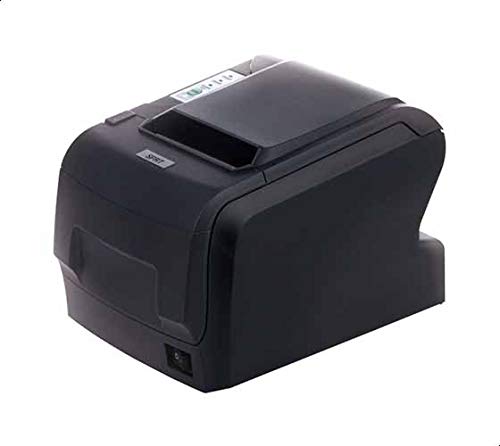
Figure 1: SPRT POS58 IVU Receipt Thermal Printer. This image displays the compact black thermal printer from an angled view, highlighting its paper output slot and the power switch located on the side.
Návod k obsluze
Základní tisk
- Ensure the printer is powered on and connected to your computer/POS system.
- Install the necessary printer drivers on your operating system if not already installed. Refer to the driver installation guide provided separately or available from the manufacturer's webmísto.
- From your application (e.g., POS software, word processor), select the SPRT POS58 IVU as your printer.
- Initiate the print command. The printer will automatically feed and print the receipt.
- Tear off the receipt against the serrated edge of the paper output slot.
Kontrolky
The printer typically has indicator lights to show its status:
- Kontrolka napájení: Indikuje, že je tiskárna zapnutá.
- Error Light: Illuminates or blinks to indicate an error condition (e.g., paper out, print head overheat).
- Paper Out Light: Indicates that the paper roll is empty or incorrectly loaded.
Údržba
Čištění termohlavice
Regular cleaning of the thermal head ensures clear print quality and extends printer life. Clean the thermal head after every 50-100 km of printing or if print quality degrades.
- Vypněte tiskárnu a odpojte napájecí kabel.
- Otevřete papírový kryt.
- Wait a few minutes for the thermal head to cool down if the printer has been recently used.
- Gently wipe the thermal head surface with a cotton swab lightly moistened with absolute alcohol (ethanol).
- Allow the alcohol to evaporate completely before closing the cover and reconnecting power.
Čištění exteriéru
Otřete vnější povrch tiskárny měkkým,amp hadříkem. Nepoužívejte silná rozpouštědla ani abrazivní čisticí prostředky.
Manipulace s papírem
- Use only high-quality thermal paper to prevent damage to the thermal head and ensure optimal print quality.
- Termopapír skladujte na chladném a suchém místě mimo dosah přímého slunečního záření a tepla.
Odstraňování problémů
| Problém | Možná příčina | Řešení |
|---|---|---|
| Tiskárna se nezapne. | Power cable not connected; power outlet faulty; printer switch off. | Zkontrolujte připojení napájecího kabelu; zkuste jinou zásuvku; ujistěte se, že je vypínač zapnutý. |
| No printing / Blank output. | Paper loaded incorrectly (upside down); paper out; driver not installed/configured; printer not selected. | Reload paper correctly (printing side facing thermal head); replace paper roll; install/reinstall drivers; select printer in application. |
| Špatná kvalita tisku. | Thermal head dirty; low-quality paper; paper stored improperly. | Clean thermal head; use recommended thermal paper; store paper correctly. |
| Zaseknutý papír. | Paper not loaded straight; foreign object in paper path. | Open cover, remove jammed paper carefully, reload paper straight; inspect for obstructions. |
Specifikace
| Funkce | Detail |
|---|---|
| Značka | SPRT |
| Číslo modelu | POS58 IVU |
| Typ tiskárny | Termální tiskárna účtenek |
| Technologie připojení | USB |
| Tisková média | Labels (commonly used for receipts) |
| Šířka papíru | 5.7 cm |
| Barva | Černý |
| Hmotnost položky | 1.82 kg |
| Rozměry balení | 28 x 21.4 x 17.8 cm |
Záruka a podpora
Specific warranty terms and detailed support contact information are not provided within the available product data. For warranty claims, technical support, or service inquiries, please refer to the documentation included with your purchase or contact your point of sale or the manufacturer directly.
You may find additional resources and contact details on the official SPRT webmísto.
Ask a question about this manual
Ask about setup, troubleshooting, compatibility, parts, safety, or missing instructions. Manuals+ will review the question and use this page’s manual context to help answer it.