
1. Úvod
The Xprinter XP-C300H is a high-speed thermal receipt printer designed for various business environments. It features robust construction with water, oil, and dust resistance, ensuring durability and reliable performance. This printer offers versatile connectivity options including USB, Serial, and LAN, making it compatible with a wide range of operating systems. With a printing speed of 300mm per second, it efficiently handles high-volume printing tasks. This manual provides detailed instructions for setting up, operating, and maintaining your XP-C300H printer.
2. Bezpečnostní informace
- Tiskárnu vždy připojujte k uzemněné elektrické zásuvce.
- Nevystavujte tiskárnu vodě ani nadměrné vlhkosti.
- Neumísťujte tiskárnu na přímé sluneční světlo ani do blízkosti zdrojů tepla.
- Používejte pouze specifikovaný napájecí adaptér a příslušenství.
- Uchovávejte mimo dosah dětí.
- Nepokoušejte se tiskárnu rozebírat ani opravovat sami. Požádejte o pomoc kvalifikovaný servisní personál.
3. Obsah balení
Please check the package contents upon unpacking. If any items are missing or damaged, contact your vendor.
- Xprinter XP-C300H Thermal Receipt Printer
- Napájecí kabel
- USB Cable (may vary by model/region)
- Thermal Paper Roll (for initial testing)
4. Konec produktuview
Familiarize yourself with the components of your XP-C300H printer.
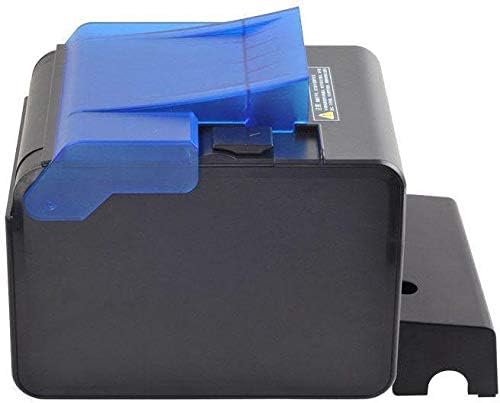
Obrázek 4.1: Strana view of the XP-C300H printer. This image shows the compact design and the blue transparent cover for the paper compartment.
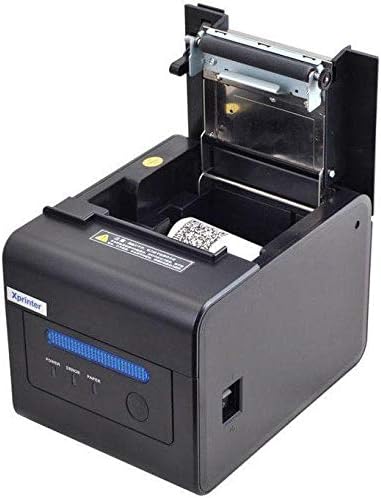
Obrázek 4.2: Horní přední část view of the XP-C300H printer with the paper cover open. This reveals the thermal print head mechanism and the area for loading the thermal paper roll. Status indicator lights (Power, Error, Paper) are visible on the front panel.
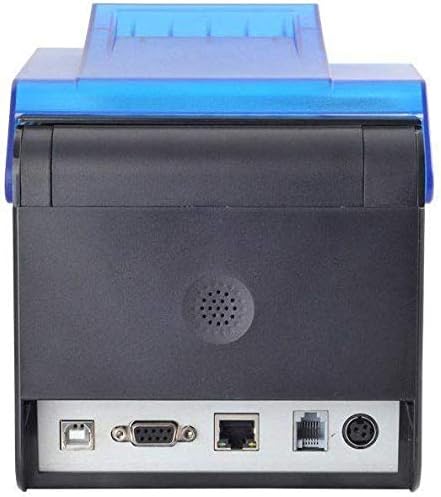
Obrázek 4.3: Zadní view of the XP-C300H printer. This image highlights the multiple connectivity ports including USB, Serial (DB9), LAN (Ethernet), and the power input port, offering flexible integration options.
5. Nastavení
5.1 Připojení napájecího adaptéru
- Ujistěte se, že je tiskárna vypnutá.
- Připojte napájecí kabel k napájecímu adaptéru.
- Plug the power adapter into the printer's power input port (refer to Figure 4.3).
- Zapojte druhý konec napájecího kabelu do uzemněné elektrické zásuvky.
5.2 Vkládání termopapíru
- Open the printer's top cover by pressing the release latch (refer to Figure 4.2).
- Insert a new thermal paper roll into the compartment, ensuring the paper feeds from the bottom and the leading edge is straight.
- Vytáhněte malé množství papíru ven z řezačky.
- Pevně zavřete horní kryt, dokud nezaklapne.
5.3 Připojení k počítači
The XP-C300H supports USB, Serial, and LAN connections.
- USB připojení: Připojte jeden konec kabelu USB k portu USB tiskárny a druhý konec k počítači.
- Sériové připojení: Connect a serial cable (DB9) from the printer's serial port to your computer's serial port.
- Připojení k LAN: Připojte ethernetový kabel z portu LAN tiskárny k síťovému routeru nebo přepínači.
5.4 Instalace ovladače
After connecting the printer, you may need to install the appropriate drivers for your operating system (Windows, Linux, etc.). Drivers are typically provided on a CD with the printer or can be downloaded from the Xprinter official webwebu. Postupujte podle pokynů na obrazovce pro instalaci ovladače.
6. Návod k obsluze
6.1 Zapnutí/vypnutí
Press the power switch located on the printer to turn it on or off. The 'Power' indicator light will illuminate when the printer is on.
6.2 Stavové indikátory
The printer features indicator lights on the front panel:
- Moc: Indikuje, že je tiskárna zapnutá.
- Chyba: Illuminates or flashes to indicate an error condition (e.g., paper out, print head overheat, cover open).
- Papír: Illuminates when paper is present, flashes when paper is low, or off when paper is out.
6.3 Tisk
Once the printer is connected and drivers are installed, you can print receipts or other documents from your POS software or application. The printer supports EPSON ESC/POS command sets for various printing functions.
6.4 Auto Cutter
The XP-C300H features an auto-cutter that can perform full or partial cuts of the thermal paper, depending on the software commands sent to the printer.
7. Údržba
7.1 Čištění tiskové hlavy
Regular cleaning of the print head ensures optimal print quality. Turn off the printer and disconnect the power cable before cleaning. Use a soft cloth dampened with isopropyl alcohol to gently wipe the thermal elements on the print head. Allow it to dry completely before use.
7.2 Čištění exteriéru
Wipe the exterior of the printer with a soft, dry cloth. For stubborn dirt, use a cloth lightly dampened with water and mild detergent. Do not use strong solvents or abrasive cleaners.
7.3 Výměna papírové role
When the 'Paper' indicator shows low paper or is off, replace the paper roll following the steps in Section 5.2.
8. Řešení problémů
| Problém | Možná příčina | Řešení |
|---|---|---|
| Tiskárna se nezapne | Napájecí kabel není připojen; Vadná zásuvka | Zkontrolujte připojení napájecího kabelu; zkuste jinou zásuvku |
| Žádný tisk | Paper out; Printer cover open; Incorrect driver/connection; Error state | Load paper; Close cover; Verify driver installation and cable connection; Check error indicator |
| Špatná kvalita tisku | Print head dirty; Low quality thermal paper | Clean print head (Section 7.1); Use recommended thermal paper |
| Zaseknutý papír | Nesprávné vkládání papíru; Cizí předmět | Open cover and clear jammed paper; Reload paper correctly (Section 5.2) |
Pokud problém přetrvává i po vyzkoušení těchto řešení, kontaktujte technickou podporu.
9. Specifikace
| Funkce | Popis |
|---|---|
| Model | XP-C300H |
| Způsob tisku | Přímé tepelné |
| Rychlost tisku | 300 mm/s |
| Rozhraní | USB, Serial (RS232), LAN (Ethernet) |
| Šířka papíru | Max 198 mm (Note: Standard receipt printers typically use 80mm or 58mm width. Please verify actual supported paper width with product documentation.) |
| Auto Cutter | Full/Partial Cut |
| Spolehlivost | Water, Oil, and Dust Resistant |
| Sada příkazů | Kompatibilní s EPSON ESC/POS |
| Podpora operačního systému | Windows, Linux, various others |
| Rozměry (D x Š x V) | 198 x 148 x 138 mm |
| Hmotnost | 1.78 kg |
| Barva | Černý |
| Zahrnuté komponenty | Printer, Power Cable |
| Tisková média | Štítky (Primary media for receipt printers is typically thermal paper rolls) |
| Oboustranný tisk | Ano (Note: This feature is generally not applicable to thermal receipt printers. Please refer to official product documentation for clarification.) |
10. Záruka a podpora
For detailed warranty information, technical support, and service inquiries, please refer to the documentation included with your purchase or visit the official Xprinter website. You may also contact your local dealer or distributor for assistance.
Uschovejte si účtenku jako doklad o koupi pro případ reklamace.