
1. Úvod
This manual provides detailed instructions for the installation, setup, and operation of your LoraTap 5th Generation Smart Roller Shutter Switch. Please read this manual thoroughly before installation and use to ensure proper function and safety.
2. Bezpečnostní informace
- Elektrická bezpečnost: Installation must be performed by a qualified electrician or a person with a thorough understanding of electrical systems. Always turn off power at the circuit breaker before installation or maintenance.
- Vyžadován neutrální vodič: This device requires a neutral wire for operation. Ensure your electrical box has a neutral wire available before attempting installation.
- Provozní svtage: The switch is designed for 240V AC systems. Do not connect to other voltage systémy.
- Maximální zatížení: Do not exceed the maximum load of 2400W (10A) for connected devices.
- Pouze pro vnitřní použití: This product is intended for indoor use in dry environments. Avoid exposure to moisture or extreme temperatures.
3. Konec produktuview
The LoraTap 5th Gen Smart Roller Shutter Switch offers advanced control over your roller blinds, curtains, or awnings. It is compatible with electronic or motorized actuators. Key features include:
- Procenttage ovládání: Open or close blinds to a specific percentage (0-100%) via the Smart Life app or voice commands.
- Hlasové ovládání: Kompatibilní s Amazon Alexa a Google Home pro ovládání bez použití rukou.
- Funkce časovače: Schedule automatic opening and closing times through the Smart Life app.
- Dálkové ovládání: Control your blinds from anywhere using the Smart Life/Tuya app on your smartphone.
- Ovládání a sdílení ve skupině: Control multiple switches as a group and share device access with family members.

Obrázek: Overview of LoraTap Smart Roller Shutter Switch key features including percentage control, timer, voice control, and app remote control.

Image: The LoraTap Smart Roller Shutter Switch alongside a smartphone displaying the Smart Life app interface, highlighting the percentage control feature for blinds.

Obrázek: Přamples of compatible window coverings such as Venetian blinds, roller blinds, and awnings. The image includes a note indicating a typical motor wattage of less than 600W for such applications, while the switch itself supports up to 2400W.
4. Specifikace
| Číslo modelu | SC400W-EU-V5T2 |
| Značka | Lora Tap |
| Provozní svtage | 240 voltů AC |
| Aktuální hodnocení | 10 Ampere |
| Wattage | 2400 wattů (max.) |
| Protokol připojení | Wi-Fi |
| Typ montáže | Držák na zeď |
| Materiál | ABS |
| Hodnocení IP | IP20 |
| Dodržování | Certifikováno CE |
| Počet pozic | 101 (for 0-100% control) |
| Rozměry balení | 10.5 x 10.3 x 4.4 cm |
| Hmotnost balení | 140 g |

Image: Front, side, and back dimensions of the switch, along with a wiring diagram showing input L, input N, output N, output L1, and output L2. Note: Earth wire connection is not required.
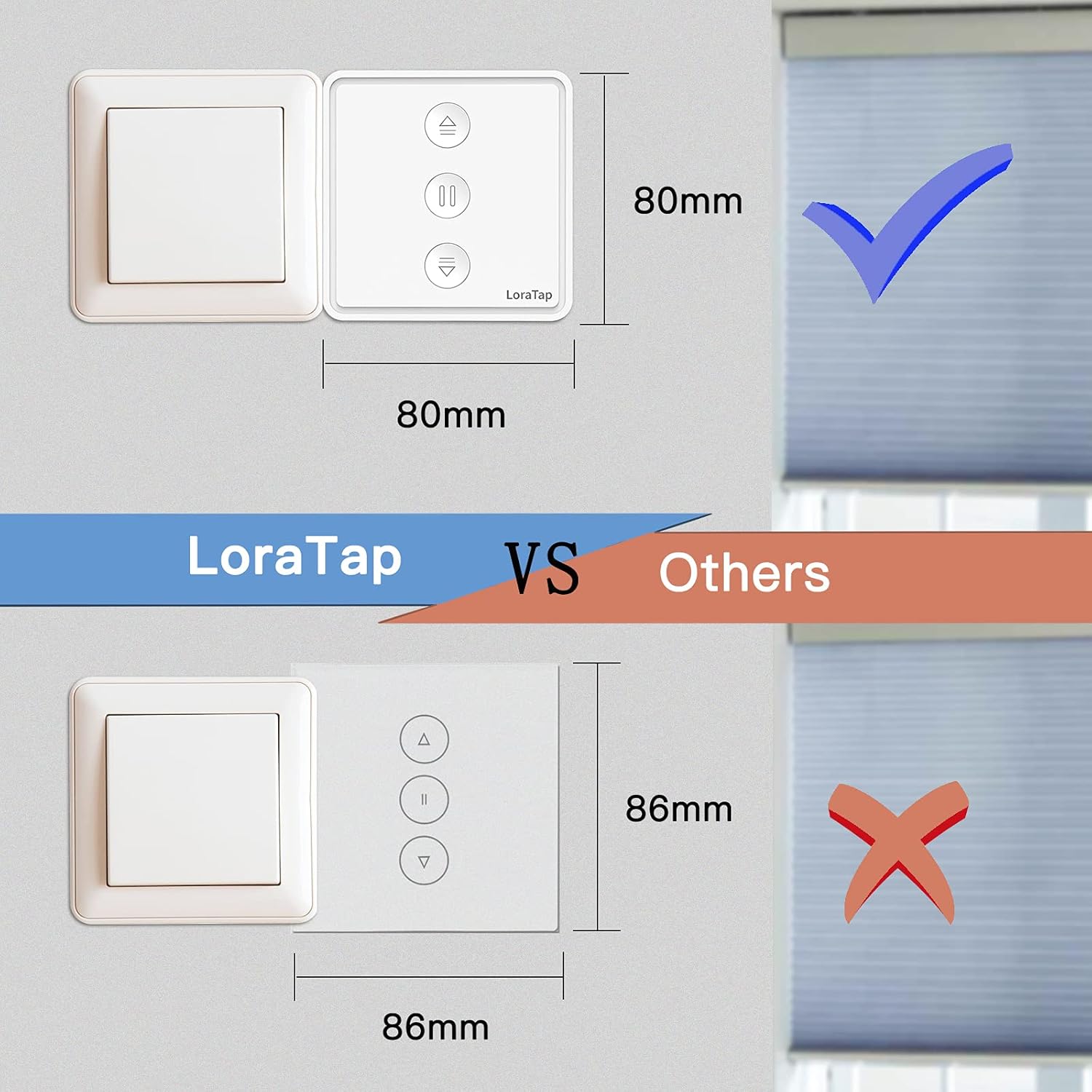
Image: A visual comparison illustrating the compact size of the LoraTap switch (80mm x 80mm) compared to larger standard switches (86mm x 86mm), indicating compatibility with standard wall boxes.
5. Instalace
Důležité: Ensure power is turned off at the main circuit breaker before beginning installation. If you are unsure about electrical wiring, consult a qualified electrician.
- Příprava zapojení: Identify the Live (L), Neutral (N), and motor wires (Up/Down/Common) from your existing roller shutter system. This switch requires a neutral wire.
- Připojit dráty: Viz schéma zapojení níže.
- Connect the Live wire from your power supply to the 'Input L' terminal on the switch.
- Connect the Neutral wire from your power supply to the 'Input N' terminal on the switch.
- Connect the motor's Common wire to the 'Output N' terminal on the switch.
- Connect the motor's Up wire to the 'Output L1' terminal on the switch.
- Connect the motor's Down wire to the 'Output L2' terminal on the switch.
- Note: An Earth wire connection is not required for this switch.
- Namontujte spínač: Carefully place the wired switch into the wall box and secure it with screws. Attach the faceplate.
- Obnovit napájení: Znovu zapněte napájení na jističi.
Image: Detailed wiring diagram for the LoraTap switch. Ensure correct connection of Input L (Live), Input N (Neutral), Output N (Motor Common), Output L1 (Motor Up), and Output L2 (Motor Down). The diagram explicitly states no need to connect the Earth Wire.
6. Nastavení
- Stáhnout aplikaci: Stáhněte si aplikaci „Smart Life“ nebo „Tuya Smart“ z obchodu s aplikacemi pro váš chytrý telefon (iOS nebo Android).
- Registrace/Přihlášení: Vytvořte si účet nebo se přihlaste ke svému stávajícímu účtu.
- Vstupte do režimu párování: After powering on the switch, the LED indicator should blink rapidly. If not, press and hold the central pause button for approximately 5 seconds until it blinks rapidly to enter pairing mode.
- Přidat zařízení: In the app, tap the "+" icon to add a device. The app should automatically discover the switch. If not, manually select "Curtain Switch" or "Roller Shutter Switch" from the device list.
- Připojení k Wi-Fi: Follow the in-app instructions to connect the switch to your 2.4GHz Wi-Fi network. (5GHz Wi-Fi is not supported).
- Kalibrace: Once connected, the app will prompt you to calibrate the motor's travel time. This is crucial for accurate percentage ovládání.
- Follow the app's instructions to fully open and fully close your blinds. The switch will record the time taken for each action.
- Accurate calibration ensures precise percentage positioning.
7. Návod k obsluze
7.1 Ruční ovládání
The switch has three physical buttons:
- Šipka nahoru (▲): Press to open the blinds.
- Pause (▮▮): Press to stop the blinds at their current position.
- Šipka dolů (▼): Press to close the blinds.
7.2 App Control (Smart Life/Tuya App)
After successful setup, you can control your blinds via the app:
- Open/Close/Pause: Use the dedicated buttons in the app interface.
- Procenttage ovládání: Use the slider in the app to set the blinds to any desired percentage (např. otevřeno na 50 %).
- Funkce časovače:
- In the app, navigate to the switch's control interface.
- Select the "Timer" or "Schedule" option.
- Set desired times for opening or closing the blinds. You can also specify the percentage for scheduled actions.
- Uložte si svůj rozvrh.
- Ovládání skupiny: Create groups of multiple LoraTap switches in the app to control them simultaneously.
- Sdílení zařízení: Share control of the switch with other family members by inviting them through the app.

Image: A smartphone screen displaying the Smart Life app's timer function, allowing users to schedule automatic opening and closing of curtains at specific times, such as 8:00 AM and 10:00 PM.

Image: The LoraTap switch next to an illustration of device sharing, indicating that control of the smart switch can be easily shared with multiple family members via the app.
7.3 Hlasové ovládání
Integrate your LoraTap switch with Amazon Alexa or Google Home for voice commands:
- Propojit účet: V aplikaci Alexa nebo Google Home povolte dovednost/akci „Smart Life“ nebo „Tuya Smart“ a propojte svůj účet.
- Objevte zařízení: Požádejte svého hlasového asistenta o „objevení zařízení“.
- Hlasové příkazy: Použijte příkazy jako například:
- "Alexa, open [Device Name]"
- "Hey Google, close [Device Name]"
- "Alexa, set [Device Name] to 50 percent"
- "Hey Google, pause [Device Name]"
8. Údržba
- Čištění: Povrch spínače otřete měkkým, suchým hadříkem. Nepoužívejte abrazivní čisticí prostředky ani rozpouštědla.
- Pravidelné kontroly: Periodically check the physical condition of the switch and wiring for any signs of damage.
- Aktualizace softwaru: Keep your Smart Life/Tuya app updated to ensure optimal performance and access to new features.
9. Řešení problémů
| Problém | Možná příčina / řešení |
|---|---|
| Switch not responding / No power |
|
| Nelze spárovat s aplikací |
|
| Inaccurate percentage ovládání |
|
| Hlasové ovládání nefunguje |
|
10. Záruka a podpora
LoraTap provides a 3-letá záruka for this product. LoraTap has over 10 years of experience in the research, development, and production of radio and smart switches. All LoraTap products are certified according to European standards.
For technical support or warranty claims, please contact LoraTapuk customer service through your purchase platform or visit the official LoraTap webstránky pro kontaktní informace.