
Zavedení
Thank you for choosing the LENRUE Bluetooth Speaker. This portable wireless speaker delivers loud stereo sound with rich bass and offers up to 12 hours of playtime. Featuring advanced Bluetooth 5.0 technology and a built-in microphone, it is designed for a superior audio experience and convenient hands-free communication. This manual provides essential information for setting up, operating, and maintaining your speaker.
Obsah balení
Zaškrtněte prosím políčko u následujících položek:
- LENRUE Bluetooth Speaker (Model: yun-dong-199)
- USB nabíjecí kabel
- Přídavný audio kabel
- Uživatelská příručka
Konec produktuview
The LENRUE Bluetooth Speaker is designed for portability and high-quality audio. It features:
- Špičková kvalita zvuku: Dual high-performance drivers and enhanced bass for clear, powerful audio.
- Prodloužená hrací doba: Až 12 hodin nepřetržitého přehrávání hudby na jedno nabití.
- Pokročilé připojení: Bluetooth 5.0 for stable, fast wireless connections. Supports USB, Micro SD card (up to 32GB), and AUX input.
- Vestavěný mikrofon: Enables hands-free calling with clear stereo sound.
- Přenosný design: Lightweight (0.66 lb) and compact, making it ideal for travel and outdoor use.

Image: The LENRUE Bluetooth Speaker, showcasing its compact and sleek design in blue.
Nastavení
1. Nabíjení reproduktoru
Before first use, fully charge the speaker. Connect the provided USB charging cable to the speaker's charging port and to a USB power source (e.g., computer, wall adapter). The charging indicator light will show the charging status (refer to LED indicator section for details). A full charge typically takes 2-3 hours.

Obrázek: Zadní view of the speaker highlighting the USB, TF card, DC 9V charging, Reset pinhole, and AUX input ports.
2. Zapnutí/vypnutí
- To Power On: Press and hold the Power/Mode button (often marked 'M' or with a power icon) until you hear an audible prompt or see the LED indicator light up.
- To Power Off: Press and hold the Power/Mode button again until you hear an audible prompt or the LED indicator turns off.
3. Párování Bluetooth
- Ensure the speaker is powered on and in Bluetooth pairing mode (the LED indicator will usually flash blue).
- Na svém zařízení (chytrém telefonu, tabletu atd.) povolte Bluetooth a vyhledejte dostupná zařízení.
- Select "LENRUE Speaker" (or similar name) from the list.
- Once paired, the speaker will emit an audible confirmation, and the LED indicator will turn solid blue.

Image: The LENRUE speaker positioned on a desk, wirelessly connected to a laptop, tablet, and smartphone, illustrating its versatile Bluetooth 5.0 connectivity.
4. Connecting via AUX, USB, or Micro SD Card
- Vstup AUX: Connect one end of the provided auxiliary audio cable to the speaker's AUX port and the other end to your audio device's headphone jack. The speaker will automatically switch to AUX mode.
- USB přehrávání: Vložte USB disk se zvukovým souborem filedo portu USB. Reproduktor automaticky detekuje a přehraje hudbu z jednotky.
- Přehrávání karet Micro SD: Vložte kartu Micro SD (až 32 GB) se zvukem filedo slotu pro kartu TF. Reproduktor automaticky detekuje a přehraje hudbu z karty.
Návod k obsluze
Funkce tlačítek
Reproduktor má intuitivní ovládací prvky na horním panelu:

Obrázek: Nahoře view of the LENRUE speaker, displaying the control buttons for power, mode, volume, and track navigation.
- Power/Mode Button (M):
- Stiskněte a podržte pro zapnutí/vypnutí.
- Short press to switch between input modes (Bluetooth, AUX, USB, Micro SD).
- Tlačítko Přehrát/Pozastavit:
- Krátkým stisknutím spustíte nebo pozastavíte hudbu.
- Krátkým stisknutím přijmete/ukončíte telefonní hovor.
- Příchozí hovor odmítnete stisknutím a podržením.
- Tlačítko pro snížení hlasitosti / Předchozí skladba (-):
- Krátkým stisknutím snížíte hlasitost.
- Stisknutím a podržením přejdete na předchozí skladbu.
- Tlačítko pro zvýšení hlasitosti / další skladbu (+):
- Krátkým stisknutím zvýšíte hlasitost.
- Stisknutím a podržením přejdete na další skladbu.
Skutečné bezdrátové stereofonní připojení (TWS)
For an enhanced stereo experience, you can connect two LENRUE Bluetooth Speakers together:
- Ujistěte se, že jsou oba reproduktory vypnuté.
- Zapněte oba reproduktory. Automaticky se přepnou do režimu párování Bluetooth.
- On one speaker, double-press the Power/Mode button. It will search for another speaker to pair with.
- Once connected, you will hear an audible confirmation, and both speakers will play in stereo.
- Now, connect your device to one of the speakers via Bluetooth as described in the "Bluetooth Pairing" section.
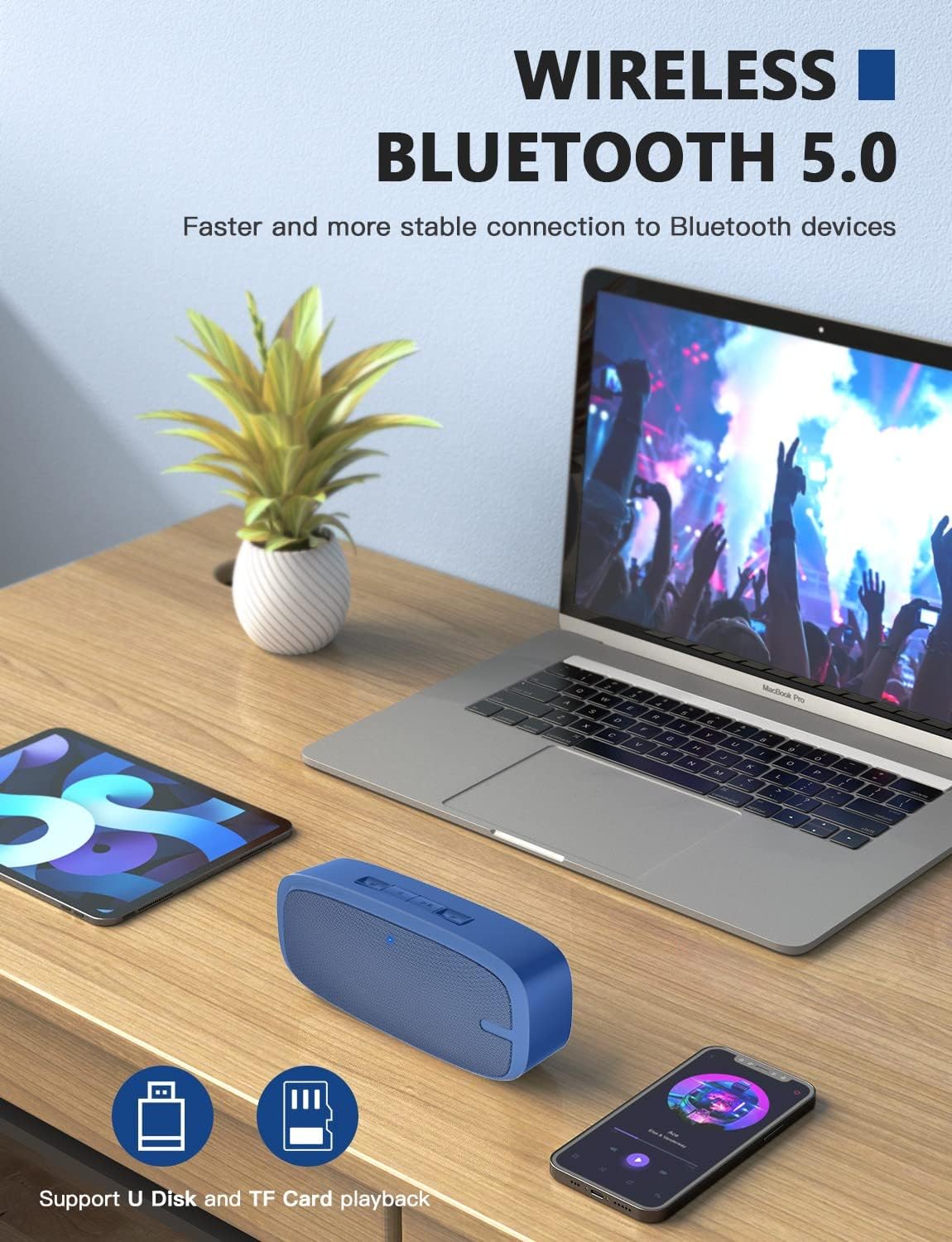
Image: Two LENRUE Bluetooth Speakers shown side-by-side, illustrating the True Wireless Stereo (TWS) connection capability for a wider soundstage.
Údržba
- Čištění: K čištění povrchu reproduktoru použijte měkký, suchý hadřík. Nepoužívejte agresivní chemikálie ani abrazivní čisticí prostředky.
- Skladování: Reproduktor skladujte na chladném a suchém místě mimo dosah přímého slunečního záření a extrémních teplot.
- Péče o baterie: Chcete-li prodloužit životnost baterie, vyhněte se častému úplnému vybíjení reproduktoru. Pravidelně jej nabíjejte, i když jej delší dobu nepoužíváte.
- Voděodolnost: Tento reproduktor NENÍ vodotěsný. Zabraňte vystavení vodě nebo nadměrné vlhkosti.
Odstraňování problémů
| Problém | Možná příčina | Řešení |
|---|---|---|
| Reproduktor se nezapne. | Slabá baterie. | Reproduktor plně nabijte pomocí dodaného USB kabelu. |
| Nelze spárovat přes Bluetooth. | Reproduktor není v režimu párování; Bluetooth zařízení je vypnuté; zařízení je příliš daleko. | Ensure speaker is in pairing mode (flashing blue LED). Turn Bluetooth on your device. Move speaker closer to device (within 10 meters). Forget previous pairings on your device and try again. |
| Žádný zvuk. | Příliš nízká hlasitost; nesprávný režim vstupu; zařízení nepřehrává. | Increase speaker and device volume. Check if the correct input mode (Bluetooth, AUX, USB, TF) is selected. Ensure your device is playing audio. |
| Špatná kvalita zvuku. | Slabá baterie; rušení; zařízení je příliš daleko. | Charge the speaker. Move away from other wireless devices. Move speaker closer to your device. |
| Micro SD card or USB drive not recognized. | Nesprávný file format; card/drive not inserted correctly; unsupported capacity. | Zajistěte zvuk files are in a supported format (e.g., MP3). Reinsert the card/drive. Ensure Micro SD card is 32GB or less. |
Specifikace
| Funkce | Detail |
|---|---|
| Značka | DÉLKA |
| Číslo modelu | yun-dong-199 |
| Technologie připojení | Bluetooth 5.0, pomocný, USB |
| Režim zvukového výstupu | Stereo |
| Maximální výstupní výkon reproduktoru | 3 wattů |
| Průměrná životnost baterie | 12 hodiny |
| Dosah Bluetooth | 10 metrů (33 stop) |
| Hmotnost položky | 0.47 kilogramů (0.66 liber) |
| Mikrofon | Built-in (1 microphone) |
| Podporovaná média | USB, Micro SD Card (up to 32GB), AUX |
| Kontrolní metoda | Dotyková tlačítka |
| Je voděodolný | FALEŠNÝ |
Záruka a podpora
The LENRUE Bluetooth Speaker comes with a limited warranty. For detailed warranty information, please refer to the product packaging or contact LENRUE customer support.
If you encounter any issues or have questions about your speaker, please contact our customer support team:
- Online podpora: Visit the official LENRUE webweb s nejčastějšími dotazy a zdroji podpory.
- E-mail: E-mailovou adresu zákaznického servisu naleznete na obalu produktu.