
Zavedení
This manual provides comprehensive instructions for the installation, operation, and maintenance of your AeroCool Miragebk ATX PC Case. The Miragebk features an ARGB LED strip on the front panel, a hinged tempered glass side panel, and a 12 cm ARGB fan, designed for optimal component visibility and cooling performance.
Obsah balení
- AeroCool Miragebk ATX PC Case
- Sada příslušenství (šrouby, distanční sloupky, stahovací pásky)
- Uživatelská příručka (tento dokument)
Bezpečnostní informace
Please read and understand all safety instructions before installing or operating this product. Failure to do so may result in injury or damage to the product.
- Před jakoukoli instalací nebo údržbou vždy odpojte napájecí kabel ze zásuvky.
- Neumísťujte pouzdro na přímé sluneční světlo nebo do blízkosti zdrojů tepla.
- Keep the case away from water and excessive humidity.
- Handle the tempered glass panel with care to prevent breakage.
- Zajistěte správné uzemnění, abyste předešli nebezpečí úrazu elektrickým proudem.
Nastavení a instalace
Follow these steps to set up your AeroCool Miragebk PC case and install components.
1. Příprava případu
- Umístěte pouzdro na stabilní, rovný povrch.
- Carefully open the hinged tempered glass side panel. This panel provides full access to the interior.
- Remove any protective films from the glass and other surfaces.

Obrázek 1: Přední strana view of the AeroCool Miragebk PC case, showcasing the ARGB LED strip and tempered glass panel.
2. Instalace základní desky
- Nainstalujte kryt I/O do zadního otvoru skříně.
- Align your ATX, Micro ATX, or Mini ITX motherboard with the standoffs inside the case.
- Zajistěte základní desku pomocí dodaných šroubů.
3. Instalace napájecího zdroje
- Install the power supply unit (PSU) into the dedicated compartment at the bottom of the case.
- Zajistěte zdroj šrouby ze zadní strany skříně.
4. Storage Drive Installation (HDDs/SSDs)
The case supports up to 7 HDDs and SSDs.
- Locate the drive bays or mounting points.
- Mount your 2.5" SSDs or 3.5" HDDs using the appropriate screws.
5. Instalace grafické karty (GPU)
Skříň podporuje grafické karty o délce až 356 mm.
- Odstraňte potřebné kryty rozšiřujících slotů na zadní straně skříně.
- Vložte grafickou kartu do slotu PCIe na základní desce.
- Zajistěte grafickou kartu šrouby.
6. Cooling System Installation (Fans/Liquid Cooling)
The case supports up to 8 fans and liquid cooling on the front, top, and rear.
- Install additional fans as needed for optimal airflow.
- For liquid cooling, mount radiators to the designated areas (front, top, or rear).
- The case includes one 12 cm ARGB fan.
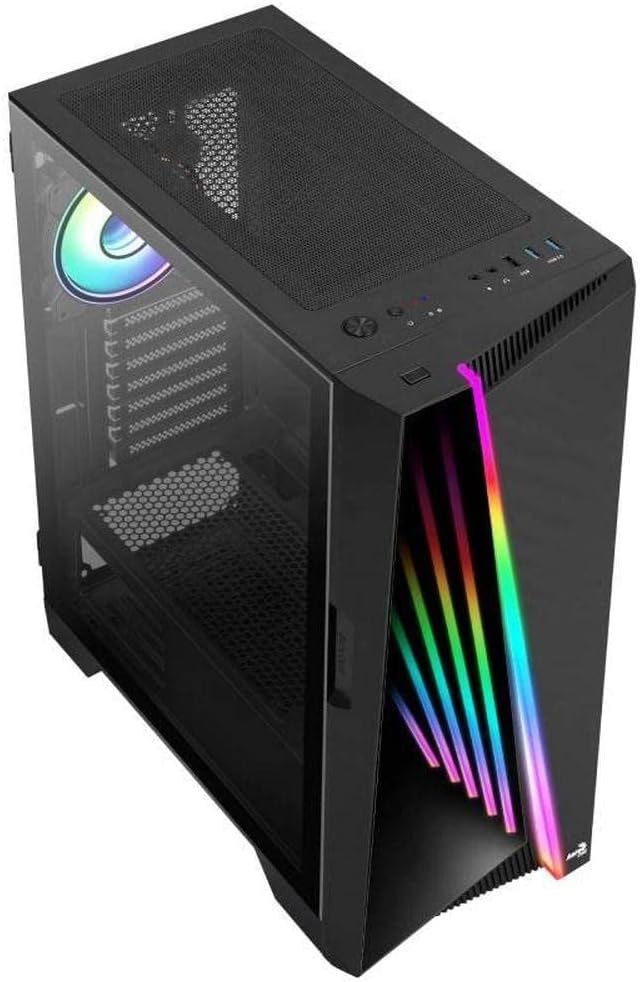
Obrázek 2: Úhlové view of the AeroCool Miragebk PC case, highlighting the top mesh for ventilation and the front panel design.
7. Správa kabelů
Utilize the cable routing cutouts and tie-down points behind the motherboard tray to manage cables for improved airflow and aesthetics.
8. Uzavření případu
Once all components are installed and cables are managed, close the tempered glass side panel and secure it.
Návod k obsluze
Přední panel I / O
The top panel of the AeroCool Miragebk provides convenient access to essential ports and controls:
- Vypínač: Turns the PC on/off.
- Resetovací tlačítko: Restartuje počítač.
- Ovládací tlačítko LED: Cycles through ARGB lighting modes or syncs with the motherboard.
- Porty USB 3.0 (x2): Pro vysokorychlostní přenos dat.
- Port USB 2.0 (x1): Pro standardní USB zařízení.
- HD Audio & Microphone Jacks: Pro audio vstup a výstup.
Ovládání osvětlení ARGB
The ARGB lighting on the front panel and included fan can be controlled in two ways:
- Ovládací tlačítko LED: Press the dedicated LED button on the top panel to cycle through various pre-set ARGB lighting effects.
- Synchronizace základní desky: Connect the ARGB lighting to a compatible 3-pin +5V ARGB header on your motherboard. This allows software control of 16.8 million colors and synchronization with other ARGB components. The Mirage control hub supports up to 6 ARGB fans and 2 additional 3-pin ARGB accessories.
Údržba
Pravidelná údržba pomáhá zajistit optimální výkon a dlouhou životnost vaší počítačové skříně.
- Prachové filtry: Periodically remove and clean the dust filters (if present) to maintain good airflow and prevent dust buildup inside the case.
- Čištění exteriéru: Vnější povrchy otřete měkkým, damp hadříkem. Nepoužívejte abrazivní čisticí prostředky ani rozpouštědla.
- Čištění interiéru: Use compressed air to remove dust from internal components and fans. Ensure the PC is powered off and unplugged before cleaning.
- Tvrzené sklo: Clean the tempered glass panel with a microfiber cloth and a glass cleaner designed for electronics.
Odstraňování problémů
If you encounter issues with your AeroCool Miragebk case, refer to the following common solutions:
- Počítač se nezapíná:
- Ujistěte se, že je zdroj napájení správně připojen k zásuvce ve zdi a zapnutý.
- Verify all internal power cables (24-pin ATX, CPU, GPU) are securely connected.
- Check that the front panel power switch cable is correctly connected to the motherboard.
- ARGB osvětlení nefunguje:
- Confirm the ARGB cables are correctly connected to the motherboard's 3-pin +5V ARGB header or the internal control hub.
- If using motherboard sync, ensure the motherboard's ARGB software is installed and configured correctly.
- Try pressing the LED control button on the top panel to see if pre-set modes function.
- Špatné proudění vzduchu/Přehřátí:
- Check if all installed fans are spinning correctly.
- Vyčistěte všechny prachové filtry a vnitřní součásti.
- Ensure proper fan orientation (intake/exhaust) for optimal airflow.
Specifikace
| Funkce | Detail |
|---|---|
| Značka | AeroCool |
| Název modelu | MIRAGEBK |
| Typ pouzdra | Tower (Semitower) |
| Kompatibilita základní desky | ATX, Micro ATX, Mini ITX |
| Materiál | Tvrzené sklo |
| Barva | Černý |
| Hmotnost položky | 12.98 libry |
| Rozměry produktu (DxŠxV) | 19.65 x 8.5 x 16.46 palce |
| Počet portů USB 3.0 | 2 |
| Počet portů USB 2.0 | 1 |
| Typ montáže napájecího zdroje | Spodní montáž |
| Způsob chlazení | Vzduch |
| Velikost ventilátoru (součástí balení) | 12 Centimeters (ARGB) |
| Maximální výška chladiče CPU | 162 mm |
| Maximální délka GPU | 356 mm |
| Drive Bays | 7 (HDDs and SSDs) |
Záruka a podpora
For warranty information or technical support, please refer to the official AeroCool webnebo se obraťte na jejich zákaznický servis. Uschovejte si doklad o koupi pro případ reklamace.