
Zavedení
The Seagate Expansion Portable Hard Drive provides an easy-to-use solution for instantly adding storage to your computer. This portable hard drive is designed for simple drag-and-drop file saving and offers automatic recognition with both Windows and Mac computers. It features a sleek, compact design, making it ideal for carrying your photos, movies, music, and other important files on the go. The device connects via USB 3.0, ensuring fast data transfer speeds and power directly from the USB port.
Co je zahrnuto
Ověřte, zda jsou v balení přítomny všechny položky:
- Seagate Expansion portable hard drive
- 18palcový (45.72 cm) kabel USB 3.0
- Průvodce rychlým startem
- Limited Warranty: APAC - 3 years
- Rescue Data Recovery Services information
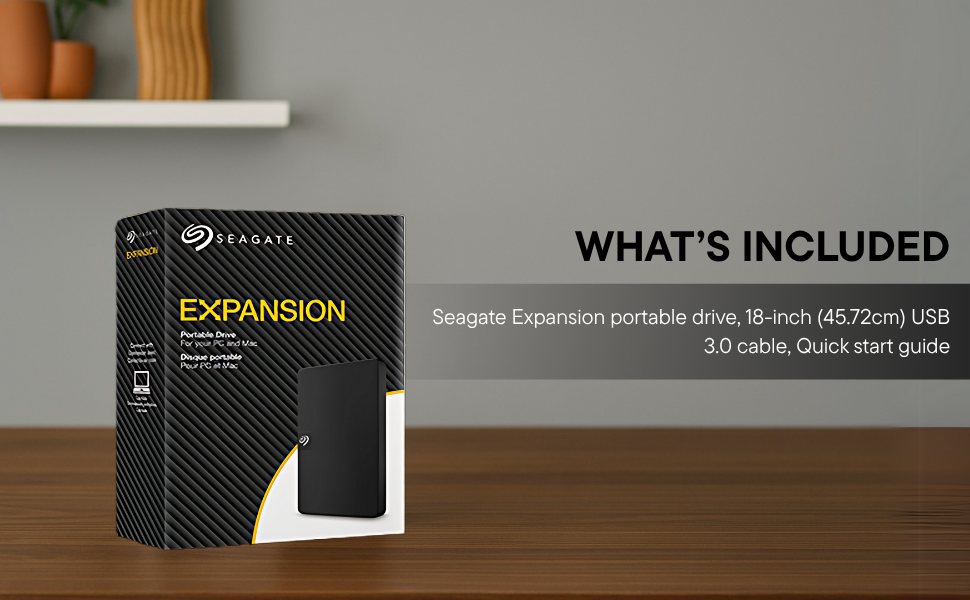
Image: Contents of the Seagate Expansion portable hard drive package, including the drive, USB cable, and documentation.
Nastavení
- Připojte kabel USB: Plug the small end of the included USB 3.0 cable into the Seagate Expansion portable hard drive.
- Připojení k počítači: Plug the larger end of the USB 3.0 cable into an available USB port on your computer. The drive is USB 3.0 powered, so no external power adapter is needed.
- Automatické rozpoznání: The drive will be automatically recognized by your Windows or Mac operating system. No software installation is typically required for basic functionality.
- For Mac Users (Time Machine): If you intend to use the drive with Apple Time Machine for backups, reformatting the drive is required. Refer to your Mac's documentation for instructions on how to reformat and set up Time Machine.

Image: A Seagate Expansion portable hard drive connected to a laptop via a USB cable, demonstrating the plug-and-play setup.

Image: A hand holding the Seagate Expansion drive, with Windows and Mac compatibility logos displayed next to it.
Návod k obsluze
Once connected, the Seagate Expansion drive functions like any other external storage device on your computer.
- Přístup k disku: On Windows, the drive will appear under 'This PC' or 'My Computer'. On Mac, it will appear on the desktop or in Finder under 'Locations'.
- Ukládání Files: Chcete-li uložit files, simply drag and drop them from your computer's internal storage to the Seagate Expansion drive's icon or open folder. You can also use the 'Copy' and 'Paste' functions.
- Organizování Files: Create folders on the drive to organize your data efficiently.
- Bezpečné vysunutí: Always safely eject the drive before disconnecting it to prevent data corruption. On Windows, right-click the drive icon in the system tray and select 'Eject'. On Mac, drag the drive icon to the Trash or click the Eject button next to the drive in Finder.

Image: A hand demonstrating the drag-and-drop method to transfer files from a laptop to the Seagate Expansion portable hard drive.
Údržba
Proper maintenance ensures the longevity and optimal performance of your Seagate Expansion drive.
- Fyzikální péče: Handle the drive with care. Avoid dropping it or exposing it to extreme temperatures, moisture, or strong magnetic fields.
- Čištění: K čištění vnější strany disku používejte měkký, suchý hadřík, který nepouští vlákna. Nepoužívejte tekuté čisticí prostředky ani rozpouštědla.
- Záloha dat: While the drive is designed for storage, it is always recommended to maintain backups of critical data on multiple devices or cloud services.
- Aktualizace firmwaru: Pravidelně kontrolujte podporu Seagate webPro zajištění optimálního výkonu a kompatibility navštivte webové stránky a vyhledejte dostupné aktualizace firmwaru pro váš model.
Odstraňování problémů
If you encounter issues with your Seagate Expansion drive, consider the following steps:
- Disk nebyl detekován:
- Ujistěte se, že je kabel USB bezpečně připojen k disku i k počítači.
- Zkuste připojit disk k jinému USB portu v počítači.
- Test the drive with a different USB cable, if available.
- Restartujte počítač.
- Pomalý výkon:
- Ensure you are using a USB 3.0 port for optimal speeds. USB 2.0 ports will result in slower transfers.
- Zavřete všechny nepotřebné aplikace běžící na pozadí.
- Check your computer's disk management or disk utility to ensure the drive is healthy.
- Přístup Files: Pokud nemáte přístup files, ensure the drive is properly mounted and not in use by another application.
Pro podrobnější informace o řešení problémů se prosím obraťte na oficiální Seagate Troubleshooting Guide (PDF).
Specifikace
| Číslo modelu | STKM1000400 |
| Digitální kapacita úložiště | 1 TB |
| Rozhraní pevného disku | USB 2.0/3.0 |
| Technologie připojení | USB |
| Značka | Seagate |
| Speciální funkce | Data Recovery Service, Portable |
| Pevný disk Form Factor | 2.5 palce |
| Popis pevného disku | Mechanický pevný disk |
| Kompatibilní zařízení | Stolní počítač, notebook |
| Typ instalace | Externí pevný disk |
| Barva | Černý |
| Rychlost otáčení pevného disku | 5400 ot./min |
| Rychlost čtení | 120 megabajtů za sekundu |
| Rozměry položky D x Š x Tloušťka | 11.7D x 8Š x 1.5 centimetrů |
| Hmotnost položky | 0.4 libry |
| Materiál pouzdra | Plast |
Záruka a podpora
Your Seagate Expansion portable hard drive comes with comprehensive support and warranty coverage.
- Omezená záruka: The product includes a 3-year limited warranty. This covers device replacement or repair for manufacturing defects.
- Služby obnovy dat ze zálohy: For added peace of mind, your purchase includes 3 years of Rescue Data Recovery Services. This service covers data loss due to accidents, mechanical errors, or natural disasters, providing a chance to recover your valuable data.

Image: The 'Rescue Services' logo, indicating the inclusion of 3 years of data recovery services.
Kontaktní informace
For warranty claims, technical support, or inquiries regarding Rescue Data Recovery Services, please contact Seagate Customer Care:
- Seagate Technology (Thailand) Limited. India Customer Care No: 18003092525
Please have your product model number (STKM1000400) and proof of purchase ready when contacting support.