
Sharp OZJONG
SHARP Digital Alarm Clock with AccuSet
Model: OZJONG
Zavedení
The SHARP Digital Alarm Clock with AccuSet is designed for effortless timekeeping. Featuring automatic time setting, a clear LED display, and user-friendly controls, this clock is ideal for any bedroom. Its AccuSet technology ensures the time is always accurate, eliminating the need for manual adjustments, making it perfect for seniors, children, or anyone seeking a hassle-free alarm clock solution.

Obrázek 1: Přední strana view of the SHARP Digital Alarm Clock with green LED display.
Klíčové vlastnosti
- AccuSet Automatic Time Set: The clock is pre-programmed to automatically set the correct time, removing the need for manual adjustments. Simply select your time zone.
- Quick Daylight Savings Time (DST) Adjustment: A convenient switch allows for easy adjustment for Daylight Savings Time (+1 hour) or Standard Time (-1 hour).
- High/Low Dimmer Control: Adjust the brightness of the LED display to your preference, ensuring comfortable viewve dne nebo v noci.
- Bateriová záloha: A pre-installed CR2032 button cell battery provides backup for time settings during power outages, ensuring continuous accuracy.
- Výběr časového pásma: Easily select your local time zone from the options provided at the bottom of the clock.

Figure 2: Diagram illustrating the key features and functionalities of the alarm clock.
Průvodce nastavením
- Rozbalení: Carefully remove the alarm clock from its packaging.
- Battery Installation (Pre-installed): The CR2032 button cell battery for backup is pre-installed in a screw-secured cabinet at the bottom of the clock. This battery is designed to last for several years. No immediate action is required for initial setup.
- Výběr časového pásma: Before plugging in the clock, locate the time zone selection switch at the bottom of the unit. Select your correct time zone (e.g., EST, CST, MST, PST). The default time zone is Eastern Standard Time.
- Připojení napájení: Plug the clock into an approved electrical source. The AccuSet feature will automatically program the correct time based on your selected time zone.
- Daylight Savings Time (DST) Adjustment: If applicable, slide the DST switch at the bottom of the clock to "ON" to add one hour (+1 hr) for Daylight Savings Time. For Standard Time, slide the switch to "OFF" to subtract one hour (-1 hr).

Figure 3: Top panel controls for setting time, alarm, and adjusting display.
Návod k obsluze
Nastavení alarmu
- Stiskněte tlačítko POPLACH button once. The alarm time will appear on the display.
- Když je zobrazen čas budíku, stiskněte tlačítko HODINA tlačítko pro nastavení hodiny budíku.
- Stiskněte tlačítko MINUTA tlačítko pro nastavení minuty budíku.
- Chcete-li aktivovat nebo deaktivovat budík, stiskněte tlačítko ALARM ZAPNUTO / VYPNUTO button. An alarm indicator light (usually a small LED) will illuminate when the alarm is active.
- To return to the current time display, press the ČAS button or wait a few seconds for it to revert automatically.
Použití funkce Snooze
Když zazvoní budík, stiskněte velké PODŘIMOVAT button located on the top of the clock. This will temporarily silence the alarm for a set period (typically 9 minutes), allowing for extra rest. The alarm will sound again after the snooze period ends.
Adjusting Display Brightness (Dimmer Control)
The clock features a High/Low dimmer control to adjust the display brightness. Locate the DIMMER HI/LO button on the top panel. Press this button to toggle between high and low brightness settings to suit your environment and preference.

Figure 4: Illustration of the High & Low Display Dimmer Control.
Údržba
- Čištění: To clean the clock, use a soft, dry cloth. Do not use abrasive cleaners or solvents, as they may damage the finish.
- Výměna baterie: The CR2032 backup battery is designed for long-term use. If the clock loses time during a power outage after several years, it may be time to replace the battery. This is located in a screw-secured compartment at the bottom of the clock.
- Umístění: Place the clock on a stable, flat surface. Avoid placing it in direct sunlight, near heat sources, or in areas with high humidity.
Odstraňování problémů
| Problém | Možná příčina | Řešení |
|---|---|---|
| Clock does not display time after plugging in. | Not connected to power, or power outlet is not active. | Ujistěte se, že je napájecí kabel bezpečně zapojený do funkční elektrické zásuvky. |
| Čas je nesprávný. | Incorrect time zone selected, or DST switch is set incorrectly. | Verify the time zone switch at the bottom of the clock is set to your local zone. Check the DST switch position. |
| Alarm se nespustí. | Alarm is not activated, or alarm volume is too low (if adjustable). | Ensure the alarm is turned ON using the ALARM ON/OFF button. Check for an alarm indicator light. |
| Displej je příliš jasný nebo příliš tmavý. | Je třeba upravit nastavení stmívače. | Press the DIMMER HI/LO button to cycle through brightness settings. |
| Hodiny ztrácejí čas během výpadku proudutage. | Backup battery is depleted. | Replace the CR2032 backup battery located in the compartment at the bottom of the clock. |
Specifikace
| Funkce | Detail |
|---|---|
| Značka | Ostrý |
| Číslo modelu | OZJONG |
| Barva | Black - Green Led |
| Typ zobrazení | Digitální |
| Speciální funkce | Alarm, Daylight Saving, Auto Dimmable |
| Rozměry produktu | 5.5 cm Š x 2.6 cm V |
| Zdroj napájení | Elektrický kabel, na baterie |
| Záložní baterie | CR2032 (pre-installed) |
| Materiál | Plast |
| Hmotnost položky | 9.9 unce |
| Typ montáže | Stolní deska |
| UPC | 049353006079 |
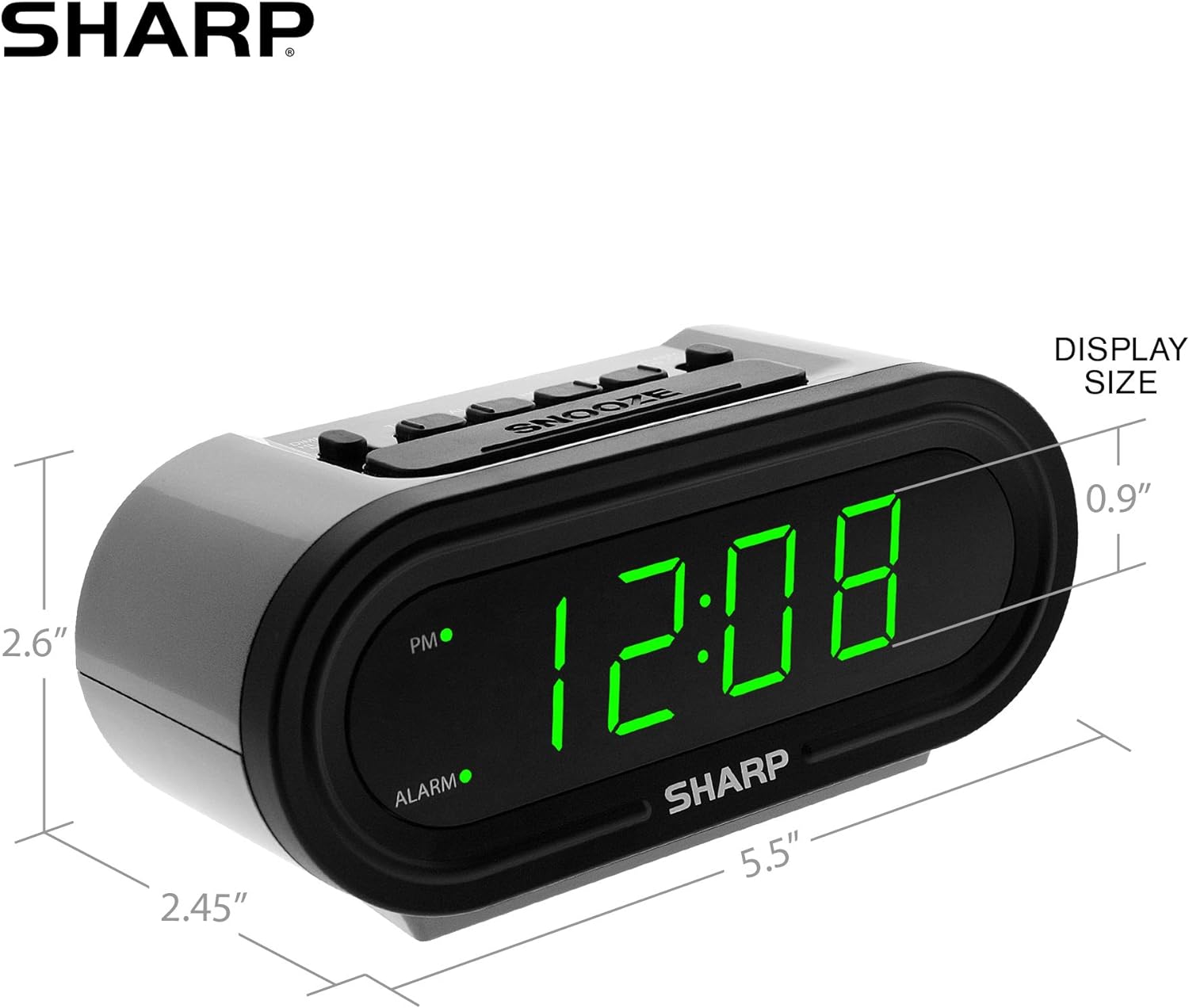
Obrázek 5: Rozměry produktu pro snadnou orientaci.
Záruka a podpora
For warranty information or technical support, please refer to the contact details provided in your product packaging or visit the official Sharp webmísto. Uschovejte si doklad o koupi pro případ záručních reklamací.
Ask a question about this manual
Ask about setup, troubleshooting, compatibility, parts, safety, or missing instructions. Manuals+ will review the question and use this page’s manual context to help answer it.