
1. Úvod
The Hombli Smart Doorbell 2 is an advanced video doorbell designed to enhance your home security. It features 1080p HD video, a 140-degree wide-angle view, two-way audio communication, motion detection, and infrared night vision. This manual provides detailed instructions for the installation, operation, and maintenance of your Smart Doorbell 2, ensuring optimal performance and security for your home.
Compared to its predecessor, the Smart Doorbell 2 offers a 25% faster response time and nearly double the battery life, along with flexible wired or wireless installation options.
2. Konec produktuview
Familiarize yourself with the components and features of your Hombli Smart Doorbell 2.

Image 2.1: Hombli Smart Doorbell 2 highlighting key features such as 140° wide-angle 1080p HD camera, motion detection, built-in 5000mAh battery, optional cloud storage, Micro SD slot, two-way audio, infrared night vision, weatherproof IP65 rating, and GDPR compliance.
- Objektiv fotoaparátu: Captures 1080p Full HD video with a 140° wide-angle view.
- Pohybový senzor: Detekuje pohyb před zvonkem.
- Tlačítko zvonku: Illuminates when pressed, sending a notification to your smartphone.
- Mikrofon: Pro obousměrnou audio komunikaci.
- Reproduktor: Pro obousměrnou audio komunikaci.
- Nabíjecí port: Pro dobíjení interní baterie.
- Resetovací tlačítko: Používá se pro párování a resetování zařízení.
- Slot pro kartu Micro SD: Supports local video storage up to 128GB.
3. Co je v krabici
Před zahájením instalace se ujistěte, že jsou přítomny všechny komponenty:
- Hombli Smart Doorbell 2
- Montážní konzola
- Angle Mount (optional, for optimal viewúhel záběru)
- Oboustranná lepicí páska 3M
- Montážní šrouby a hmoždinky
- USB nabíjecí kabel
- Uživatelská příručka (tento dokument)

Image 3.1: The Hombli Smart Doorbell 2 shown alongside its separate mounting bracket, illustrating how the device attaches to its base.
4. Nastavení a instalace
4.1 Počáteční nabíjení
Before installation, fully charge the Hombli Smart Doorbell 2 using the provided USB cable. A full charge ensures the device is ready for immediate use and helps calibrate the battery life indicator.
4.2 Instalace a párování aplikace
- Stáhněte si Hombli app z App Storu (iOS) nebo z Obchodu Google Play (Android).
- Vytvořte si účet nebo se přihlaste, pokud jej již máte.
- V aplikaci klepněte na ikonu „+“ pro přidání nového zařízení.
- Select "Smart Doorbell 2" from the list of devices.
- Follow the on-screen instructions to connect the doorbell to your Síť Wi-Fi 2.4 GHz. Ensure your phone is connected to the same 2.4 GHz network during pairing.

Image 4.1: A smartphone displaying the Hombli app interface, showing options like screenshot, speak, record, playback, cloud storage, and buzzer, positioned next to the Hombli Smart Doorbell 2.
4.3 Montáž zvonku
Choose a suitable location for your doorbell, typically at eye level, ensuring a clear view of your entrance. The doorbell can be installed wirelessly or wired to existing doorbell connections.
- Wireless Installation (Battery Powered):
- Důkladně očistěte montážní povrch.
- Attach the mounting bracket to the desired location using either the provided 3M double-sided adhesive tape or screws. For a more secure installation, screws are recommended.
- If needed, use the angle mount to adjust the viewing angle for optimal coverage of your entryway.
- Nasuňte chytrý zvonek Hombli Smart Doorbell 2 na namontovaný držák, dokud nezacvakne.
- Wired Installation (Continuous Power):
- Ensure power to your existing doorbell system is turned off at the circuit breaker.
- Remove your old doorbell.
- Connect the existing doorbell wires to the terminals on the Hombli Smart Doorbell 2 mounting bracket.
- Připevněte držák na stěnu pomocí šroubů.
- Slide the Hombli Smart Doorbell 2 onto the mounted bracket.
- Obnovte napájení na jističi.
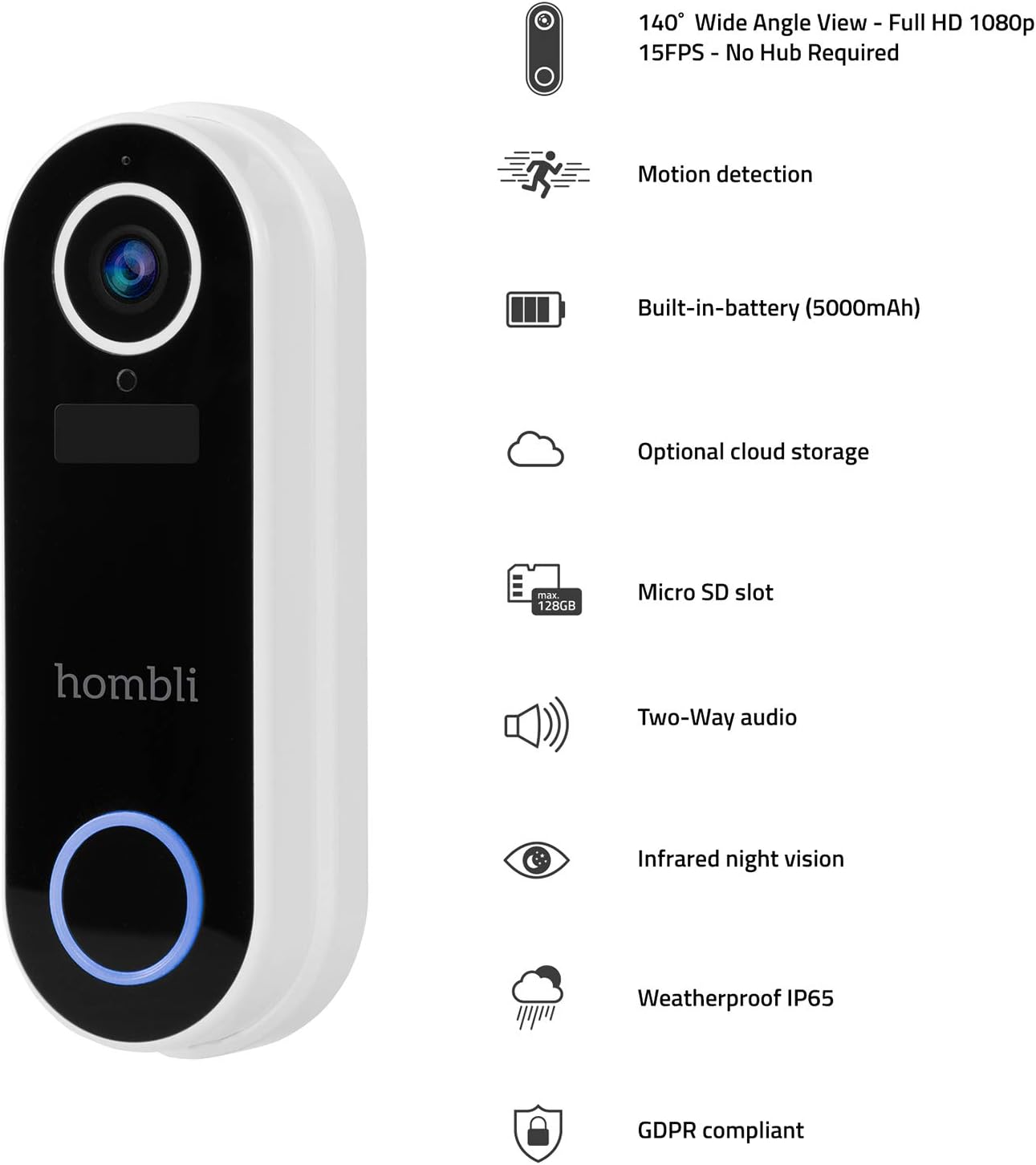
Image 4.2: The Hombli Smart Doorbell 2 is shown mounted on a brick wall, viewed from the side, demonstrating its slim profile and integration with the wall surface.

Image 4.3: The Hombli Smart Doorbell 2 is shown mounted on a brick wall, viewed from the front, highlighting its camera lens and illuminated doorbell button.
5. Operating the Smart Doorbell 2
5.1 Příjem oznámení
When someone presses the doorbell button or motion is detected, you will receive an instant notification on your smartphone via the Hombli app. Tap the notification to view živé vysílání.
5.2 Obousměrná zvuková komunikace
Z živého vysílání view in the Hombli app, you can use the microphone and speaker icons to engage in real-time two-way audio communication with visitors at your door, even when you are away from home.
5.3 Živě View a nahrávání videa
Access the 1080p HD live video feed at any time through the Hombli app. You can manually record video or capture screenshots directly from the live view. The doorbell also automatically records events triggered by motion or doorbell presses.
5.4 Detekce pohybu
The integrated motion sensor detects activity in its field of view. You can adjust the motion detection sensitivity and set specific detection zones within the Hombli app to minimize false alerts.
5.5 Infračervené noční vidění
Zvonek se při slabém osvětlení automaticky přepne na infračervené noční vidění a poskytne tak jasný černobílý videozáznam.tage i v úplné tmě.
5.6 Možnosti ukládání videa
- Micro SD karta: Insert a Micro SD card (up to 128GB, not included) into the designated slot for local storage of recorded video events.
- Cloudové úložiště: Optional cloud storage plans are available through the Hombli app for secure, remote access to your video history.
5.7 Životnost baterie
The built-in 5000mAh rechargeable battery provides 3 to 6 months of operation, depending on usage frequency and environmental factors. The Hombli app will notify you when the battery level is low.
6. Údržba
6.1 Nabíjení baterie
When the battery is low, remove the doorbell from its mounting bracket and charge it using the provided USB cable. Connect the cable to the charging port on the doorbell and a standard USB power adapter (not included). The charging indicator will show the charging status.
6.2 Čištění
Periodically clean the doorbell's camera lens and body with a soft, damp cloth to ensure clear video quality and proper functioning of the sensors. Avoid using harsh chemicals or abrasive materials.

Obrázek 6.1: Detailní záběr view of the Hombli Smart Doorbell 2's camera area, showing water droplets on its surface, demonstrating its IP65 weatherproof rating.
7. Řešení problémů
| Problém | Možná příčina | Řešení |
|---|---|---|
| Doorbell not powering on | Low battery; Incorrect wired connection. | Charge the doorbell fully. For wired installation, ensure wires are correctly connected and power is on. |
| Nelze se připojit k Wi-Fi | Incorrect Wi-Fi password; Not a 2.4 GHz network; Weak Wi-Fi signal. | Verify Wi-Fi password. Ensure you are connecting to a 2.4 GHz network. Move the doorbell closer to your router or use a Wi-Fi extender. Reset the doorbell and try pairing again. |
| Špatná kvalita videa | Weak Wi-Fi signal; Dirty camera lens. | Zlepšete sílu signálu Wi-Fi. Očistěte objektiv fotoaparátu měkkým hadříkem. |
| Žádné upozornění na detekci pohybu | Motion detection disabled; Sensitivity too low; Incorrect detection zone settings. | Enable motion detection in the Hombli app. Adjust sensitivity settings. Configure detection zones to cover the desired area. |
| No notifications on phone | App notifications disabled; Phone's notification settings. | Check notification settings within the Hombli app. Ensure your phone's system settings allow notifications from the Hombli app. |
8. Specifikace

Image 8.1: Technical drawing showing the dimensions of the Hombli Smart Doorbell 2: 14.2 cm height, 4.9 cm width (front), and 2.8 cm depth (side).
- Číslo modelu: HBDB-0209
- Výrobce: hombli
- Rozměry (D x Š x V): 2.6 x 4.6 x 13 cm
- Hmotnost: 420 gramů
- Barva: Bílý
- Materiál: Plast
- svtage: 5 voltů
- Způsob instalace: Self-adhesive, Screws
- Zahrnuté komponenty: Video zvonek
- Baterie: 5000 mAh rechargeable (included)
- Rozlišení fotoaparátu: 1080p HD
- Pole View: 140° široký úhel
- Noční vidění: Infračervený
- Konektivita: 2.4 GHz Wi-Fi
- Odolnost vůči počasí: IP65
- Skladování: Micro SD card slot (up to 128GB), Optional Cloud Storage
9. Záruka a podpora
For warranty information, technical support, or further assistance, please refer to the official Hombli website or contact Hombli customer service directly. Details regarding specific warranty periods and support channels can typically be found on the manufacturer's official product page or within the Hombli app.
Please note that information regarding spare parts availability is not provided in this manual. For inquiries about spare parts, please contact Hombli support.