
1. Úvod
Welcome to the user manual for your new LTC NB681 Nimbleback Wired 65% Mechanical Keyboard. This guide provides detailed instructions on setting up, operating, maintaining, and troubleshooting your keyboard to ensure optimal performance and longevity. Please read this manual thoroughly before using the product.

Figure 1: LTC NB681 Nimbleback Wired 65% Mechanical Keyboard
Video 1: LTC NB681 65% Hot Swappable Keyboard OverviewToto video poskytuje obecný přehledview of the keyboard's features and design.
Video 2: LTC Nimbleback NB681 Keyboard. This video showcases the keyboard's aesthetics and some functionalities.
2. Klíčové vlastnosti
The LTC NB681 Nimbleback Keyboard is designed with a range of features to enhance your typing and gaming experience:
- Compact but Practical 65% Layout: Ultra-compact design with 68 keys, balancing functionality with space-saving. Includes practical arrow, navigation, and control keys.
- Přepínače vyměnitelné za provozu: Features a hot-swap PCB, allowing free replacement of 3-pin/5-pin MX-style switches (e.g., Gateron, Kailh). Equipped with quiet linear red switches for nimble reactions and quiet typing.
- 2 USB 2.0 Ports and Type-C Wired Connection: Two built-in USB passthrough ports for connecting peripheral devices like a mouse or flash drive, or for charging mobile devices. The Type-C wired connection ensures high-speed and stable data transmission.
- Dynamické RGB podsvícení: Offers 18 preset backlight modes with 5 adjustable brightness and flowing speed levels, providing gorgeous color schemes and reactive effects.
- Professional Software Support: Customize keypress combinations, assign macros, and personalize RGB lighting effects using the powerful LTC drive software. Compatible with Windows 7/8/10, iOS, and Mac systems.
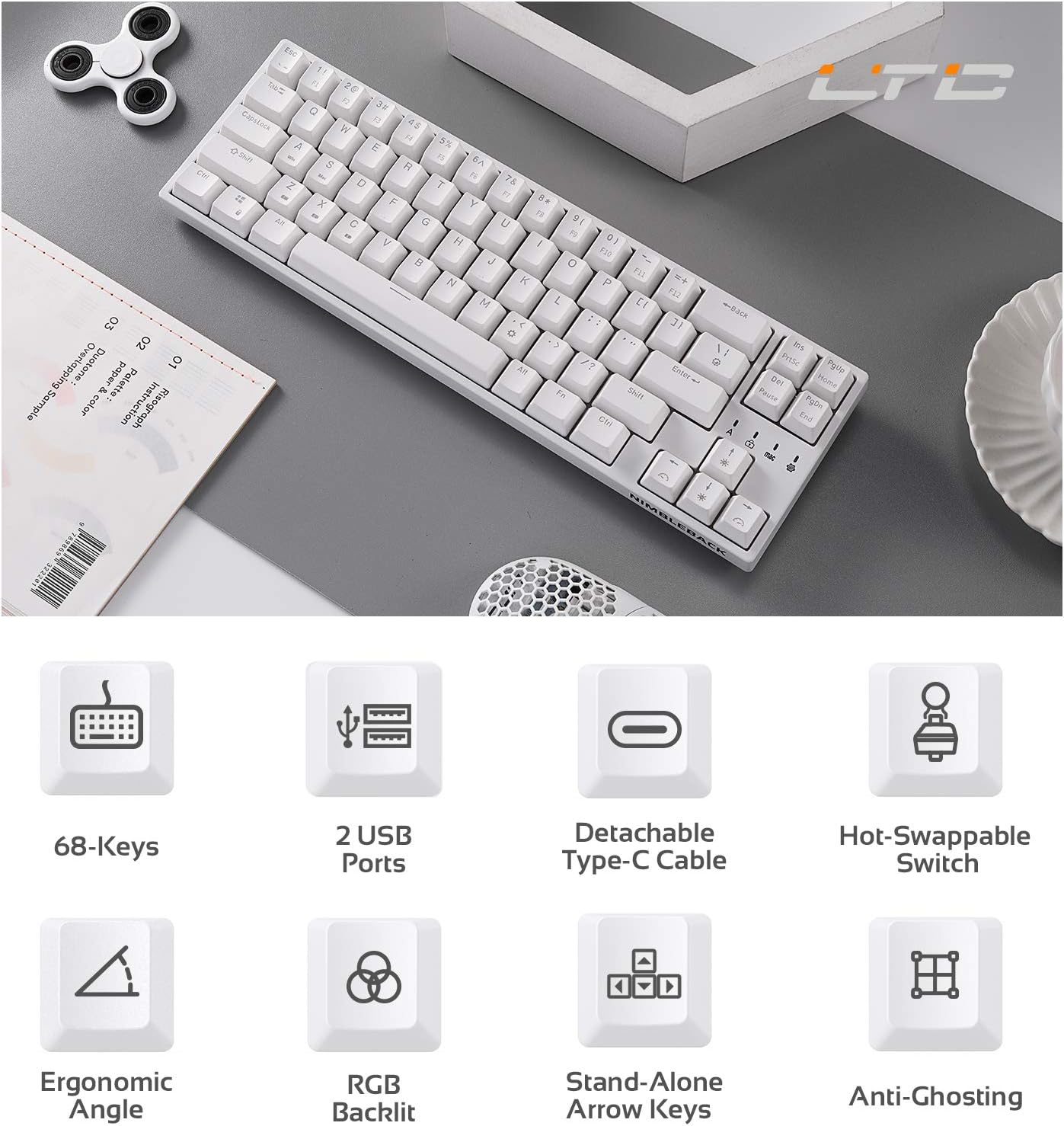
Figure 2: Visual representation of key features including 68-keys, 2 USB ports, detachable Type-C cable, hot-swappable switch, ergonomic angle, RGB backlit, stand-alone arrow keys, and anti-ghosting.
3. Nastavení
Follow these steps to set up your LTC NB681 keyboard:
- Rozbalení: Carefully remove the keyboard and all accessories from the packaging. Ensure you have the keyboard, USB-C cable, and any included tools (e.g., keycap puller, switch puller).
- Připojení kabelu USB-C: Plug the USB-C end of the provided cable into the Type-C port on the keyboard. Connect the other end (USB-A) to an available USB port on your computer.
- Počáteční uznání: Váš počítač by měl automaticky detekovat a nainstalovat potřebné ovladače. Může to chvíli trvat.
- Umístění: Place the keyboard on a stable, flat surface. You can adjust the typing angle using the foldable feet on the underside of the keyboard for ergonomic comfort.
- Instalace softwaru (volitelné, ale doporučené): For advanced customization, download the LTC drive software from the official LTC website. Install it on your Windows or Mac system to remap keys, assign macros, and customize RGB lighting.
Video 3: LTC NB681 Keyboard Unboxing! This video demonstrates the unboxing process and shows the included accessories.

Figure 3: Close-up of the keyboard's 2 built-in USB 2.0 passthrough ports and the detachable Type-C wired connection port.
4. Ovládání klávesnice
4.1 Základní funkce
- Standardní psaní: Klávesnice funguje jako standardní QWERTY klávesnice.
- Arrow, Navigation, and Control Keys: Despite its compact size, the NB681 includes dedicated arrow keys and essential navigation/control keys for convenience.
4.2 Ovládání RGB podsvícení
The NB681 features dynamic RGB backlighting with multiple customization options:
- Změna režimů: Stiskněte Fn + \| (pipe key) to cycle through 18 preset backlight modes.
- Nastavení jasu: Použití Fn + šipka nahoru pro zvýšení jasu a Fn + šipka dolů pro snížení jasu (5 úrovně).
- Nastavení rychlosti: Použití Fn + šipka doleva to decrease flowing speed and Fn + šipka vpravo to increase flowing speed (5 levels).

Obrázek 4: Zobrazení klávesniceasing its dynamic 16.8 million RGB backlight with 19 modes and 5 brightness/speed levels.
4.3 Přepínače vyměnitelné za provozu
The hot-swappable design allows you to easily change switches without soldering:
- Odstranění krytky kláves: Pomocí přiloženého stahováku kláves jemně odstraňte požadovanou klávesu.
- Odstraňte přepínač: Pomocí přiloženého stahováku spínačů opatrně uchopte spínač a vytáhněte jej přímo nahoru.
- Vložit nový přepínač: Align the pins of the new 3-pin or 5-pin MX-style switch with the holes on the PCB. Press firmly until it clicks into place.
- Výměna krytky kláves: Nasaďte krytku kláves zpět na nový spínač.

Figure 5: Close-up demonstrating the hot-swappable switch feature, allowing easy replacement of 3-pin or 5-pin mechanical switches.
Video 4: LTC NB681 Red Switch Keyboard Sound Test. This video provides an audio demonstration of the keyboard's red switches.
4.4 Professional Software Customization
The dedicated software allows for in-depth customization:
- Přemapování klíčů: Změňte funkci libovolné klávesy podle svých preferencí.
- Přiřazení makra: Create and assign complex macros for gaming or productivity tasks.
- Přizpůsobení RGB osvětlení: Design your own lighting effects, colors, and patterns beyond the preset modes.

Figure 6: Screenshot showing the professional software interface for customizing RGB backlight, remapping keys, and assigning macros.
5. Údržba
Správná údržba zajistí dlouhou životnost a výkon vaší klávesnice:
- Pravidelný úklid: Use a soft brush or compressed air to remove dust and debris from between the keycaps. For deeper cleaning, remove keycaps and wipe the surface with a slightly damp hadříkem. Před čištěním se ujistěte, že je klávesnice odpojena.
- Péče o spínač: The hot-swappable design makes switch replacement easy if a switch becomes faulty or if you wish to try different switch types. Avoid excessive force when inserting or removing switches to prevent damage to the PCB sockets.
- Správa kabelů: Keep the USB-C cable untangled and avoid sharp bends to prevent internal wire damage.
6. Řešení problémů
If you encounter issues with your LTC NB681 keyboard, try the following steps:
- Klávesnice nereaguje:
- Ujistěte se, že je kabel USB-C bezpečně připojen ke klávesnici i k počítači.
- Zkuste připojit klávesnici k jinému USB portu na počítači.
- Otestujte klávesnici na jiném počítači, abyste zjistili, zda je problém v klávesnici nebo v původním počítači.
- RGB světla nefungují/jsou nesprávná:
- Zkontrolujte nastavení jasu pomocí Fn + šipka nahoru/dolů.
- Přepínejte mezi různými režimy osvětlení pomocí Fn + \|.
- If using the software, ensure the lighting profiles are correctly applied and the software is up to date.
- Klávesy se neregistrují/psají se dvakrát:
- This could indicate a faulty switch. Use the switch puller to remove the problematic switch and replace it with a spare or a known good switch.
- Ujistěte se, že je spínač zcela zasunut do své zásuvky.
- Software nerozpoznává klávesnici:
- Ensure the keyboard is connected directly to the computer (avoiding USB hubs if possible).
- Restartujte počítač a software.
- Reinstall the LTC drive software.
If these steps do not resolve the issue, please contact LTC customer support for further assistance.
7. Specifikace
| Funkce | Popis |
|---|---|
| Číslo modelu | NB681 |
| Rozložení | 65 % (68 kláves) |
| Konektivita | USB Type-C Wired |
| Spínače | Hot-Swappable (3-pin/5-pin MX-style compatible) |
| Podsvícení | RGB (18 preset modes, 5 brightness/speed levels) |
| Průchod USB | 2 x USB 2.0 porty |
| Kompatibilita | Windows 7/8/10, iOS, Mac |
| Hmotnost položky | 2 libry |
| Rozměry | 14.96 x 6.14 x 1.92 palce |
| Výrobce | LTC |
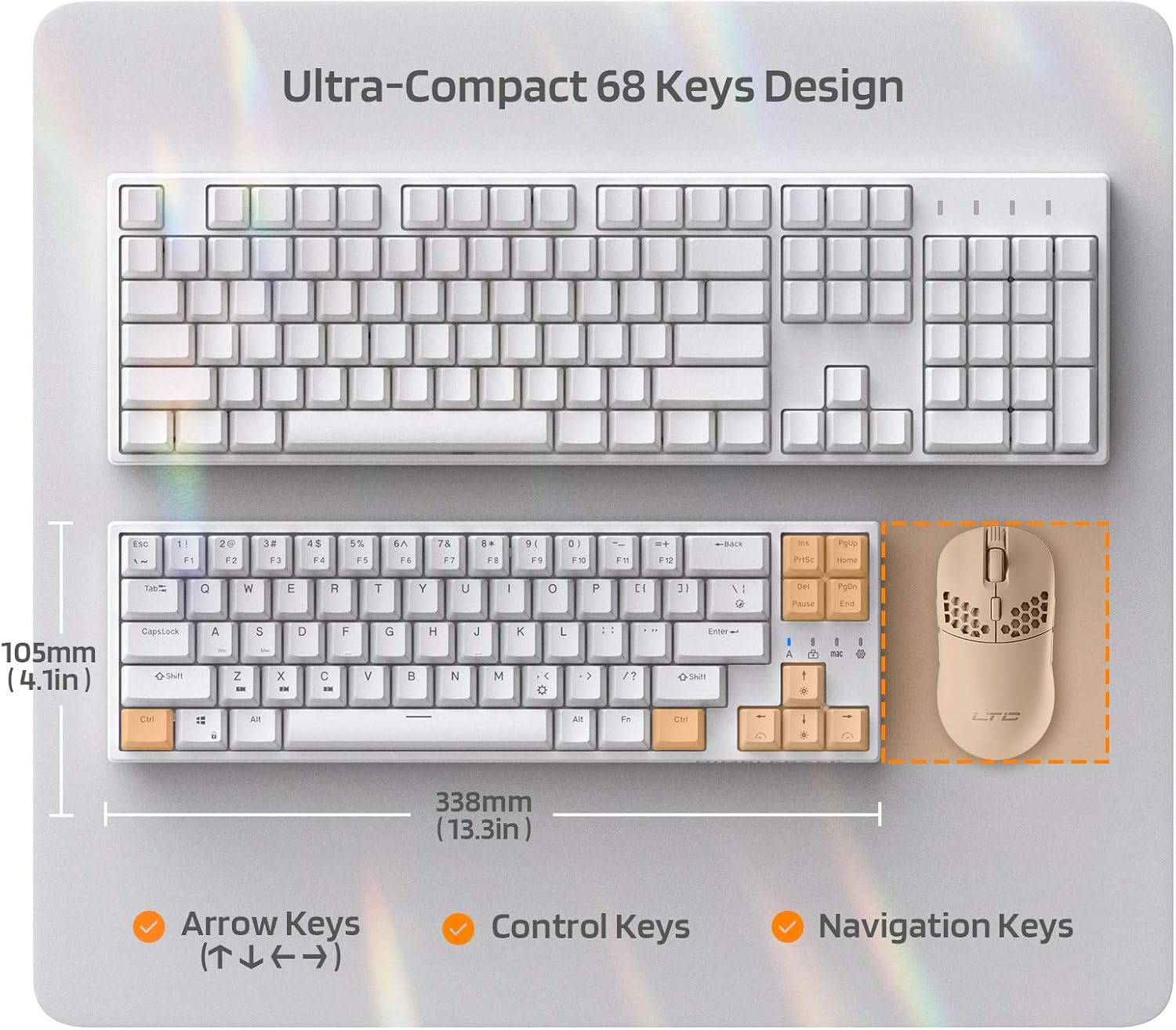
Figure 7: Comparison of the ultra-compact 68-key design with a full-size keyboard, highlighting its space-saving benefits.

Figure 8: Illustration of the ergonomic design with foldable feet for 10-degree and 5-degree typing angles, and anti-slip pads.
8. Záruka a podpora
For detailed warranty information and customer support, please refer to the official LTC webwebu nebo v dokumentaci k nákupu.
You can also find additional resources and a downloadable PDF user manual here: Oficiální uživatelská příručka (PDF)
Pro více produktů a podporu navštivte LTC Store on Amazon.