
1. Úvod
Děkuji za nákupasing the ONIKUMA K1 RGB Gaming Headset. This manual provides detailed instructions for setup, operation, maintenance, and troubleshooting to ensure optimal performance and longevity of your headset. Please read this manual carefully before use and retain it for future reference.
2. Konec produktuview
The ONIKUMA K1 is a wired gaming headset designed for multi-platform compatibility, featuring vibrant RGB lighting, 7.1 surround sound, and a noise-cancelling microphone. It is built for comfort during extended gaming sessions.
Klíčové vlastnosti:
- 7.1 Prostorový zvuk: Provides immersive audio for an enhanced gaming experience.
- Mikrofon s potlačením hluku: Zajišťuje jasnou komunikaci snížením šumu v pozadí.
- RGB osvětlení: Dynamic lighting effects for an aesthetic appeal.
- Kompatibilita s více platformami: Works with PC, PlayStation (PS3, PS4), Mobile devices, and Xbox (Xbox One requires an adapter, not included).
- Pohodlný design: Features soft protein earpads, an adjustable headband, and cozy head cushions.
- In-line ovládání: Easy access to volume adjustment and microphone mute.
Komponenty:
The headset includes the main unit with integrated microphone and a wired connection featuring a 3.5mm audio jack and a USB connector for RGB lighting.

Figure 1: Headset with in-line volume and microphone mute control, USB connector for RGB lighting, and 3.5mm audio jack.

Figure 2: Flexible microphone with 160-degree adjustment and 360-degree voice pick-up for clear communication.

Figure 3: Soft protein earpads, adjustable headband, and cozy head cushions designed for supreme comfort.
3. Pokyny k nastavení
Follow these steps to connect your ONIKUMA K1 headset to your device.
Kompatibilita s více platformami:
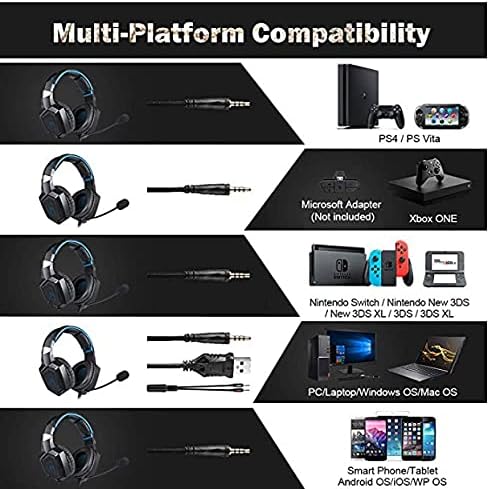
Obrázek 4: Kompatibilita nadview for PC, PlayStation, Xbox, Nintendo Switch, and mobile devices.
- For PC/Laptop (Windows OS/Mac OS):
Connect the 3.5mm audio jack to your computer's audio output/input port. Connect the USB cable to a USB port for RGB lighting. Ensure your sound settings are configured to use the headset. - For PlayStation (PS4/PS Vita/PS3):
Connect the 3.5mm audio jack to the controller or console's audio port. For PS4, go to Settings > Devices > Audio Devices > Output to Headphones > All Audio. Connect the USB for RGB lighting if a USB port is available. - For Xbox ONE:
An additional Microsoft Adapter (not included) is required for older Xbox One controllers. Connect the 3.5mm audio jack to the adapter, then connect the adapter to your controller. Newer Xbox One controllers have a built-in 3.5mm jack. Connect the USB for RGB lighting if a USB port is available on the console. - For Nintendo Switch/New 3DS XL/3DS/3DS XL:
Connect the 3.5mm audio jack directly to the console's audio port. - For Smart Phone/Tablet (Android OS/iOS/WP OS):
Connect the 3.5mm audio jack directly to your mobile device's headphone jack.
4. Návod k obsluze
Once connected, you can begin using your headset. Here are the basic operating functions:
- Ovládání hlasitosti: Use the in-line volume roller to adjust the audio output level. Roll up to increase volume, roll down to decrease.
- Ztlumení mikrofonu: Use the in-line switch to mute or unmute the microphone. Slide the switch to the 'OFF' position to mute and 'ON' to unmute.
- Nastavení mikrofonu: The microphone is flexible. Adjust its position closer to your mouth for optimal voice pickup or away when not in use.
- RGB osvětlení: The RGB lighting is powered via the USB connection. Once the USB is plugged in, the lighting will activate automatically. There are no user-adjustable controls for the RGB lighting patterns on the headset itself.
- Přizpůsobení náhlavní soupravy: Adjust the headband to ensure a comfortable and secure fit over your ears. The earpads should fully cover your ears for optimal sound isolation and comfort.
5. Údržba
Správná péče prodlouží životnost vašich sluchátek.
- Čištění: K čištění sluchátek s mikrofonem používejte měkký, suchý hadřík. Nepoužívejte tekuté čisticí prostředky ani abrazivní materiály.
- Skladování: Sluchátka skladujte na chladném a suchém místě mimo dosah přímého slunečního záření a extrémních teplot.
- Péče o kabely: Avoid sharp bends or excessive pulling on the cables to prevent damage. The cable is designed to be tangle-free.
- Vyhněte se vlhkosti: The headset is not water-resistant. Keep it away from liquids.
6. Řešení problémů
If you encounter issues with your headset, please refer to the following common solutions:
| Problém | Možné řešení |
|---|---|
| Žádný zvuk nebo nízká hlasitost |
|
| Mikrofon nefunguje |
|
| RGB podsvícení nefunguje |
|
| Sound quality issues (e.g., no 7.1 surround sound) |
|
7. Specifikace
| Funkce | Detail |
|---|---|
| Název modelu | K1-B-Black RGB |
| Technologie připojení | Kabelové |
| Jack pro sluchátka | Zásuvka 3.5 mm |
| Citlivost | 104 dB |
| Frekvenční odezva | Not specified (Original data: 3045 Unknown Rate) |
| Kontrola hluku | Aktivní potlačení hluku |
| Tvarový faktor sluchátek | Over-Ear |
| Umístění uší | Over-Ear |
| Barva | Černý |
| Název značky | ONIKUMA |
| Rozměry produktu | 22.5 x 19.5 x 10.5 cm |
| Hmotnost položky | 394 gramů |
| Funkce kabelu | Bez zamotání |
| Typ ovládání | Ovládání hlasitosti |
| Kompatibilní zařízení | Multiplatformní |
| Doporučená použití | Gaming, Making Calls |
| Specifické použití produktu | Herní sluchátka |
| Materiály | Plastic, Polycarbonate Leather (PC) |
| Popis věkového rozmezí | Dospělý |
| Úroveň odolnosti proti vodě | Není odolný proti vodě |
8. Záruka a podpora
Informace o záruce nebo technickou podporu naleznete v dokumentaci dodané s vaším nákupem nebo se obraťte přímo na prodejce. Uschovejte si doklad o koupi pro případné reklamace.