
Zavedení
This manual provides detailed instructions for the safe and efficient use of your XO B26 Bluetooth 4.2 Wireless Earbud. Please read this manual thoroughly before using the product and retain it for future reference.
Konec produktuview
The XO B26 is a single Bluetooth 4.2 wireless earbud designed for mobile phones, offering ease of use and portability. It is crafted from high-quality materials to ensure durability and a secure fit.
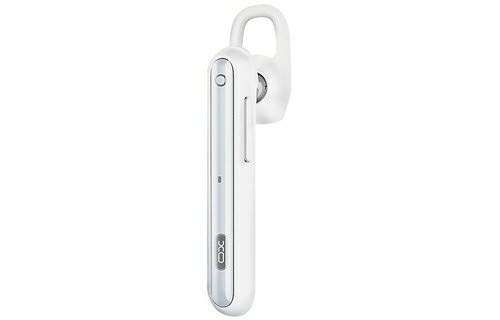
Image: The XO B26 Bluetooth Wireless Earbud, shown in white with a silver accent, featuring its ergonomic design and ear hook.
Klíčové vlastnosti:
- Bluetooth 4.2 connectivity for stable wireless connection.
- Kompaktní a lehký design pro snadnou přenositelnost.
- Ergonomically designed for a secure and comfortable fit.
- Touch control method for intuitive operation.
Obrázek: Detailní záběr view of the XO B26 earbud, highlighting the control button and sleek design.
Nastavení
1. Charging the Earbud
- Connect the charging cable (not included) to the earbud's charging port.
- Zapojte druhý konec kabelu do kompatibilního zdroje napájení USB.
- Kontrolka bude ukazovat stav nabíjení. Úplné nabití trvá přibližně 2 hodiny.
- Once fully charged, disconnect the earbud from the power source.
2. Spárování se zařízením
- Ensure the earbud is fully charged and turned off.
- Press and hold the multi-function button on the earbud until the indicator light flashes red and blue alternately, indicating it is in pairing mode.
- On your mobile phone or compatible device, enable Bluetooth and search for available devices.
- Select "XO B26" from the list of found devices.
- Once paired, the indicator light will flash blue slowly, and you may hear a confirmation tone.
- Pokud budete vyzváni k zadání hesla, zadejte „0000“.
Návod k obsluze
Zapnutí/vypnutí
- Zapnutí: Stiskněte a podržte multifunkční tlačítko přibližně 3 sekundy, dokud nezačne blikat modrá kontrolka.
- Vypnout: Stiskněte a podržte multifunkční tlačítko přibližně 5 sekund, dokud se nerozsvítí červená kontrolka a poté nezhasne.
Making and Receiving Calls (Touch Control)
- Přijmout hovor: Briefly tap the multi-function button when an incoming call rings.
- Ukončit hovor: Briefly tap the multi-function button during a call.
- Odmítnout hovor: Během příchozího hovoru stiskněte a podržte multifunkční tlačítko přibližně 2 sekundy.
- Znovu vytočit poslední číslo: Double-tap the multi-function button when not on a call.
Přehrávání hudby (dotykové ovládání)
- Přehrát/pozastavit: Briefly tap the multi-function button to play or pause music.
- Další skladba: Press and hold the multi-function button for approximately 2 seconds to skip to the next track.
- Ovládání hlasitosti: Volume is typically controlled via the connected device.
Údržba
Čištění
- Wipe the earbud with a soft, dry, lint-free cloth.
- Nepoužívejte abrazivní čisticí prostředky, rozpouštědla ani čisticí spreje.
- Udržujte nabíjecí port bez prachu a nečistot.
Skladování
- Store the earbud in a cool, dry place away from direct sunlight and extreme temperatures.
- Avoid storing near magnetic fields.
Péče o baterie
- Charge the earbud regularly, even if not in use, to maintain battery health.
- Vyhněte se častému úplnému vybíjení baterie.
Odstraňování problémů
| Problém | Možné řešení |
|---|---|
| Earbud does not power on. | Ensure the earbud is fully charged. Press and hold the multi-function button for a longer duration. |
| Nelze spárovat se zařízením. | Make sure the earbud is in pairing mode (flashing red and blue). Turn off and on Bluetooth on your device. Move the earbud closer to your device. |
| No sound during music or calls. | Check the volume level on both the earbud and your connected device. Ensure the earbud is properly paired and connected. |
| Špatná kvalita zvuku. | Ensure there are no obstructions between the earbud and your device. Move closer to your device. Check for interference from other wireless devices. |
| Earbud not charging. | Verify the charging cable is securely connected. Try a different USB power source or cable. Ensure the charging port is clean. |
Specifikace
| Funkce | Detail |
|---|---|
| Značka | XO |
| Název modelu | B26 |
| Barva | Bílý |
| Verze Bluetooth | 4.2 |
| Technologie bezdrátové komunikace | Bezdrátový |
| Kompatibilní zařízení | Multiple (Mobile Phones) |
| Kontrolní metoda | Dotek |
| Doba hovoru | Přibližně 3 hodiny |
| Čas hudby | Přibližně 3 hodiny |
| Doba nabíjení | Přibližně 2 hodiny |
| Zahrnuté komponenty | Ušní polštářky |
| Hmotnost položky | 106 gramů |
| Přepravní rozměry | 17.8 x 3.4 x 0.8 cm |
| ASIN | B08WT1RK59 |
Bezpečnostní informace
Dodržujte prosím následující bezpečnostní pokyny, abyste předešli poškození produktu nebo zranění sebe sama:
- Do not disassemble, repair, or modify the earbud.
- Keep the earbud away from water, moisture, and extreme temperatures.
- Vyhněte se dlouhodobému vystavení vysoké hlasitosti, abyste předešli poškození sluchu.
- Uchovávejte mimo dosah dětí a domácích zvířat.
- Use only compatible charging accessories.
Záruka a podpora
Informace o záruce nebo technickou podporu naleznete v dokumentaci dodané při nákupu nebo se obraťte na svého prodejce. Uschovejte si doklad o koupi pro případné reklamace.