
Hoco ES32 Plus
Hoco ES32 Plus Series TWS Wireless Bluetooth Headset User Manual
Model: ES32 Plus | Brand: Hoco
Zavedení
Thank you for choosing the Hoco ES32 Plus Series TWS Wireless Bluetooth Headset. This manual provides detailed instructions on how to set up, operate, and maintain your new headset. Please read this manual carefully before use to ensure optimal performance and longevity of your device.
Obsah balení
- Hoco ES32 Plus TWS Wireless Bluetooth Headset (Left and Right Earbuds)
- Nabíjecí pouzdro
- Nabíjecí kabel
- Silikonové pouzdro
- Háček
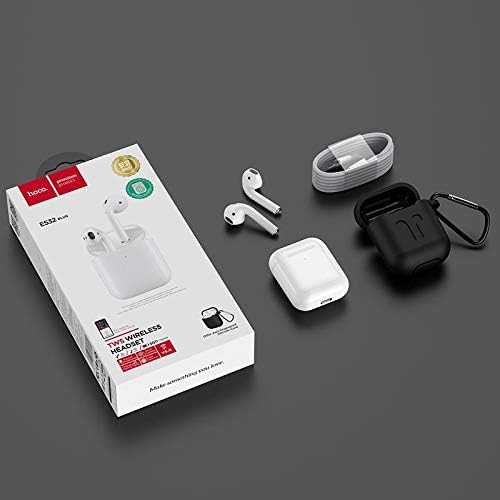
Image: Contents of the Hoco ES32 Plus package, including the earbuds, charging case, charging cable, silicone case, and hook.
Konec produktuview a funkce
The Hoco ES32 Plus headset is designed for a seamless wireless audio experience. Key features include:
- Bluetooth V5.0: Zajišťuje stabilní a efektivní bezdrátové připojení.
- Airoha AB1536U Chip: Provides reliable performance.
- Kapacita baterie: 350mAh for the charging case, 30mAh for each earbud.
- Dlouhá výdrž baterie: Approximately 3 hours of talk/music time, 200 hours standby time.
- Kompaktní design: Earbuds and case are lightweight and portable.
- Pop-Up Window Support: For Apple mobile phones, enabling quick pairing and battery display.
- Přepínání Master-Slave: Allows independent use of either earbud.
- Detekce v uchu: Automatically pauses/plays audio when earbuds are removed/inserted.
- Podpora bezdrátového nabíjení: Pohodlné nabíjení bez kabelů.
- Ovládání dotykem: Intuitivní ovládání hudby a hovorů.

Obrázek: Podrobný view of the Hoco ES32 Plus wireless earbuds, highlighting their design.
Průvodce nastavením
1. Počáteční nabíjení
Before first use, fully charge the charging case and earbuds. Place the earbuds into the charging case. Connect the charging cable to the case and a USB power source, or place the case on a compatible wireless charger.

Image: The Hoco ES32 Plus charging case being charged wirelessly on a charging pad.
2. Párování s vaším zařízením
- Ujistěte se, že jsou sluchátka v nabíjecím pouzdře a že je pouzdro dostatečně nabité.
- Otevřete víko nabíjecího pouzdra. Sluchátka se automaticky přepnou do režimu párování.
- On your mobile device (e.g., iPhone, Samsung, Huawei, Oppo), go to Bluetooth settings and turn Bluetooth on.
- Hledat available devices. You should see "HOCO ES32 Plus" or similar in the list.
- Select "HOCO ES32 Plus" to connect. For Apple devices, a pop-up window may appear for quick pairing.
- Po připojení jsou sluchátka připravena k použití.

Image: Visual guide demonstrating the pairing process for the Hoco ES32 Plus headset with an iPhone, including the pop-up window for connection and battery status.
Návod k obsluze
Dotykové ovládání
The Hoco ES32 Plus earbuds feature intuitive touch controls on the outer surface of each earbud.
- Přehrát/pozastavit: Jediným klepnutím na jedno sluchátko.
- Další skladba: Dvakrát klepněte na pravé sluchátko.
- Předchozí skladba: Dvakrát klepněte na levé sluchátko.
- Přijmout/ukončit hovor: Během příchozího hovoru klepněte jedním klepnutím na kterékoli sluchátko.
- Odmítnout hovor: Během příchozího hovoru stiskněte a podržte kterékoli ze sluchátek po dobu 2 sekund.
- Aktivace hlasového asistenta (Siri/Google Assistant): Třikrát klepněte na kterékoli sluchátko.
Detekce do uší
The earbuds are equipped with in-ear detection. Music will automatically pause when you remove an earbud and resume when you put it back in.
Údržba
- Čištění: K čištění sluchátek a nabíjecího pouzdra používejte měkký, suchý hadřík, který nepouští vlákna. Nepoužívejte agresivní chemikálie ani abrazivní materiály.
- Skladování: Pokud sluchátka nepoužíváte, uložte je do nabíjecího pouzdra, aby byla chráněna a zůstávala nabitá.
- Péče o baterie: Chcete-li prodloužit životnost baterie, vyvarujte se častého úplného vybíjení. Zařízení pravidelně nabíjejte, i když jej nepoužíváte neustále.
- Voděodolnost: Sluchátka nejsou vodotěsná. Zabraňte vystavení vodě, potu nebo vysoké vlhkosti.
Odstraňování problémů
| Problém | Možné řešení |
|---|---|
| Sluchátka se nepárují/nepřipojují |
|
| Žádný zvuk z jednoho sluchátka |
|
| Nabíjecí pouzdro se nenabíjí |
|
| Špatná kvalita zvuku |
|
Specifikace
| Funkce | Detail |
|---|---|
| Verze Bluetooth | V5.0 |
| Čipová sada | Airoha AB1536U |
| Kapacita baterie nabíjecího pouzdra | 350 XNUMX mAh |
| Kapacita baterie sluchátek (jedno) | 30 XNUMX mAh |
| Čas mluvení/hudby | Přibl. 3 hodin |
| Pohotovostní doba | 200 hodin |
| Rozměry (pouzdro) | 53.8 x 44.3 x 21.4 mm |
| Hmotnost (celkem) | 47 g |
| Konektivita | Bezdrátový |
| Barva | Bílý |
| Číslo modelu | ES32 Plus |
| Kompatibilní zařízení | Mobilní telefony |
| Speciální funkce | Dual ear, Pop-up window support (Apple), Master-slave switching, In-ear detection, Wireless charging support |
Záruka a podpora
For warranty information and technical support, please refer to the official Hoco website or contact your local retailer where the product was purchased. Keep your proof of purchase for any warranty claims.
Pro další pomoc můžete navštívit Hoco brand page on Amazon.eg.
Ask a question about this manual
Ask about setup, troubleshooting, compatibility, parts, safety, or missing instructions. Manuals+ will review the question and use this page’s manual context to help answer it.