
1. Úvod
Děkuji za nákupasing the QFX E-B3 Bluetooth Professional High-Power Speaker. This manual provides essential information for the safe and efficient operation of your speaker. Please read it thoroughly before use and retain it for future reference.
The QFX E-B3 is designed to deliver powerful audio with features including Bluetooth connectivity, FM radio, USB/SD card playback, LED party lights, and a 250W power amplifier. It also supports True Wireless System (TWS) for stereo pairing with another compatible speaker.
2. Bezpečnostní informace
- Zdroj napájení: Connect the speaker only to the specified power supply as indicated on the unit.
- Větrání: Zajistěte dostatečné větrání kolem reproduktoru. Neblokujte žádné větrací otvory.
- Voda a vlhkost: This speaker is not waterproof. Do not expose it to rain, moisture, or any liquids to prevent electric shock or fire.
- Teplo: Udržujte reproduktor mimo dosah zdrojů tepla, jako jsou radiátory, topná tělesa, kamna nebo jiná zařízení produkující teplo.
- Čištění: Unplug the speaker from the power outlet before cleaning. Use a dry cloth for cleaning. Do not use liquid cleaners or aerosol cleaners.
- Servis: Nepokoušejte se tento výrobek opravit sami. Veškerý servis svěřte kvalifikovanému servisnímu personálu.
- Umístění: Umístěte reproduktor na stabilní, rovný povrch, aby nedošlo k jeho pádu.
3. Obsah balení
Ověřte, zda jsou v balení přítomny všechny položky:
- QFX E-B3 High-Power Speaker
- Mikrofon
- Dálkové ovládání
- Síťový napájecí kabel
- Uživatelská příručka (tento dokument)
4. Konec produktuview
The QFX E-B3 speaker features dual 15-inch woofers and a 1-inch tweeter, protected by a metal grill. It includes integrated handles and wheels for portability.

Obrázek 4.1: Přední strana view of the QFX E-B3 Speaker.
Rear Panel Controls and Ports
The rear panel houses all input/output connections and control knobs.
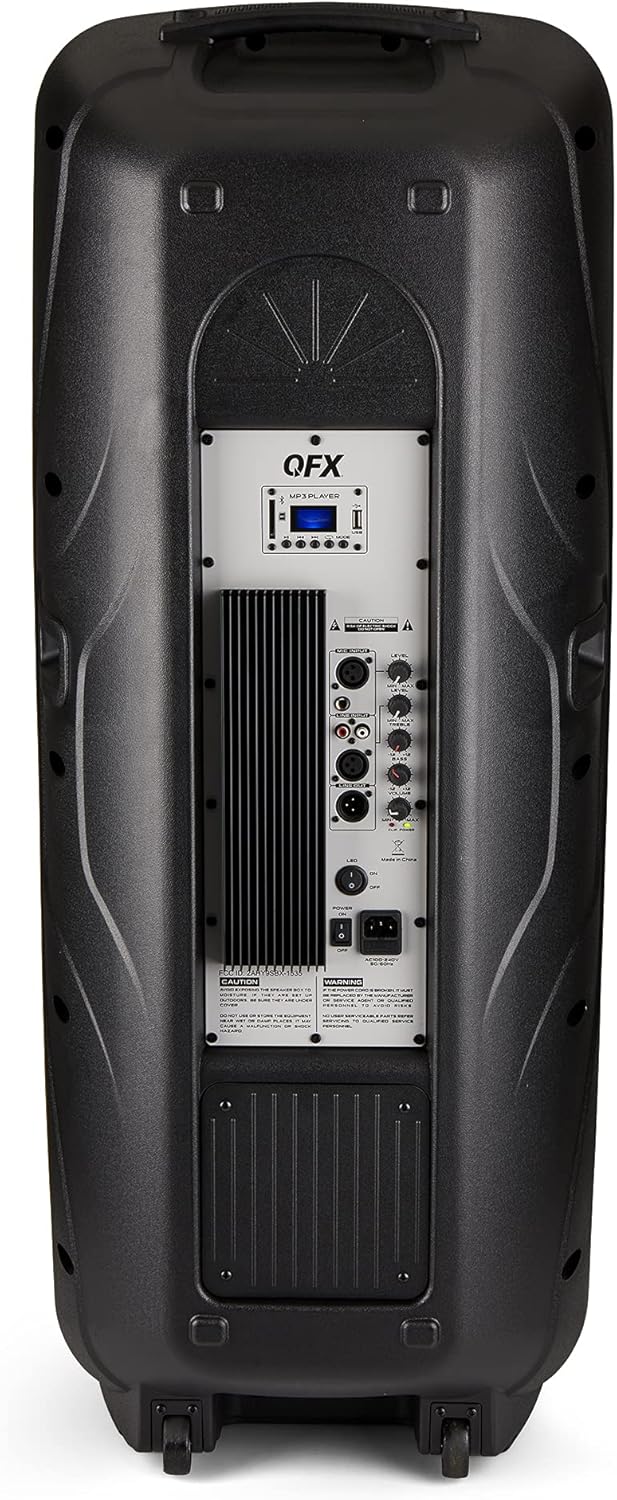
Figure 4.2: Rear panel with controls and ports.
- Vypínač: Zapíná/vypíná reproduktor.
- AC vstup: Připojuje kabel střídavého proudu.
- USB/SD Card Ports: Pro přehrávání zvuku filez USB disků nebo SD karet.
- Displej: Zobrazuje aktuální režim a informace o trase.
- Tlačítko režimu: Switches between input modes (Bluetooth, FM, USB, SD, RCA).
- Tlačítko Přehrát/Pozastavit: Ovládá přehrávání z USB/SD/Bluetooth.
- Tlačítka předchozí/následující stopy: Procházení skladeb nebo FM stanic.
- Hlavní ovladač hlasitosti: Upravuje celkovou hlasitost.
- Bass/Treble Control Knobs: Adjusts low and high frequencies.
- XLR mikrofonní vstup: Connects a wired microphone.
- Microphone Volume/Echo Knobs: Adjusts microphone volume and echo effect.
- Vstup RCA (L/P): Connects external audio devices via RCA cables.
- XLR Line Input/Output: For connecting to other audio equipment.
5. Nastavení
Počáteční umístění
Place the speaker on a stable, flat surface. For optimal sound, position it in a central location within the listening area. The integrated wheels and handle allow for easy transport.

Figure 5.1: Speaker being moved with handle and wheels.
Připojení napájení
- Ujistěte se, že je vypínač reproduktoru v poloze VYPNUTO.
- Connect the AC power cable to the AC input on the rear panel of the speaker.
- Zapojte druhý konec napájecího kabelu do standardní zásuvky ve zdi.
- Flip the power switch to the ON position. The display screen will illuminate.
6. Návod k obsluze
Párování pomocí Bluetooth
- Turn on the QFX E-B3 speaker.
- Stiskněte tlačítko MODE button on the speaker or remote control until "BLUE" appears on the display screen, indicating Bluetooth mode.
- Povolte Bluetooth na svém mobilním zařízení (chytrém telefonu, tabletu atd.).
- Hledat available Bluetooth devices and select "QFX E-B3" from the list.
- Once paired, the speaker will emit a confirmation sound. You can now play audio from your device through the speaker.
Párování s True Wireless System (TWS)
TWS allows two QFX E-B3 speakers to connect wirelessly for a stereo sound experience. This feature works only in Bluetooth mode.
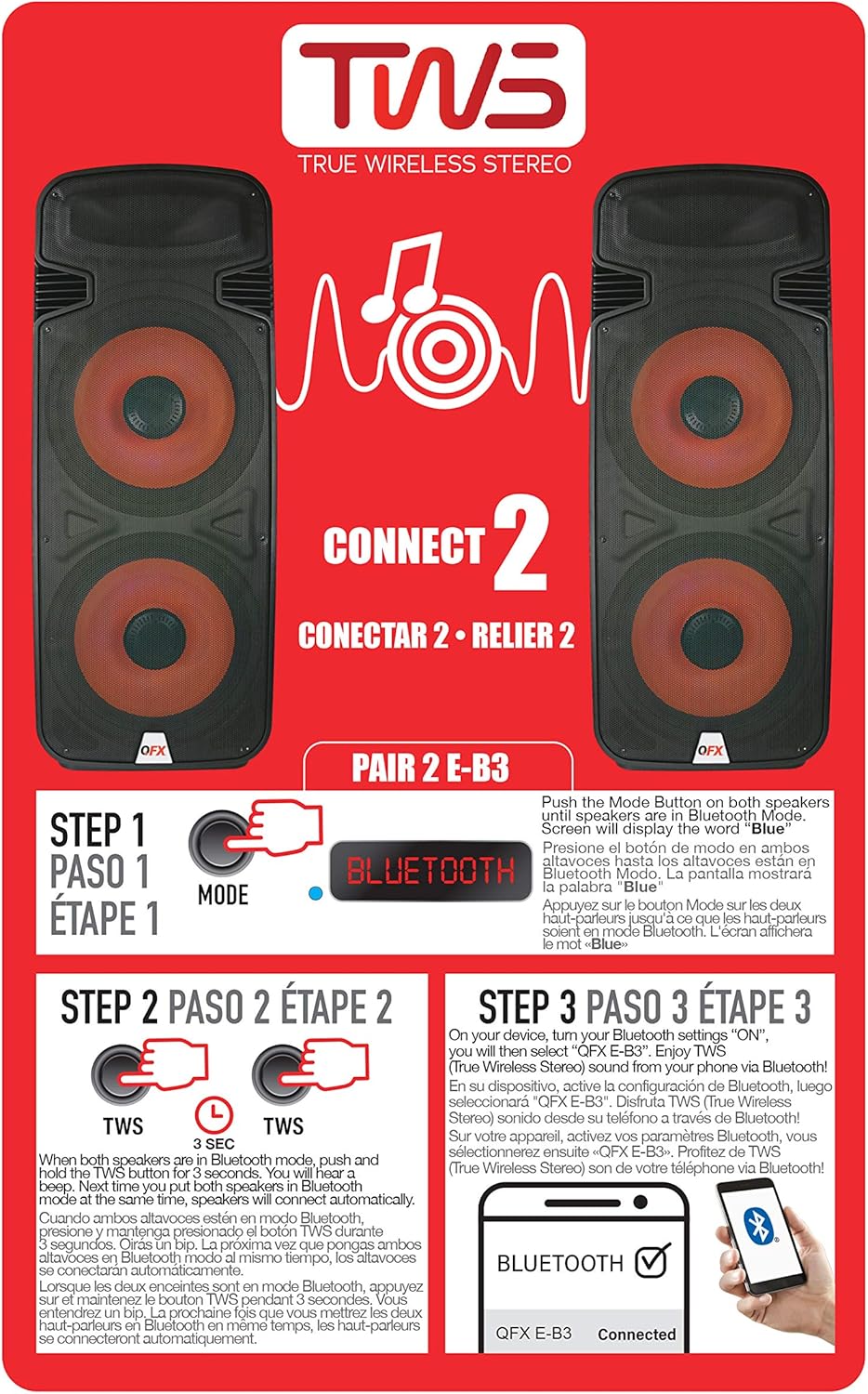
Figure 6.1: TWS Pairing Instructions.
- Ensure both QFX E-B3 speakers are powered on and in Bluetooth mode. The display on both speakers should show "BLUE".
- On one of the speakers (this will be your primary speaker), press and hold the TWS button for approximately 3 seconds. The speakers will attempt to connect to each other.
- Once successfully paired, you will hear a confirmation sound, and the display on the primary speaker will show "BLUE" while the secondary speaker will show "BLUE" as well.
- On your Bluetooth-enabled device, search for and select "QFX E-B3". The two speakers will now play audio in stereo.
Provoz FM rádia
- Stiskněte tlačítko MODE button to switch to FM radio mode. The display will show the FM frequency.
- Stiskněte a podržte Přehrát/Pozastavit button to initiate an automatic scan for FM stations. The speaker will save all found stations.
- Použijte Předchozí/Další stopa buttons to navigate through the saved FM stations.
Přehrávání z USB/SD karty
- Vložte USB flash disk nebo SD kartu (s kompatibilním audio files) into the respective port on the rear panel.
- The speaker will automatically switch to USB/SD mode and begin playing the audio files. Pokud ne, stiskněte tlačítko MODE pro výběr režimu USB nebo SD.
- Použijte Přehrát/Pozastavit a Předchozí/Další stopa tlačítka pro ovládání přehrávání.
Vstup pro mikrofon
- Connect a microphone to the XLR Microphone Input on the rear panel.
- Adjust the Microphone Volume and Echo knobs to achieve the desired sound.
Vstup RCA
- Connect an external audio source (e.g., CD player, mixer) to the RCA Input (L/R) ports using appropriate RCA cables.
- Stiskněte tlačítko MODE button to select RCA input mode.
- Adjust the master volume on the speaker and the volume on your external audio source.
LED světla na párty
The speaker features integrated LED party lights that activate automatically when the speaker is powered on. There are no specific controls for the LED lights mentioned; they are designed to enhance the audio experience.
7. Údržba
Čištění
- Always unplug the speaker before cleaning.
- K otření vnějších povrchů reproduktoru použijte měkký, suchý hadřík.
- Nepoužívejte abrazivní čisticí prostředky, vosky ani rozpouštědla, protože by mohly poškodit povrchovou úpravu.
- Udržujte větrací otvory čisté od prachu a nečistot.
Skladování
When not in use for extended periods, store the speaker in a cool, dry place, away from direct sunlight and extreme temperatures. Cover the speaker to protect it from dust.
8. Řešení problémů
If you encounter issues with your QFX E-B3 speaker, refer to the following common problems and solutions:
| Problém | Možná příčina | Řešení |
|---|---|---|
| Žádná síla | Power cable not connected; Power outlet not active; Speaker power switch off. | Ensure AC cable is securely connected to speaker and outlet. Check if outlet is working. Turn speaker power switch ON. |
| Žádný zvuk | Volume too low; Incorrect input mode selected; Audio source not playing. | Increase master volume. Press MODE button to select correct input. Ensure audio source is playing and its volume is up. |
| Bluetooth se nepřipojuje | Speaker not in Bluetooth mode; Device Bluetooth off; Speaker already paired to another device; Device too far. | Ensure speaker is in Bluetooth mode ("BLUE" on display). Turn on device Bluetooth. Disconnect from other devices. Move device closer to speaker (within 30 feet). |
| Párování TWS se nezdařilo | Speakers not in Bluetooth mode; TWS button not held long enough. | Ensure both speakers are in Bluetooth mode. Press and hold the TWS button on one speaker for 3 seconds. |
| Přehrávání z USB/SD nefunguje | Nesprávný režim; Nekompatibilní file format; Corrupted USB/SD card. | Press MODE to select USB/SD. Ensure audio files are in a compatible format (e.g., MP3). Try a different USB/SD card. |
9. Specifikace
| Funkce | Specifikace |
|---|---|
| Značka | QFX |
| Číslo modelu | E-B3 |
| Maximální výstupní výkon reproduktoru | 250 wattů |
| Technologie připojení | USB, Bluetooth |
| Režim zvukového výstupu | Stereo |
| Typ montáže | Montáž zástrčky, montáž na kolo |
| Typ reproduktoru | Woofer (Dual 15 Inches) |
| Typ ovladače | Dálkové ovládání |
| Barva | Party LED |
| Je voděodolný | Falešný |
| Kontrolní metoda | Vzdálený |
| Průměr basového reproduktoru | 15 palce |
| Počet zvukových kanálů | 2.0 |
| Bezdrátová technologie | Bluetooth |
| Protokol připojení | Bluetooth |
| Zdroj napájení | Elektrický kabel |
| Typ zvukového ovladače | Dynamický ovladač |
| Velikost zvukového ovladače | 15 palce |
| Rozměry položky (D x Š x V) | 16.77"H x 13.98"Š x 23.74"V |
| Hmotnost položky | 13.2 libry |
| Kompatibilní zařízení | Laptop, MP3 Player, Smartphone, Tablet, Television |
| UPC | 606540039618 |
10. Informace o záruce
This product is covered by a limited warranty. For specific details regarding warranty coverage and terms, please refer to the warranty information provided at the point of purchase or contact QFX customer support directly. The warranty is typically per contract with the retailer.
11. Podpora
For technical assistance, troubleshooting beyond this manual, or inquiries about your QFX E-B3 speaker, please contact QFX customer support or your retailer. Contact information can usually be found on the manufacturer's webwebu nebo na účtence.