
1. Úvod
Děkuji za nákupasing the ANXONIT Cylinder X2 Mini Projector. This manual provides essential information for the safe and efficient operation of your device. Please read it thoroughly before use and retain it for future reference.

Image 1.1: The ANXONIT Cylinder X2 Mini Projector, a compact device designed for portability and ease of use.
Obsah balení
- ANXONIT Cylinder X2 Mini Projector
- Dálkové ovládání
- Napájecí adaptér
- USB kabel
- Uživatelská příručka

Image 1.2: Included accessories with the ANXONIT Cylinder X2 Mini Projector.
2. Nastavení
2.1 Zapnutí
- Připojte napájecí adaptér ke vstupnímu portu projektoru.
- Zapojte napájecí adaptér do elektrické zásuvky.
- Press and hold the power button on the projector or remote control for a few seconds until the device powers on.
2.2 Placement and Focus Adjustment
Umístěte projektor na stabilní, rovný povrch. Pro optimální viewing, position the projector perpendicular to the projection surface. Adjust the focus wheel located on the side of the projector until the image appears clear and sharp.

Image 2.1: The compact design of the projector allows for easy portability.
2.3 Síťové připojení (Wi-Fi)
- Na domovské obrazovce přejděte do sekce „Nastavení“.
- Vyberte možnost „Wi-Fi“ a zapněte ji.
- Vyberte požadovanou síť Wi-Fi ze seznamu.
- Zadejte heslo sítě pomocí klávesnice na obrazovce a potvrďte.
3. Návod k obsluze
3.1 Navigace v rozhraní systému Android 8.1
The projector runs on Android 8.1, providing access to various applications. Use the remote control to navigate through menus, select apps, and input text. The interface is similar to a standard Android tablet or smartphone.

Image 3.1: The Android 8.1 operating system interface on the projector.
3.2 Používání aplikací
Pre-installed applications like YouTube and Netflix are available. You can download additional applications from the Google Play Store after connecting to Wi-Fi.
3.3 Bezdrátový displej (zrcadlení obrazovky)
The projector supports AirPlay for iOS devices and Miracast for Android devices, allowing you to mirror your smartphone or tablet screen wirelessly.
- Ensure both your mobile device and the projector are connected to the same Wi-Fi network.
- On the projector, select the 'AirPlay' or 'Miracast' application.
- On your mobile device, activate screen mirroring (e.g., 'Screen Mirroring' on iOS, 'Cast' on Android) and select the projector from the list of available devices.

Image 3.2: Wireless screen mirroring in action.
3.4 Připojení Bluetooth
Connect Bluetooth speakers or headphones for enhanced audio experience.
- Přejděte do „Nastavení“ a vyberte „Bluetooth“.
- Zapněte Bluetooth a vyhledejte zařízení.
- Select your desired Bluetooth device from the list to pair.
4. Údržba
4.1 Cleaning the Projector Lens
Use a soft, lint-free cloth specifically designed for optical lenses to gently wipe the projector lens. Avoid using abrasive materials or chemical cleaners, as these can damage the lens coating.
4.2 Obecné čištění
Wipe the exterior of the projector with a soft, dry cloth. Do not use liquid cleaners directly on the device. Ensure ventilation ports are free from dust and obstructions.
4.3 Péče o baterii
The projector includes a built-in 4400mAh Lithium-Ion battery. For optimal battery life, avoid fully discharging the battery frequently and store the projector in a cool, dry place when not in use for extended periods.

Image 4.1: The projector features a 4400mAh built-in lithium battery.
5. Řešení problémů
| Problém | Možná příčina | Řešení |
|---|---|---|
| Žádný promítaný obraz | Projector not powered on; Lens cap on; Input source not selected. | Ensure power is connected and unit is on; Remove lens cap; Verify correct input source. |
| Rozmazaný obraz | Není nastavené zaostření; Projektor je příliš daleko/blízko k promítacímu plátnu. | Adjust the focus wheel; Reposition the projector. |
| Žádné Wi-Fi připojení | Nesprávné heslo; Mimo dosah; Problém s routerem. | Re-enter password; Move closer to router; Restart router. |
| Bluetooth device won't connect | Zařízení není v režimu párování; Mimo dosah; Rušení. | Ensure Bluetooth device is in pairing mode; Move devices closer; Restart both devices. |
| Apps (e.g., Netflix) not working | Poor internet connection; App requires update; App data corrupted. | Check Wi-Fi stability; Update the app via Google Play Store; Clear app cache/data in settings. |
6. Specifikace
| Funkce | Detail |
|---|---|
| Značka | ANXONIT |
| Číslo modelu | Válec X2 |
| Technologie displeje | DLP |
| Rozlišení displeje | 854 x 480 pixelů |
| Jas | 100 ANSI Lumens |
| Viditelná úhlopříčka obrazovky | Až 120 palce / 305 cm |
| Operační systém | Android 8.1 |
| Konektivita | USB2.0, Bluetooth 4.0, 802.11 ac/b/g/n Wi-Fi |
| Speciální funkce | Internet Built-In, Pico, Short Throw, Stereo Speakers |
| Baterie | 4400mAh lithium-iontová baterie (součástí balení) |
| Hmotnost položky | 10.6 unce |
| Rozměry produktu | 4.33 x 2.36 x 2.36 palce |
| Certifikace | CE, FCC, ROHS |
7. Záruka a podpora
7.1 Informace o záruce
Please refer to the warranty card included in your product packaging for detailed warranty terms and conditions. Keep your proof of purchase for warranty claims.
7.2 Zákaznická podpora
For technical assistance, troubleshooting, or service inquiries, please contact ANXONIT customer support through the contact information provided on the official ANXONIT webweb nebo vaše nákupní platforma.
8. Další informace
8.1 Diffuse Reflection Technology
The ANXONIT Cylinder X2 utilizes diffuse reflection technology, which projects light indirectly onto the screen. This method is designed to be gentler on the eyes compared to direct light emission from traditional displays, potentially reducing eye strain during prolonged viewIng.
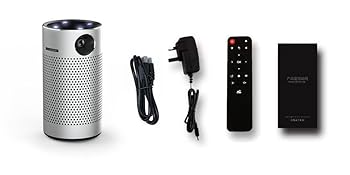
Image 8.1: Diffuse Reflection technology for eye comfort.
8.2 Advanced DLP Technology
This projector incorporates advanced DLP (Digital Light Processing) technology, which contributes to clear and vibrant image reproduction. DLP technology is known for its high contrast and color accuracy.

Image 8.2: Enhanced color reproduction with Advanced DLP Technology.
8.3 Scénáře použití
The portable design and built-in battery make the Cylinder X2 suitable for various environments, including home theater setups, outdoor movie nights, and presentations.

Image 8.3: The projector is suitable for outdoor movie experiences.