
1. Konec produktuview
The COOLOUS Smart Door Lock F20 combines multiple keyless entry methods for enhanced security and convenience. It features fingerprint recognition, passcode entry, emergency key access, and mobile application control via Tuya Bluetooth. Designed for easy installation, this lock is suitable for various applications including homes, apartments, and offices.

Klíčové vlastnosti:
- Technologie Smart Lock: Combines 4 keyless entry methods: Fingerprint, Passcode, Emergency Key, and Mobile Application.
- Highly Accurate Fingerprint Recognition: Unlocks the door within 0.3 seconds, stores up to 120 unique fingerprints.
- Vylepšené zabezpečení: Remote control, real-time access notifications, and access logs via the Tuya App. Includes an incorrect entry alarm.
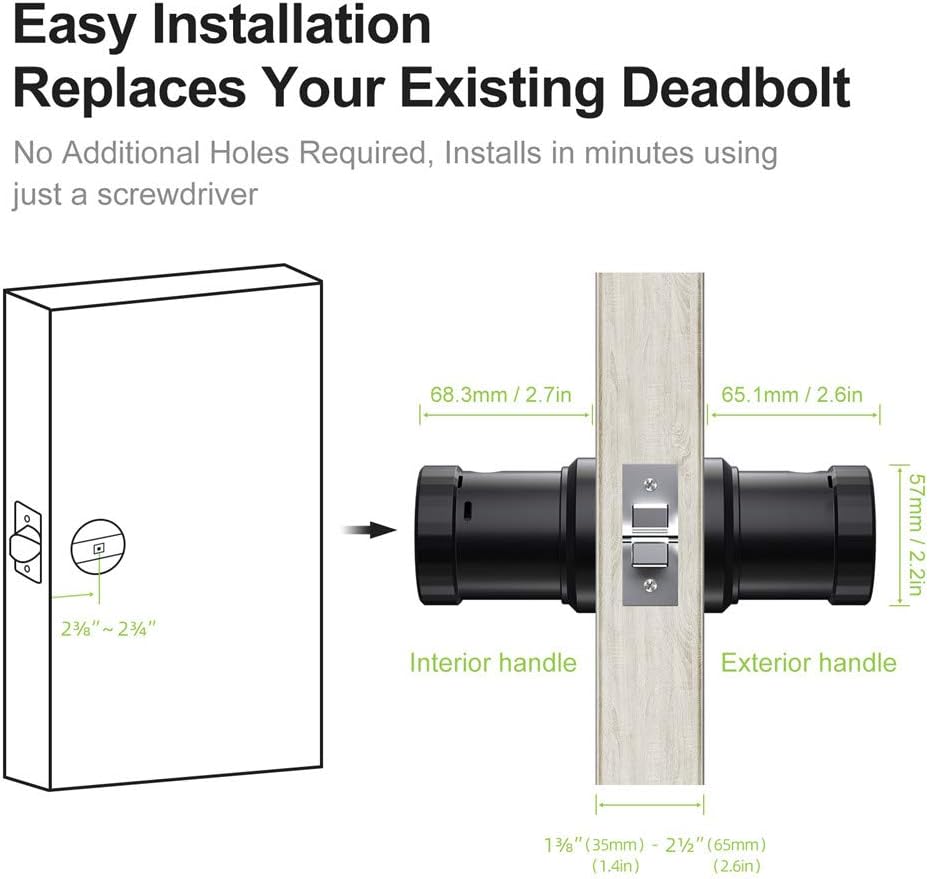
- Snadná instalace: Designed to replace existing deadbolts with minimal effort, requiring only a screwdriver and approximately 15 minutes.
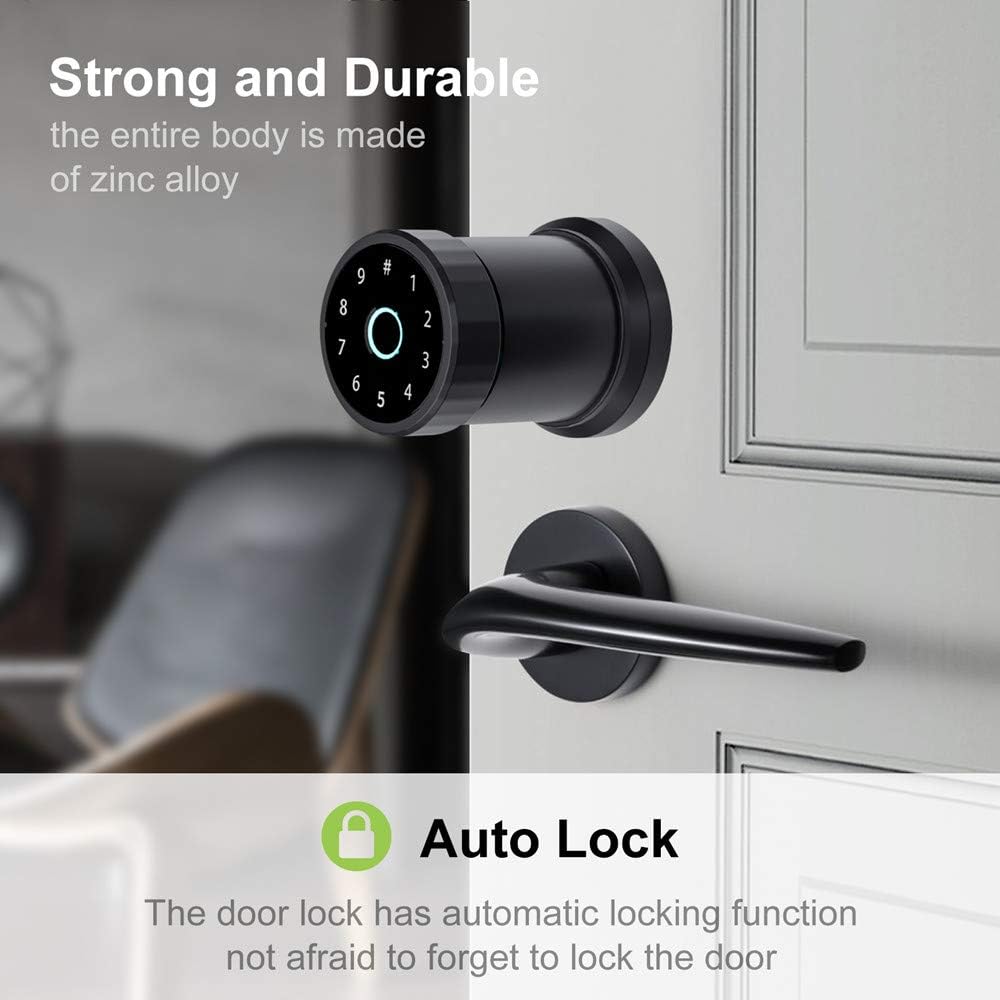
- Moderní design: Constructed from high-quality aluminum alloy with a streamlined design and intuitive LED touch panel.
- Convenience & Smart Life: Wire-free design, long battery standby (up to a year), low battery notification, and emergency power supply. Share one-time passcodes with visitors.
2. Obsah balení
Before beginning installation, please ensure all components are present and in good condition. The package typically includes:
- Exterior Handle with Fingerprint Sensor and Keypad
- Interior Handle with Battery Compartment
- Latch Mechanism (60/70mm adjustable)
- Úderná deska a šrouby
- Montážní deska
- Nouzové klíče
- Instalační šrouby a spojovací materiál
- User Manual and Installation Template

For a visual guide to the package contents, please refer to the video below:
3. Instalační příručka
The COOLOUS Smart Door Lock F20 is designed for straightforward installation. Follow these steps carefully.
3.1 Příprava dveří
Ensure your door meets the required dimensions for installation. The lock is compatible with standard American-style doors with 60/70mm latches.

3.2 Postup instalace
For a detailed visual guide on the installation process, please watch the following video. It covers installing the latch, exterior handle, interior handle, and connecting the power.
Ensure the latch is correctly oriented and secured with screws. When installing the interior handle, connect the power cord between the rear panel and the front panel, then secure the handle with screws, ensuring they are parallel to avoid jamming the lock mechanism.

4. Návod k obsluze
The COOLOUS Smart Door Lock F20 offers multiple convenient ways to unlock your door.
4.1 Metody odemykání

4.1.1 Odemknutí otiskem prstu
Place your registered fingerprint on the sensor. The lock will verify and unlock within 0.3 seconds. Up to 120 unique fingerprints can be stored.

4.1.2 Odemknutí přístupovým kódem
Enter your programmed passcode on the touchscreen keypad. The lock will verify the code and unlock the door.
4.1.3 Mobile Application (Tuya App) Unlock
Use the Tuya App on your mobile device to remotely unlock the door via Bluetooth. The app also provides access notifications and logs.

4.1.4 Odemknutí mechanickým klíčem
In case of battery depletion or electronic malfunction, use the provided emergency mechanical key to unlock the door manually.
4.2 Funkce automatického zámku
The door lock features an automatic locking function, ensuring the door is secured after a set period, preventing accidental oversight.

For a demonstration of fingerprint unlocking and the auto-lock feature, please refer to the video below:
5. Údržba
5.1 Výměna baterie
The lock is powered by 4 AAA batteries (not included). When the battery level is low, you will receive a notification. To replace the batteries:
- Remove the cover of the interior handle's battery compartment.
- Opatrně vyjměte staré baterie.
- Vložte 4 nové baterie AAA a dbejte na správnou polaritu.
- Nasaďte kryt prostoru pro baterie.
If the batteries completely deplete, use the emergency mechanical key or connect an external power source via the emergency power supply port (usually Micro-USB) to temporarily power the lock and gain access.
5.2 Čištění
To maintain the appearance and functionality of your smart lock:
- Vnější povrchy otřete měkkým, suchým hadříkem.
- Nepoužívejte abrazivní čisticí prostředky, rozpouštědla nebo chemické spreje, protože by mohly poškodit povrchovou úpravu a elektronické součástky.
- Keep the fingerprint sensor and touchscreen clean and free of debris for optimal performance.
6. Řešení problémů
If you encounter issues with your COOLOUS Smart Door Lock F20, refer to the following common troubleshooting steps:
- Zámek nereaguje: Check battery levels and replace if necessary. Ensure the power cord connection between the front and rear panels is secure.
- Otisk prstu nebyl rozpoznán: Ensure your finger is clean and dry. Try re-registering your fingerprint. Ensure the sensor is clean.
- Heslo nefunguje: Zkontrolujte zadaný přístupový kód. Ujistěte se, že klávesnice je čistá a reaguje správně.
- Tuya App connectivity issues: Ujistěte se, že máte v telefonu povoleno Bluetooth a zámek je v dosahu. Restartujte aplikaci a zkuste se znovu připojit.
- Lock mechanism stuck: Verify that the installation screws are parallel and not overtightened, which can cause internal friction.
- Upozornění na vybitou baterii: Replace batteries promptly to avoid being locked out. Use emergency key or external power if batteries are completely drained.
Pokud problémy přetrvávají i po vyzkoušení těchto řešení, kontaktujte zákaznickou podporu.
7. Specifikace produktu
| Funkce | Detail |
|---|---|
| Značka | BAREVNÝ |
| Speciální funkce | Fingerprint, Smart Lock, Touchscreen |
| Typ zámku | Tuya APP/Fingerprint/Code/Key |
| Materiál | Zinc, Aluminum |
| Doporučená použití | Zabezpečení |
| Styl | Moderní |
| Barva | Černý |
| Počet kusů | 1 |
| Typ ovladače | Ruční ovládání |
| Tvar | Kolo |
| Kontrolní metoda | App |
| Protokol připojení | Bluetooth |
| UPC | 791107928181 |
| Výrobce | COOLOUS Lock |
| Hmotnost položky | 3.98 libry |
| Rozměry balení | 10 x 6.77 x 4.76 palce |
| Baterie jsou součástí dodávky? | Žádný |
| Jsou vyžadovány baterie? | Žádný |
| ASIN | B08VDN7T63 |
| Datum první dostupnosti | 29. ledna 2021 |
8. Záruka a podpora
For warranty information and customer support, please refer to the documentation included with your product or contact COOLOUS customer service directly. Keep your purchase receipt as proof of purchase for any warranty claims.