
Varmilo VBS108
Varmilo VBS108 Lure Bot Mechanical Keyboard
Návod k použití
Zavedení
Thank you for choosing the Varmilo VBS108 Lure Bot Mechanical Keyboard. This keyboard is designed for versatility and durability, featuring triple mode connectivity (Bluetooth 5.0, 2.4GHz Wireless, and USB-C), high-quality PBT dye-sub keycaps, and Cherry MX Brown switches for a tactile typing experience. This manual provides detailed instructions for setup, operation, maintenance, and troubleshooting to ensure optimal performance and longevity of your keyboard.
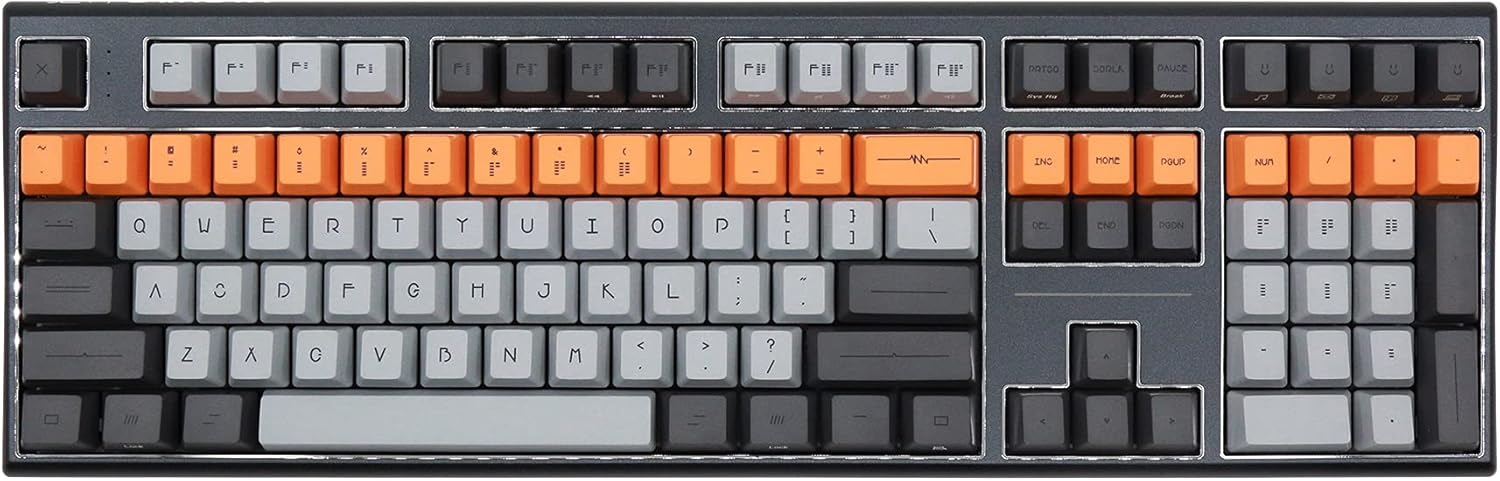
Figure 1: Varmilo VBS108 Lure Bot Mechanical Keyboard
Obsah balení
Ujistěte se prosím, že balení obsahuje všechny položky:
- Varmilo VBS108 Lure Bot Mechanical Keyboard
- Kabel USB-C na USB-A
- 2.4GHz Wireless Dongle (typically stored in the keyboard's battery compartment or a dedicated slot)
- Stahovák kláves (může být součástí balení)
- Uživatelská příručka (tento dokument)
Nastavení
The Varmilo VBS108 offers three connectivity modes: USB-C wired, 2.4GHz wireless, and Bluetooth 5.0.
1. Kabelové připojení USB-C
- Locate the USB-C port on the keyboard (usually on the top edge).
- Připojte jeden konec dodaného kabelu USB-C ke klávesnici.
- Druhý konec (USB-A) připojte k volnému portu USB v počítači.
- Klávesnice bude automaticky rozpoznána a připravena k použití.
2. Bezdrátové připojení 2.4 GHz
- Vyhledejte bezdrátový adaptér 2.4 GHz.
- Zapojte hardwarový klíč do dostupného portu USB na vašem počítači.
- Ensure the keyboard is in 2.4GHz mode (refer to the keyboard's function key combinations or a physical switch if available).
- Klávesnice by se měla připojit automaticky.
3. Připojení Bluetooth 5.0
- Ensure the keyboard is in Bluetooth pairing mode. This typically involves holding down a specific Fn key combination (e.g., Fn + 1, Fn + 2, or Fn + 3 for different profiles) until an indicator light flashes. Consult your keyboard's specific key legend for Bluetooth pairing.
- V počítači nebo zařízení otevřete nastavení Bluetooth.
- Hledat new devices and select "Varmilo VBS108" or a similar name from the list.
- Dokončete proces párování podle pokynů na obrazovce.
Provozní
The Varmilo VBS108 keyboard includes various function key combinations for enhanced control.
Function Key Combinations (Fn + Key)
- Fn + F1–F12: Multimedia controls (play/pause, volume up/down, mute, etc.). Refer to the keycap legends for specific functions.
- Fn + Win: Klávesa pro zamknutí/odemknutí systému Windows.
- Fn + levý Alt: Switch between macOS and Windows layouts (if supported).
- Fn + Q/W/E: Přepínání mezi Bluetooth Profiles (pokud existuje).
- Fn + R: Switch to 2.4GHz wireless mode.
- Fn + T: Switch to USB-C wired mode.
- Fn + Backlight Keys: Adjust backlight brightness or effects (if applicable).
Adjustable Flip-out Feet
Klávesnice je vybavena 3tage adjustable flip-out feet on the underside, allowing you to customize the typing angle for ergonomic comfort.

Figure 2: Adjustable Flip-out Feet
Údržba
Proper maintenance ensures the longevity and performance of your Varmilo keyboard.
Čištění klávesnice
- Klávesnice: Use a keycap puller to carefully remove keycaps. Clean them with a mild soap solution and a soft cloth, then rinse thoroughly and air dry completely before reattaching.
- Věc: Wipe the keyboard case with a soft, slightly damp, hadřík, který nepouští vlákna. Nepoužívejte agresivní chemikálie nebo abrazivní materiály.
- Mezi klíči: Use compressed air to remove dust and debris from between the key switches. A small brush can also be used for stubborn particles.

Figure 3: PBT Dye-Sub Keycaps
Odstraňování problémů
If you encounter issues with your Varmilo VBS108 keyboard, try the following solutions:
- Klávesnice nereaguje (kabelová): Ujistěte se, že je kabel USB-C bezpečně připojen ke klávesnici i k počítači. Zkuste jiný port USB nebo kabel.
- Klávesnice nereaguje (bezdrátová/Bluetooth):
- Zkontrolujte stav baterie.
- Ensure the keyboard is in the correct mode (2.4GHz or Bluetooth).
- For 2.4GHz, ensure the dongle is properly inserted and try a different USB port.
- For Bluetooth, unpair and re-pair the keyboard with your device. Ensure your device's Bluetooth is enabled.
- Klíče se neregistrují: Remove the keycap and check for any obstructions around the switch. Clean the area with compressed air.
- Přerušované připojení: Ensure there are no major sources of interference (e.g., other wireless devices) near the keyboard or dongle.
- Aktualizace firmware: Check the official Varmilo website for any available firmware updates for your model, which can resolve known issues.
Specifikace
| Funkce | Detail |
|---|---|
| Značka | Varmilo |
| Model | VBS108 Lure Bot |
| Technologie připojení | Bluetooth 5.0, 2.4GHz Wireless, USB-C |
| Typ přepínače | Třešňová MX hnědá |
| Materiál krytky klíče | PBT subtilizér |
| Počet klíčů | 104 |
| Kompatibilní zařízení | PC |
| Barva | Cherry MX Brown (keyboard color scheme) |
| Speciální funkce | 3-Stage Adjustable Flip-out Feet |
Záruka a podpora
Varmilo products are designed for quality and reliability. For information regarding warranty coverage, technical support, or service, please refer to the warranty card included with your product or visit the official Varmilo webwebu. Můžete se také obrátit na prodejce, od kterého jste produkt zakoupili.
Ask a question about this manual
Ask about setup, troubleshooting, compatibility, parts, safety, or missing instructions. Manuals+ will review the question and use this page’s manual context to help answer it.