
Amazon Basics LSMICRO128GU3
Amazon Basics Micro SDXC Memory Card User Manual
Model: LSMICRO128GU3 | Brand: Amazon Basics
Konec produktuview
The Amazon Basics Micro SDXC Memory Card with Full Size Adapter offers reliable and high-speed storage for a wide range of devices. Designed for optimal performance, it supports high-resolution photos, Full HD/4K video recording, and efficient app usage. Its robust construction ensures lasting reliability against various environmental factors.

Image: Amazon Basics 128GB Micro SDXC Memory Card with its full-size adapter.
Klíčové vlastnosti
- Široká kompatibilita: Compatible with smartphones, tablets, cameras, GoPro/action cameras, laptops, desktop computers, DSLRs, drones, Nintendo Switch/other portable consoles, and more. Includes a full-size SD adapter for versatile use.
- High Quality Storage: Ideal for high-resolution photos, and for recording and storing Full HD/4K videos and any other data type.
- Ultra Fast Performance: Features read speeds up to 100MB/s and write speeds up to 60MB/s (varies by memory size). UHS, U3, Class 10, and A2 speed classes ensure an optimal smartphone experience.
- Lasting Reliability: Designed to be shockproof, IPX6 waterproof, temperature-proof (-10° to 80°C), X-Ray-proof, and magnetic-proof, ensuring data safety in various conditions.

Obrázek: Overview of the memory card's key features including compatibility, speed, and durability.
Nastavení a instalace
The Amazon Basics Micro SDXC Memory Card is designed for easy installation in compatible devices. It comes with a full-size SD adapter for broader compatibility.
Vložení karty Micro SD:
- Identifikujte slot: Locate the Micro SD card slot on your device (e.g., smartphone, tablet, camera, laptop).
- Orient Card: Ensure the metal contacts on the Micro SD card are facing the correct direction, typically aligning with the contacts inside the device's slot.
- Jemně vložte: Gently push the Micro SD card into the slot until it clicks into place. Do not force the card.
Using the Full-Size SD Adapter:
- Insert Micro SD: Slide the Micro SD card into the designated slot on the full-size SD adapter until it locks securely.
- Vložkový adaptér: Insert the adapter with the Micro SD card into a device that uses a standard SD card slot (e.g., DSLR camera, laptop with an SD card reader).
- Zamykací spínač (volitelný): Some SD adapters have a lock switch on the side. Ensure it is in the "unlocked" position to allow writing to the card.

Image: Demonstrates inserting the Micro SD card into the adapter and then into a DSLR camera.

Image: Illustrates inserting the Micro SD card with its adapter into a laptop's SD card slot.
Návod k obsluze
Once installed, your Amazon Basics Micro SDXC Memory Card is ready for use. Its high-speed capabilities make it suitable for demanding tasks.
Ukládání a přenos dat:
- Photos & Videos: Use the card to store high-resolution photos and record Full HD or 4K videos directly from your camera or smartphone.
- Výkon aplikace: The A2 rating ensures faster app loading and performance when running applications directly from the card on compatible smartphones and tablets.
- File Převod: Převod files between your device and a computer quickly, thanks to read speeds up to 100MB/s.
Kompatibilita zařízení:
This Micro SD card is widely compatible with various electronic devices, expanding your storage options.

Image: Visual representation of various devices compatible with the Micro SD card.
Pokyny pro kapacitu:
Refer to the table below for estimated storage capacities for photos and video recordings based on card size.
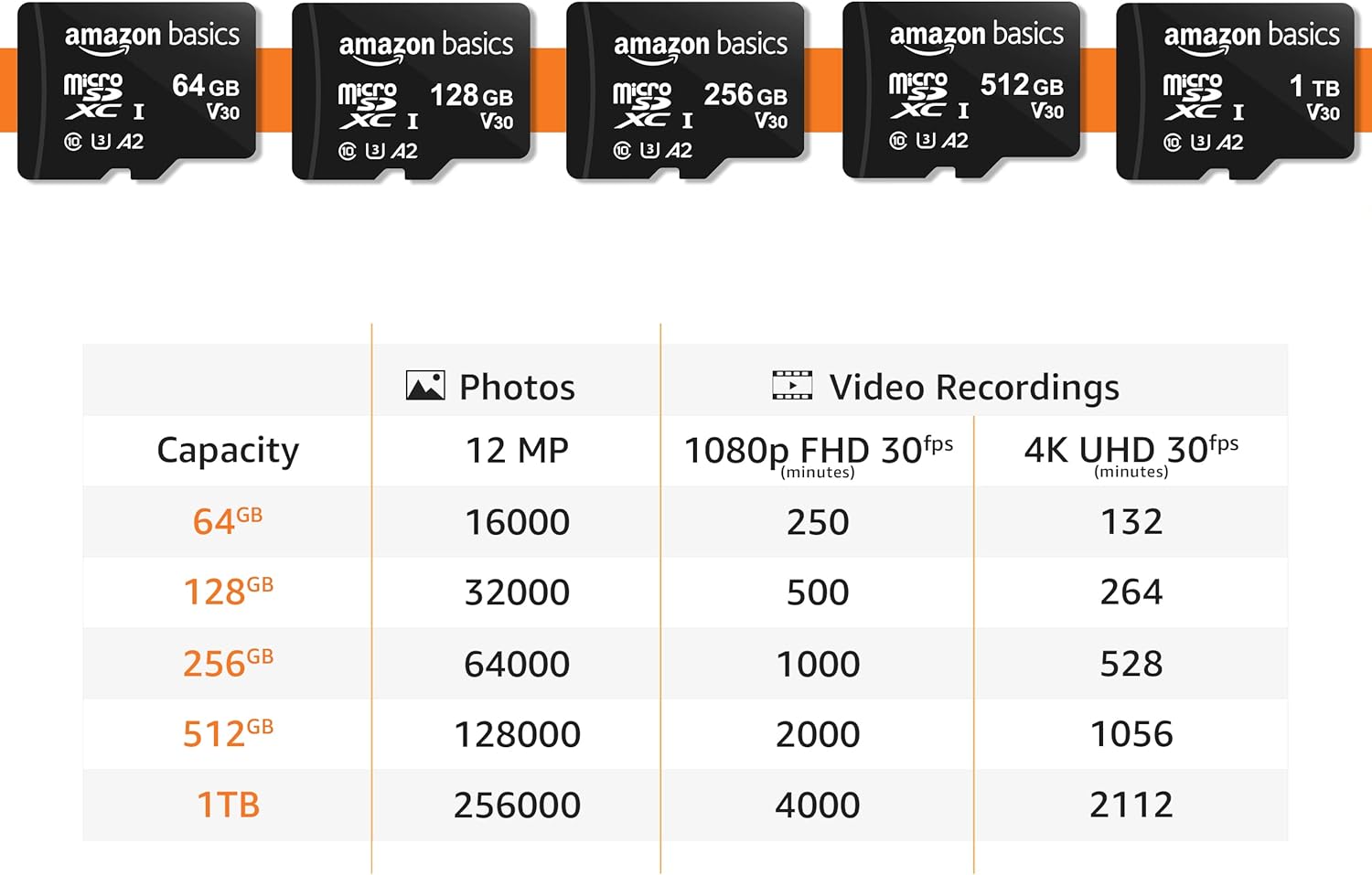
Image: Table detailing estimated storage capacities for photos and videos across different card sizes.
Údržba a péče
The Amazon Basics Micro SDXC Memory Card is built for durability. Follow these guidelines to ensure its longevity and data integrity:
- Fyzická ochrana: Kartu neohýbejte, nepouštějte ji na zem ani na ni netlačte nadměrnou silou.
- Odolnost vůči prostředí: The card is shockproof, IPX6 waterproof, temperature-proof (-10° to 80°C), X-Ray-proof, and magnetic-proof. While robust, avoid unnecessary exposure to extreme conditions.
- Čistota: Udržujte kovové kontakty čisté a bez prachu a nečistot. V případě potřeby čištění použijte měkký, suchý hadřík.
- Bezpečné odstranění: Always safely eject the card from your device or computer before physically removing it to prevent data corruption.

Image: Visuals demonstrating the card's resistance features against various elements.
Odstraňování problémů
If you encounter issues with your Micro SDXC Memory Card, try the following common troubleshooting steps:
- Karta nebyla rozpoznána:
- Ujistěte se, že je karta zcela zasunuta do zařízení nebo adaptéru.
- Check if your device supports the Micro SDXC format and the specific capacity (e.g., if a device only supports 64GB, it may not recognize 128GB cards).
- Try the card in another compatible device to rule out a device-specific issue.
- If using the adapter, ensure the lock switch is in the unlocked position.
- Pomalý výkon:
- Ensure your device's card reader supports UHS-I speeds.
- Free up space on the card; performance can decrease when storage is nearly full.
- Format the card (back up data first!) to resolve potential file fragmentace systému.
- Poškození dat:
- Před vyjmutím karty vždy bezpečně vyjměte.
- Zabraňte přerušení přenosu dat.
- Pokud jsou data poškozena, může být možností software pro obnovu dat, ale úspěch není zaručen.
Specifikace
| Specifikace | Detail |
|---|---|
| Značka | Základy Amazonu |
| Typ paměti Flash | Micro SDXC |
| Kapacita paměti | 128 GB |
| Rychlost čtení | Až 100 XNUMX MB/s |
| Rychlost zápisu | Až 60 XNUMX MB/s |
| Hardwarové rozhraní | microSDXC |
| Třída rychlosti Secure Digital Association | Class 10, U3, A2 |
| Kompatibilní zařízení | Laptop, Gaming Console, Personal Computer, Tablet, Drone, Camera, Smartphone |
| Barva | Černý |
| Číslo modelu položky | LSMICRO128GU3 |
| Hmotnost položky | 0.283 unce (8.02 gramů) |
| Rozměry produktu | 0.59 x 0.43 x 0.1 palce (1.69"D x 0.3"Š) |
| Země původu | Tchaj-wan |
| První dostupný termín | 10. srpna 2021 |
Záruka a podpora
For detailed safety information and warranty details, please refer to the official documents:
Pro další pomoc prosím navštivte Základní obchod Amazonu.
Ask a question about this manual
Ask about setup, troubleshooting, compatibility, parts, safety, or missing instructions. Manuals+ will review the question and use this page’s manual context to help answer it.