
Timex TW5M44500
Timex Ironman Classic Quartz Watch User Manual
Model: TW5M44500
Zavedení
This manual provides instructions for the Timex Ironman Classic Quartz Watch, Model TW5M44500. This watch is designed for durability and ease of use, featuring a five-button interface, digital display, and INDIGLO® backlight. It is built to be lightweight and water-resistant, making it suitable for various activities.
Key features include a sports-stopwatch with 30-lap memory, customizable alarm, and countdown timer.
Konec produktuview

Obrázek 1: Přední strana View. This image displays the watch face, highlighting the digital display, the "TIMEX" and "IRONMAN" branding, and the five control buttons: SET/RECALL (top left), MODE (bottom left), INDIGLO (top right), STOP/RESET (bottom right), and START/SPLIT (center bottom).

Image 2: Angled Front View. This perspective shows the watch at an angle, emphasizing the matte green resin case with black accents and the black resin strap. The digital display is visible, along with the prominent buttons.

Image 3: Side Profile. Tento obrázek poskytuje jasný view boční strany hodinekfile, illustrating the thickness of the case and the design of the resin strap as it extends from the watch body.

Image 4: Case Back. Zadní část view of the watch highlights the stainless steel case back. Engravings indicate "IRONMAN", "WATER RESISTANT 100 METERS", "CR2025 BATTERY", and "STAINLESS STEEL BACK", along with the Timex webmísto.
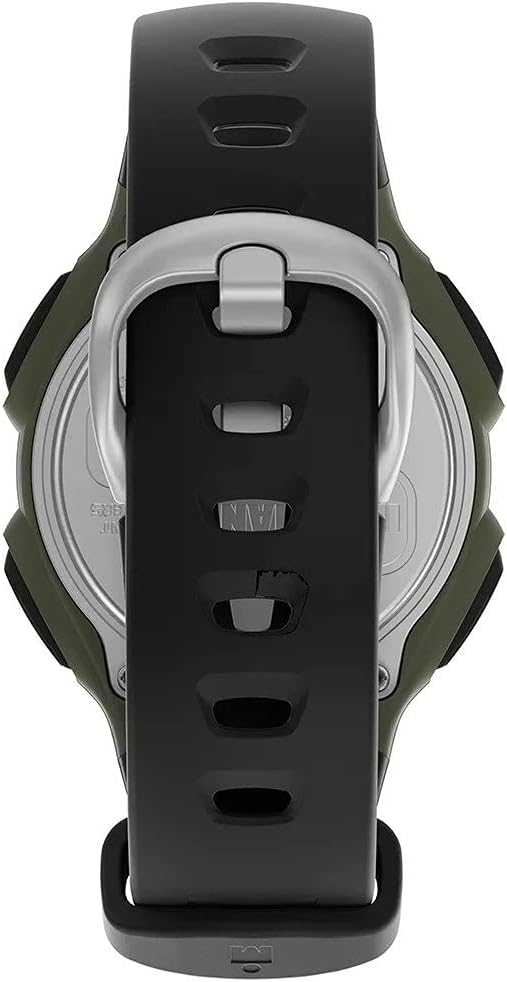
Image 5: Strap and Buckle. This image shows the watch from the back with the strap laid flat, providing a clear view of the buckle and the textured design of the resin strap.

Image 6: On Wrist. This photograph demonstrates how the watch appears when worn on a wrist, giving a sense of its size and fit.
Nastavení
Nastavení času a data
- Stiskněte a podržte NASTAVIT/VYVOLAT tlačítko, dokud nezačne blikat zobrazení času.
- Stiskněte tlačítko MODE button to cycle through hours, minutes, seconds, year, month, and day settings.
- Použijte START/ROZDĚLENÍ a STOP/RESET buttons to adjust the flashing value up or down.
- Jakmile jsou všechna nastavení správná, stiskněte tlačítko NASTAVIT/VYVOLAT znovu stiskněte tlačítko pro ukončení režimu nastavení.
Aktivace nočního světla INDIGLO®
Stiskněte tlačítko INDIGLO tlačítko (vpravo nahoře) pro snadné osvětlení ciferníku viewing in low light conditions. The light will remain on for a few seconds.
Návod k obsluze
Používání stopek
- Stiskněte tlačítko MODE button until "CHRONO" or "STOPWATCH" appears on the display.
- Stiskněte START/ROZDĚLENÍ začít měřit čas.
- Stiskněte START/ROZDĚLENÍ again to record a lap time without stopping the main timer. The watch can store up to 30 lap times.
- Stiskněte STOP/RESET to pause the stopwatch. Press again to resume, or hold to reset to zero.
- To recall lap times, press the NASTAVIT/VYVOLAT button while in stopwatch mode.
Nastavení a používání budíku
- Stiskněte tlačítko MODE tlačítko, dokud se nezobrazí „ALARM“.
- Stiskněte a podržte NASTAVIT/VYVOLAT vstoupíte do režimu nastavení budíku.
- Použití START/ROZDĚLENÍ a STOP/RESET pro úpravu času budíku.
- Stiskněte MODE to toggle the alarm on/off. An alarm icon will appear when active.
- Stiskněte NASTAVIT/VYVOLAT uložit a ukončit.
Použití odpočítávacího časovače
- Stiskněte tlačítko MODE button until "TIMER" appears.
- Stiskněte a podržte NASTAVIT/VYVOLAT pro nastavení požadované doby odpočítávání.
- Použití START/ROZDĚLENÍ a STOP/RESET pro nastavení hodin, minut a sekund.
- Stiskněte NASTAVIT/VYVOLAT uložit.
- Stiskněte START/ROZDĚLENÍ zahájit odpočítávání.
- Stiskněte STOP/RESET to pause/resume or hold to reset.
Údržba
Čištění hodinek
Pravidelně čistěte hodinky měkkým hadříkemamp cloth. For stubborn dirt, a mild soap solution can be used, followed by rinsing with clean water. Ensure the watch is completely dry before storage.
Voděodolnost
This watch is water resistant to 100 meters (330 feet). This makes it suitable for swimming, snorkeling, and recreational scuba diving. Do not press any buttons while the watch is submerged to maintain water resistance.
Výměna baterie
The watch uses 1 Lithium Metal battery (CR2025). When the display dims or functions become erratic, the battery may need replacement. It is recommended to have the battery replaced by a qualified watch technician to ensure proper sealing and maintain water resistance.
Odstraňování problémů
- Displej je prázdný nebo tmavý: Baterie může být slabá nebo vybitá. Vyměňte baterii.
- Tlačítka nereagují: Ensure the watch is not in a locked mode (if applicable, though not a stated feature for this model). If issues persist, a battery replacement or professional inspection may be required.
- Čas je nesprávný: Re-set the time and date following the "Setting Time and Date" instructions. Ensure the correct AM/PM setting is selected.
- Voda uvnitř hodinek: Immediately take the watch to a qualified service center. Do not attempt to open the watch yourself, as this will void the warranty and compromise water resistance.
Specifikace
| Funkce | Detail |
|---|---|
| Číslo modelu | TW5M44500 |
| Materiál pouzdra | Pryskyřice |
| Velikost pouzdra | 38 mm |
| Materiál popruhu | Pryskyřice |
| Voděodolnost | 100 metrů (330 stop) |
| Typ baterie | Lithium-kovová baterie CR2025 (součástí balení) |
| Rozměry produktu | 4 x 10 x 6 cm |
| Hmotnost | 70 g |
| Vlastnosti | Digital display, Sports-stopwatch (30 lap memory), Customizable alarm, Countdown timer, INDIGLO® backlight |
Záruka a podpora
For detailed warranty information and customer support, please refer to the documentation included with your product or visit the official Timex website. Timex provides support for product inquiries, service, and repairs.
You can often find additional resources and FAQs on the manufacturer's support pages.
Manufacturer: Timex Group