
XINMENG MK-17
XINMENG MK-17 Mechanical Keyboard and Honeycomb Mouse Combo User Manual
Model: MK-17 | Brand: XINMENG
Zavedení
This manual provides detailed instructions for the setup, operation, and maintenance of your XINMENG MK-17 Mechanical Keyboard and Honeycomb Mouse Combo. Please read this manual thoroughly before using the product to ensure optimal performance and longevity.
Obsah balení
- 1 x XINMENG Mechanical Keyboard
- 1 x USB Type-C Cable (for keyboard)
- 1 x Keyboard English Manual
- 1 x stahovák klíčů
- 1 x XINMENG Gaming Mouse
- 1 x Mouse English Manual
- 1 x Gaming Mousepad

Image: The complete XINMENG Mechanical Keyboard and Mouse Combo, including the keyboard, honeycomb mouse, gaming mousepad, and a sample blue mechanical switch.
Pokyny pro nastavení
1. Připojení klávesnice
- Vyhledejte port USB Type-C na klávesnici.
- Connect the provided USB Type-C cable to the keyboard.
- Zapojte druhý konec kabelu USB do volného portu USB na počítači.
- Klávesnice bude automaticky rozpoznána vaším operačním systémem.
2. Připojení myši
- Locate the USB connector of the mouse cable.
- Zapojte konektor USB do volného portu USB na vašem počítači.
- Operační systém myš automaticky rozpozná.
3. Systémové požadavky
- PC/MAC with a USB port
- Operating Systems: Windows 7/8/10/Vista/XP, Mac OS (Note: Multimedia keys may not be fully functional on Mac OS)
Ovládání klávesnice
Ovládání podsvícení RGB
The keyboard features 18 distinct RGB backlight modes. You can adjust the backlight brightness and breathing speed, and program user-defined backlight settings.
- Změna režimů: Use specific key combinations (refer to keyboard legends or included mini-manual for exact keys) to cycle through the 18 backlight modes.
- Nastavení jasu: Adjust backlight brightness through dedicated keys or FN key combinations.
- Rychlost dýchání: Modify the speed of breathing effects using specific key combinations.
- User-Defined Backlight: The keyboard supports programmable backlight settings for personalized lighting.
Volume Wheel and Independent Function Keys
The keyboard includes a dedicated volume wheel and several independent function keys for quick access to system controls.
- Kolečko hlasitosti: Rotate the wheel to adjust the system volume. Pushing the wheel may mute/unmute.
- Independent Keys: Access functions such as shutdown, sleep, search, calculator, and mute directly.

Image: Detail of the keyboard's dedicated volume wheel and mute button, allowing for quick audio control.
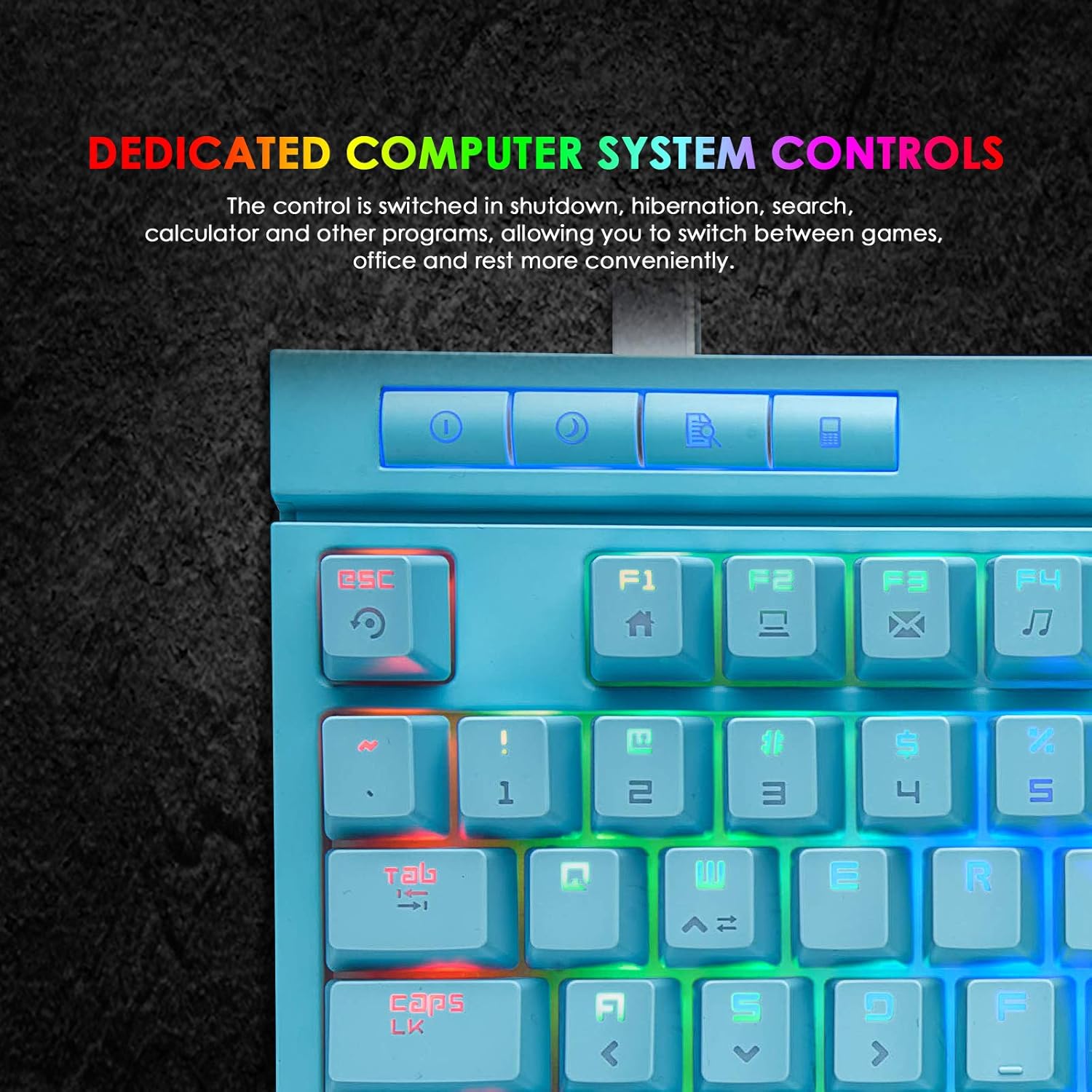
Image: Detail of the keyboard's dedicated system control keys for functions like shutdown, sleep, search, and calculator.
Multimedia Shortcuts and Anti-Ghosting
The keyboard supports multimedia shortcuts and features full anti-ghosting for accurate input.
- Multimediální zkratky: Použijte FN klíč v kombinaci s F1 přes F8 for various multimedia functions.
- Anti-Ghosting: All keys feature anti-ghosting technology, ensuring that multiple simultaneous key presses are registered accurately.
- Win Lock Key: Stiskněte FN + Vyhrát to disable the Windows key, preventing accidental interruptions during gaming.
- Interchangeable Keys: The keyboard allows for interchangeable WASD and arrow keys.

Image: The keyboard highlighting multimedia function buttons (FN + F1-F8) and the full anti-ghosting capability.
Mechanické spínače
The keyboard is equipped with classic Blue Switches, known for their tactile feedback and audible click sound.
- Typ přepínače: Modrý spínač
- Hmatová zpětná vazba: Provides a distinct bump sensation when a key is actuated.
- Audible Click: Produces a clear "click" sound upon actuation.
- Klíčová síla: 60 ± 20 g
- Stroke Travel: 2.2 ± 0.6 mm
- Klíčový život: 50 milionůkrát

Obrázek: Detailní záběr view of the blue mechanical switches, illustrating their design and characteristics.
Ovládání myši
Úprava DPI
The gaming mouse features a high-precision optical sensor with adjustable DPI settings.
- Úrovně DPI: 6 adjustable DPI levels (800-1600-2400-3200-4800-6400).
- Tlačítko DPI: Press the dedicated DPI button on the mouse to cycle through the available DPI settings.
- Optický senzor: Sunplus SPCP199 for accurate tracking.
Programmable Buttons and Design
The mouse is designed for gaming with programmable buttons and a lightweight honeycomb shell.
- tlačítka: 6 programmable buttons (Left, Right, Scroll Wheel, DPI, Backward, Forward) + 1 bottom backlit switch button.
- Voštinová skořápka: The O-shaped perforated design reduces weight (69g ± 3g), improves heat dissipation, and extends service life.
- Ergonomický design: Shaped to fit comfortably in the palm for extended use.
- Kabel: Long braided paracord cable for flexible movement.

Image: The XINMENG lightweight RGB gaming mouse, showcasing its honeycomb shell, rainbow backlight, 6-level DPI, wide compatibility, plug & play functionality, and ergonomic design.
Herní podložka pod myš
The included gaming mouse pad is designed to complement the mouse for optimal performance.
- Velikost: 12.6 x 9.4 inches (approximately 32 x 24 cm).
- Povrch: Silk-processed cloth surface for smooth and precise mouse movements.
- Sledování: Advanced multi-layer surface with microscopic points for ultra-precise tracking.
- Báze: Underside made of natural processed foam rubber for stability on various surfaces.
- Trvanlivost: Stitched edges prevent damage and curlIng.
- Údržba: Waterproof, washable, and easy to clean.

Image: The XINMENG keyboard, honeycomb mouse, and gaming mousepad arranged on a desk, demonstrating the complete setup.
Údržba
Keyboard Cleaning
- Před čištěním odpojte klávesnici od počítače.
- Use the provided key puller to carefully remove keycaps for deeper cleaning.
- Otřete klávesy a povrch klávesnice měkkým hadříkemamp hadříkem. Zabraňte nadměrné vlhkosti.
- K odstranění prachu a nečistot z prostoru mezi klávesami použijte stlačený vzduch.
- Před opětovným připojením se ujistěte, že je klávesnice zcela suchá.
Mouse Cleaning
- Odpojte myš od počítače.
- Otřete povrch myši měkkým, lehce navlhčeným hadříkem.amp tkanina.
- Use a cotton swab or compressed air to clean the optical sensor area.
- Před opětovným připojením se ujistěte, že je myš zcela suchá.
Mouse Pad Cleaning
- The mouse pad is waterproof and washable.
- Ruční mytí jemným mýdlem a vodou.
- Rinse thoroughly and air dry completely before use.
Odstraňování problémů
Keyboard Issues
- Klávesnice nereaguje:
- Ujistěte se, že je kabel USB typu C bezpečně připojen ke klávesnici i k počítači.
- Zkuste zapojit klávesnici do jiného USB portu na počítači.
- Restartujte počítač.
- Podsvícení nefunguje nebo je nesprávné:
- Check if the backlight is turned off or set to the lowest brightness. Adjust using the dedicated keys or FN combinations.
- Cycle through different backlight modes to see if the issue persists.
- Klíče se neregistrují:
- Očistěte postižené klávesy od nečistot.
- Ujistěte se, že jsou klávesy správně usazeny na přepínačích.
Mouse Issues
- Mouse not moving or tracking:
- Ujistěte se, že je kabel USB pevně připojen k počítači.
- Zkuste zapojit myš do jiného USB portu.
- Vyčistěte optický senzor na spodní straně myši.
- Ensure you are using the mouse on a suitable surface, preferably the included mouse pad.
- DPI se nemění:
- Press the DPI button firmly to cycle through settings.
- Ensure the mouse is properly connected and recognized by the system.
Specifikace
Specifikace klávesnice
| Množství klíčů | 87 kláves |
| Typ hřídele | Modrý spínač |
| Rozhraní | Kabel USB typu C |
| Velikost klávesnice | 395 x 200 x 54 mm |
| Hmotnost klávesnice | 1200 g |
| Systémové požadavky | PC/MAC with USB port, Windows 7/8/10/Vista/XP |
| Speciální funkce | RGB Backlit, Volume Wheel, Independent Function Keys, Anti-Ghosting, Win Lock Key, Lightweight, Wrist Rest |
Specifikace myši
| Optický senzor | Sunplus SPCP199 |
| Počet tlačítek | 6 Programmable Buttons + 1 Bottom Backlit Switch Button |
| Úrovně DPI | 800-1600-2400-3200-4800-6400 |
| Hmotnost myši | 69 g ± 3 g |
| Velikost myši | 128.5 x 67 x 38 mm |
| Délka kabelu | 170 cm |
| Kompatibilní systém | Windows 2000/XP/WIN 7/WIN8/WIN10 Vista 32bit, Mac OS or Latest |
| Orientace rukou | Právo |
Obecné rozměry

Image: Diagram showing the dimensions of the XINMENG keyboard (360mm width, 170mm depth) and mouse (128.5mm length, 67mm width).
Záruka a podpora
Informace o záruce
Specific warranty details for the XINMENG MK-17 Mechanical Keyboard and Honeycomb Mouse Combo are typically provided at the point of purchase or within the product packaging. Please retain your proof of purchase for warranty claims. For detailed warranty terms and conditions, please contact your retailer or the manufacturer directly.
Zákaznická podpora
If you encounter any issues or have questions regarding your XINMENG product that are not covered in this manual, please contact XINMENG customer support or your product retailer for assistance. Contact information can usually be found on the manufacturer's official webmístě nebo na obalu produktu.
Ask a question about this manual
Ask about setup, troubleshooting, compatibility, parts, safety, or missing instructions. Manuals+ will review the question and use this page’s manual context to help answer it.