
1. Úvod
This manual provides instructions for the proper setup, operation, and maintenance of your Decdeal J900 USB Wired Gaming Mouse. Please read this manual thoroughly before using the product to ensure optimal performance and longevity.
2. Vlastnosti produktu
- Nastavitelné DPI: Supports 800/1600/2400/3200/4800/6400 DPI settings for precise control.
- RGB podsvícení: Features 7 programmable RGB backlight modes for customizable visual effects.
- Ergonomický design: Engineered for comfortable hand feel, reducing fatigue during extended use.
- Honeycomb Hollow Design: Promotes ventilation and cooling, preventing hot hands and palms.
- Plug and Play: USB powered, no additional drivers required for operation.
- Odolné spínače: Equipped with switches rated for 20 million clicks.

Obrázek 2.1: Boční profíkfile of the Decdeal J900 mouse, detailing its ergonomic design, maximum 6400 DPI, customizable RGB lighting, 5G laser sensor, and 1000Hz polling rate for responsive performance.
3. Nastavení
- Unpack the Decdeal J900 USB Wired Gaming Mouse from its packaging.
- Vyhledejte volný USB port na vašem počítači (stolním počítači nebo notebooku).
- Zasuňte USB konektor myši do USB portu.
- The mouse is plug-and-play; no additional software or drivers are required for basic functionality. The operating system will automatically detect and install the necessary components.
4. Návod k obsluze
4.1. Nastavení DPI
The Decdeal J900 mouse features six adjustable DPI levels to suit various tasks and preferences. The DPI can be cycled through using the dedicated DPI button located on the top of the mouse, behind the scroll wheel.
- Press the DPI button to cycle through the available settings: 800, 1600, 2400, 3200, 4800, and 6400 DPI.
- Each DPI level may correspond to a specific LED color indicator (refer to Figure 4.1 for details).

Figure 4.1: This diagram shows the six adjustable DPI levels (800, 1600, 2400, 3200, 4800, 6400) of the Decdeal J900 mouse, indicating how to cycle through them.
4.2. RGB Backlight Modes
The mouse offers 7 programmable RGB backlight modes. These modes can be changed using the RGB light mode switch located on the underside of the mouse.
- Flip the mouse over to locate the RGB light mode switch.
- Press the switch to cycle through different lighting effects, including Rainbow, DPI Color Breath, Keep Light On, Close, Random Leisure, Random Sleep, and Random Sport modes.
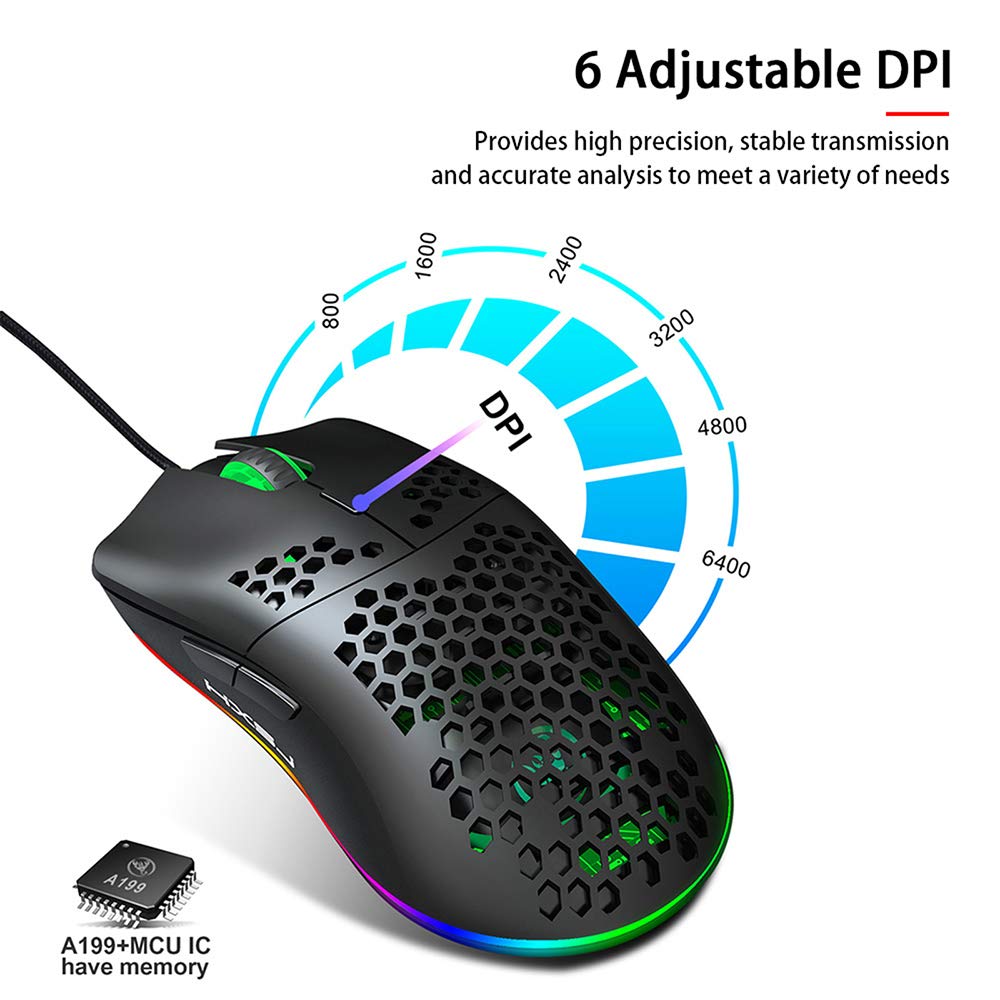
Figure 4.2: A hand is shown pressing the dedicated RGB light mode switch located on the underside of the Decdeal J900 mouse, demonstrating how to change lighting effects.

Figure 4.3: This image illustrates the adjustable DPI settings and various LED light modes available on the Decdeal J900 mouse.
5. Údržba
To ensure the longevity and optimal performance of your Decdeal J900 mouse, follow these maintenance guidelines:
- Čištění: K otření povrchu myši použijte měkký, suchý hadřík. V případě odolných nečistot použijte lehceamp Lze použít hadřík a ujistit se, že se do vnitřních součástí nedostane vlhkost. Nepoužívejte agresivní chemikálie ani abrazivní čisticí prostředky.
- Péče o kabely: Avoid bending or twisting the USB cable excessively. Do not pull the cable to disconnect the mouse; always grasp the USB connector.
- Skladování: Pokud myš nepoužíváte, skladujte ji v čistém a suchém prostředí mimo dosah extrémních teplot a přímého slunečního záření.
6. Řešení problémů
If you encounter issues with your Decdeal J900 mouse, refer to the following common solutions:
- Myš nereaguje:
- Ujistěte se, že je kabel USB bezpečně připojen k portu USB počítače.
- Zkuste připojit myš k jinému USB portu.
- Restartujte počítač.
- Vyzkoušejte myš na jiném počítači, abyste zjistili, zda je problém s myší nebo s počítačem.
- DPI se nemění:
- Ujistěte se, že stisknete správné tlačítko pro nastavení DPI.
- Check if the mouse is properly connected and powered.
- RGB Lights Not Working/Changing:
- Verify the RGB light mode switch on the underside of the mouse is being pressed correctly.
- Ensure the mouse is receiving power via the USB connection.
7. Specifikace
| Značka | Dedecdeal |
| Model | J900 |
| Technologie připojení | Kabel USB |
| Technologie detekce pohybu | Optický |
| Nastavitelný DPI | 800/1600/2400/3200/4800/6400 |
| Podsvícení | RGB (7 režimů) |
| Orientace rukou | Pravá ruka |
| Rozměry produktu | 15 x 10 x 5 cm |
| Hmotnost položky | 150 g |
| Kompatibilní operační systémy | Linux, Windows 7, Windows XP (a novější verze) |

Figure 7.1: An exploded diagram of the Decdeal J900 mouse, revealing its internal components such as the left button, Gundam 6400DPI sensor, transparent roller, ten-million-life microswitch, PCB circuit board, tail logo, RGB marquee glow ring, hollow base, and UPE foot sticker.
8. Záruka a podpora
The Decdeal J900 USB Wired Gaming Mouse comes with a standard manufacturer's warranty. For specific warranty terms, duration, and support inquiries, please refer to the warranty card included with your product or contact Decdeal customer service directly. Keep your purchase receipt as proof of purchase for warranty claims.


