
1. Konec produktuview
The KAIDI KD-763 is a wired gaming headset designed for use with the PlayStation 4 (PS4) console and other compatible devices with a 3.5mm audio jack. It features over-ear cups for immersive sound, a rotary microphone for clear communication, and an inline volume control for convenient audio adjustments. The headset also includes an LED lighting effect, typically powered via a USB connection.
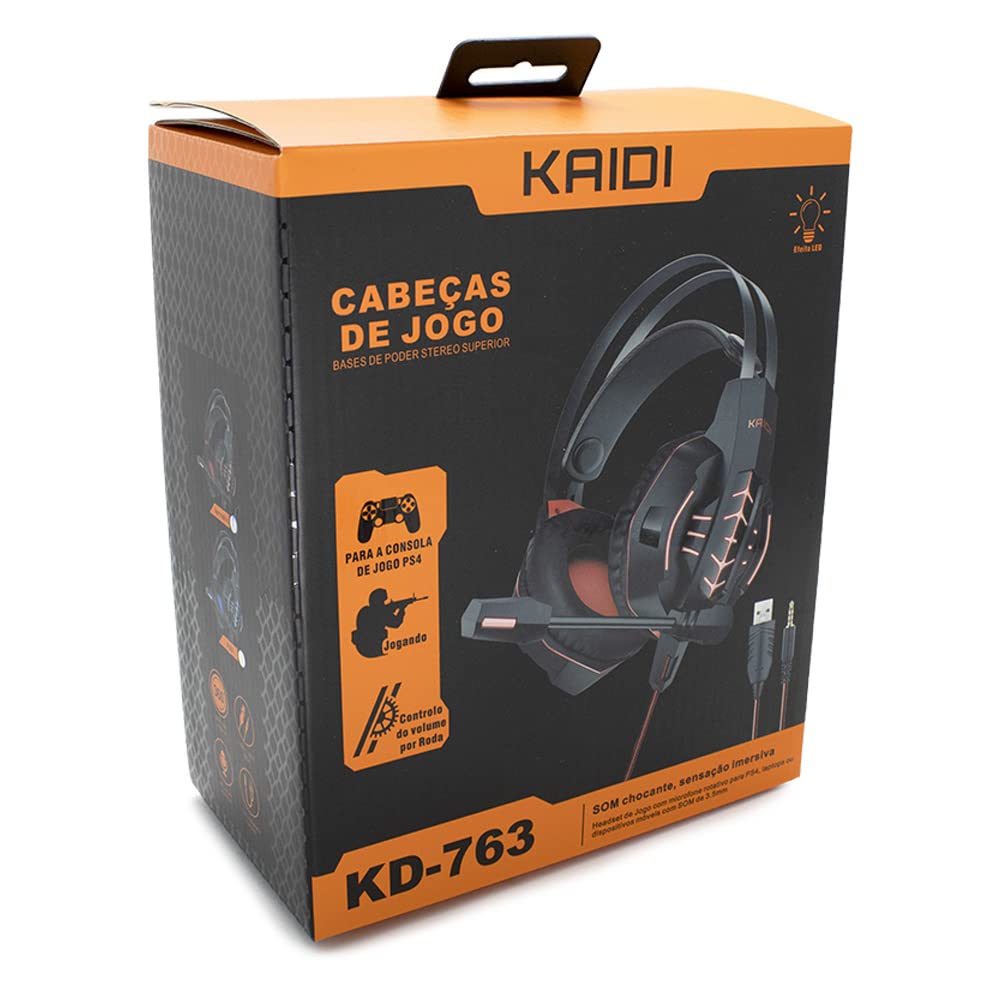
Obrázek 1.1: The KAIDI KD-763 PS4 Gaming Headset packaging, showing the headset, its features, and compatibility with PS4.
2. Bezpečnostní informace
- Vyhněte se delšímu poslechu při vysoké hlasitosti, abyste předešli poškození sluchu.
- Nevystavujte sluchátka extrémním teplotám, vlhkosti ani přímému slunečnímu záření.
- Chraňte sluchátka před vodou a jinými kapalinami.
- Nepokoušejte se rozebírat ani upravovat sluchátka. Mohlo by dojít ke zrušení záruky a poškození.
- Čistěte sluchátka pouze měkkým, suchým hadříkem.
- Uchovávejte mimo dosah dětí.
3. Obsah balení
Po otevření zkontrolujte obsah balení. Pokud některé položky chybí nebo jsou poškozené, obraťte se na prodejce.
- KAIDI KD-763 Gaming Headset
- Uživatelská příručka (tento dokument)
4. Průvodce nastavením
- Connect to PS4 Controller: Locate the 3.5mm audio jack on your PS4 controller. Insert the 3.5mm connector from the KD-763 headset firmly into this port.
- Powering LED Lights (Optional): If your headset features LED lighting, connect the USB connector from the headset to an available USB port on your PS4 console or a compatible USB power adapter. The LED lights will illuminate once connected.
- Nastavení velikosti headsetu: Extend or retract the headband to ensure the earcups sit comfortably and securely over your ears. The over-ear design should fully enclose your ears for optimal sound isolation.
- Pozice mikrofonu: Adjust the flexible rotary microphone boom to a position near your mouth for clear voice pickup. Ensure it is not obstructing your vision.
- Configure PS4 Audio Settings:
- Přejít na Nastavení > Zařízení > Zvuková zařízení on your PS4.
- Soubor Vstupní zařízení to "Headset (Controller)".
- Soubor Výstupní zařízení to "Headset (Controller)".
- Soubor Výstup do sluchátek to "All Audio" for full game and chat sound.
- Upravit Ovládání hlasitosti (sluchátka) na pohodlnou úroveň.
5. Návod k obsluze
5.1. Ovládání hlasitosti
The KD-763 headset features an inline volume control wheel located on the cable. Rotate the wheel upwards to increase the volume and downwards to decrease it. Adjust to a comfortable listening level.
5.2. Použití mikrofonu
The microphone is designed to capture your voice clearly. Ensure it is positioned correctly near your mouth. If your PS4 audio settings are configured correctly, your voice will be transmitted to other players in online games or chat parties.
To mute the microphone, check if there is a physical mute switch on the inline control. If not, you can mute the microphone through your PS4's quick menu (hold the PS button on your controller).
6. Údržba
- Čištění: Use a soft, dry, lint-free cloth to wipe the earcups and headband. Do not use liquid cleaners or abrasive materials.
- Skladování: When not in use, store the headset in a clean, dry place, away from direct sunlight and extreme temperatures. Avoid tangling the cable.
- Péče o kabely: Do not pull on the cable to disconnect the headset. Always grasp the plug. Avoid bending or twisting the cable excessively.
7. Řešení problémů
- Žádný zvuk nebo nízká hlasitost:
- Ensure the 3.5mm jack is fully inserted into the PS4 controller.
- Check the inline volume control wheel on the headset cable and turn it up.
- Verify PS4 audio settings (Nastavení > Zařízení > Zvuková zařízení) are correctly configured for the headset.
- Vyzkoušejte sluchátka s mikrofonem s jiným zařízením (např. chytrým telefonem), abyste vyloučili problém s nimi.
- Mikrofon nefunguje:
- Ujistěte se, že je rameno mikrofonu správně umístěno.
- Check PS4 audio settings (Nastavení > Zařízení > Zvuková zařízení) to ensure Vstupní zařízení is set to "Headset (Controller)".
- Confirm the microphone is not muted via an inline switch or the PS4 quick menu.
- Pokud je to možné, otestujte mikrofon s jinou aplikací nebo zařízením.
- LED světla nefungují:
- Ensure the USB connector is firmly plugged into a powered USB port.
- Vyzkoušejte jiný port USB.
8. Specifikace
| Značka: | KAIDI |
| Model: | KD-763 |
| Typ náhlavní soupravy: | Over-ear (Circumaurais) |
| Impedance: | 32 ohmů |
| Citlivost: | 110 dB |
| Konektivita: | Wired (3.5mm audio jack + USB for LED) |
| Kompatibilní zařízení: | Gaming Consoles (e.g., PS4), devices with 3.5mm audio jack |
| Specifické použití: | Hraní |
| Typ ovládání: | Inline Volume Control Wheel |
| Mikrofon: | Rotary/Swivel |
| LED efekt: | Ano (napájení přes USB) |
9. Záruka a podpora
KAIDI products are designed and manufactured to the highest quality standards. For information regarding warranty coverage, terms, and conditions, please refer to the warranty card included with your purchase or visit the official KAIDI webmísto.
For technical support, troubleshooting assistance, or to inquire about replacement parts, please contact KAIDI customer service through their official channels. Contact information can typically be found on the product packaging or the official KAIDI webmísto.