
1. Úvod
This manual provides instructions for the installation, operation, and maintenance of your LUOWAN Android 10.4-inch Tesla Style Car Radio. This unit is designed for Chevrolet Chevy Cruze models from 2009 to 2015, and 2016 Limited editions. It features an Android 10 operating system, 4GB RAM, 64GB ROM, built-in Carplay, 4G LTE, WiFi, and GPS navigation.
Před instalací a použitím si prosím pečlivě přečtěte tento návod k obsluze, abyste zajistili správnou funkci a bezpečnost.
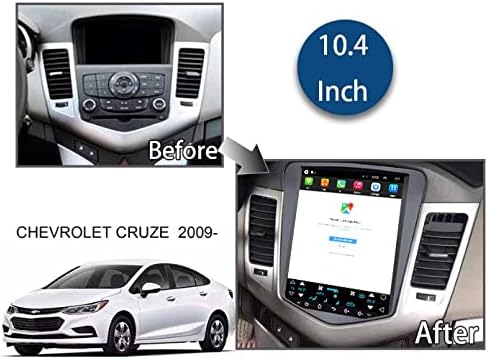
Image 1.1: Comparison of the car dashboard before and after installing the 10.4-inch Tesla Style Car Radio in a Chevrolet Cruze (2009-2016 model years).
2. Obsah balení
Ověřte, zda jsou v balení přítomny všechny komponenty:
- 10.4-inch Tesla Style Car Radio Unit
- Kabel napájecího rozhraní
- GPS anténa
- USB kabely (2)
- RCA kabely
- 4G anténa
- Radio Converter Head
- Dekodér CANbusu
- Zadní View Camera (Gift)

Obrázek 2.1: Konecview of the main unit and included accessories, such as the power interface, GPS antenna, USB cables, RCA cables, 4G antenna, radio converter head, Canbus decoder, and a gift back camera.
3. Instalační příručka
Doporučuje se odborná instalace. Před zahájením instalace se ujistěte, že je vozidlo odpojeno od napájení.
3.1 Schéma zapojení
Refer to the following diagrams for proper connection of all cables.

Obrázek 3.1: Zadní strana view of the car radio unit with labeled connection ports for power, 4G, GPS, radio, USB, reversing image, and RCA cables.

Image 3.2: Detailed wiring diagram illustrating how to connect the power interface, GPS antenna, USB cables, RCA cables, 4G antenna, radio converter head, and Canbus decoder to the main unit.
3.2 Instalační video
Watch this video for a visual guide on the installation process.
Video 3.1: Installation guide for the LUOWAN Car Radio in a Chevrolet Cruze. This video demonstrates the steps involved in replacing the factory radio with the new Tesla-style unit.
4. Návod k obsluze
4.1 Základní obsluha
- Zapnutí/vypnutí: Press and hold the power button (if available) or turn on the vehicle ignition.
- Dotyková obrazovka: The unit features a 10.4-inch IPS capacitive touchscreen with 1024*768 resolution. Navigate by tapping, swiping, and pinching.
- Ovládání na volantu: The unit supports original steering wheel controls for easy access to functions like volume adjustment and track changes.

Image 4.1: Demonstrates the superior clarity and viewing angles of the IPS screen compared to a normal screen, and the phone sync display feature.
4.2 GPS navigace
The unit has built-in GPS navigation, supporting both online and offline navigation applications. You can use apps like Igo map or Waze. The GPS dual zone function allows you to listen to music or radio while navigating.
4.3 CarPlay a Android Auto
The unit includes built-in wireless CarPlay and Android Auto functionality. Connect your smartphone to access navigation, music, calls, and messages directly on the car radio screen.

Image 4.2: The CarPlay interface shown on the 10.4-inch display, demonstrating phone, music, maps, and messaging applications.
Video 4.1: Demonstration of Wireless CarPlay connection for Chevrolet Chevy Cruze, showcasing navigation and app usage.
4.4 Funkce Bluetooth
Connect your mobile device via Bluetooth for hands-free calling and audio streaming. This feature enhances driving safety by allowing you to manage calls and music without distraction.

Image 4.3: Visual representation of the Bluetooth function, highlighting its use for calls, music, and safer driving.
4.5 4G LTE & WiFi Connectivity
The unit supports 4G LTE connectivity (SIM card required, not included) and built-in WiFi, allowing internet access for online applications, streaming, and updates.
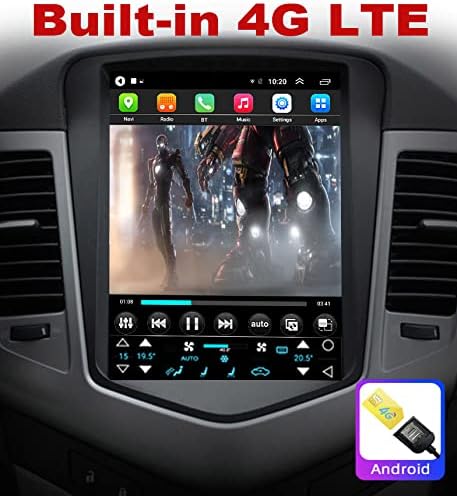
Image 4.4: The car radio screen showing an application running with 4G LTE connectivity, indicated by a 4G icon and SIM card slot graphic.
Video 4.2: Demonstrates 5G WiFi upgrade and general car radio features for Chevrolet Chevy Cruze.
4.6 Couvací kamera
The unit supports a reversing camera input, providing a clear view of the area behind your vehicle when in reverse gear. This increases safety during parking and maneuvering.

Image 4.5: The car radio display showing the view from a reversing camera, including parking guidelines.
Image 4.6: Illustrates AHD reversing camera support for increased clarity and compatibility with original car functions like the interface and USB ports.
5. Údržba
- Čištění obrazovky: K čištění dotykové obrazovky používejte měkký hadřík, který nepouští vlákna. Nepoužívejte abrazivní čisticí prostředky ani rozpouštědla.
- Aktualizace softwaru: Pravidelně kontrolujte aktualizace softwaru, abyste zajistili optimální výkon a přístup k novým funkcím.
- Obecná péče: Nevystavujte jednotku extrémním teplotám, delšímu přímému slunečnímu záření nebo nadměrné vlhkosti.
6. Řešení problémů
| Problém | Možná příčina | Řešení |
|---|---|---|
| Jednotka se nezapne. | Nesprávné zapojení; Spálená pojistka; Problém s napájením vozidla. | Check all power connections. Verify vehicle's fuse box. Consult a professional installer. |
| Obrazovka je tmavá nebo nereaguje. | Brightness settings; Software glitch; Hardware malfunction. | Adjust screen brightness in settings. Restart the unit. If problem persists, contact technical support. |
| CarPlay/Android Auto se nepřipojuje bezdrátově. | Bluetooth/WiFi interference; Incorrect settings; Phone compatibility. | Ensure Bluetooth and WiFi are enabled on your phone and the unit. Try connecting via USB cable. Check phone's compatibility and update its OS. |
| Žádný signál GPS. | Anténa GPS není připojena nebo je zakrytá; Problém se softwarem. | Ujistěte se, že je anténa GPS správně připojena a má jasný signál. view of the sky. Restart navigation app. |
| Špatný příjem rádia. | Antenna connection issue; Weak signal area. | Check the radio antenna connection. Try scanning for stations in a different location. |
7. Specifikace
| Funkce | Detail |
|---|---|
| Značka | LUOWAN |
| Kompatibilní modely vozidel | Chevrolet Chevy Cruze 2009-2015, 2016 Limited |
| Operační systém | Android 10 |
| BERAN | 4 GB |
| ROM (interní úložiště) | 64 GB |
| Velikost obrazovky | 10.4 palce |
| Typ zobrazení | IPS kapacitní dotyková obrazovka |
| Rezoluce | 1024*768 (supports 4K video) |
| Konektivita | 4G LTE, WiFi, Bluetooth, USB |
| Navigace | Built-in GPS (supports online/offline maps) |
| Speciální funkce | Built-in Wireless CarPlay, Android Auto, Steering Wheel Control Support, Reversing Camera Input |
| Zahrnuté komponenty | Fotoaparát |
| Hmotnost položky | 2 kg |
8. Záruka a podpora
This product typically comes with a return policy of 30 days for refund or replacement. For specific warranty details, please refer to your purchase documentation.
Our professional technical support team is available 24/7 to answer your questions or assist with any issues. Please contact us through the Amazon chat system for prompt assistance.