
1. Úvod
Thank you for choosing the Gravity GTV64BT Audio 35-Inch Weatherproof Sound Bar. This high-performance sound bar is designed for ATVs, UTVs, and other outdoor vehicles, providing robust audio with its integrated high-power digital amplifier. This manual provides essential information for proper installation, operation, and maintenance to ensure optimal performance and longevity of your device.

Figure 1.1: Gravity GTV64BT Sound Bar with included remote and an example UTV application.
2. Klíčové vlastnosti
- Integrated SUPER HPD (High Power Digital) amplifier topology with 30% more SPL.
- Six high-efficiency drivers for bass and midrange.
- Two 1-inch Pure Titanium Dome Tweeters with Neodymium Magnets for high frequencies.
- Multiple audio input options: Bluetooth or 3.5mm auxiliary input.
- Secure Simple Pairing for stable Bluetooth connection.
- Convenient controls for track forward/back and volume up/down, operable with riding gloves.
- Waterproof and Dustproof with IPX68 Certification.
- Solid Extruded Aluminum Structure with Cast Aluminum End Caps.
- Heavy Impact Grill to protect speakers.
- Adjustable Track for Roll Cage Installation, ideal for SXS, ORV's, or custom Sand Cars.
3. Co je v krabici
Před zahájením instalace ověřte, zda jsou všechny komponenty přítomny:
- Gravity GTV64BT Sound Bar
- Mounting kit (including adjustable track brackets)
- Power accessory extension adapter (cigarette lighter adapter)
- 3.5mm Audio line (AUX cable)
- Dálkové ovládání
- Uživatelská příručka (tento dokument)
- Záruční list
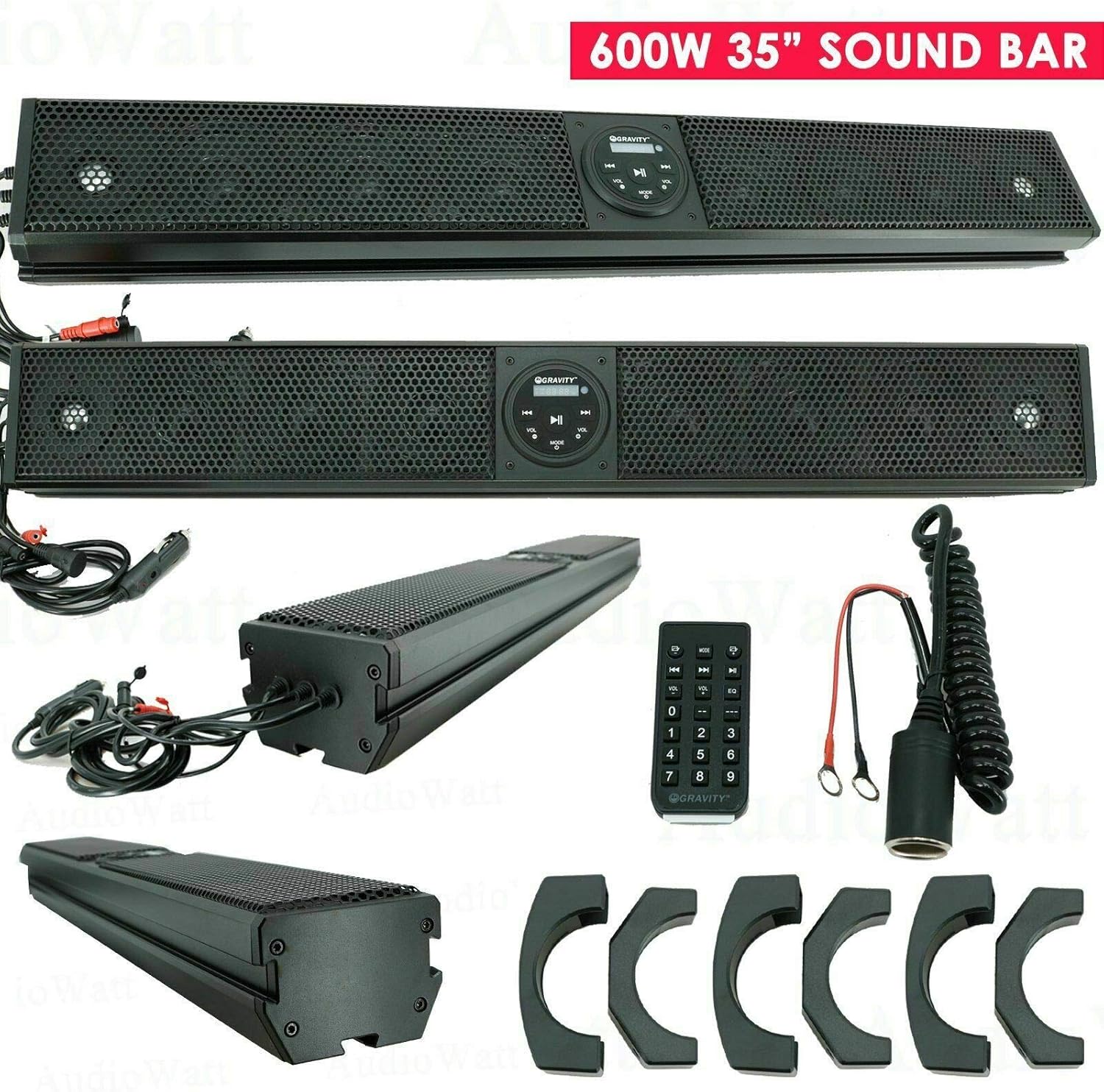
Figure 3.1: Contents of the Gravity GTV64BT package, including the sound bar, remote, power adapter, and mounting brackets.
4. Nastavení a instalace
4.1 Mounting the Sound Bar
The GTV64BT sound bar is designed for easy installation on roll cages or other suitable surfaces using the included adjustable mounting kit. Ensure the mounting location is secure and allows for proper cable routing.
- Identify a suitable mounting location on your ATV/UTV's roll cage or flat surface.
- Attach the mounting brackets to the sound bar using the provided hardware.
- Secure the sound bar to the chosen location using the adjustable track and appropriate fasteners. Ensure it is firmly in place to prevent movement during operation.
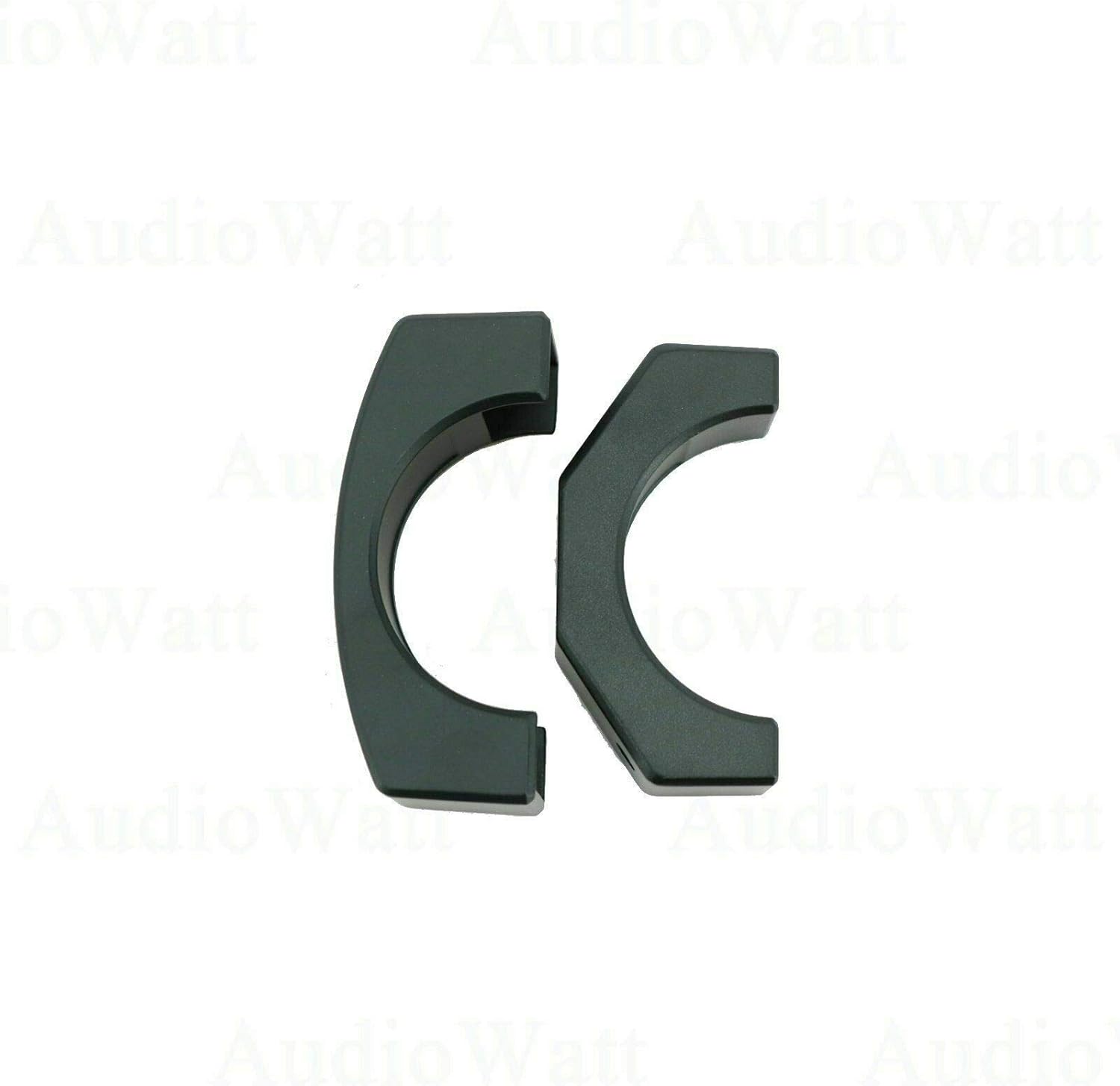
Figure 4.1: The included mounting brackets for securing the sound bar.
4.2 Připojení napájení
The sound bar operates on 12V DC power. Use the provided power accessory extension adapter for connection to a standard 12V cigarette lighter socket, or wire directly to a 12V power source (professional installation recommended for direct wiring).
- Connect the power cable from the sound bar to the power accessory extension adapter.
- Plug the adapter into your vehicle's 12V power outlet.
- Alternatively, for a permanent installation, connect the sound bar's power wires directly to your vehicle's 12V electrical system, ensuring proper fusing (15A AGC type fuse recommended).

Figure 4.2: The sound bar with its power cable, ready for connection.
5. Provoz
5.1 Ovládací panel Overview
The sound bar features an intuitive control panel for easy access to functions.

Figure 5.1: Close-up of the sound bar's control panel with illuminated buttons.
- Vypínač: Stiskněte pro zapnutí nebo vypnutí jednotky.
- Tlačítko AUX: Selects the 3.5mm auxiliary input.
- Tlačítko BT: Selects Bluetooth input and initiates pairing mode.
- Tlačítko USB: Selects USB input (if applicable).
- Tlačítka pro nastavení hlasitosti - / +: Upravte hlasitost zvuku.
- Previous Track / Next Track Buttons: Skip to the previous or next audio track.
- Tlačítko Přehrát/Pozastavit: Přehrát nebo pozastavit přehrávání zvuku.
5.2 Párování Bluetooth
Připojení mobilního zařízení přes Bluetooth:
- Ujistěte se, že je soundbar zapnutý.
- Stiskněte tlačítko BT button on the control panel or remote. The Bluetooth indicator will flash, indicating pairing mode.
- Na svém mobilním zařízení povolte Bluetooth a vyhledejte dostupná zařízení.
- Select "GTV64BT" from the list of devices.
- Once paired, the Bluetooth indicator will become solid, and you can begin playing audio from your device.
5.3 Používání dálkového ovladače
The included remote control provides full functionality from a distance.

Figure 5.2: The remote control and power accessory extension adapter.
- All functions available on the sound bar's control panel are also accessible via the remote.
- The remote also includes a numeric keypad for direct track selection (if supported by the media source).
- Ensure the remote has working batteries (not included, typically 2 x AAA).
6. Údržba
To ensure the longevity and optimal performance of your Gravity GTV64BT Sound Bar, follow these maintenance guidelines:
- Čištění: Použijte měkký, damp cloth to clean the exterior of the sound bar. Avoid using harsh chemicals or abrasive cleaners, as they may damage the finish or internal components.
- Vystavení vodě: While the sound bar is weatherproof (IPX68 certified), prolonged submersion or high-pressure water jets should be avoided. After exposure to water, especially saltwater, rinse with fresh water and allow to air dry thoroughly.
- Skladování: Pokud se soundbar delší dobu nepoužívá, skladujte jej na chladném a suchém místě, mimo dosah přímého slunečního záření a extrémních teplot.
- Kontrola kabelů: Periodically inspect all cables and connections for any signs of wear, fraying, or corrosion. Replace damaged cables immediately.
7. Řešení problémů
Pokud se se soundbarem setkáte s problémy, podívejte se na následující běžné problémy a jejich řešení:
| Problém | Možná příčina | Řešení |
|---|---|---|
| Žádná síla | Loose power connection; Blown fuse; Vehicle's 12V outlet not active. | Check all power connections. Inspect the fuse in the power adapter or vehicle's fuse box. Test the 12V outlet with another device. |
| Žádný zvuk | Volume too low; Incorrect input selected; Device not playing audio; Bluetooth not connected. | Increase volume. Ensure correct input (BT, AUX, USB) is selected. Verify audio is playing on the connected device. Re-pair Bluetooth if necessary. |
| Bluetooth není párování | Sound bar not in pairing mode; Device too far; Interference; Previously paired device connected. | Press BT button to enter pairing mode. Move device closer to sound bar. Avoid strong electromagnetic interference. Disconnect from other Bluetooth devices. |
| Sound distortion at high volume | Input audio source too high; Overdriving speakers. | Reduce the volume on your connected device. Lower the sound bar's volume slightly. |
If the problem persists after attempting these solutions, please contact Gravity customer support for further assistance.
8. Specifikace
| Funkce | Specifikace |
|---|---|
| Název modelu | GTV64BT |
| Typ reproduktoru | Soundbar, Tweeter |
| Velikost reproduktoru | 35.82 palce |
| Průměr výškového reproduktoru | 1 palce |
| Maximální výstupní výkon reproduktoru | 600 wattů |
| Frekvenční odezva | 45Hz - 22000 Hz |
| Operational Power | 12V DC |
| Typ pojistky | 15A AGC type |
| Technologie připojení | Bluetooth, Auxiliary |
| Verze Bluetooth | 2.1 EDR A2DP |
| Dosah Bluetooth | 33 stop |
| Hodnocení voděodolnosti | IPX68 certifikováno |
| Typ montáže | Bar Mount, Plug Mount |
| Kontrolní metoda | Dálkové ovládání |
| Hmotnost položky | 20.6 libry |
| Rozměry balení | 41.5 x 9 x 7.5 palce |
9. Záruka a podpora
The Gravity GTV64BT Audio 35-Inch Weatherproof Sound Bar comes with a limited warranty. Please refer to the warranty card included in your package for detailed terms and conditions. For technical support, troubleshooting assistance beyond this manual, or warranty claims, please contact Gravity customer service through their official webstránky nebo kontaktní informace uvedené na vaší záruční kartě.
For the most up-to-date information and support resources, visit the official Gravity webmísto: www.gravityaudio.com