
1. Důležité bezpečnostní informace
- Ensure all connections are secure before operation to prevent damage to equipment or devices.
- Do not expose the sound card or microphone to moisture or extreme temperatures.
- Handle the microphone and stand components with care to avoid physical damage.
- Keep the equipment away from strong electromagnetic fields to prevent interference.
- Use only the provided power cable or a compatible alternative to charge the sound card.
2. Obsah balení
The ALPOWL BM800 Condenser Microphone Podcast Equipment Bundle includes the following items:
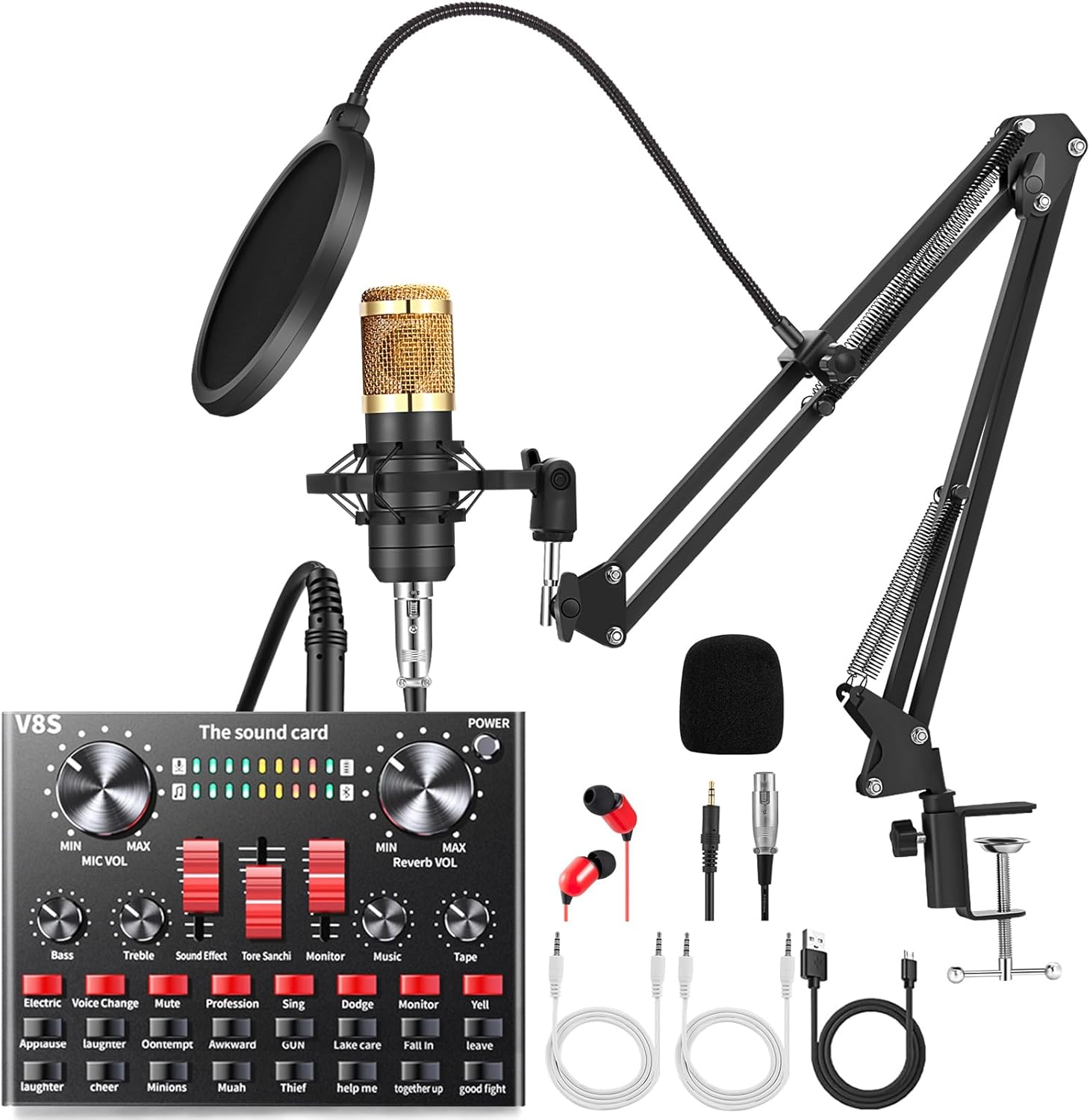
Obrázek: Overview of the ALPOWL BM800 Condenser Microphone Podcast Equipment Bundle components.
- ALPOWL BM-800 Condenser Microphone
- Shock Mount
- Popový filtr
- Adjustable Suspension Scissor Arm Stand
- Pěnová čepice proti větru
- Napájecí kabel
- ALPOWL Live Sound Card (V8S)
- Sluchátka
- Audio kabely
3. Průvodce nastavením
3.1 Assembling the Microphone Stand and Accessories
- Připojte desku Clamp: Zajistěte psací stůl třamp to a sturdy surface, such as a desk or table edge. Tighten the screw until the clamp je pevně na svém místě.
- Insert the Scissor Arm Stand: Insert the base of the adjustable suspension scissor arm stand into the hole on the desk clamp. Ensure it is seated securely.
- Namontujte držák tlumiče: Screw the metal shock mount onto the threaded end of the scissor arm stand.
- Instalace mikrofonu: Gently place the ALPOWL BM-800 condenser microphone into the shock mount. Ensure it is held firmly but without excessive force.
- Připojení pop filtru: Clamp the pop filter to the microphone stand or desk, positioning it approximately 2-3 inches in front of the microphone. Adjust the flexible gooseneck to cover the microphone's front.
- Place the Foam Cap: Slide the anti-wind foam cap over the microphone for additional plosive reduction.

Image: Proper microphone placement with pop filter and foam cap for optimal sound capture.
3.2 Připojení zařízení
Refer to the connection diagram below for proper wiring:

Image: Detailed connection diagram showing how to connect the microphone, sound card, and various devices.
- Microphone to Sound Card: Connect the microphone cable (XLR to 3.5mm or similar, depending on microphone model) to the 'Capacitor MIC' input on the sound card.
- Sound Card to Device (Smartphone/Tablet): Use the provided audio cable to connect one of the 'LIVE' ports on the sound card to the 3.5mm headphone jack of your smartphone or tablet. For devices without a 3.5mm jack, an adapter may be required (not included).
- Sound Card to Computer: Connect the sound card to your computer using the USB charging/data cable. The computer port is typically labeled 'Computer' or 'USB'. This connection provides power and allows the computer to recognize the sound card as an audio device.
- Headphones/Earphones: Plug your headphones or earphones into the 'Earphone' or 'Headset' jack on the sound card for real-time monitoring.
- Nabíjení: Connect the sound card to a power source using the 'Charging' port and the provided USB cable when the battery is low.
4. Návod k obsluze
4.1 Ovládání zvukové karty
The V8S sound card features various controls and sound effects to enhance your audio experience:

Image: The ALPOWL V8S sound card interface, highlighting the various sound effects and control knobs.
- Otočný knoflík hlasitosti mikrofonu: Adjusts the microphone input level.
- Knoflík ECHO: Controls the echo effect intensity.
- Bass/Treble Sliders: Adjust the low and high frequencies of your voice.
- Sound Effect Sliders: Control the volume of various sound effects.
- Knoflík monitoru: Adjusts the volume of your headphones/earphones.
- Hudební knoflík: Controls the volume of background music input.
- Tlačítka zvukových efektů: Trigger pre-set sound effects such as Applause, Laughter, Cheer, Kiss, etc.
- Voice Change Buttons: Activate various voice modulation effects (e.g., Electric, Voice Change).
4.2 Device Compatibility and Usage
The ALPOWL podcast equipment is compatible with a wide range of devices and applications:

Image: Demonstrates the versatility of the equipment for recording, meetings, video calls, and gaming.
- Mobilní telefony: Connect via the 'LIVE' port for live streaming, calls, or recording on platforms like TikTok, YouTube, WeChat.
- Computers (Windows, Mac OS): Connect via USB for studio recording, podcasting, video calls, or gaming. The sound card will be recognized as an audio input/output device.
- Gaming Consoles (PS4, Xbox, Switch): Connect for enhanced in-game communication and streaming.
- Aplikace: Suitable for various applications requiring high-quality audio input, including recording software, communication apps, and live broadcasting platforms.
5. Údržba
- Čištění: Use a soft, dry cloth to clean the microphone and sound card. Avoid liquid cleaners or abrasive materials.
- Skladování: When not in use, store the equipment in a dry, dust-free environment. Disassemble the stand and microphone if storing for extended periods.
- Péče o kabely: Abyste předešli vnitřnímu poškození, vyhněte se nadměrnému ohýbání nebo krimpování kabelů.
- Battery Care (Sound Card): For optimal battery life, avoid fully discharging the sound card frequently. Charge it regularly.
6. Řešení problémů
- Žádný zvukový výstup/vstup:
- Check all cable connections to ensure they are secure and plugged into the correct ports.
- Verify that the microphone and monitor volumes on the sound card are turned up.
- Ensure the sound card is powered on and charged.
- On your computer or mobile device, check audio input/output settings to confirm the sound card is selected as the default device.
- Static or Thumping Noise:
- Ujistěte se, že všechny kabely jsou zcela zasunuté a nejsou volné.
- Try using different audio cables to rule out faulty wiring.
- Move the equipment away from other electronic devices that might cause interference.
- Reduce the microphone gain if the noise is a hiss, indicating too high sensitivity.
- Sound Card Not Recognized by Computer:
- Ensure the USB cable is connected to the 'Computer' port on the sound card and a functional USB port on your computer.
- Zkuste jiný port USB nebo kabel.
- Restartujte počítač.
- Check your computer's Device Manager (Windows) or System Information (Mac) to see if the sound card is listed.
- Echo or Delay in Audio:
- Adjust the 'ECHO' knob on the sound card to reduce or eliminate the effect.
- If experiencing a delay, ensure your monitoring setup does not create a feedback loop.
7. Specifikace
| Funkce | Detail |
|---|---|
| Značka | ALPOWL |
| Název modelu | BM 800 (Microphone), V8S (Sound Card) |
| Tvarový faktor mikrofonu | Pole tabulky |
| Polární vzor | Jednosměrný |
| Technologie připojení | Bluetooth (Sound Card), 3.5 mm Jack (Microphone/Headset) |
| Speciální funkce | Redukce šumu |
| Odstup signálu od šumu | 78 dB |
| Frekvenční odezva | 20000 Hz |
| Zdroj napájení | Elektrický kabel |
| Materiál | Foam, Metal |
| Hmotnost položky | 2.97 libry |
| Rozměry balení | 16.45 x 8.11 x 2.6 palce |
| UPC | 783979973307 |
8. Záruka a podpora
ALPOWL offers a 45-day replacement or refund policy for faulty products. For any queries or issues, please contact ALPOWL customer support. Refer to the product packaging or the official ALPOWL webNejnovější informace o záruce a kontaktní údaje naleznete na webových stránkách.
Pro tento produkt nebyla nalezena žádná oficiální videa prodejce, která by splňovala kritéria pro vložení.