
1. Úvod
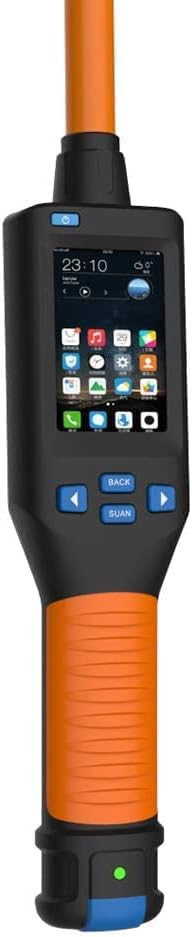
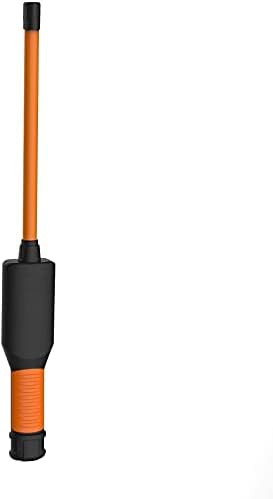
The Yanzeo AR980 RFID FDX-B Animal Tag Scanner is designed for efficient and reliable identification of animal microchips. This device supports FDX-B and FDX-A protocols, including HDX and EM4102 chips, compliant with ISO11784/85 standards. It features an Android system for customizable applications, enabling GPS, mobile networking, Bluetooth, and Wi-Fi connectivity. The scanner is composed of a card reader, a display board, a battery board, and a rod-shaped shell antenna. Its primary function is to read low-frequency ear tags in the animal industry. The display board, powered by an Android core board, controls the reader, while the battery board provides power. Stable and reliable serial communication between the core board and card reader facilitates easy development. A communication protocol is provided for users to develop custom applications. The rod-shaped antenna design allows for quick and convenient reading of ear tags without precise alignment, requiring only proximity to the tag.
2. Konec produktuview
2.1 Klíčové vlastnosti
- Supports FDX-B and FDX-A protocols.
- 3.5-inch display with 480*320 resolution.
- Integrated 5-megapixel camera.
- Operating temperature range: 0 - 35℃.
- Storage temperature range: -20 to 45℃.
- Připojení Bluetooth 4.0.
- Rod-shaped antenna for easy tag čtení.
- Android system for custom application development.
2.2 Komponenty
The Yanzeo AR980 scanner is comprised of several key components:
- Čtečka paměťových karet: The core unit responsible for detecting and reading RFID microchips.
- Zobrazovací deska: Features a 3.5-inch screen and an Android core board for controlling the reader and displaying information.
- Battery Board: Provides power to the display board and card reader, ensuring portable operation.
- Shell Antenna: A rod-shaped antenna designed to emit an electromagnetic field for efficient tag čtení.
2.3 Produkt Views


3. Nastavení
3.1 Počáteční poplatek
Before first use, ensure the AR980 scanner is fully charged. Connect the device to a power source using the provided USB cable. The battery indicator on the display will show charging status.
3.2 Connecting to a Computer for Data Transfer
The AR980 scanner can connect to a computer via USB for data transfer. This allows you to upload stored tag IDs to a text file pro vedení záznamů.
- Připojte skener k počítači pomocí kabelu USB.
- Open a text editor (e.g., Notepad) on your computer.
- On the scanner, long-press the scan button for approximately 3 seconds. The scanner will begin uploading stored data to the open text file.
- Wait for the data upload to complete. The scanner can store up to 128 records for upload.
Video 1: Demonstrates how to upload stored data from the Yanzeo AR180 (similar model) scanner to a computer via USB. This process is applicable to the AR980 model.
4. Návod k obsluze
4.1 Zapnutí/vypnutí
To power on the device, press and hold the power button until the display illuminates. To power off, press and hold the power button again until the display shuts down.
4.2 Scanning Animal Tags
The AR980 scanner is designed for quick and easy reading of low-frequency animal ear tags. Its rod-shaped antenna simplifies the scanning process.
- Ujistěte se, že je skener zapnutý.
- Position the top of the scanner (antenna area) near the animal's ear tag.
- The scanner will automatically detect and read the tag ID, displaying it on the screen. There is no need for precise alignment.
- The read time is typically less than 100 milliseconds.
Video 2: Konecview of the Yanzeo AR180 (similar model) Pet Microchip Scanner, demonstrating its features and how to scan various RFID tags. This functionality is consistent with the AR980 model.
Video 3: Shows the Yanzeo Pet Microchip Reader (similar model) in action, scanning different types of animal ID tags and microchips. This demonstrates the AR980's tag kompatibilita.
4.3 úložiště dat
The AR980 scanner automatically stores the IDs of scanned tags. It has a capacity to store up to 128 records before requiring data upload to a computer.
4.4 Android System Customization
For advanced users, the integrated Android system allows for customization and development of specific applications. A communication protocol is available to facilitate this process, enabling features like GPS integration, mobile networking, and enhanced data management.
5. Údržba
5.1 Čištění
K čištění skeneru použijte měkký, suchý hadřík. V případě odolných nečistot použijte lehceamp cloth with mild soap can be used, ensuring no liquid enters the device openings. Do not use harsh chemicals or abrasive cleaners.
5.2 Péče o baterii
The AR980 uses a Lithium Ion battery. To prolong battery life:
- Vyhněte se častému úplnému vybíjení baterie.
- Pokud zařízení delší dobu nepoužíváte, skladujte jej na chladném a suchém místě.
- Zařízení pravidelně nabíjejte, i když jej nepoužíváte neustále, abyste zachovali jeho stav.
6. Řešení problémů
6.1 Běžné problémy a řešení
| Problém | Možná příčina | Řešení |
|---|---|---|
| Zařízení se nezapne. | Slabá nebo vybitá baterie. | Nabijte zařízení pomocí dodaného kabelu USB. |
| Nelze číst tags. | Tag out of range, incorrect tag type, or damaged tag. | Ensure the antenna is close to the tag. Verify tag compatibility (FDX-A/FDX-B). Try scanning a different tag. |
| Data not uploading to computer. | Incorrect USB connection, no text editor open, or scan button not held long enough. | Check USB connection. Open a text editor. Long-press the scan button for 3 seconds. |
| Displej je tmavý nebo nečitelný. | Environmental conditions (too bright) or display settings. | Move to a shaded area. Check device settings for display brightness if available. |
Pokud narazíte na problémy, které zde nejsou uvedeny, nebo pokud navrhovaná řešení problém nevyřeší, kontaktujte prosím zákaznickou podporu.
7. Specifikace
| Funkce | Detail |
|---|---|
| Značka | Yanzeo |
| Číslo modelu | AR980 |
| Podporované protokoly | FDX-B, FDX-A (ISO11784/85, HDX, EM4102) |
| Obrazovka | 3.5 palce, rozlišení 480*320 |
| Fotoaparát | 5 milionů pixelů |
| Teplota pracovního prostředí | 0 - 35℃ |
| Skladovací teplota | -20 až 45 ℃ |
| Bezdrátové Standardní | Bluetooth 4.0 |
| Typ konektoru | Bluetooth, USB |
| Typ zdroje napájení | Napájení z baterie |
| Typ baterie | Lithium-iontové (vyžadují 1, jsou součástí balení) |
| Rozměry produktu | 71.5 x 7.8 x 3.8 cm |
| Kompatibilní zařízení | Smartphone, Tablet (for app customization) |
8. Záruka a podpora
For warranty information, technical support, or service inquiries regarding your Yanzeo AR980 RFID Animal Tag Scanner, please refer to the documentation included with your purchase or contact Yanzeo customer service directly. Contact details can typically be found on the manufacturer's webmísto nebo obal produktu.