
1. Úvod
This manual provides instructions for the proper installation and use of your Radtel USB Programming Cable. This cable is designed to connect your Radtel RT-480, RT-67, or RT-68P handheld two-way radio to a computer for programming channel frequencies, settings, and other parameters using compatible software. Please read this manual thoroughly before use to ensure optimal performance and avoid potential issues.
2. Obsah balení
Ověřte, zda jsou v balení přítomny všechny položky:
- 1 x Radtel USB Programming Cable
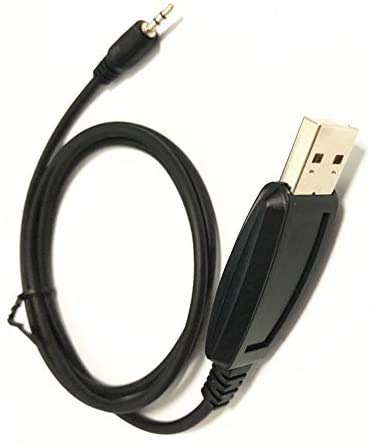
Figure 1: Radtel USB Programming Cable. This image shows the entire black cable, featuring a standard USB Type-A connector on one end and a 3.5mm audio jack on the other, designed for connecting to compatible Radtel two-way radios.
3. Systémové požadavky
To use this programming cable, ensure your system meets the following requirements:
- Operační systém: Windows 10 (or compatible versions of Windows).
- Dostupný USB port: A standard USB Type-A port.
- Programovací software: Manufacturer-provided programming software for your specific Radtel radio model (e.g., RT-480, RT-67, RT-68P). This software is typically available for download from the Radtel official website or provided on a CD with the radio.
- Přístup na internet: May be required for driver downloads or software updates.
4. Nastavení
4.1 Instalace ovladače
The programming cable requires a USB driver to function correctly. In most cases, Windows 10 will automatically install the necessary driver when the cable is first connected. If automatic installation fails, follow these steps:
- Kabel zatím k počítači NEPŘIPOJUJTE.
- Obtain the correct USB driver. This is usually found on the Radtel official website under the support or download section for your radio model, or on a CD included with your radio.
- Run the driver installation executable file. Follow the on-screen prompts to complete the installation.
- Pokud k tomu budete vyzváni, restartujte počítač.
- Connect the USB Type-A end of the programming cable to an available USB port on your computer.
- Windows should now recognize the device and assign a COM port. You can verify this in Device Manager (Control Panel > Device Manager > Ports (COM & LPT)). Note the assigned COM port number, as you will need it for the programming software.
4.2 Programming Software Installation
Install the programming software specific to your Radtel radio model (e.g., RT-480, RT-67, RT-68P). This software is essential for configuring your radio.
- Download the appropriate programming software from the Radtel official website or use the provided installation media.
- Run the software installation executable.
- Dokončete instalaci podle pokynů na obrazovce.
- Launch the programming software after installation.
Poznámka: Generic programming software like CHIRP may not be compatible with all Radtel radio models. Always use the manufacturer's recommended software for best results.
5. Návod k obsluze
Follow these steps to program your Radtel radio using the USB programming cable:
- Prepare the Radio: Ensure your Radtel radio is turned OFF.
- Connect the Cable to Radio: Insert the 3.5mm audio jack end of the programming cable into the programming port of your Radtel radio. This port is typically located on the side of the radio, often covered by a rubber flap. Ensure a secure connection.
- Connect the Cable to Computer: Connect the USB Type-A end of the programming cable to an available USB port on your computer.
- Zapněte rádio: Turn ON your Radtel radio.
- Spuštění programovacího softwaru: Otevřete programovací software Radtel na vašem počítači.
- Vyberte COM port: In the programming software, navigate to the "Settings," "Options," or "Communications" menu. Select the correct COM port that was assigned to the USB programming cable (as noted in Device Manager during driver installation).
- Přečtěte si z rádia: Before making any changes, it is highly recommended to read the current configuration from your radio. Look for an option like "Read from Radio," "Download," or "Get Data." This creates a backup of your radio's existing settings.
- Upravit nastavení: Make the desired changes to frequencies, channels, tones, and other radio settings within the software interface.
- Napište do rádia: Once you have finished modifying the settings, save your changes in the software and then use the "Write to Radio," "Upload," or "Send Data" function to transfer the new configuration to your radio.
- Ověřte: After writing, turn your radio OFF and then ON again to apply the new settings. Verify that the changes have been successfully implemented.
- Odpojit: Safely disconnect the cable from both the radio and the computer.
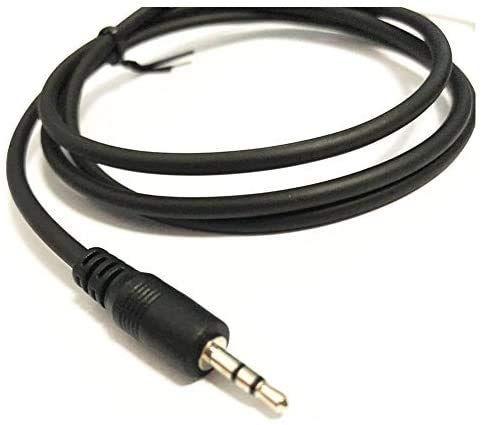
Figure 2: Close-up of the 3.5mm audio jack connector. This image highlights the 3.5mm jack, which connects to the programming port on your Radtel two-way radio.
Důležité: Always ensure the radio is powered on and the cable is securely connected during the read/write process to prevent data corruption.
6. Údržba
Správná péče prodlouží životnost vašeho programovacího kabelu:
- Skladování: Kabel skladujte na chladném a suchém místě mimo dosah přímého slunečního záření a extrémních teplot.
- Čištění: K čištění kabelu a konektorů použijte měkký, suchý hadřík. Nepoužívejte tekuté čisticí prostředky ani rozpouštědla.
- Zacházení: Avoid bending or kinking the cable sharply. Always grasp the connector ends when plugging or unplugging, not the cable itself.
- Ochrana: Udržujte konektory čisté od prachu a nečistot.
7. Řešení problémů
Pokud narazíte na problémy, podívejte se na následující běžné problémy a jejich řešení:
| Problém | Možná příčina | Řešení |
|---|---|---|
| Počítač nerozpoznál kabel. | Missing or incorrect driver. Faulty USB port. |
|
| Programming software cannot find the radio or COM port. | Incorrect COM port selected. Radio not powered on or connected. Driver issue. |
|
| Error during read/write operation. | Loose connection. Radio powered off during process. Incompatible software. |
|
8. Specifikace
- Značka: Radtel
- Connector Type (Computer): USB typu A
- Connector Type (Radio): 3.5mm Audio Jack (compatible with Radtel RT-480, RT-67, RT-68P)
- Typ kabelu: USB
- Barva: Černý
- Speciální funkce: Tangle Free
- Kompatibilní operační systémy: Windows 10 (and potentially earlier versions with appropriate drivers)
- Hmotnost položky: Přibližně 0.634 uncí (18 gramů)
- Rozměry balení: Přibližně 5.12 x 3.62 x 0.47 palce
9. Záruka a podpora
Radtel products are manufactured to high-quality standards. For warranty information, technical support, or service inquiries, please refer to the documentation included with your original radio purchase or visit the official Radtel webweb. Před kontaktováním podpory si prosím připravte model produktu a datum zakoupení.
Oficiální Webmísto: www.radtel.com (Poznámka: Toto je zástupný symbol URL. Please refer to the actual Radtel webstránky pro podporu.)