
Naztech 15350
Naztech Xpods PRO True Wireless Noise Cancelling Earbuds
Model: 15350
Brand: Naztech
Zavedení
The Naztech Xpods PRO are advanced true wireless noise-cancelling earbuds designed for an immersive audio experience and clear communication. Featuring HD sound, touch controls, and IPX4 water resistance, these earbuds are suitable for various activities, including sports and daily use. They come with a wireless charging case for extended playtime and convenient recharging.

Image: Naztech Xpods PRO earbuds, charging case, and product packaging, highlighting key features like 25 hours play time and touch controls.
Nastavení
Co je v krabici
- Bezdrátové nabíjecí pouzdro
- Nabíjecí kabel USB-C
- 6 Sets of Silicone Ear Tips (3 sizes, 2 colors)
Nabíjení sluchátek a pouzdra
Before first use, fully charge the Xpods PRO and their charging case. The case can be charged via the included USB-C cable or a Qi-compatible wireless charging pad.
- Nabíjení USB-C: Připojte kabel USB-C k nabíjecímu portu na pouzdře a ke zdroji napájení.
- Bezdrátové nabíjení: Place the charging case on a Qi-compatible wireless charging pad. Ensure the case is properly aligned for charging.
A 10-minute quick charge provides approximately 1 hour of playback. A full charge offers up to 5 hours of playtime for the earbuds, with the charging case providing an additional 20 hours, totaling 25 hours of playtime.
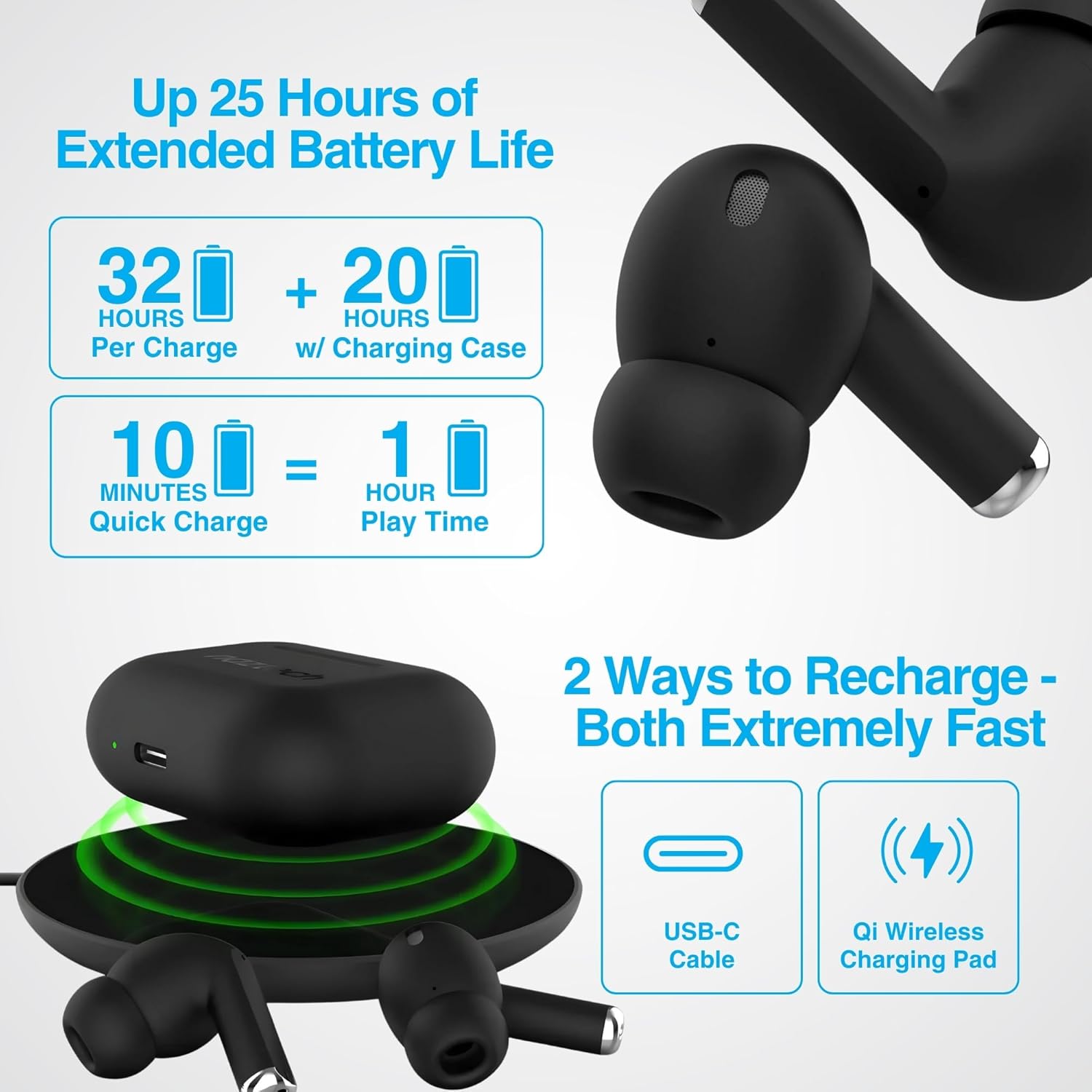
Image: Illustration showing USB-C and Qi wireless charging options for the Naztech Xpods PRO case, along with battery life indicators.
Spárování se zařízením
- Ujistěte se, že jsou sluchátka nabitá.
- Otevřete nabíjecí pouzdro. Sluchátka se automaticky přepnou do režimu párování.
- Na svém zařízení (chytrém telefonu, tabletu atd.) přejděte do nastavení Bluetooth a povolte Bluetooth.
- Select "NAZTECH Xpods PRO" from the list of available devices.
- Po připojení uslyšíte zvukové potvrzení a sluchátka budou připravena k použití.
The Xpods PRO feature Bluetooth 5.0 for stable connectivity up to 33 feet (10 meters) and auto-pair technology for seamless re-connection with previously paired devices.

Image: A smartphone screen showing the "NAZTECH Xpods PRO" listed in Bluetooth settings, demonstrating universal compatibility with various devices.
Návod k obsluze
Dotykové ovládání
The Xpods PRO feature intuitive touch sensor controls on each earbud for easy management of audio playback and calls.
| Akce | Řízení |
|---|---|
| Přehrát/Pozastavit hudbu | Jediným klepnutím na kterékoli sluchátko |
| Další stopa | Dvojité poklepání na pravé sluchátko |
| Předchozí stopa | Dvojité poklepání na levé sluchátko |
| Přijmout/ukončit hovor | Jediným klepnutím na kterékoli sluchátko |
| Odmítnout hovor | Stiskněte a podržte jedno ze sluchátek po dobu 2 sekund |
| Aktivujte hlasového asistenta | Trojité klepnutí na kterékoli sluchátko |

Image: Diagram illustrating the touch control functions on the Naztech Xpods PRO earbuds.
Nošení sluchátek
For optimal sound quality and a secure fit, choose the silicone ear tips that best suit your ear canal. The Xpods PRO come with 6 sets of silicone ear tips in 3 sizes and 2 colors to ensure a comfortable and noise-isolating fit.

Image: Naztech Xpods PRO earbuds shown with various silicone ear tip sizes, emphasizing customizable fit.
Potlačení hluku
The Xpods PRO feature Passive Noise Cancellation through their closed-system design, which helps to immerse you in music by preserving low-frequency bass richness and reducing ambient noise. Dual microphones with advanced voice capture technology filter out wind and background noise for clear conversations.

Image: A person using Naztech Xpods PRO, illustrating the clear call quality and passive noise cancellation features.
Údržba
Čištění
To maintain optimal performance and hygiene, regularly clean your Xpods PRO earbuds and charging case. Use a soft, dry, lint-free cloth to wipe down the surfaces. For ear tips, you may gently wipe them with a slightly damp hadříkem a nechte je před opětovným připevněním zcela uschnout.
Avoid using abrasive materials, solvents, or harsh chemicals, as these can damage the product.
Voděodolnost (IPX4)
The Naztech Xpods PRO are rated IPX4 water-resistant, meaning they are protected against splashing water from any direction. This makes them suitable for workouts and light rain. However, they are not designed for submersion in water or exposure to pressurized water jets. Do not use them while swimming or showering.

Image: A person wiping sweat from their face, indicating the IPX4 water-resistant rating of the Naztech Xpods PRO for active use.
Skladování
When not in use, store your Xpods PRO in their charging case to protect them from dust, dirt, and physical damage. Store the case and earbuds in a cool, dry place away from extreme temperatures and direct sunlight.
Odstraňování problémů
If you encounter issues with your Naztech Xpods PRO, refer to the following common solutions:
Sluchátka se nepárují nebo nepřipojují
- Zkontrolujte baterii: Ujistěte se, že jsou sluchátka i nabíjecí pouzdro dostatečně nabité.
- Opravit: Turn off Bluetooth on your device, place earbuds back in the case, close and reopen the case. Then, re-enable Bluetooth on your device and try pairing again.
- Zapomenout zařízení: On your device's Bluetooth settings, "forget" or "unpair" the "NAZTECH Xpods PRO" and then attempt to pair from scratch.
- Vzdálenost: Ensure your device is within the 33ft (10m) Bluetooth range.
- Rušení: Přesuňte se dále od jiných bezdrátových zařízení, která mohou způsobovat rušení.
Sound Quality Issues (e.g., Static, Low Volume)
- Čisté sluchátka: Ensure the mesh filters and ear tips are clean and free of debris.
- Uchycení ušních koncovek: Experiment with different sized silicone ear tips to ensure a proper seal in your ear canal, which significantly impacts sound quality and bass response.
- Kvalita zdroje: Ensure the audio source (music file, streamovací služba) je vysoké kvality.
- Hlasitost zařízení: Zkontrolujte úroveň hlasitosti na připojeném zařízení i na sluchátkách.
Problémy s nabíjením
- Kontrola kabelu: Ensure the USB-C cable is securely connected to both the case and the power source. Try a different USB-C cable and power adapter if available.
- Bezdrátová podložka: If using wireless charging, ensure the case is correctly positioned on the charging pad and the pad is powered on.
- Umístění sluchátek: Ujistěte se, že jsou sluchátka správně usazena v nabíjecím pouzdře a že se správně dotýkají nabíjecích pinů.
Specifikace
| Funkce | Detail |
|---|---|
| Název modelu | NAZTECH Xpods PRO |
| Číslo modelu položky | 15350 |
| Technologie připojení | Bezdrátové připojení (Bluetooth 5.0) |
| Bezdrátové Dosah | Až 33 stop / 10 m |
| Typ ovládání | Dotykové ovládání (ovládání médií) |
| Kontrola hluku | Pasivní potlačení hluku |
| Hodnocení odolnosti proti vodě | IPX4 |
| Celková doba hraní | Až 25 hodin (s nabíjecím pouzdrem) |
| Doba přehrávání sluchátek (na jedno nabití) | Až 5 hodin |
| Rychlé nabíjení | 10 minut nabíjení pro 1 hodinu přehrávání |
| Nabíjecí rozhraní | Bezdrátové nabíjení USB-C, Qi |
| Zahrnuté komponenty | USB-C Charging Cable, 6 Sets of Silicone Ear Tips, Wireless Charging Case |
| Materiál | Plast |
| Rozměry produktu | 2.39 x 1.81 x 0.91 palce |
| Hmotnost položky | 4.4 unce |
Záruka a podpora
Naztech products are designed for quality and performance. While specific warranty details are not provided in this manual, Naztech generally backs its products with warranties. For detailed warranty information, product support, or technical assistance, please visit the official Naztech webwebu nebo se přímo obraťte na jejich zákaznický servis.
Více informací a podpůrných zdrojů naleznete na adrese Naztech Store on Amazon nebo jejich úředník webmísto.
Ask a question about this manual
Ask about setup, troubleshooting, compatibility, parts, safety, or missing instructions. Manuals+ will review the question and use this page’s manual context to help answer it.