
1. Nastavení
1.1 Co je zahrnuto
Balení obsahuje následující položky:
- 1 Smart Security Camera (CAM/PAN/WIFI)
- Napájecí adaptér 1
- 1 USB Cord (1 meter)

Figure 1: Packaging for the Feit Electric Smart Indoor Camera with Pan & Tilt, illustrating included components.
1.2 Než začnete
Ensure you have the following before proceeding with installation:
- A stable 2.4 GHz Wi-Fi network. The camera is not compatible with 5 GHz networks.
- A smartphone or tablet with the Feit Electric App installed (available on Android and iOS app stores).
- An available standard electrical outlet for power.
- Optional: A Micro-SD card (up to 128GB) for local video storage (not included).
1.3 kroky instalace
- Download the Feit Electric App: Hledat "Feit Electric" in your device's app store and install the application.
- Vytvořit účet: Otevřete aplikaci a postupujte podle pokynů na obrazovce k vytvoření nového uživatelského účtu nebo se přihlaste, pokud již nějaký máte.
- Zapnutí fotoaparátu: Connect the provided USB cord to the camera and the power adapter. Plug the power adapter into a standard electrical outlet. The camera will power on and indicate readiness for pairing (refer to the camera's LED indicator for status).
- Přidat zařízení do aplikace: In the Feit Electric App, tap the "+" icon to add a new device. Select the "Security Camera" category and follow the app's instructions to connect your camera to your 2.4 GHz Wi-Fi network. You may need to scan a QR code displayed on your phone with the camera lens.
- Umístění: Position the camera indoors on a flat surface or mount it using appropriate hardware (not included) in your desired location. Ensure it has a clear line of sight to the area you wish to monitor.
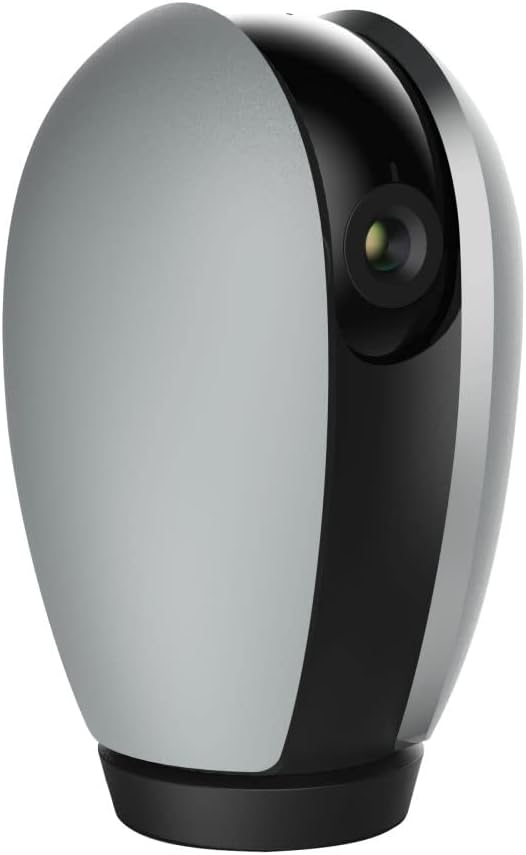
Obrázek 2: Přední strana view of the Feit Electric Indoor Security Camera, ready for placement.
2. Ovládání fotoaparátu
2.1 App Control and Live View
Once connected, you can access your camera from anywhere using the Feit Electric App. Open the app and select your camera from the device list to view a live feed. Multiple users can be granted access to control the camera through app sharing features.
2.2 Funkce otáčení a naklápění
The camera features remote pan and tilt capabilities, allowing you to adjust the field of vision. Within the live view in the Feit Electric App, use the directional controls to:
- Pánev: Rotate the camera horizontally from 0° to 355°.
- Náklon: Adjust the camera vertically from -10° to 75°.
2.3 Detekce pohybu a noční vidění
The camera is equipped with advanced motion detection, capable of detecting activity up to 32 feet away. You can configure the app to send push notifications to your mobile device when motion is detected. The camera also features night vision, providing clear visibility in low-light conditions up to 30 feet using Night Color technology.
2.4 Obousměrný zvuk
Utilize the built-in microphone and speaker for two-way communication. This allows you to listen to audio from the camera's location and speak through the camera from your mobile device via the app.
2.5 Nahrávání a ukládání videa
The camera records video in 1080p HD resolution. Recorded events can be stored locally on a Micro-SD card (up to 128GB, sold separately). A 128GB card can store approximately 14,400 minutes (10 days) of video. There are no monthly fees or subscriptions required for local storage. Videos can be downloaded wirelessly through the Feit Electric App.
2.6 Integrace chytré domácnosti
The Feit Electric Indoor Security Camera is compatible with Amazon Alexa and Google Assistant. Follow the instructions within the Feit Electric App or your smart home assistant's app to link your devices and enable voice control for certain camera functions.

Figure 3: The camera integrates with Amazon Alexa and Google Assistant for enhanced smart home control.
3. Údržba
3.1 Čištění
To maintain optimal performance, periodically clean the camera lens and body with a soft, dry cloth. Avoid using liquid cleaners or abrasive materials that could damage the camera's surfaces.
3.2 Aktualizace softwaru
Regularly check the Feit Electric App for available firmware updates for your camera. Keeping the firmware updated ensures you have the latest features, security enhancements, and bug fixes.
3.3 Správa SD karty
If using a Micro-SD card for storage, it is recommended to periodically format the card through the Feit Electric App to ensure stable recording and prevent data corruption. Replace the SD card if you experience consistent recording issues or if the card reaches its end of life.
4. Řešení problémů
If you encounter issues with your Feit Electric Indoor Security Camera, refer to the following common troubleshooting steps:
- Kamera se nepřipojuje k Wi-Fi:
- Ujistěte se, že vaše Wi-Fi síť pracuje na frekvenci 2.4 GHz. Kamera nepodporuje sítě 5 GHz.
- Ověřte, zda je v aplikaci zadáno správně heslo k Wi-Fi.
- Pro zlepšení síly signálu přesuňte kameru blíže k Wi-Fi routeru.
- Restartujte Wi-Fi router a kameru.
- Žádné živé vysílání View or Offline Status:
- Zkontrolujte si domácí připojení k internetu.
- Ujistěte se, že je kamera zapnutá a napájecí adaptér je bezpečně připojen.
- Restart the Feit Electric App.
- Recording Issues (with SD Card):
- Ensure the Micro-SD card is correctly inserted into the camera.
- Check if the SD card is full. Format the card via the app if necessary (this will erase all data).
- Verify the SD card is not damaged or faulty.
- Detekce pohybu nefunguje:
- Check the motion detection settings in the Feit Electric App to ensure it is enabled and sensitivity is adjusted appropriately.
- Ujistěte se, že v záběru kamery nejsou žádné překážky. view.
- Problémy s obousměrným zvukem:
- Ensure your phone's microphone and speaker permissions are granted to the Feit Electric App.
- Zkontrolujte nastavení hlasitosti v telefonu a v aplikaci.
For further assistance, consult the help section within the Feit Electric App or contact customer support.
5. Specifikace
| Funkce | Specifikace |
|---|---|
| Číslo modelu | CAM/PAN/WIFI |
| Vnitřní/venkovní použití | Krytý |
| Zdroj napájení | Elektrický s kabelem (120 voltů, 10 wattů) |
| Protokol připojení | Wi-Fi (pouze 2.4 GHz) |
| Rozlišení záznamu videa | 1080p HD (25 frames per second) |
| Rozsah nočního vidění | 30 Feet (Night Color technology) |
| Viewúhel | 115 stupňů |
| Rozsah Pan | 0° - 355° |
| Rozsah náklonu | -10° - 75° |
| Obousměrný zvuk | Ano |
| Pohybový senzor | Yes (up to 32ft detection) |
| Skladování | Micro-SD card (up to 128GB, not included) |
| Rozměry (D x Š x V) | 6.6 x 3.6 x 3.7 palce |
| Hmotnost položky | 11.2 uncí |
| Kompatibilní zařízení | Chytrý telefon, Amazon Alexa, Google Assistant |
| UPC | 017801722208 |
| Materiál | Plast |
| Osvědčení | ETL |
6. Záruka a podpora
6.1 Informace o záruce
This Feit Electric Indoor Security Camera comes with a one-year warranty from the date of purchase. Please retain your proof of purchase for warranty claims.
6.2 Zákaznická podpora
For technical support, warranty inquiries, or any questions regarding your Feit Electric product, please contact Feit Electric customer service:
- E-mail: info@feit.com
- Bezplatný telefon: 1-866-326-BULB (1-866-326-2852)
Můžete také navštívit úředníka Feit Electric Store on Amazon pro více informací o produktech a zdrojů.