
Konec produktuview
The UltraPro 24hr Digital Bar Outlet Plug Timer (Model 52086) is designed to automate the ON/OFF cycles of connected devices. It features a single polarized outlet, two programmable cycles, and a 5-foot tethered override button for convenient manual control. This timer is suitable for indoor use with various appliances, including lights and fans.

Obrázek 1: Přední view of the UltraPro Digital Timer. This image displays the timer's digital screen, 'CLOCK', 'SET', 'ON TIME', 'OFF TIME', 'ON/OFF', and arrow buttons.
Klíčové vlastnosti
- 5ft Tethered Push Button: Provides manual ON/OFF operation and overrides timed programs.
- Digitální časovač: Features 1 polarized outlet for controlling plug-in lights, seasonal decor, fans, and other small appliances.
- Vlastní rozvrh: Offers 2 personal ON/OFF options and a 24-hour cycle for versatile daily control.
- Prostorově úsporný design: Compact construction with a side-access outlet, allowing the second wall outlet to remain free.
- Vnitřní použití: Plugs into any indoor outlet to automate LED, CFL, incandescent, and halogen lights or other small appliances.
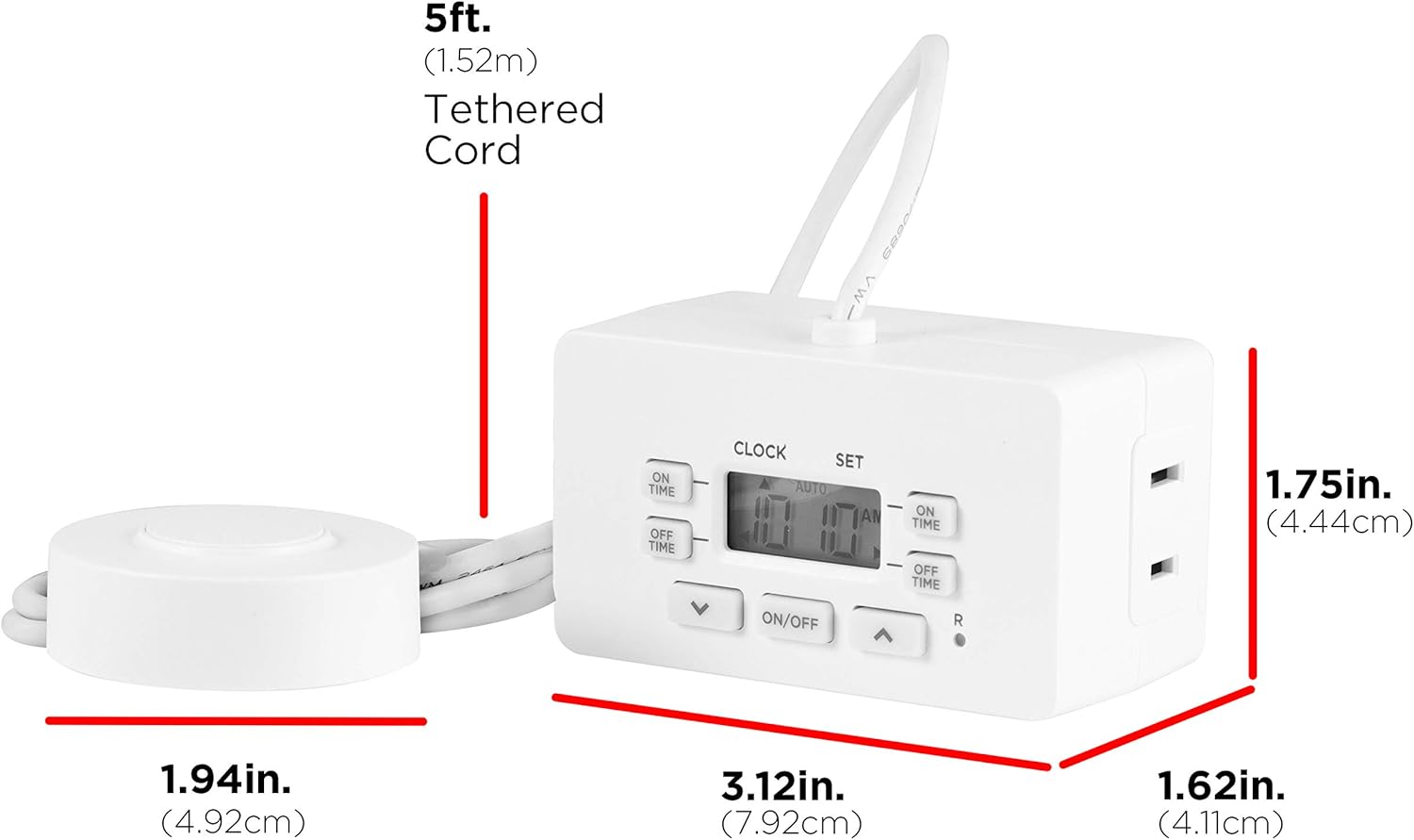
Obrázek 2: Dimensions of the UltraPro Digital Timer and its 5ft tethered cord. The timer measures 3.12in (7.92cm) wide, 1.62in (4.11cm) high, and 1.75in (4.44cm) deep. The tethered cord is 5ft (1.52m) long, and the button is 1.94in (4.92cm) in diameter.
Pokyny pro nastavení
- Plug In the Timer: Insert the timer into a standard indoor 120V AC wall outlet.
- Nabíjení baterie: Allow the timer to charge for approximately 30 minutes before initial programming or if the display is blank. This internal battery retains settings during power outages.
- Nastavit aktuální čas:
- Stiskněte tlačítko HODINY button once. The display will show '12:00 AM'.
- Použijte NAHORU (▲) or DOLŮ (▼) arrow buttons to adjust the hour. Note the AM/PM indicator.
- Stiskněte tlačítko HODINY button again to set the minutes. Use the NAHORU (▲) or DOLŮ (▼) tlačítka se šipkami pro nastavení.
- Stiskněte tlačítko HODINY button a third time to confirm and exit time setting mode.
- Připojit zařízení: Plug the appliance you wish to control into the polarized outlet on the side of the timer. Ensure the appliance's power switch is in the ON position.
Návod k obsluze
Programování časů zapnutí / vypnutí
The timer allows for two distinct ON/OFF programs. Follow these steps to set your desired schedules:
- Nastavení času zapnutí programu 1:
- Stiskněte tlačítko VČAS jednou tlačítko. Na displeji se zobrazí „1 ON“.
- Použijte NAHORU (▲) or DOLŮ (▼) arrow buttons to set the desired ON hour for Program 1.
- Stiskněte VČAS again to set the minutes. Use the NAHORU (▲) or DOLŮ (▼) tlačítka se šipkami pro nastavení.
- Nastavení času vypnutí programu 1:
- Stiskněte tlačítko VYPNUTO button once. The display will show '1 OFF'.
- Použijte NAHORU (▲) or DOLŮ (▼) arrow buttons to set the desired OFF hour for Program 1.
- Stiskněte VYPNUTO again to set the minutes. Use the NAHORU (▲) or DOLŮ (▼) tlačítka se šipkami pro nastavení.
- Set Program 2 (Optional): Repeat steps 1 and 2 using the VČAS a VYPNUTO buttons until '2 ON' and '2 OFF' appear on the display, respectively.
- Activate Programs: After setting programs, ensure the timer is in 'AUTO' mode for the programs to run. Press the ON/OFF button on the timer until 'AUTO' is displayed.
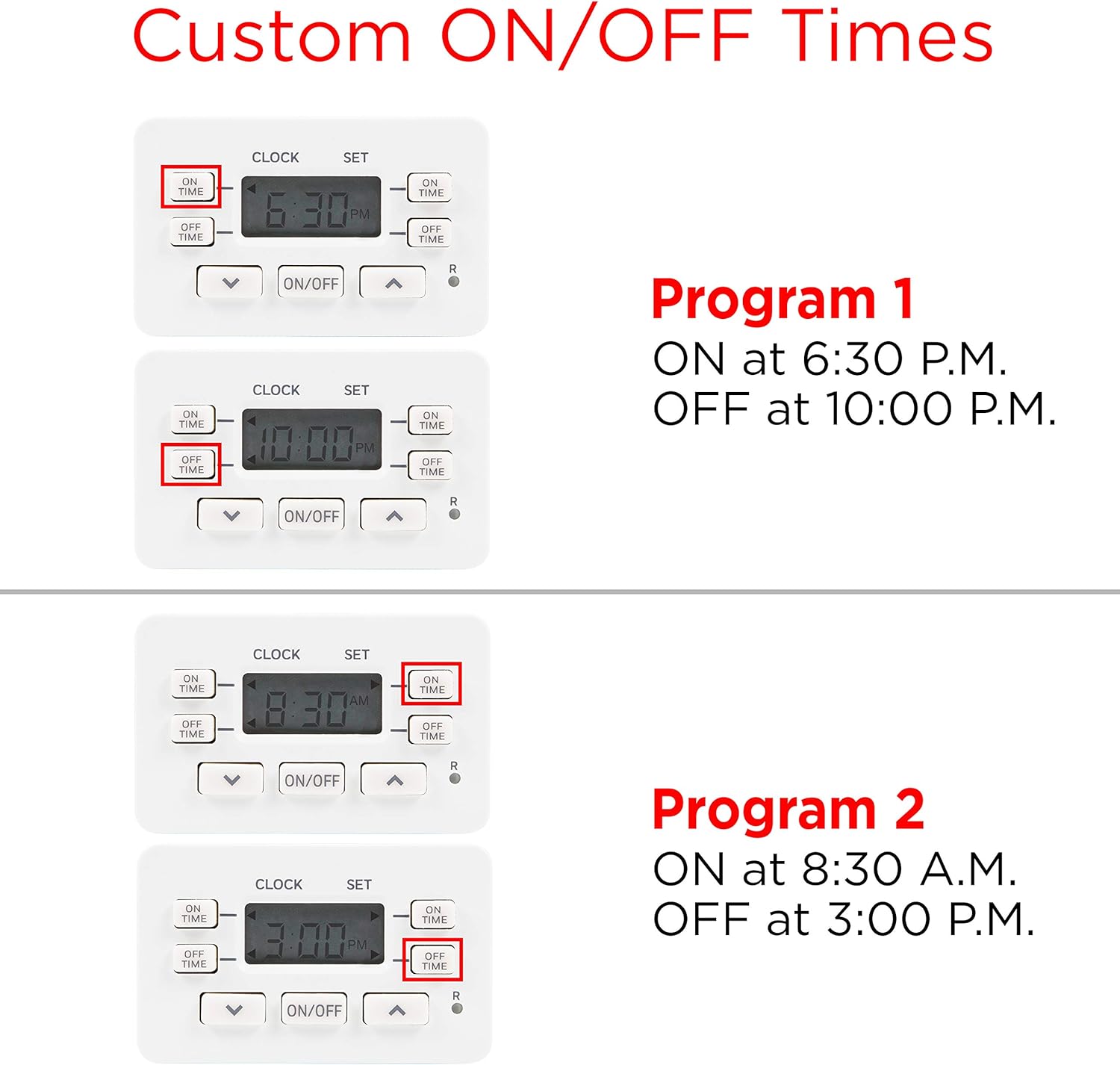
Obrázek 3: Visual guide for setting custom ON/OFF times. Program 1 is set to ON at 6:30 P.M. and OFF at 10:00 P.M. Program 2 is set to ON at 8:30 A.M. and OFF at 3:00 P.M.
Using the Override Tether
The 5-foot tethered push button provides convenient manual control and can override current timer settings.
- Manuální ZAP/VYP: Press the tether button once to toggle the connected device ON or OFF.
- Funkce potlačení: When the timer is running a program in 'AUTO' mode, pressing the tether button will temporarily override the current setting. For example, if the device is scheduled to be OFF but you press the tether, it will turn ON until the next scheduled program change or until you press the tether again.

Obrázek 4: The tethered button can be used as a tabletop switch or a foot switch for easy access, demonstrating its versatility for year-round use with various applications.
Údržba
To ensure optimal performance and longevity of your UltraPro Digital Timer, follow these simple maintenance guidelines:
- Čištění: Před čištěním odpojte časovač ze zásuvky. Vnější povrch otřete měkkým, suchým hadříkem. Nepoužívejte tekuté čisticí prostředky ani abrazivní materiály.
- Skladování: If storing the timer for an extended period, ensure it is clean and dry. Store in a cool, dry place away from direct sunlight and extreme temperatures.
- Baterie: The internal battery is designed to hold settings during power interruptions. If the display is blank, plug the timer into an outlet for at least 30 minutes to recharge the battery.
Odstraňování problémů
If you encounter issues with your UltraPro Digital Timer, refer to the following common problems and solutions:
- Timer display is blank: The internal battery may be depleted. Plug the timer into a live outlet for at least 30 minutes to recharge.
- Connected device does not turn ON/OFF as programmed:
- Ensure the timer is in 'AUTO' mode. Press the ON/OFF button on the timer until 'AUTO' is displayed.
- Verify that the connected appliance's power switch is in the ON position.
- Check that the ON/OFF times are set correctly, including AM/PM indicators.
- Confirm the timer is securely plugged into a working outlet.
- Tethered button does not respond: Ensure the tether cable is securely connected to the timer. If the timer is in 'AUTO' mode, the tether should override the current program.
- Timer loses settings during power outage: The internal battery may not be fully charged or may be at the end of its life. Allow the timer to charge for several hours. If the issue persists, the timer may need replacement.
Specifikace
| Specifikace | Detail |
|---|---|
| Číslo modelu | 52086 |
| Značka | UltraPro |
| Materiál | Plast |
| Rozměry produktu (D x Š x V) | 1.63" x 3.13" x 1.75" (4.14 cm x 7.95 cm x 4.45 cm) |
| Počet nastavení | 2 (programy ZAP/VYP) |
| Tether Cord Length | 5 stop (1.52 m) |
| Hmotnost položky | 6.7 unce (190 g) |
| Typ montáže | Plug-In Mount |
| Styl přepínání | Push Button Switch (on timer and tether) |
| Jsou vyžadovány baterie | No (internal rechargeable battery for settings retention) |
| UPC | 030878520867 |
Záruka a podpora
For warranty information or technical support regarding your UltraPro Digital Timer (Model 52086), please refer to the manufacturer's official webnebo se obraťte na jejich zákaznický servis. Uschovejte si doklad o koupi pro případ reklamace.
Výrobce: Jasco Products Company, LLC