
1. Úvod
This manual provides detailed instructions for the installation, operation, and maintenance of your Foscam SD2 2MP PTZ Wi-Fi Dome IP Camera. Please read this manual thoroughly before using the product to ensure proper setup and functionality. Keep this manual for future reference.
2. Bezpečnostní informace
To prevent damage to the product or injury to yourself or others, observe the following safety precautions:
- Zajistěte napájení objtage matches the camera's requirements (12V).
- Nevystavujte fotoaparát extrémním teplotám, vlhkosti ani přímému slunečnímu záření.
- Neumisťujte kameru do blízkosti silných elektromagnetických polí.
- Nepokoušejte se kameru rozebírat ani upravovat. Veškerý servis svěřte kvalifikovanému personálu.
- Uchovávejte fotoaparát a jeho příslušenství mimo dosah dětí.
- Use only Foscam-approved accessories.
3. Obsah balení
Ověřte, zda jsou v balení přítomny všechny položky:
- Foscam SD2 IP Camera
- Napájecí adaptér
- Montážní držák a šrouby
- Ethernet Cable (for initial setup or wired connection)
- Průvodce rychlou instalací
4. Konec produktuview
The Foscam SD2 is a 2-megapixel PTZ (Pan-Tilt-Zoom) Wi-Fi dome IP camera designed for comprehensive surveillance. It features 4x optical zoom, a 118° wide viewing angle, and advanced human detection capabilities.
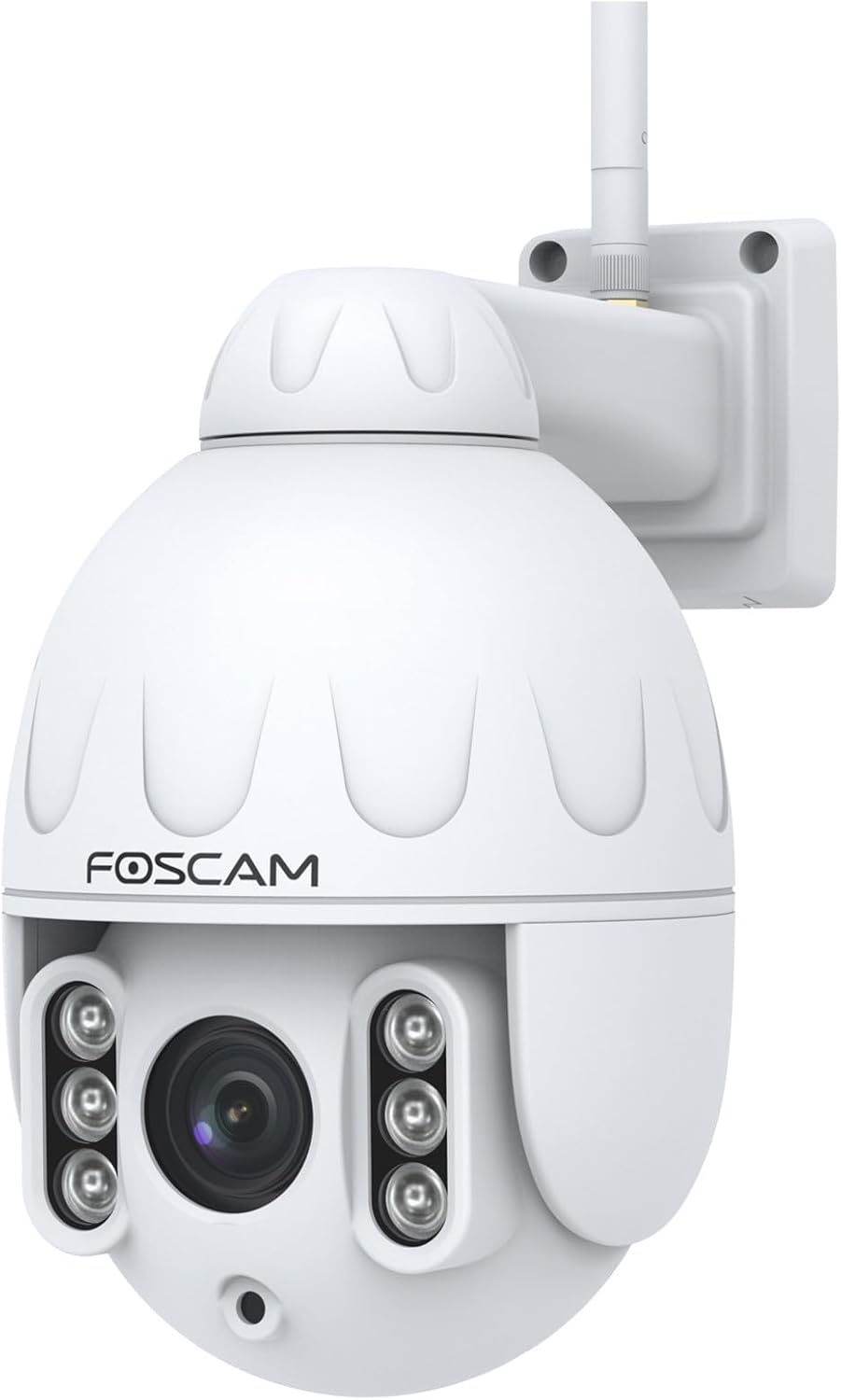
Obrázek 4.1: Přední strana view of the Foscam SD2 PTZ Dome IP Camera. This image shows the camera's main lens, infrared LEDs, and the Foscam logo on its white dome housing.

Obrázek 4.2: Strana view of the Foscam SD2 camera, illustrating the integrated mounting arm for wall installation. The antenna for Wi-Fi connectivity is visible at the top.

Obrázek 4.3: Zadní view of the Foscam SD2 camera, showing the power and Ethernet cable connections. These cables are essential for providing power and network access to the device.
5. Nastavení
5.1 Fyzická instalace
The Foscam SD2 camera is designed for both indoor and outdoor use and can be wall-mounted.
- Vyberte umístění: Select a suitable location that provides the desired viewing angle and is within range of your Wi-Fi network or an Ethernet connection. Ensure the mounting surface is sturdy enough to support the camera.
- Namontujte držák: Use the provided mounting bracket as a template to mark drill holes on the wall. Drill the holes, insert wall anchors if necessary, and secure the bracket with the screws.
- Připojte kameru: Securely attach the camera to the mounted bracket.
- Připojte napájení: Připojte napájecí adaptér k fotoaparátu a zapojte jej do elektrické zásuvky.

Figure 5.1: The Foscam SD2 camera shown mounted on an exterior white wall, demonstrating a typical installation scenario. The camera's antenna is visible, indicating Wi-Fi connectivity.
5.2 Síťové připojení
The Foscam SD2 supports dual-band Wi-Fi (2.4GHz/5GHz) or a wired Ethernet connection.
- Drátové připojení (volitelné): Připojte ethernetový kabel z routeru k ethernetovému portu kamery.
- Wi-Fi připojení: For wireless setup, proceed to install the Foscam app.
5.3 Instalace aplikace a počáteční nastavení
To configure and control your camera, download the Foscam app on your smartphone or tablet.
- Stáhněte si aplikaci: Hledat "Foscam" in the App Store (iOS) or Google Play Store (Android) and install the official Foscam app.
- Vytvořit účet: Otevřete aplikaci a postupujte podle pokynů na obrazovce k vytvoření nového účtu Foscam nebo se přihlaste, pokud již nějaký máte.
- Přidat fotoaparát: Tap the "+" icon to add a new device. Follow the in-app wizard to connect your camera to your Wi-Fi network. This typically involves scanning a QR code on the camera or manually entering its details.
- Kompletní nastavení: Po připojení můžete kameru pojmenovat a upravit počáteční nastavení.
6. Návod k obsluze
6.1 Remote Access and Live View
Access your camera's live feed and controls from anywhere using the Foscam app or web rozhraní.
- Foscam App: Open the Foscam app, select your camera from the device list, and tap to view přímý přenos.
- Web Interface/Foscam VMS: For PC access, open a web browser and navigate to the camera's IP address or use the Foscam VMS software.
6.2 PTZ Control and Optical Zoom
The SD2 camera offers Pan, Tilt, and Zoom functionalities.
- Pan/Tilt: V přímém přenosu view, swipe your finger across the screen (or use directional controls in the app/web interface) to pan (rotate horizontally up to 350°) and tilt the camera.
- Optický zoom: Use the zoom controls within the app or web interface to activate the 4x optical zoom, allowing you to magnify specific areas without losing image quality.
6.3 Smart Motion Detection (Human Detection)
The camera features intelligent motion detection that distinguishes human shapes from other objects, reducing false alarms.
- Povolit detekci: Navigate to the camera settings in the Foscam app. Locate the "Alarm" or "Detection" section.
- Configure Human Detection: Enable "Human Detection" and adjust sensitivity levels as needed.
- Nastavení oznámení: Configure push notifications to receive alerts on your smartphone when human motion is detected.
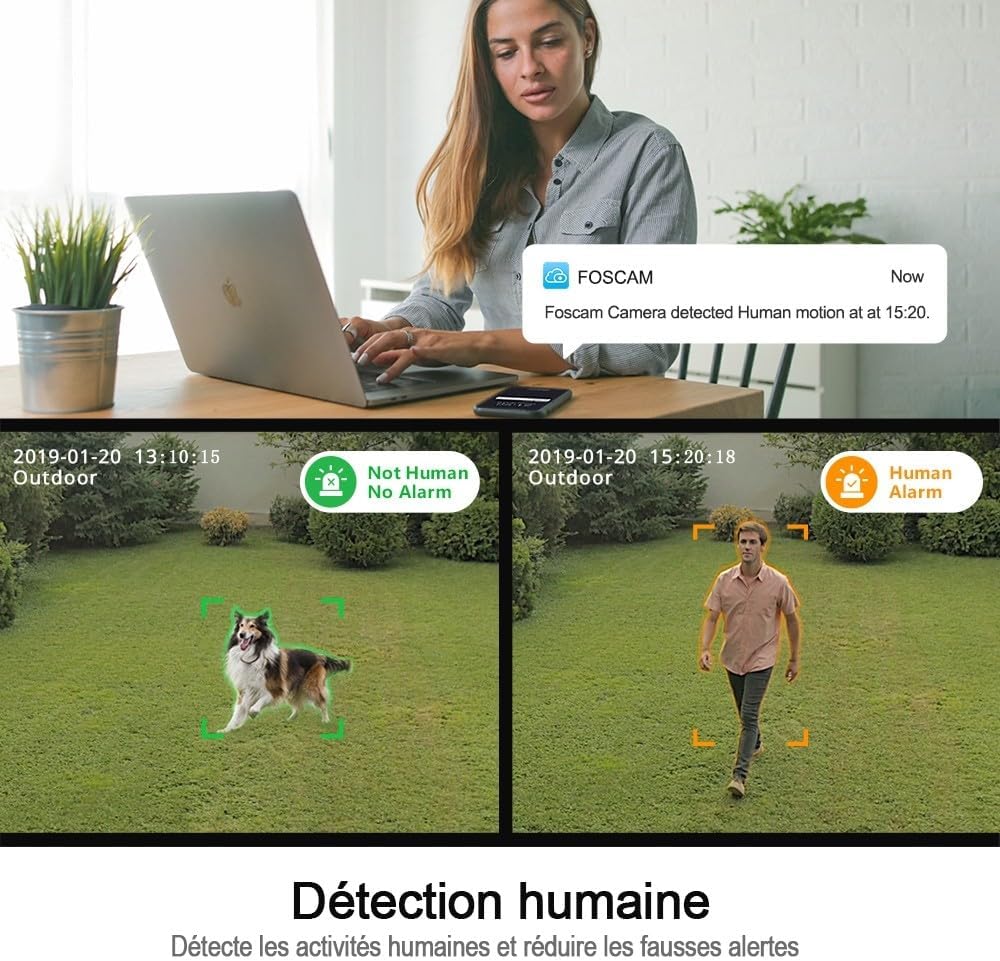
Figure 6.1: An illustration of the Foscam SD2's human detection feature. The image displays two scenarios: one where a dog is detected but not flagged as human, and another where a person is detected and triggers a human alarm, demonstrating the camera's ability to differentiate subjects.
6.4 Integrace hlasového ovládání
The Foscam SD2 is compatible with Amazon Alexa and Google Assistant for convenient voice control.
- Propojit účty: In your Alexa or Google Home app, search for the Foscam skill/action and link your Foscam account.
- Objevte zařízení: Allow the assistant to discover your camera.
- Hlasové příkazy: Use commands like "Alexa, show me the [camera name]" or "Hey Google, show [camera name] on [display device]" to view živý přenos na kompatibilních chytrých displejích.

Figure 6.2: This image demonstrates the Foscam SD2's compatibility with voice assistants like Google Assistant and Amazon Alexa. A smart display shows the camera's live feed, controlled by voice commands from a smart speaker.
6.5 Možnosti úložiště
The camera supports multiple storage methods for recorded footage.
- Foscam Cloud Storage: Subscribe to Foscam Cloud for secure off-site storage of your recordings.
- Úložiště SD karty: Insert a microSD card (up to 128GB, sold separately) into the camera's SD card slot for local storage.
7. Údržba
Regular maintenance ensures optimal performance and longevity of your Foscam SD2 camera.
- Čištění: Gently wipe the camera lens and housing with a soft, dry cloth. Do not use harsh chemicals or abrasive cleaners.
- Aktualizace firmwaru: Periodically check for and install firmware updates via the Foscam app to ensure your camera has the latest features and security enhancements.
- Kontrola sítě: Ensure your Wi-Fi signal is strong and stable, especially for outdoor installations.
8. Řešení problémů
If you encounter issues with your Foscam SD2 camera, refer to the following common solutions:
- Fotoaparát offline: Check power connection, Wi-Fi signal strength, and router status. Restart the camera and your router.
- Žádné živé vysílání View: Ensure your internet connection is active. Check app permissions and camera settings.
- Špatná kvalita obrazu: Clean the camera lens. Ensure adequate lighting. Check network bandwidth.
- Upozornění na falešný pohyb: Adjust motion detection sensitivity in the app. Ensure human detection is enabled if desired.
- Nelze se připojit k Wi-Fi: Verify correct Wi-Fi password. Ensure camera is within router range. Try connecting to the 2.4GHz band if experiencing issues with 5GHz.
9. Specifikace
| Číslo modelu | SD2 |
| Značka | Foscam |
| Technologie připojení | Bezdrátové připojení (Wi-Fi 2.4 GHz/5 GHz) |
| Speciální funkce | Night Vision, PTZ (Pan-Tilt-Zoom), 4x Optical Zoom, Human Detection, Voice Control (Alexa/Google Assistant), IP66 Weatherproof |
| Rezoluce | 2 megapixelů (1920 x 1080 pixelů) |
| Viewúhel | 118° |
| Rotace pánve | 350° |
| Moc | 12 voltů, 24 wattů |
| Materiál | Akryl |
| Rozměry (D x Š x V) | 10 x 5 x 1.27 cm |
| Hmotnost | 1 kilogram |
| Možnosti úložiště | Foscam Cloud, MicroSD Card (up to 128GB) |
| Komprese videa | H.264 |
10. Záruka
The Foscam SD2 camera comes with a 2letá záruka výrobce. This warranty covers defects in materials and workmanship under normal use. Please retain your proof of purchase for warranty claims. The warranty does not cover damage caused by misuse, accidents, unauthorized modifications, or natural disasters.
11. Podpora
For technical assistance, troubleshooting, or further information, please visit the official Foscam support website or contact their customer service. Refer to the Foscam webweb s nejaktuálnějšími kontaktními informacemi a zdroji podpory.
Online zdroje: www.foscam.com