
1. Úvod
The Aputure Amaran 200d is a high-output 200W LED video light designed for professional and enthusiast filmmakers and photographers. It offers exceptional color fidelity, versatile control options, and a robust build, making it suitable for various lighting scenarios. This manual provides detailed instructions for the safe and effective use of your Amaran 200d.

Figure 1.1: The Amaran 200d LED Video Light with its standard reflector mounted on a light stand.
2. Bezpečnostní informace
Před použitím tohoto výrobku si prosím přečtěte a pochopte všechna bezpečnostní varování a pokyny. Nedodržení těchto pokynů může vést k úrazu elektrickým proudem, požáru nebo vážnému zranění.
- Do not expose the light to water or high humidity.
- Do not disassemble or modify the light. Refer all servicing to qualified personnel.
- Ensure the power supply is compatible with the local voltage (100-240V).
- Do not block the ventilation openings on the light fixture. Overheating can cause damage.
- Avoid direct eye exposure to the LED light source when it is powered on.
- Always secure the light fixture properly on a stable light stand before operation.
3. Co je v krabici
Po vybalení zkontrolujte, zda jsou všechny komponenty přítomny:
- Amaran 200d LED Lamp Hlava
- Standard Bowens Mount Reflector
- AC napájecí jednotka
- Síťový napájecí kabel

Figure 3.1: Included components of the Amaran 200d package.
4. Nastavení
4.1 Mounting the Light Head
- Attach the Amaran 200d lamp head to a compatible light stand using the integrated mounting bracket.
- Secure the light head by tightening the locking knob on the mounting bracket.

Figure 4.1: The Amaran 200d securely mounted on a light stand.
4.2 Připevnění reflektoru
- Align the three mounting prongs of the standard reflector with the Bowens Mount on the front of the lamp hlava.
- Vložte reflektor do držáku a otáčejte jím ve směru hodinových ručiček, dokud bezpečně nezapadne na místo.
4.3 Připojení napájení
The Amaran 200d supports both AC and DC (48V) power input.
- Connect the AC power cable to the power supply unit.
- Connect the power supply unit's output cable to the 48V DC input port on the rear of the Amaran 200d lamp hlava.
- Plug the AC power cable into a suitable wall outlet.
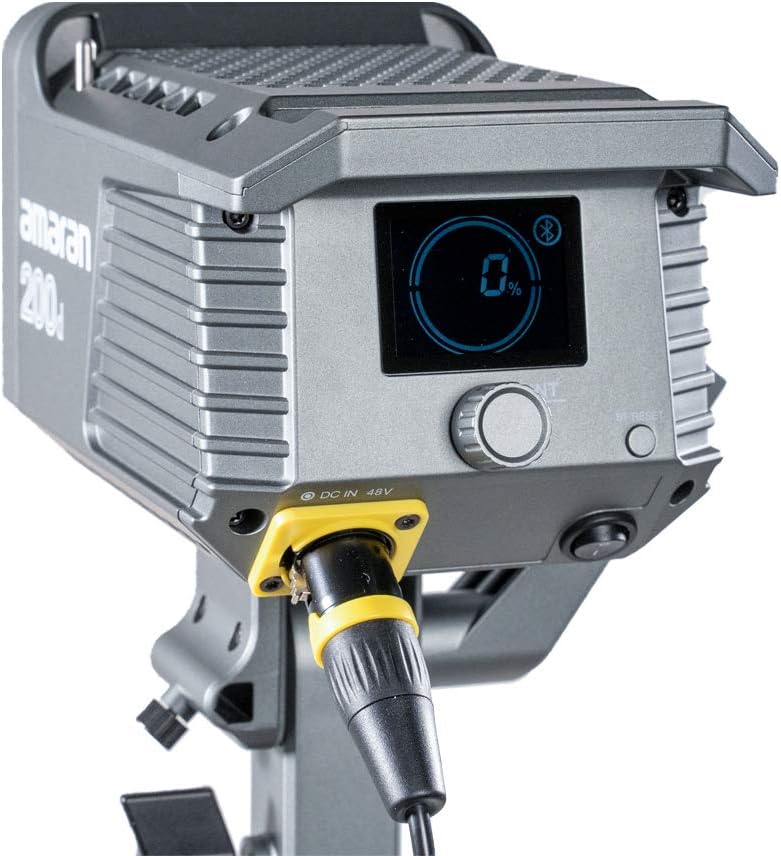
Figure 4.2: Detail of the DC 48V power input on the Amaran 200d.
5. Provoz
5.1 Zapnutí/vypnutí
Locate the power switch on the rear panel of the light head. Flip the switch to the 'ON' position to power on the device. Flip it to 'OFF' to power down.
5.2 Ovládání jasu
The Amaran 200d features an INT adjustment knob for brightness control (0-100%).
- Rotate the INT knob clockwise to increase brightness.
- Rotate the INT knob counter-clockwise to decrease brightness.
- Press the INT knob to quickly cycle through preset brightness levels: 20%, 40%, 60%, 80%, 100%.
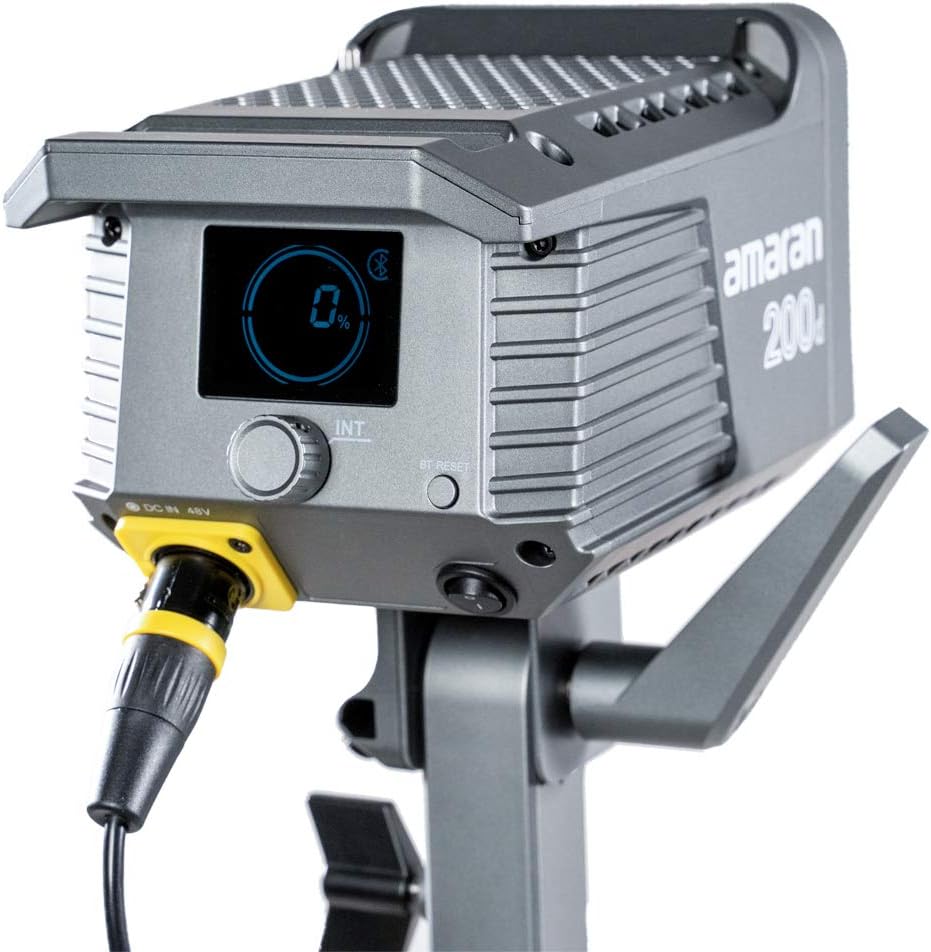
Figure 5.1: The control panel of the Amaran 200d, showing the display and adjustment knob.
5.3 Světelné efekty
The Amaran 200d includes 8 pre-programmed lighting effects:
- Paparazzi
- Ohňostroj
- Blesk
- Chybná žárovka
- TV
- Dech
- Blikat
- Výbuch
These effects can be accessed and controlled via the Sidus Link App.
5.4 Sidus Link App Control
The Amaran 200d supports 2.4G Bluetooth control via the Sidus Link App, allowing remote adjustment of brightness, lighting effects, and frequency.
- Download the Sidus Link App from your device's app store.
- Ujistěte se, že je na vašem mobilním zařízení povoleno Bluetooth.
- Open the Sidus Link App and follow the on-screen instructions to connect to your Amaran 200d.
- Once connected, you can control various parameters of the light remotely.

Figure 5.2: Controlling the Amaran 200d via the Sidus Link App.
6. Údržba
6.1 Čištění
- Před čištěním vždy odpojte napájení.
- Use a soft, dry cloth to wipe the surface of the light.
- Nepoužívejte agresivní chemikálie nebo abrazivní materiály.
6.2 Skladování
- Světlo skladujte na chladném a suchém místě mimo dosah přímého slunečního záření.
- If storing for extended periods, disconnect the power supply.
7. Řešení problémů
| Problém | Možná příčina | Řešení |
|---|---|---|
| Světlo se nerozsvítí. | No power supply; loose connection; faulty power supply. | Check power cable connection; ensure outlet is working; test with another power supply if available. |
| Světlo bliká nebo je nestabilní. | Loose power connection; overheating; interference. | Secure all connections; ensure proper ventilation; move away from other electronic devices. |
| Aplikace Sidus Link se nemůže připojit. | Bluetooth off; light not in pairing mode; app issue. | Ensure Bluetooth is on; restart light and app; try pairing again. |
8. Specifikace
- Rozměry produktu: 13 x 11.4 x 21 palce
- Hmotnost položky: 10.34 libry
- Číslo modelu: 200D
- Značka: Aputura
- Technologie připojení: Bluetooth, rádiová frekvence
- Popis režimů blesku: Constant illumination, adjustable brightness, 8 built-in lighting effects
- Teplota barev: 5600 K (denní světlo)
- CRI: ≥95
- TLCI: ≥96
- Osvětlení: Up to 65,000 lux@1m (with Hyper-Reflector)
- Montáž: Universal Bowens Mount
- Příkon: 48V DC
9. Záruka a podpora
Aputure products are designed for durability and performance. For specific warranty details and terms, please refer to the warranty card included with your product or visit the official Aputure website. For technical support, troubleshooting assistance, or service inquiries, please contact Aputure customer support through their official channels.
Optional protection plans are available for purchase, such as 2-Year and 3-Year Protection Plans, which can provide extended coverage beyond the standard manufacturer's warranty.
Pro více informací navštivte Aputure Store.