
LENRUE A25-USB
LENRUE A25-USB Computer Speakers Instruction Manual
Model: A25-USB
Zavedení
Thank you for choosing the LENRUE A25-USB Computer Speakers. This manual provides detailed instructions for setting up, operating, and maintaining your speakers to ensure optimal performance and longevity. Please read this manual thoroughly before using the product.

Image: The LENRUE A25-USB Computer Speakers, featuring a sleek black design with illuminated blue speaker grilles and an attached USB cable.
Obsah balení
Ověřte, zda jsou v balení přítomny všechny položky:
- 1 × A25-USB Computer Speaker with Built-in Microphone
- 1 × Návod k použití
Průvodce nastavením
1. Připojení reproduktorů
The LENRUE A25-USB speakers are designed for plug-and-play functionality via a single USB cable.
- Locate an available USB port on your computer (desktop, laptop, iMac, etc.).
- Insert the USB cable from the speakers into the USB port. The speakers will draw power directly from the USB connection.

Image: A man relaxing on a couch, using a laptop with the LENRUE speakers connected via a USB cable, illustrating the USB-powered feature.
2. Powering On the Speakers
To power on the speakers, press and hold the power button on the speaker unit for approximately 5 seconds. The integrated LED lights will illuminate, indicating the speakers are active.
3. Setting Audio Output
After connecting the speakers, you may need to select them as the default audio output device in your operating system settings.
Pro Windows:
- Plug the USB cable into your computer's USB port.
- Click the Speaker icon located in the taskbar (usually in the bottom-right corner).
- From the list of playback devices, select "Speaker (LENRUE A25USB)" as your audio output device.
Pro MacOS:
- Click on "System Preferences" from the Apple menu.
- Select "Sound", then navigate to the "Output" tab.
- Choose "Speaker (LENRUE A25USB)" or "USB2.0 Device" from the list of output devices.

Image: A desktop computer setup with the LENRUE speakers positioned below the monitor, demonstrating the plug-and-play functionality and providing on-screen tips for Windows audio output selection.
Návod k obsluze
Ovládání hlasitosti
Adjust the volume using the dedicated volume buttons located on the top of the speaker unit or through your computer's system volume controls.
Ovládání LED světla
The speakers feature integrated LED lights. To turn off the lights, locate and click the power button on the speaker unit. Clicking it again will turn the lights back on.

Image: A gaming setup featuring the LENRUE speakers with their blue LED lights illuminated, demonstrating the aesthetic lighting feature and indicating the power button for light control.
Kompatibilita s více zařízeními
The LENRUE A25-USB speakers are compatible with various devices that have a USB port for audio output, including laptops, desktop computers, and iMacs, providing versatile audio solutions.

Image: A visual representation highlighting the compatibility of the LENRUE speakers with multiple device types, including laptops, desktops, and iMacs, all connected via a single USB cable.
Údržba
To ensure the longevity and optimal performance of your LENRUE A25-USB speakers, follow these simple maintenance guidelines:
- Čištění: Use a soft, dry cloth to wipe the exterior of the speakers. Avoid using abrasive cleaners, solvents, or sprays directly on the unit.
- Umístění: Place the speakers on a stable, flat surface. Avoid placing them in direct sunlight, near heat sources, or in areas with high humidity.
- Skladování: If storing the speakers for an extended period, disconnect them from the power source and store them in a cool, dry place.
- Péče o kabely: Kabel USB nadměrně neohýbejte ani nekrimpujte. Při odpojování vždy uchopte za zástrčku, nikoli za kabel.
Odstraňování problémů
If you encounter issues with your LENRUE A25-USB speakers, please refer to the following common solutions:
No Power / Speakers Not Turning On
- Ujistěte se, že je kabel USB bezpečně zapojený do funkčního portu USB v počítači.
- Press and hold the power button on the speaker for 5 seconds to ensure it is powered on.
- Try plugging the USB cable into a different USB port on your computer or another device to rule out a faulty port.
- If the speakers still do not turn on, unplug the USB cable completely and then plug it back in.
Žádný zvukový výstup
- Verify that the speakers are selected as the default audio output device in your computer's sound settings (refer to the "Setting Audio Output" section).
- Check the volume levels on both the speakers and your computer. Ensure they are not muted or set to a very low level.
- Ensure the audio source (e.g., music player, video) is playing and its volume is up.
- Zkuste restartovat počítač.
Sound Distortion or Low Quality
- Ensure the speakers are placed on a stable surface and not obstructed.
- Reduce the volume if the sound is distorted at high levels.
- Check the audio source for quality issues. Try playing different audio files or from a different application.

Obrázek: Explodoval view of the internal components of the LENRUE speaker, illustrating the drivers and passive radiators responsible for sound production, emphasizing the 'Clear Vigorous Sound' feature.
Problémy s kompatibilitou
- If the computer speaker is not compatible with your specific computer model, please contact customer support for assistance or replacement options.
Specifikace
| Funkce | Detail |
|---|---|
| Název modelu | A25-USB |
| Materiál | Plast |
| Barva | Černý |
| Typ reproduktoru | General-purpose speaker |
| Speciální funkce | Vestavěný mikrofon |
| Technologie připojení | USB |
| Zdroj napájení | Napájení USB |
| Režim zvukového výstupu | Stereo |
| Konfigurace kanálů prostorového zvuku | 2.0 |
| Maximální výstupní výkon reproduktoru | 10 wattů |
| Rozměry produktu | 3"H x 17"Š x 3"V |
| Hmotnost položky | 1.36 liber (0.62 kilogramů) |
| Kompatibilní zařízení | Přenosný počítač, osobní počítač |
| Kontrolní metoda | App (Note: Physical buttons also available) |
| Odstup signálu od šumu | 80 dB |
| Počet mikrofonů | 1 |
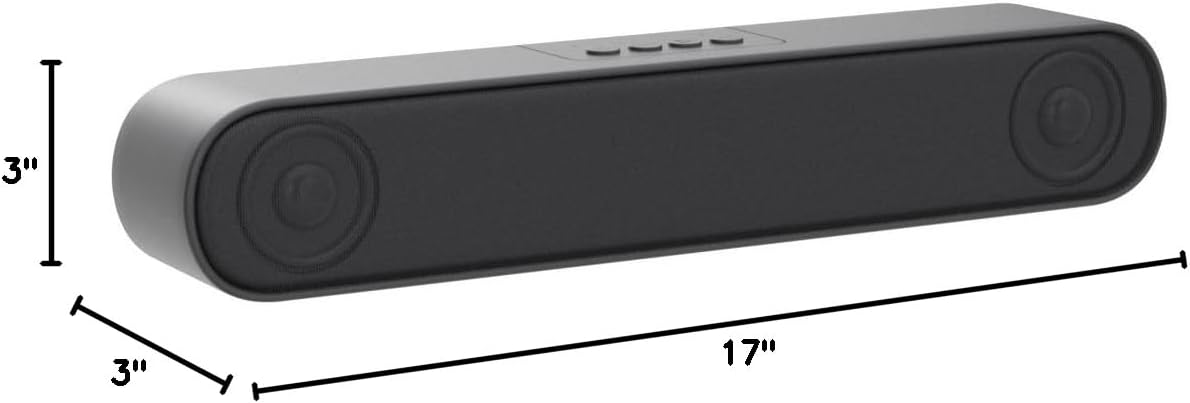
Image: A diagram illustrating the physical dimensions of the LENRUE A25-USB speaker, showing its length of 17 inches, and height and depth of 3 inches each.
Záruka a podpora
LENRUE is committed to providing excellent customer service. Your A25-USB Computer Speakers come with the following service guarantees:
- 60denní politika vrácení peněz: No reason required for a refund within 60 days of purchase.
- 2-Year Free Maintenance: Enjoy free maintenance services for two years from the date of purchase.
- 24hodinová online služba: Dedicated online support available 24 hours a day.
Jak nás kontaktovat:
For any inquiries, support, or warranty claims, please use the following method:
- Přejděte na stránku produktu na Amazonu.
- Click on the seller name, "QHC Tech", located below the cart section to enter our storefront.
- Press the button labeled "Ask-a-question" to connect with our customer service team.
Ask a question about this manual
Ask about setup, troubleshooting, compatibility, parts, safety, or missing instructions. Manuals+ will review the question and use this page’s manual context to help answer it.