
Xinmeng N520
Xinmeng N520 Wireless Keyboard and Mouse Set User Manual
Model: N520
Zavedení
Thank you for choosing the Xinmeng N520 Wireless Keyboard and Mouse Set. This product is designed to provide a comfortable and efficient input experience for office and business use, featuring a unique punk mechanical feel and reliable wireless connectivity. This manual will guide you through the setup, operation, and maintenance of your new device.
Nastavení
Obsah balení
- Xinmeng N520 Wireless Keyboard
- Xinmeng Wireless Mouse
- USB přijímač (umístěný v přihrádce na baterie myši)
- Uživatelská příručka (tento dokument)
Instalace baterie
- Klávesnice: Locate the battery compartment on the underside of the keyboard. Insert the required batteries (typically 2x AAA, not included) ensuring correct polarity (+/-).
- Myš: Locate the battery compartment on the underside of the mouse. Insert the required battery (typically 1x AA, not included) ensuring correct polarity (+/-). The USB receiver is stored inside this compartment.
Připojení USB přijímače
- Vyjměte USB přijímač z přihrádky na baterie myši.
- Zapojte USB přijímač do volného USB portu na vašem počítači.
- The system will automatically detect and install the necessary drivers. This may take a few moments.
Počáteční připojení
Once the USB receiver is plugged in and batteries are installed, the keyboard and mouse should automatically connect to your computer. No manual pairing is typically required. If connection issues occur, refer to the Troubleshooting section.

Image: The Xinmeng N520 wireless keyboard and mouse set, showcasing černá barevná varianta.
Provozní
Funkce klávesnice
The N520 keyboard features a standard 104-key layout with a unique 'punk mechanical feel' for comfortable typing. It includes a full numeric keypad and standard function keys (F1-F12).
- psaní: Use the keys as you would a standard keyboard. The round keycaps provide a distinct tactile experience.
- Funkční klávesy: Standard F1-F12 keys are available. Some keys may have secondary functions accessible via the 'Fn' key, depending on your operating system and software.
- Šetření energie: The keyboard is designed with intelligent power-saving features to extend battery life. It will enter a sleep mode after a period of inactivity. Press any key to wake it up.
Funkce myši
The accompanying wireless mouse is a compact and ergonomic design, suitable for daily use.
- tlačítka: Left-click, right-click, and scroll wheel button.
- Rolovací kolečko: Používá se pro vertikální posouvání v dokumentech a web stránky.
- Šetření energie: The mouse also features intelligent power management. It will enter a sleep mode when not in use. Move the mouse or click a button to wake it up.
Bezdrátové Dosah
The Xinmeng N520 set operates on a 2.4GHz wireless frequency, providing a stable connection up to approximately 10 meters (33 feet) from the USB receiver. Performance may vary depending on environmental factors and obstacles.
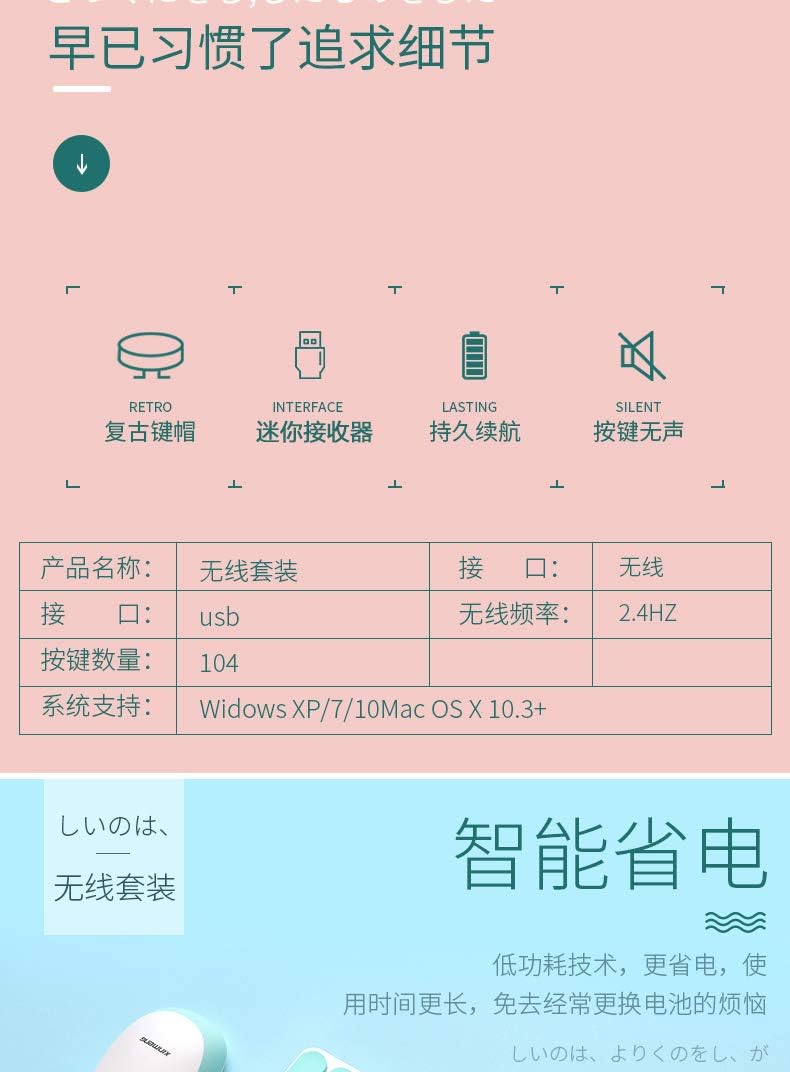
Image: The black Xinmeng N520 keyboard and mouse set in an office environment, demonstrating its use.

Image: The pink Xinmeng N520 keyboard and mouse set in an office environment, highlighting its aesthetic.
Údržba
Čištění
- K otření povrchů klávesnice a myši použijte měkký, suchý hadřík.
- Pro odolnou špínu lehceampOmyjte hadřík vodou nebo jemným, neabrazivním čisticím prostředkem. Zabraňte nadměrné vlhkosti.
- Do not use harsh chemicals, solvents, or abrasive materials, as these can damage the finish.
- Pro čištění mezi klávesami použijte stlačený vzduch k odstranění prachu a nečistot.
Výměna baterie
When the keyboard or mouse performance degrades (e.g., delayed response, intermittent connection), it may be time to replace the batteries. Follow the battery installation steps outlined in the Setup section.
Skladování
When not in use for extended periods, it is recommended to remove the batteries to prevent leakage. Store the keyboard and mouse in a cool, dry place away from direct sunlight and extreme temperatures.
Odstraňování problémů
No Connection / Device Not Responding
- Zkontrolujte baterie: Ujistěte se, že jsou baterie správně vloženy a dostatečně nabité. V případě potřeby je vyměňte.
- Zkontrolujte USB přijímač: Make sure the USB receiver is securely plugged into a working USB port on your computer. Try a different USB port.
- Blízkost: Ensure the keyboard and mouse are within the effective wireless range (approx. 10 meters) of the USB receiver.
- Rušení: Move the devices away from other wireless devices (e.g., Wi-Fi routers, cordless phones) that might cause interference.
- Restartovat: Restartujte počítač.
Keys Not Responding / Mouse Cursor Jumps
- Clean Devices: Dust or debris under keys or mouse sensor can cause issues. Refer to the Maintenance section for cleaning instructions.
- Surface (Mouse): Ujistěte se, že myš je používána na čistém, nereflexním povrchu.
- Úroveň baterie: Slabá baterie může způsobit nepravidelné chování. Vyměňte baterie.
Lag nebo Delay
- Vzdálenost/Překážky: Reduce the distance between the devices and the receiver, and remove any large metallic objects that might block the signal.
- USB port: Try plugging the receiver into a USB port on the front of your computer or a USB hub to improve signal strength.
- Rušení: Minimize other 2.4GHz wireless devices operating nearby.
Specifikace
| Funkce | Popis |
|---|---|
| Značka | Xinmeng |
| Model | N520 |
| Konektivita | 2.4GHz Bezdrátové připojení |
| Rozhraní | USB přijímač |
| Keyboard Key Count | 104 kláves |
| Bezdrátové Dosah | Až 10 metrů (33 stop) |
| Kompatibilita systému | Windows XP/7/10, Mac OS X 10.3+ |
| Barva | Černá (mohou být k dispozici i jiné barvy) |
| Výrobce | Shenzhen Junxingcheng Electronic Technology Co., Ltd. |
| UPC | 046432672125 |
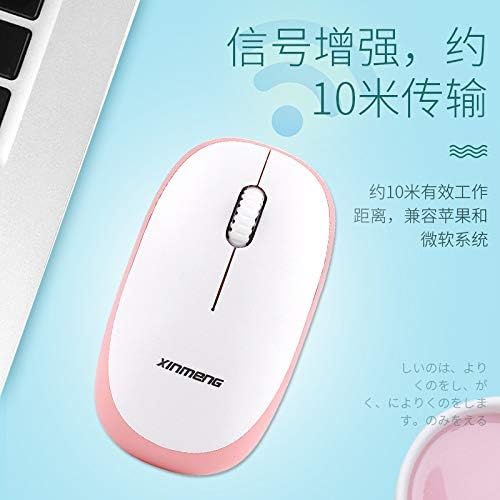
Image: A diagram illustrating key features such as retro keys, mini receiver, lasting battery, silent keys, and a table of specifications for the wireless set.
Záruka a podpora
For information regarding warranty coverage, terms, and conditions, please refer to the documentation provided at the time of purchase or contact your retailer. For technical support or further assistance, please reach out to the manufacturer or seller through their official support channels.
Manufacturer: Shenzhen Junxingcheng Electronic Technology Co., Ltd.
Ask a question about this manual
Ask about setup, troubleshooting, compatibility, parts, safety, or missing instructions. Manuals+ will review the question and use this page’s manual context to help answer it.