
Walfront 30A Solar Charge Controller User Manual
Model: BSC3048
Intelligent Regulator for 12V/24V/36V/48V Battery Systems
1. Úvod
This manual provides essential information for the safe and efficient operation of your Walfront BSC3048 Solar Charge Controller. Please read this manual thoroughly before installation and use to ensure optimal performance and longevity of the product.
1.1 Bezpečnostní opatření
- Před připojením napájení se ujistěte, že jsou všechna připojení správná a bezpečná.
- Do not attempt to repair or modify the controller yourself. Refer to qualified personnel.
- Install the controller in a well-ventilated, dry environment, away from direct sunlight and moisture.
- Vždy nejprve připojte baterii, poté solární panel a nakonec zátěž. Odpojení provádějte v opačném pořadí.
- Během instalace používejte vhodné osobní ochranné prostředky (OOP).
2. Konec produktuview
The Walfront BSC3048 is an intelligent solar charge controller designed for various battery types and voltage systems (12V/24V/36V/48V). It features automatic voltage recognition and customizable parameters for flexible battery management.

Obrázek 2.1: Přední strana view of the Walfront BSC3048 Solar Charge Controller, showing the LCD display, USB ports, and control buttons.
2.1 Klíčové vlastnosti
- Automatická identifikace objemu systému 12V/24V/36V/48Vtage.
- Compatibility with sealed, gel, flooded, lithium iron, and ternary lithium batteries.
- Customizable charging parameters for other battery types.
- Dual USB 5V/2A output for charging external devices.
- LCD display for real-time monitoring of system status.
- Integrated protection functions against overcharge, over-discharge, short circuit, and reverse polarity.
3. Instalace a nastavení
Follow these steps carefully to install your solar charge controller. Incorrect wiring can damage the controller, battery, or solar panel.
3.1 Pořadí zapojení
- Připojte baterii: Connect the battery to the controller's battery terminals (positive to positive, negative to negative). The controller will automatically detect the battery voltage. Ensure the battery is charged enough for the controller to recognize it.
- Připojte solární panel: Connect the solar panel to the controller's solar panel terminals (positive to positive, negative to negative).
- Připojení zátěže: Connect the DC load to the controller's load terminals (positive to positive, negative to negative).

Obrázek 3.1: Strana view illustrating the connection terminals for battery, solar panel, and load.
Important: Disconnect in the reverse order: first load, then solar panel, then battery.
4. Provoz
4.1 LCD displej a tlačítka
The controller features an LCD display that shows real-time system information and two buttons for navigation and settings adjustment.

Figure 4.1: Close-up of the LCD display, showing battery voltage (e.g., 14.4V) and charging status icons.
The display typically shows battery voltage, charging current, discharging current, and various status icons (solar charging, load discharging, battery level, etc.).
4.2 Nastavení typu baterie
The controller supports various battery types. The default setting is for sealed lead-acid batteries. To change the battery type or customize parameters:
- Press and hold the menu button (usually the left button) for 5 seconds to enter the settings menu.
- Pomocí navigačních tlačítek procházejte možnostmi.
- Select the desired battery type (e.g., GEL, FLOODED, LI-ION, LiFePO4) or parameter to adjust.
- Confirm your selection or adjustment.
Refer to the detailed parameter table in the full manual for specific voltage settings for each battery type if customization is required.
5. Údržba
Pravidelná údržba zajišťuje dlouhou životnost a optimální výkon vašeho solárního regulátoru nabíjení.
- Čistota: Keep the controller clean and free from dust. Use a dry cloth to wipe the surface.
- Spojení: Pravidelně kontrolujte veškeré kabelové spoje, zda nejsou pevně utažené a zda nejsou zkorodované. Volné spoje mohou způsobit přehřátí a poškození.
- Větrání: Ensure the installation area has adequate ventilation to prevent overheating. The controller's fins are designed for heat dissipation.
- Stav baterie: Sledujte stav baterie a hladinu elektrolytu (u zaplavených baterií) podle doporučení výrobce baterie.
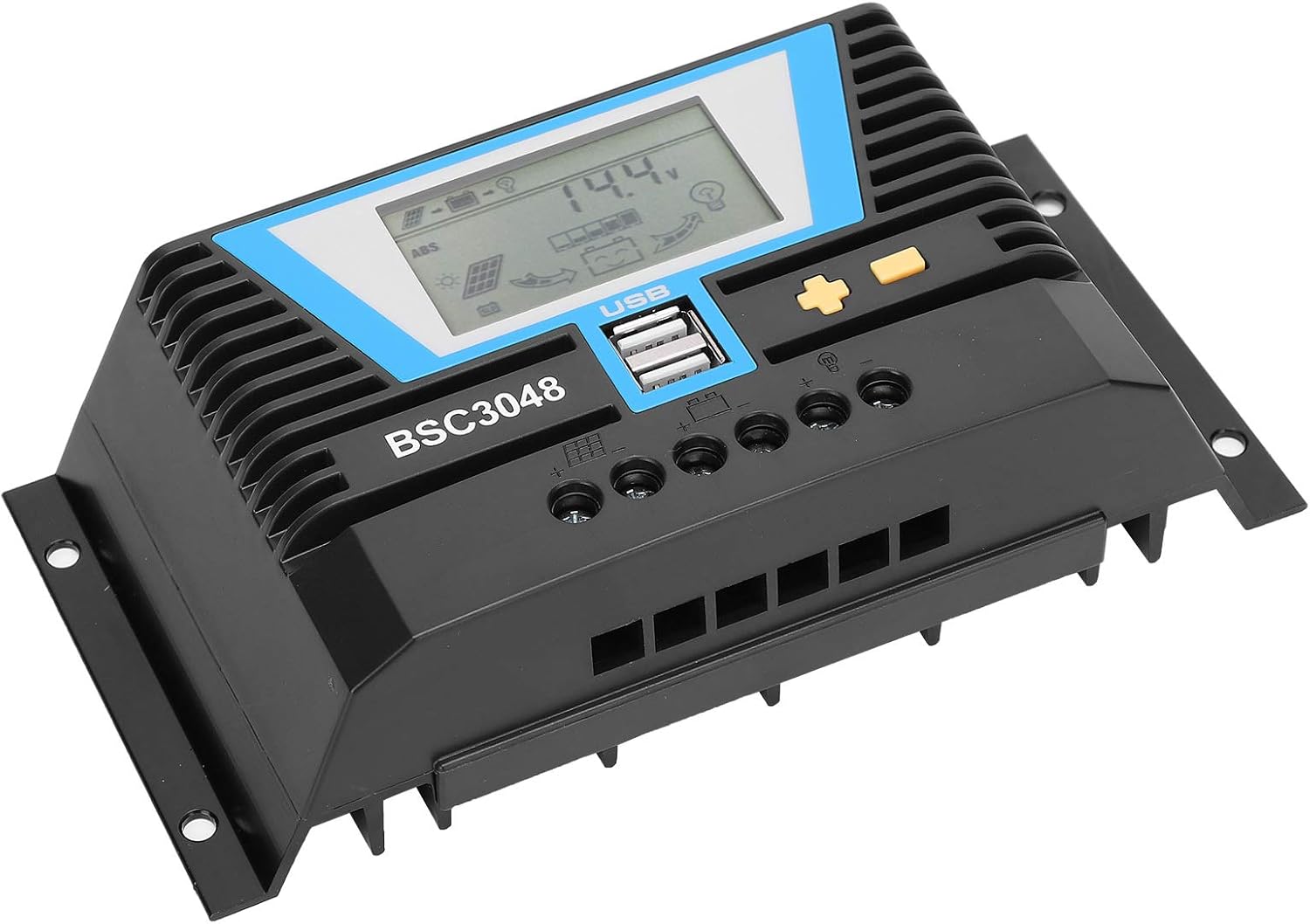
Obrázek 5.1: Úhlové view highlighting the heat dissipation fins on the controller's casing.
6. Řešení problémů
If you encounter issues with your solar charge controller, refer to the following common problems and solutions.
| Problém | Možná příčina | Řešení |
|---|---|---|
| Displej ovladače je vypnutý. | Baterie není připojena nebo je nízkátage. | Check battery connections. Ensure battery voltage je nad minimálním provozním objememtage. |
| Baterie se nenabíjí. | Solar panel not connected, insufficient sunlight, or faulty panel/wiring. | Check solar panel connections. Ensure adequate sunlight. Test solar panel voltage. |
| Zatížení nefunguje. | Load disconnected, over-discharge protection, or faulty load. | Check load connections. Ensure battery is sufficiently charged. Test the load directly. |
| Error Code E11 (as reported by a user review). | Specific error code, possibly related to internal fault or sensor issue. | While this manual does not list specific error codes, an E11 error may indicate a system fault. Try disconnecting all power (solar, battery, load) for a few minutes, then reconnect in the correct sequence (battery first). If the error persists, contact Walfront customer support. |
7. Specifikace
| Parametr | Hodnota |
|---|---|
| Jmenovitý proud | 30A |
| Ohodnoceno Working Voltage | 12V/24V/36V/48V (Auto-sensing) |
| Vstup solárního panelu Voltage | ≤100V |
| Statická ztráta | ≤20 mA |
| Loop Pressure Drop | ≤0.3V |
| USB výstup | 5V/2A x 2 |
| Pracovní teplota | -20 ℃ až +55 ℃ |
| Vodotěsná úroveň | IP30 |
| Relativní vlhkost | ≤95%, bez kondenzace |
| Velikost koncového vodiče | 6AWG/16 mm² |
| Materiál | Technický plast |
| Hmotnost položky | 1.07 libry (484 gramů) |
8. Záruka a podpora
For warranty information and technical support, please refer to the documentation provided with your purchase or contact Walfront customer service directly. This manual does not contain specific warranty terms or contact details.
Můžete navštívit Walfront Store on Amazon pro více informací o produktu.