
1. Konec produktuview
Purline WS015 is a versatile weather station designed to provide detailed and current information regarding indoor and outdoor environmental conditions. This device monitors temperature, humidity, and offers a weather forecast. It also includes a digital clock with an alarm function and a calendar display.
Equipped for both indoor and outdoor use, the WS015 features a clear digital LCD display with animated symbols for weather forecasting. It stores maximum and minimum readings and tracks temperature trends over the past 12 hours. The main unit can also function as a USB charging hub for other devices.
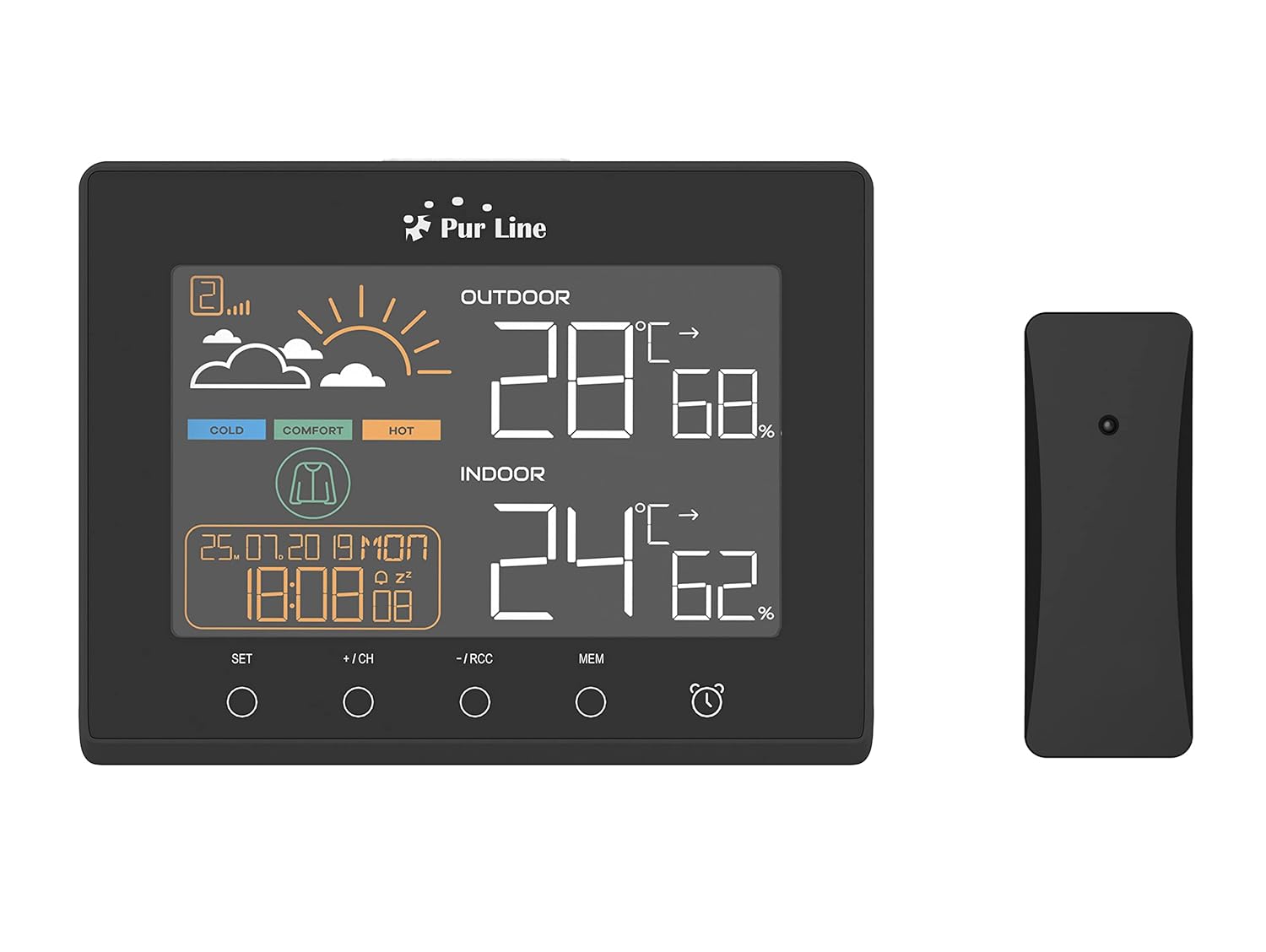
Přední view of the PUR LINE WS015 Weather Station display unit and its wireless outdoor sensor.
2. Pokyny k nastavení
2.1. Vybalení a komponenty
Carefully remove all components from the packaging. Ensure you have the main display unit and the wireless outdoor sensor.
2.2. Zapnutí hlavní jednotky
The main unit requires 3 AAA batteries (not included) or can be powered via a USB connection. To install batteries:
- Otevřete kryt přihrádky na baterie na zadní straně hlavní jednotky.
- Vložte 3 baterie typu AAA a dbejte na správnou polaritu (+/-).
- Zavřete kryt prostoru pro baterie.
Alternatively, connect the main unit to a USB power source using a compatible USB cable (not included).
2.3. Umístění venkovního senzoru
The outdoor sensor is splash-proof (IP rated) but should be placed in a sheltered location to protect it from direct rain and prolonged sunlight, which can affect temperature readings. Ensure the sensor is within effective transmission range of the main unit (typically up to 30 meters in open air).
2.4. Počáteční synchronizace
Once both the main unit and the outdoor sensor are powered, they should automatically synchronize. If synchronization does not occur, press the 'CH' button on the main unit to initiate a search for the sensor. Ensure the sensor is close to the main unit during initial setup.

Zadní view of the PUR LINE WS015 Weather Station, showing the battery compartment and stand.
3. Návod k obsluze
3.1. Zobrazit přesview
LCD displej zobrazuje následující informace:
- Venkovní teplota a vlhkost: Údaje z bezdrátového senzoru.
- Vnitřní teplota a vlhkost: Údaje z vnitřních senzorů hlavní jednotky.
- Předpověď počasí: Animated symbols indicating predicted weather conditions.
- Čas a datum: Aktuální čas, den a datum.
- Indikátor úrovně pohodlí: Based on indoor temperature and humidity.
- Teplotní trend: Arrows indicating rising, falling, or stable temperature over the last 12 hours.

Detailní záběr view of the PUR LINE WS015 Weather Station display, showing outdoor and indoor temperature, humidity, time, date, and weather forecast symbols.
3.2. Funkce tlačítek
Hlavní jednotka je vybavena několika ovládacími tlačítky:
- SOUBOR: Enters setting mode for time, date, and alarm. Confirms settings.
- +/CH: Increases values during setting. In normal mode, cycles through outdoor sensor channels or initiates sensor search.
- -/RCC: Decreases values during setting. In normal mode, manually initiates RCC (Radio Controlled Clock) signal reception.
- MEM: Zobrazuje maximální a minimální záznamy teploty/vlhkosti. Dalším stisknutím záznamy vymažete.
- Ikona alarmu: Aktivuje nebo deaktivuje funkci alarmu.
3.3. Nastavení času a data
- Stiskněte a podržte SOUBOR tlačítko, dokud nezačne blikat zobrazení času.
- Použijte + or - tlačítka pro nastavení hodiny a poté stiskněte SOUBOR pro potvrzení a přechod na minuty.
- Opakujte pro minuty, rok, měsíc a den.
- Stiskněte SOUBOR pro ukončení režimu nastavení.
3.4. Nastavení alarmu
- Stiskněte tlačítko Ikona alarmu jednou stiskněte tlačítko pro zobrazení času budíku.
- Stiskněte a podržte Ikona alarmu tlačítko , dokud nezačne blikat čas budíku.
- Použijte + or - buttons to adjust the alarm hour, then press the Ikona alarmu button to confirm and move to minutes.
- Opakujte několik minut.
- Stiskněte tlačítko Ikona alarmu button to exit setting mode. Press it again in normal mode to toggle the alarm on/off.
3.5. USB Charging Outputs
The main unit is equipped with USB outputs that allow you to charge compatible electronic devices. Simply connect your device's USB charging cable to the USB port on the side of the weather station.

The PUR LINE WS015 Weather Station with two smartphones connected to its USB charging outputs.
4. Údržba
4.1. Čištění
To clean the weather station and sensor, use a soft, damp hadříkem. Nepoužívejte abrazivní čisticí prostředky ani rozpouštědla, protože by mohly poškodit displej neboasing. Ensure no liquid enters the device openings.
4.2. Výměna baterie
When the display becomes dim or readings are inconsistent, it may be time to replace the batteries in the main unit and/or the outdoor sensor. Follow the battery installation steps outlined in Section 2.2 for the main unit. For the outdoor sensor, open its battery compartment, replace the old batteries with new ones of the correct type, and close the compartment securely.
5. Řešení problémů
Běžné problémy a řešení
- Žádný displej na hlavní jednotce:
- Check if batteries are inserted correctly and are not depleted.
- Ensure the USB power cable (if used) is securely connected.
- Outdoor Readings Not Displaying or Incorrect:
- Check the batteries in the outdoor sensor.
- Ensure the outdoor sensor is within range of the main unit and free from major obstructions.
- Stiskněte tlačítko +/CH button on the main unit to re-initiate sensor search.
- Relocate the outdoor sensor to a more suitable position, away from direct sunlight or heat sources.
- Čas se nesynchronizuje (RCC):
- Ensure the unit is placed away from electronic interference.
- Manually initiate RCC signal reception by pressing the -/RCC tlačítko.
- Alarm nezní:
- Verify that the alarm function is activated (alarm icon visible on display).
- Zkontrolujte, zda je správně nastaven čas budíku.
6. Technické specifikace
- Model: WS015
- Výrobce: Purline
- Rozměry (D x H x V): 17 x 3 x 13 cm (přibližně)
- Zdroj napájení (hlavní jednotka): 3 x AAA batteries (not included) or USB
- Zdroj napájení (venkovní senzor): Batteries (type not specified, typically AAA or AA)
- Materiál: Plast
- Konektivita: Wireless (sensor), USB (charging outputs)
- Speciální vlastnosti: Programmable alarm, Max/Min memory, Temperature trend, Weather forecast, USB charging outputs
- Typ displeje: Digitální LCD
7. Záruka a podpora
Information regarding product warranty and specific support contacts is not available in this document. For warranty claims or technical assistance, please refer to the documentation provided at the time of purchase or contact your retailer or the manufacturer directly.