
Logilink BP0117
Logilink BP0117 TV Wall Mount User Manual
For 43-80 Inch Flat and Curved Monitors
Zavedení
This manual provides essential information for the safe and proper installation and use of your Logilink BP0117 TV Wall Mount. Please read these instructions thoroughly before beginning installation and retain them for future reference. This fixed wall mount is designed to securely hold 43-80 inch flat and curved monitors with a maximum load capacity of 40 kg (88 lbs).
Bezpečnostní informace
- Ujistěte se, že konstrukce stěny bezpečně unese celkovou hmotnost držáku a televizoru.
- Nepřekračujte maximální nosnost 40 kg (88 lb).
- Use appropriate tools and follow all drilling and mounting instructions carefully.
- Always use a stud finder to locate wall studs for secure mounting, especially for drywall installations.
- Pokud si nejste jisti ohledně jakékoli části instalace, poraďte se s kvalifikovaným odborníkem.
- Během instalace držte děti a domácí zvířata mimo dosah.
Obsah balení
Verify that all components are present before beginning installation. Refer to the included parts list in your product packaging for a complete inventory.
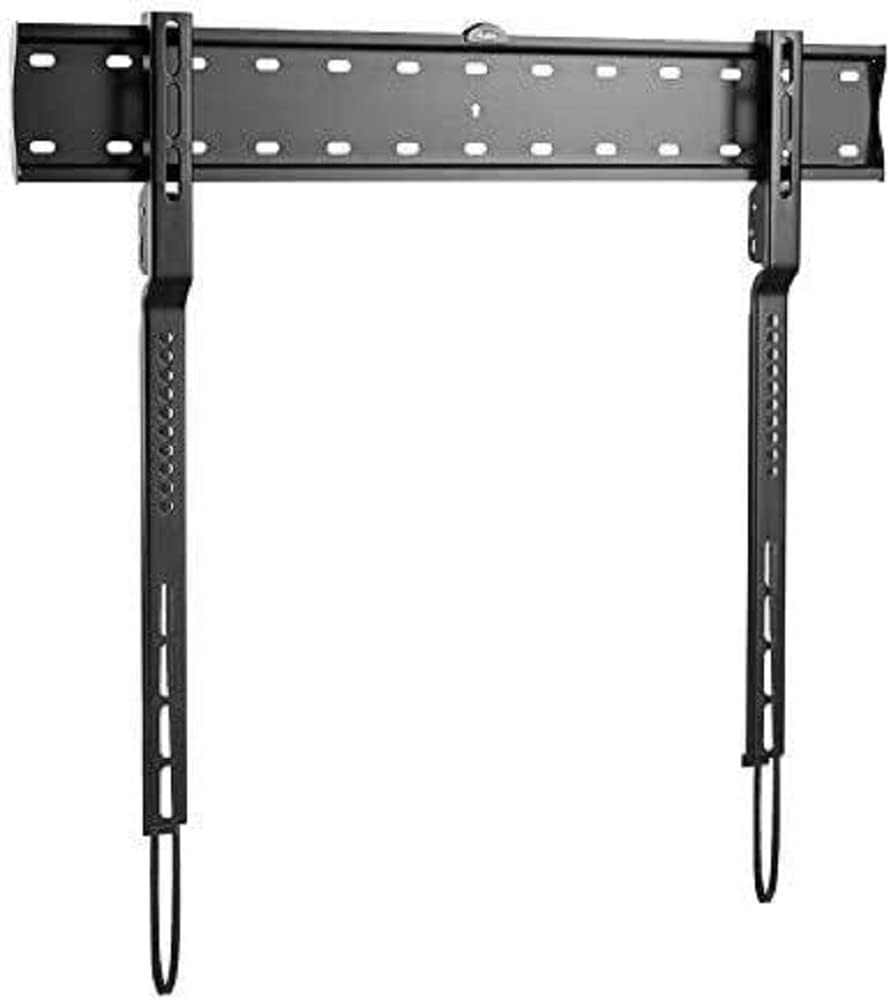
Obraz: The Logilink BP0117 TV Wall Mount, showing the main wall plate and the two vertical TV brackets. The wall plate has multiple mounting holes, and the TV brackets feature VESA mounting points and pull-down straps for easy release.
Nastavení a instalace
Pro bezpečnou instalaci postupujte takto:
- Připravte zeď:
- Určete požadovanou výšku pro váš televizor.
- Locate wall studs using a stud finder. Mark the center of the studs.
- Position the wall plate against the wall at the marked height and use the built-in spirit level to ensure it is perfectly horizontal. Mark the drilling points.
- Drill pilot holes at the marked points. Ensure the drill bit size is appropriate for your wall anchors/screws.
- Připevnění nástěnné desky:
- Secure the wall plate to the wall using the provided screws and anchors. Tighten all screws firmly but do not overtighten.
- The silicone pads on the mount help prevent scratches or damage to the wall.
- Připevnění držáků televizoru k televizoru:
- Opatrně položte televizor displejem dolů na měkký, čistý povrch.
- Identifikujte montážní otvory VESA na zadní straně televizoru.
- Attach the two vertical TV brackets to the back of your TV using the appropriate screws and spacers (if needed) that match your TV's VESA pattern. The BP0117 supports VESA patterns: 200x200, 300x200, 300x300, 400x200, 400x300, 600x300.
- Ensure the brackets are securely fastened and evenly spaced.
- Montáž televizoru na nástěnnou desku:
- With assistance, carefully lift the TV and align the hooks on the TV brackets with the top edge of the wall plate.
- Gently lower the TV until the brackets engage with the wall plate.
- The spring with the strap mechanism will lock your TV into place. Pull the straps down to ensure the TV is securely latched.
- Double-check that the TV is level and securely attached to the wall mount.
Ovládání držáku
The Logilink BP0117 is a fixed wall mount, meaning it does not offer tilt, swivel, or extension capabilities. Once installed, your TV will remain in a fixed position, 18 mm from the wall.
To remove the TV from the mount, simply pull down on the release straps located at the bottom of the TV brackets. This will disengage the locking mechanism, allowing you to lift the TV off the wall plate.
Údržba
- Pravidelně kontrolujte všechny šrouby a vruty, abyste se ujistili, že jsou pevně utažené a bezpečné.
- Držák čistěte měkkým, suchým hadříkem. Nepoužívejte abrazivní čisticí prostředky ani rozpouštědla.
- Inspect the mount for any signs of wear or damage. If any damage is found, do not use the mount and contact customer support.
Odstraňování problémů
| Problém | Možná příčina | Řešení |
|---|---|---|
| Televizor není po instalaci v rovině. | Nástěnná deska není během instalace v rovině. | Remove TV, loosen wall plate screws, adjust with spirit level, re-tighten. |
| TV feels unstable on the mount. | Screws not tightened sufficiently; incorrect VESA screws used; wall not strong enough. | Ensure all screws are tight. Verify correct VESA screws are used. Confirm wall structure can support weight. Ensure release straps are engaged. |
| K televizoru nelze připevnit držáky. | Nesprávný vzor VESA nebo velikost šroubu. | Check your TV's VESA pattern against the mount's compatibility. Use the correct screws and spacers for your TV model. |
Specifikace
| Funkce | Detail |
|---|---|
| Číslo modelu | BP0117 |
| Značka | Logilink |
| Typ montáže | Držák na zeď |
| Typ pohybu | Opraveno |
| Kompatibilní velikosti TV | 43-80 inches (Flat and Curved) |
| Max. Nosnost | 40 kg / 88 liber |
| Kompatibilita VESA | 200x200, 300x200, 300x300, 400x200, 400x300, 600x300 |
| Odstup od zdi | 18 mm |
| Materiál | Silicone pads (for wall protection) |
| Rozměry produktu | 4.53 x 2.69 x 1.59 palců (pouze držák) |
| Hmotnost položky | 4.62 libry |
Záruka a podpora
Specific warranty information for the Logilink BP0117 TV Wall Mount is not provided within this manual. Please refer to the product packaging or the official Logilink webpodrobné záruční podmínky naleznete na webu.
For technical support, missing parts, or any inquiries regarding your product, please contact Logilink customer service through their official channels. Contact information can typically be found on the manufacturer's webmísto nebo obal produktu.
Ask a question about this manual
Ask about setup, troubleshooting, compatibility, parts, safety, or missing instructions. Manuals+ will review the question and use this page’s manual context to help answer it.