
Zavedení
The 4smarts Powerbank Enterprise 2 is a high-capacity 20000 mAh portable charger designed to provide fast and efficient power to a wide range of electronic devices. With a total output of 130 watts and multiple charging ports, it supports various fast charging standards, including Power Delivery (PD), Qualcomm Quick Charge 3.0 (QC3.0), and Samsung Adaptive Fast Charge. This manual provides essential information for the safe and optimal use of your power bank.

Image: The 4smarts Powerbank Enterprise 2, highlighting its 130W output capability.
Nastavení
Počáteční nabíjení
Before first use, fully charge your 4smarts Powerbank Enterprise 2. For the fastest charging experience, use a 100W Power Delivery (PD) compatible wall charger and a USB-C to USB-C cable (sold separately). The power bank can be fully recharged in approximately 60 minutes with a 100W charger.
LED indikátory
The power bank features LED indicators to display the current charge level. Observe these lights to monitor the battery status during charging and discharging.
Návod k obsluze
Nabíjení powerbanky
- Connect a compatible charging cable to either the USB-C1 or USB-C2 input port on the power bank. For optimal speed, use the USB-C1 port with a 100W PD charger.
- Případně můžete použít Micro USB input port with a compatible cable and charger.
- LED indikátory se rozsvítí, aby signalizovaly průběh nabíjení. Po úplném nabití budou všechny LED diody svítit nepřetržitě.
Nabíjení externích zařízení
The Powerbank Enterprise 2 offers multiple output ports to charge your devices:
- USB-C1 Output (PD/PPS): Up to 100W for fast charging laptops (e.g., MacBook Pro), tablets, and smartphones.
- USB-C2 Output (PD): Up to 30W for fast charging tablets and smartphones.
- USB-A Output (QC3.0): Up to 18W for devices supporting Qualcomm Quick Charge 3.0 or other standard charging protocols.
Nabíjení zařízení:
- Connect your device to the appropriate output port on the power bank using a compatible charging cable.
- The power bank will automatically begin charging your device. If not, press the power button once to activate charging.
- You can charge multiple devices simultaneously. The total output is up to 130W (e.g., USB-C1 at 100W + USB-C2 at 30W). For safety, if the total output exceeds 130W, the power bank will regulate the output of each port accordingly.

Image: Diagram illustrating the various input and output ports of the power bank, including their respective wattages and functions (Micro USB input, USB-C1 input/output with PD/PPS, USB-C2 input/output with PD, and USB-A output with QC3.0).
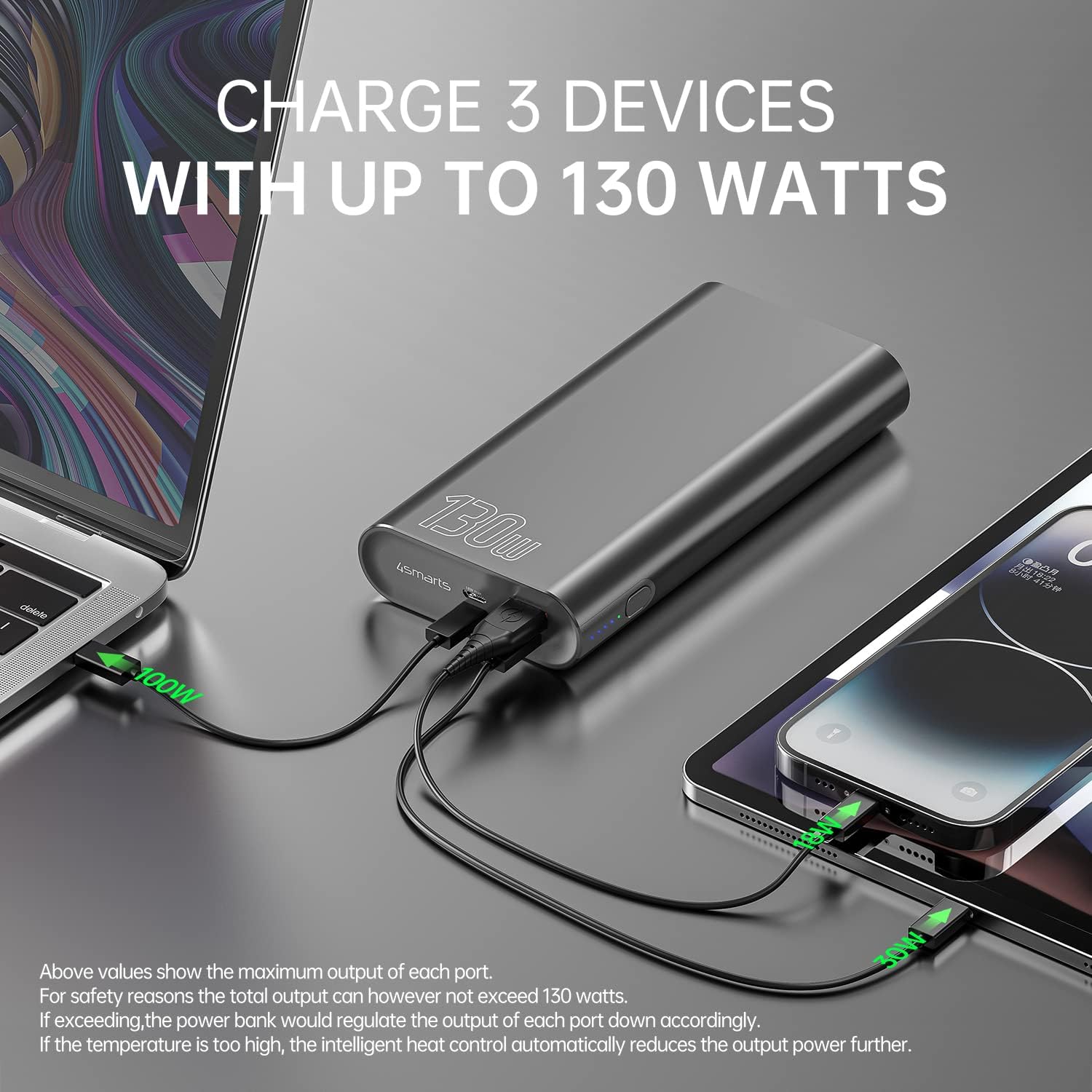
Image: The power bank connected and simultaneously charging a laptop and a tablet, demonstrating its multi-device charging capability.

Image: The power bank charging a MacBook Pro 16", illustrating 100W fast charging to reach 50% in 45 minutes.
Údržba
- Čištění: K čištění powerbanky používejte měkký, suchý hadřík. Nepoužívejte agresivní chemikálie ani abrazivní materiály.
- Skladování: Powerbanku skladujte na chladném a suchém místě mimo dosah přímého slunečního záření, extrémních teplot a vlhkosti.
- Péče o baterie: To prolong battery life, fully charge the power bank at least once every three months if not in regular use. Avoid completely draining the battery for extended periods.
- Zacházení: Powerbanku nenechávejte upadnout, nepropichujte ani nerozebírejte. Mohlo by dojít k poškození vnitřních součástí a ke ztrátě záruky.
Odstraňování problémů
- Powerbanka se nenabíjí: Ensure the charging cable and wall adapter are functioning correctly and are securely connected. For fastest charging, use a 100W PD charger with the USB-C1 port.
- Zařízení se nenabíjí z powerbanky: Ensure the power bank has sufficient charge. Press the power button to activate output if necessary. Check that the cable connecting your device to the power bank is not damaged and is compatible.
- Pomalé nabíjení: Verify that your device and cable support fast charging protocols (PD, QC3.0) and are connected to the appropriate high-output port (USB-C1 for up to 100W, USB-C2 for up to 30W, USB-A for up to 18W).
- Přehřívání: The power bank features intelligent heat control. If the temperature is too high, it will automatically reduce output power. Ensure proper ventilation during use.
The 4smarts Powerbank Enterprise 2 is equipped with multiple safety features, including overload protection, short circuit protection, intelligent charge shutdown, and deep discharge protection, to ensure safe operation.

Image: An internal diagram of the power bank, showcasing its certified safety features such as overload protection, short circuit protection, intelligent charge shutdown, and deep discharge protection.
Specifikace
| Funkce | Detail |
|---|---|
| Název modelu | Powerbank Enterprise 2 |
| Číslo modelu položky | 4S468747 |
| Kapacita baterie | 20000 XNUMX mAh |
| Složení článků baterie | Lithium-ion (4 Tesla 21700 Li-ion cells) |
| Micro USB vstup | DC 5V/2A, 9V/2A, 12V/1.5A (Max 18W) |
| USB-C1 Input/Output (PD/PPS) | DC 5V/3A, 9V/3A, 12V/3A, 15V/3A, 20V/5A (Max 100W) |
| USB-C2 Input/Output (PD) | DC 5V/3A, 9V/3A, 12V/3A, 15V/2A, 20V/1.5A (Max 30W) |
| Výstup USB-A (QC3.0) | DC 5V/3A, 9V/2A, 12V/1.5A (Max 18W) |
| Celkový výkon | 130W (USB-C1 100W + USB-C2 30W) |
| Power Bank Charging Time | Approx. 60 minutes (with 100W AC charger and cable, sold separately) |
| Rozměry (D x Š x V) | 15.2 x 7.5 x 2.5 cm (5.98 x 2.95 x 0.98 palce) |
| Hmotnost položky | 515 gramů (1.13 lb) |
| Barva | Černý |
| Speciální funkce | Fast Charging, Overload Protection, Short Circuit Protection, Deep Discharge Protection |
| Doporučená použití | iPhone, Laptop, Smartphone, Tablet |
Bezpečnostní informace
- Nevystavujte powerbanku vodě, ohni ani extrémním teplotám.
- Vyvarujte se pádu nebo vystavení powerbanky silným nárazům.
- Nepokoušejte se powerbanku rozebírat, opravovat ani upravovat.
- Uchovávejte mimo dosah dětí.
- Používejte pouze originální nebo certifikované kompatibilní nabíjecí kabely a adaptéry.
- Powerbanku zlikvidujte zodpovědně v souladu s místními předpisy pro elektronický odpad.
Záruka a podpora
Záruka
The 4smarts Powerbank Enterprise 2 comes with a manufacturer's warranty. Please refer to the warranty card included in the product packaging or visit the official 4smarts webPodrobné záruční podmínky platné pro váš region naleznete na webových stránkách.
Zákaznická podpora
For technical assistance, troubleshooting, or any questions regarding your 4smarts Powerbank Enterprise 2, please contact 4smarts customer support. Contact information can typically be found on the official 4smarts webmístě nebo na obalu produktu.