
Zavedení
This manual provides essential information for the safe and efficient operation of your Walfront YX851 Automatic Power Switch Module. Please read it thoroughly before installation and use. This module is designed to automatically switch between a primary power supply and a battery, ensuring continuous power to a load and managing battery charging.
Bezpečnostní informace
- Před instalací nebo údržbou se ujistěte, že jsou všechny zdroje napájení odpojeny.
- This module operates with DC 12V. Do not exceed specified voltage nebo aktuální hodnocení.
- Installation should be performed by qualified personnel or individuals with sufficient electrical knowledge.
- Chraňte modul před vlhkostí, prachem a extrémními teplotami.
- Verify correct polarity for all connections to prevent damage to the module or connected devices.
- Uchovávejte mimo dosah dětí.
Konec produktuview
The Walfront YX851 is an automatic power switch module designed for seamless power transition and battery management. It prioritizes a primary power supply and switches to a backup battery when the primary fails, while also handling battery charging.
Klíčové vlastnosti
- Automatic power switching between main supply and battery.
- Integrated battery charging control.
- Voltage a pod-zvtage charging protection for the battery.
- Compact plastic construction.
Komponenty

The module features screw terminals for easy connection of power input, battery, and load. Two relays manage the power switching logic. Indicator lights (not explicitly visible in this image but implied by "power indicator light" in the description) provide status feedback.
- Vstupní terminály: For connecting the primary power supply.
- Svorky baterie: For connecting the backup battery.
- Zatěžovací svorky: For connecting the device requiring power.
- Relé: Two blue relays (SRD-12VDC-SL-C) rated for 10A 250VAC / 10A 125VAC / 10A 30VDC / 10A 28VDC.
- Potentiometers (W 203): Used for adjusting charging start and stop voltages.
- Kontrolky: (Implied) for power and charging status.
Specifikace
| Parametr | Hodnota |
|---|---|
| Model | YX851 |
| Control Voltage | DC 12V |
| Řídicí proud | 10A |
| Materiál | Plast |
| Rozměry (DxŠxV) | Přibližně 69 x 48 x 18 mm (2.7 x 1.9 x 0.7 palce) |
| Montážní velikost | Přibližně 61 x 41 mm (2.4 x 1.6 palce) |
| Hodnocení relé | 10 A 250 V AC / 10 A 125 V AC / 10 A 30 V DC / 10 A 28 V DC |
Nastavení a instalace
Proper installation is critical for the correct functioning of the YX851 module. Refer to the wiring diagram below for connections.
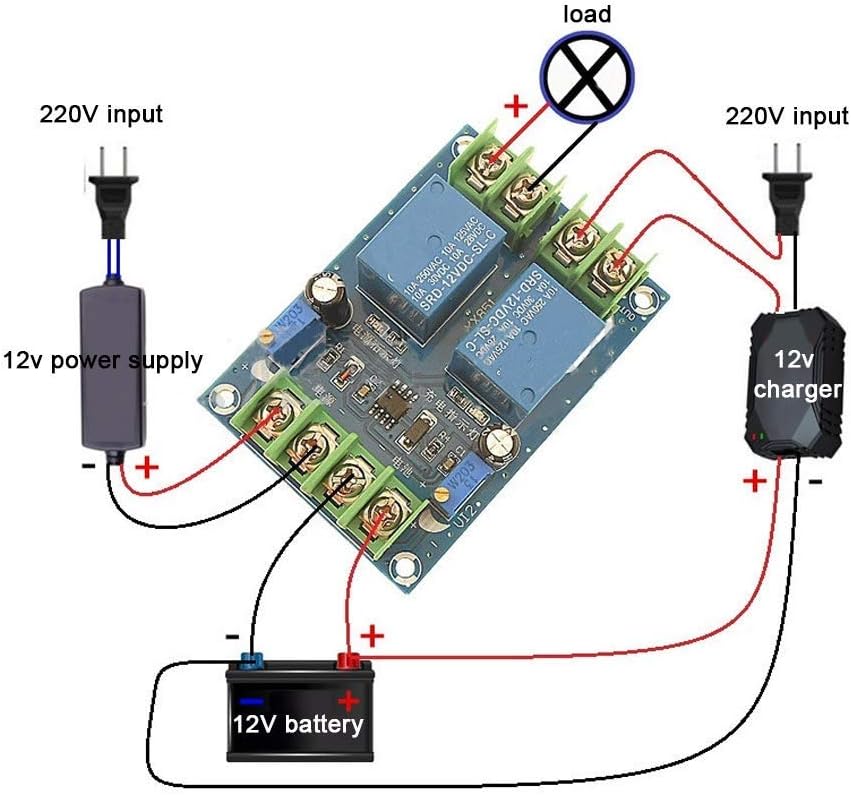
The diagram shows a typical setup where a 220V input is converted to 12V for the primary supply. A separate 12V charger is connected to the battery, and the module manages the power flow to the load.
Kroky zapojení
- Connect Primary Power Supply: Connect your DC 12V primary power supply to the "IN" terminals on the module, observing polarity (+ to + and - to -). Ensure the primary power supply is capable of providing sufficient current for both the load and battery charging.
- Připojte baterii: Connect your 12V backup battery to the "BATTERY" terminals, observing polarity.
- Připojení zátěže: Connect your DC 12V load to the "OUT" terminals, observing polarity.
- Ověřte připojení: Double-check all wiring for correct polarity and secure connections before applying power.
Úprava parametrů nabíjení
The module features two potentiometers (W 203) for adjusting the battery charging start and stop voltages.
- Charging Start Voltage nařízení: Adjust the potentiometer labeled for "charging start" (often near "充电启动" on the PCB, see Figure 3). Turning clockwise increases the voltage at which charging begins; turning counter-clockwise decreases it.
- Charging Stop Voltage nařízení: Adjust the potentiometer labeled for "charging stop" (often near "充电关闭" on the PCB, see Figure 3). Turning clockwise increases the voltage at which charging stops; turning counter-clockwise decreases it.
It is recommended to use a voltmeter to accurately set these thresholds according to your battery's specifications.

The bottom of the PCB provides labels for identifying the charging start and stop points, which correspond to the adjustable potentiometers on the top side.
Návod k obsluze
The YX851 module operates automatically based on the presence and voltage levels of the primary power supply and the connected battery.
- Primary Power Available: When the primary DC 12V power supply is connected and active, the module will prioritize this supply to power the load.
- Nabíjení baterie: If the primary power supply is active and the battery voltage is below the set charging stop voltage, the module will initiate charging of the battery. Charging will continue until the battery reaches the set charging stop voltage.
- Primary Power Failure: If the primary power supply fails or its voltage drops below a critical threshold, the module will automatically switch the load to be powered by the connected 12V battery. This ensures uninterrupted operation for the load.
- Primary Power Restoration: When the primary power supply is restored, the module will automatically switch the load back to the primary supply and resume battery charging if needed.
The module's indicator lights (if present) will provide visual feedback on the current power source and charging status.
Údržba
- Regularly inspect all wiring connections to ensure they are secure and free from corrosion.
- Udržujte modul čistý a bez prachu a nečistot. K čištění používejte měkký, suchý hadřík.
- Avoid exposing the module to excessive heat, cold, or moisture.
- Pravidelně kontrolujte objem baterietage to ensure it is within healthy operating parameters.
- Nepokoušejte se otevřít modul casing or modify its internal components, as this may void any potential warranty and could lead to damage or injury.
Odstraňování problémů
| Problém | Možná příčina | Řešení |
|---|---|---|
| Load not receiving power | No primary power; Battery discharged; Incorrect wiring; Faulty module. | Check primary power supply; Check battery charge level; Verify all wiring connections and polarity; Contact support if module is suspected faulty. |
| Baterie se nenabíjí | Primary power supply off or insufficient; Battery already full (above stop voltage); Incorrect charging voltage settings; Faulty battery. | Ensure primary power is active and sufficient; Adjust charging start/stop voltages; Test battery independently. |
| Module not switching automatically | Incorrect wiring; Primary power supply fluctuating; Module fault. | Re-check wiring diagram; Ensure stable primary power; Contact support. |
| Přehřívání | Overload on output; Insufficient ventilation; Short circuit. | Reduce load; Ensure adequate airflow around module; Check for short circuits in wiring or load. |
Záruka a podpora
For technical assistance or inquiries regarding your Walfront YX851 Automatic Power Switch Module, please contact Walfront customer support. Refer to your purchase documentation for specific warranty terms and conditions.
You can visit the Walfront store for more information: Walfront Store on Amazon.